Key takeaways
- Compare microSD cards for action cameras, drones and streaming rigs by sustained write speed, video class and capacity, from UHS-II to the value default.
- Top Pick: Quick Comparison
- Runner-up: Quick Comparison
- Also consider: Quick Comparison
Quick answer: A microSD card for a streaming rig is bought on sustained write speed, because the card’s job is to keep swallowing video for as long as the camera records, and the rating that promises that is the video speed class rather than the headline read figure. Streamers who want the default purchase for an action camera, a drone or a phone-based rig should begin with the SanDisk Extreme, the card the camera makers themselves list as approved. Streamers who want the same class of card with faster published writes and a ten-year warranty should look at the Samsung PRO Plus. Streamers who want the fastest UHS-I card in this guide, for high-frame-rate action footage and quick offloads, should look at the Lexar Professional Silver Plus. Streamers whose camera or reader carries a UHS-II slot and whose modes demand more than V30 should look at the Lexar Professional GOLD, the one V60 card here. Streamers who want the value purchase with flagship-adjacent figures should look at the Kingston Canvas Go Plus, with its generation caveat understood.
As an Amazon Associate, we earn from qualifying purchases.
Table of Contents
- Why the MicroSD Card Matters for Streaming
- How to Choose
- Quick Comparison
- 1. SanDisk Extreme
- 2. Samsung PRO Plus
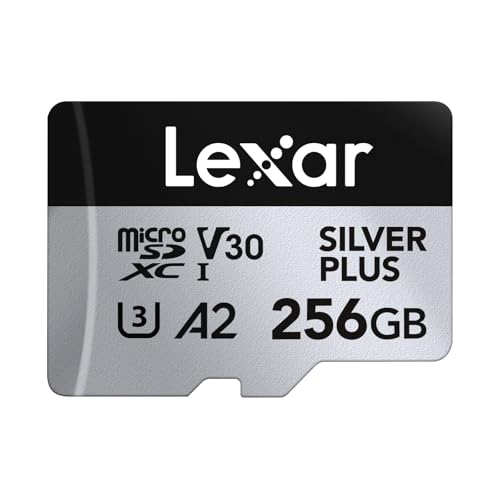
- 3. Lexar Professional Silver Plus
- 4. Lexar Professional GOLD
- 5. Kingston Canvas Go Plus
- Before You Buy: Recall, Variant and Listing Checks
- FAQ
- Conclusion
- Product and ASIN Reference
Why the MicroSD Card Matters for Streaming
The microSD card is the smallest purchase in a streaming rig and the one most likely to end a recording. The desk camera in most setups on this site is a webcam or a mirrorless body feeding a capture card, and it records nothing to a card at all. The card earns its place everywhere else in the production: inside the action camera mounted for the second angle, inside the drone that films the venue before the show, inside the phone running the mobile or IRL stream, and inside the handheld console or camera a streamer carries for the away broadcast. Those devices record locally, at their highest quality settings, for as long as they are switched on — and the quality of that recording is decided less by the camera than by whether the card inside it can sustain the write speed the camera’s bitrate demands, minute after minute, without dropping frames or stopping the file.
That is why the failure mode in this category is not slowness but interruption. A card that cannot hold its rated write speed does not produce slightly worse video; it produces a camera that halts mid-recording, splits files at awkward moments, or quietly drops to a lower bitrate where the camera offers one. Action cameras are the least forgiving hosts in the rig: their high-frame-rate and high-resolution modes write at sustained rates that sit close to the ceiling of what a UHS-I card guarantees, their makers publish approved-card lists precisely because marginal cards fail in the field, and the footage they record is usually the angle that cannot be re-shot. The streamer who treats the card as a commodity buys the same camera twice — once in money, once in lost footage.
One boundary defines this guide, and it should be read before any pick: every product here is a microSDXC card from one of the established memory makers, with published speed-class ratings and published sequential figures a buyer can check, pinned at the 256GB capacity where the families overlap. The marketplace is full of unbranded cards sold under rotating names at capacities flash memory does not reach, advertised with figures no controller sustains; counterfeit and mislabelled capacity is this category’s defining fraud, and no such card is here. A streamer whose only camera is a webcam needs none of this. The moment a second device records locally — and on this site’s camera guides, the second angle is the one that makes the production — the card inside it becomes part of the rig, and it should be bought with the same care as the camera it feeds.
How to Choose
Buy the video speed class first, because it is the only guaranteed number on the card. The V rating — V30, V60, V90 — is a certified minimum sustained write speed: a V30 card promises to keep writing at no less than 30 megabytes per second for as long as the recording lasts, and a V60 card promises twice that. Every other figure on the packaging is a peak. Action cameras recording 4K at high frame rates, and drones recording their higher-bitrate modes, live inside the V30 guarantee with room to spare; a camera mode that demands more than that is the specific case for the V60 card in this guide. The U3 mark travels with V30 in practice, and the older Class 10 mark is a floor so low that no card here is bought on it. Compare cards by their V class and their published write figure together: the class is the promise, the figure is the maker’s claim about how far above the promise the card usually runs.
Read the write figure before the read figure, and know which job each does. The large number on a card’s packaging is almost always its read speed, and read speed does no work while the camera is recording — it decides how long the offload takes afterward, and only when the reader and the connection can keep up. Write speed is the recording specification. In this guide the spread matters: the UHS-I picks publish write figures between 130 and 160 megabytes per second, all far above their V30 floor, which is headroom a camera uses in burst photography and in modes that write in peaks rather than evenly. A card whose listing leads with a read figure and buries the write figure is telling the buyer which number it would rather be judged by, and the Specs blocks below print both, attributed, for every pick.
Understand the UHS-I ceiling and what UHS-II actually changes. UHS-I is the interface in effectively every action camera, drone and phone a streamer owns, and its bus tops out near 104 megabytes per second in the host; the faster UHS-I read figures in this guide are reached through maker-specific reader technology and are offload figures, not in-camera ones. UHS-II adds a second row of contacts and lifts both the bus ceiling and the certified classes available, to V60 and V90 — but only a host with the second row of contacts can use any of it, and the hosts that carry UHS-II microSD slots are a short list of high-end cameras, readers and portable gaming devices. In a UHS-I host, a UHS-II card behaves as a UHS-I card. Buy the GOLD below for a host that can use it or for the reader-side offload speed, not as a general upgrade to a GoPro-class camera that will never see its second row.
Match capacity to bitrate and session length, not to the shelf. A 256GB card — the capacity pinned throughout this guide — holds roughly five hours of 4K footage at the bitrates action cameras commonly write, and far more at the rates a phone or a secondary angle uses. That is a deliberate middle: large enough that a full event day fits without a mid-session swap, small enough that a lost or failed card does not take a week of footage with it, and the capacity at which every family here publishes its best write figures. Note that in several families the smaller capacities are slower cards wearing the same name — the write figure drops at 64GB and 128GB in more than one pick below — so the family name alone does not specify the card; the capacity is part of the product, and the table at the end of this guide pins one capacity per family.
Treat the A rating as a phone and handheld specification, not a camera one. The A1 and A2 marks rate random-access performance for running applications, and they matter where the card works as device storage — a phone streaming rig, a handheld console, a tablet teleprompter. A2 is the faster mark and every UHS-I pick here carries it; the UHS-II pick carries A1, which is the honest trade in its design and no drawback at all in a camera. A streamer buying one card to move between a console and an action camera should weight the A2 mark; a streamer buying for a camera alone can ignore the letter entirely and buy on V class.
Buy the seller as carefully as the card. No category on Amazon is counterfeited like memory cards: a fake wears a real family’s printing, reports a false capacity to the host, and begins overwriting its own earliest footage once the genuine flash fills — a failure that announces itself only when the recording is gone. The defences are dull and complete. Buy the pinned listing from the maker’s own storefront or from Amazon itself rather than from an unfamiliar marketplace seller at an implausible figure; check the card’s reported capacity and write speed with one of the free validation utilities before trusting it with a session; and keep the packaging until the card has survived a full-length recording. Every pick in this guide is a current family from SanDisk, Samsung, Lexar or Kingston, and the checks section maps the generation and naming traps that make even a genuine purchase land on the wrong card.
Quick Comparison
| Product | Tier | Interface | Video class | Read, maker figure | Write, maker figure | Distinguishing feature |
|---|---|---|---|---|---|---|
| SanDisk Extreme 256GB | Mid-range | UHS-I | V30 | Up to 190MB/s | Up to 130MB/s | The default action camera card, on the makers’ approved lists |
| Samsung PRO Plus 256GB | Mid-range | UHS-I | V30 | Up to 180MB/s | Up to 130MB/s | Ten-year warranty and six-proof protection in the family |
| Lexar Professional Silver Plus 256GB | Premium | UHS-I | V30 | Up to 205MB/s | Up to 150MB/s | The fastest UHS-I read and write figures in this guide |
| Lexar Professional GOLD 256GB | Premium | UHS-II | V60 | Up to 280MB/s | Up to 180MB/s | The one V60 card, for UHS-II hosts and the fastest offloads |
| Kingston Canvas Go Plus 256GB | Budget | UHS-I | V30 | Up to 200MB/s | Up to 160MB/s | Flagship-adjacent figures at the value tier, generation caveat attached |




1. SanDisk Extreme
The SanDisk Extreme is the default pick because it is the card the rest of the category is measured against in the hosts streamers actually use. It is a UHS-I microSDXC card carrying the full set of marks a recording card needs — Class 10, U3, V30 for sustained video and A2 for application performance — and its published figures at the pinned 256GB capacity are read speeds of up to 190MB/s and write speeds of up to 130MB/s, per the maker’s published data: the write figure is more than four times the V30 floor the card certifies, which is the headroom an action camera’s higher-bitrate modes spend. SanDisk builds the family for exactly the hosts in a streaming rig, and the Extreme line is the card that appears on the approved and recommended lists camera makers publish for their action cameras and drones, which is a compatibility argument no specification table can make on its own.
The practical details are arranged for field work. The pinned listing includes the full-size SD adapter, so the same card can serve in a camcorder or a mirrorless body that takes SD, and can be read by any SD slot when a dedicated reader is not at hand. The maker rates the card for the operating range and the water, temperature, shock and X-ray resistance that action camera duty implies, and the family carries the maker’s recovery software offer for accidentally deleted files. Its capacities run from 32GB to 1TB, and the capacity is part of the specification: the published read and write figures above belong to the 256GB card and its larger siblings, while the smaller capacities in the family publish lower write figures under the same Extreme name — the checks section returns to this, because it is the commonest way a buyer of this exact family ends up with a slower card than the one reviewed.
The pinned listing is the 256GB Extreme with adapter, and its nearest trap is a sibling one word away: the SanDisk Extreme Pro family sits above it with higher published figures and its own listings, and the two are different products that search results and marketplace sellers routinely blur. The Specs block below describes the Extreme only. For the streamer who wants the card the camera maker already approved, with the V30 guarantee, a published write figure far above it, and the widest host compatibility in this guide, this is the purchase the rest of the guide is measured against — the card to buy when the recording cannot be re-shot and the buying decision should not have to be thought about again.
Specs
- Model: Extreme microSDXC with adapter, 256GB, per the listing data reviewed
- Type: microSDXC memory card, UHS-I, per the maker’s published data
- Capacity pinned: 256GB; family capacities 32GB to 1TB, per the maker’s published data
- Read speed: Up to 190MB/s, per the maker’s published data
- Write speed: Up to 130MB/s, per the maker’s published data
- Speed classes: Class 10, U3 and V30, per the maker’s published data
- App performance: A2, per the maker’s published data
- Adapter: Full-size SD adapter included, per the listing data reviewed
- Durability: Rated for water, temperature, shock and X-ray resistance, per the maker’s published data
- Warranty: Limited lifetime, per the maker’s published data
- Dimensions: 0.59 x 0.43 x 0.04 in, the standard microSD format
2. Samsung PRO Plus
The Samsung PRO Plus does the same job as the default pick — a UHS-I V30 recording card with an adapter in the box — with a different maker’s engineering behind it and the strongest warranty terms among the UHS-I picks. Its published figures at the pinned 256GB capacity are read speeds of up to 180MB/s and write speeds of up to 130MB/s, per the maker’s published data, with the same Class 10, U3, V30 and A2 marks as the default pick: on paper the two cards are near-twins, and the choice between them is made on the details around the figures rather than on the figures themselves. Samsung manufactures its own flash and controllers, and the PRO Plus is its performance line for cameras and drones, sitting above the EVO Plus family in both published write performance and intended duty.
Those surrounding details are where this pick argues for itself. The warranty is a ten-year limited term, per the maker’s published data — the longest stated term among the UHS-I cards here — and the family carries the maker’s six-proof protection: resistance to water, temperature extremes, X-rays, magnets, drops and wear-out, which is the durability list a card that lives in an action camera and travels in a pocket actually needs. The pinned listing includes the SD adapter, and the family’s capacities run from 64GB to 1TB. Samsung also publishes the card’s intended hosts plainly — action cameras, drones, smartphones and handhelds — and the PRO Plus is the card Samsung itself positions for 4K recording work, as distinct from the EVO Plus line it positions for everyday expansion storage.
The pinned listing is the PRO Plus with adapter at 256GB, and it has two near-name traps, both mapped in the checks section: the EVO Plus family below it, whose write figures and intended duty are lower, and the PRO Endurance family beside it, which is a different tool entirely — a card rated for the continuous overwriting of dash cameras and security cameras, with lower speed marks that make it the wrong purchase for an action camera despite the shared PRO name. The Specs block below describes the PRO Plus only. For the streamer who wants the default job done with a decade of warranty behind it and the durability proofs published rather than implied, this is the considered alternative: the same V30 guarantee, the same write figure, and the maker’s own flash from the factory to the card.
Specs
- Model: PRO Plus microSDXC with adapter, 256GB, per the listing data reviewed
- Type: microSDXC memory card, UHS-I, per the maker’s published data
- Capacity pinned: 256GB; family capacities 64GB to 1TB, per the maker’s published data
- Read speed: Up to 180MB/s, per the maker’s published data
- Write speed: Up to 130MB/s, per the maker’s published data
- Speed classes: Class 10, U3 and V30, per the maker’s published data
- App performance: A2, per the maker’s published data
- Adapter: Full-size SD adapter included, per the listing data reviewed
- Durability: Six-proof protection covering water, temperature, X-ray, magnetic, drop and wear-out resistance, per the maker’s published data
- Warranty: Ten-year limited, per the maker’s published data
- Dimensions: 0.59 x 0.43 x 0.04 in, the standard microSD format
3. Lexar Professional Silver Plus
The Lexar Professional Silver Plus is the fastest UHS-I card in this guide, and its section can be read as the answer to a specific question: how far can the interface every action camera already has be pushed? Its published figures at the pinned 256GB capacity are read speeds of up to 205MB/s and write speeds of up to 150MB/s, per the maker’s published data — the highest pair of figures on a UHS-I card here, reached, as with the other makers’ beyond-bus read figures, through proprietary reader technology on the offload side. In the camera, the card carries the same Class 10, U3, V30 and A2 marks as the two picks above it, so its recording guarantee is the familiar one; what the extra published speed buys is burst headroom in hosts that record stills alongside video, and the shortest offload times a UHS-I workflow can produce when paired with the maker’s reader.
The family is also the widest-ranging here: capacities run from 64GB to 2TB, per the maker’s published data, the largest ceiling in this guide, which makes the Silver Plus the pick for the streamer whose drone or action camera records long sessions away from any offload point and who would rather carry capacity than swap cards. The pinned listing includes the full-size SD adapter. Lexar supports the family with its recovery tool offer for deleted files, and the card is positioned by its maker at the videographer and action camera hosts this guide is about — it is a Professional-line card, a tier above the same maker’s consumer Silver and PLAY families, which share shelf space and some naming and are separated in the checks section.
The pinned listing is the Silver Plus microSDXC at 256GB, and its traps are fraternal: Lexar sells a full-size Silver Plus SD card under nearly the same name, which does not fit a microSD slot at all, and an older 1066x microSD family whose published figures are lower. The Specs block below describes the microSDXC card only. For the streamer whose hosts are UHS-I — which is to say, nearly every streamer — and who wants the most published speed that interface can be given, with the capacity ceiling to match, this is the premium UHS-I purchase: the same V30 promise as the default pick, with the fastest figures in the guide wrapped around it and the offload speed to shorten the least-loved part of the production day.
Specs
- Model: Professional Silver Plus microSDXC with adapter, 256GB, per the listing data reviewed
- Type: microSDXC memory card, UHS-I, per the maker’s published data
- Capacity pinned: 256GB; family capacities 64GB to 2TB, per the maker’s published data
- Read speed: Up to 205MB/s, per the maker’s published data
- Write speed: Up to 150MB/s, per the maker’s published data
- Speed classes: Class 10, U3 and V30, per the maker’s published data
- App performance: A2, per the maker’s published data
- Adapter: Full-size SD adapter included, per the listing data reviewed
- Warranty: Not stated in the listing data reviewed
- Dimensions: 0.59 x 0.43 x 0.04 in, the standard microSD format
4. Lexar Professional GOLD
The Lexar Professional GOLD is the one card in this guide built on the faster interface, and it exists for the hosts and the modes the UHS-I cards cannot serve. It is a UHS-II microSDXC card — the second row of contacts is visible on the card itself — carrying a V60 video speed class, which doubles the certified sustained write floor of every other pick here, and its published figures are read speeds of up to 280MB/s and write speeds of up to 180MB/s, per the maker’s published data. That combination is aimed at the short list of devices that can use it: high-end cameras and camcorders with UHS-II microSD slots, UHS-II readers on the offload desk, and portable gaming devices built to the faster bus, recording or loading at rates a V30 card does not certify. For a drone or action camera mode that specifies V60, this is not the premium option; it is the only option in the guide.
The conditions deserve the front of the section rather than the fine print. In a UHS-I host — which includes the great majority of action cameras and drones — the GOLD behaves as a UHS-I card, and its V60 certification and its read figure go unused; the premium buys nothing the Silver Plus above does not already provide in such a host, and the How to Choose section’s rule applies in full: buy this card for a host with the second row of contacts, or for a UHS-II reader that makes its offload speed real. Its app performance mark is A1 rather than the A2 the UHS-I picks carry, an honest reflection of where its engineering budget went, and no drawback in a camera. The family is narrow by design, offered at 128GB and 256GB, per the maker’s published data, and the pinned listing is the 256GB card.
The pinned listing is the GOLD microSDXC, and its trap is a namesake in a different format: Lexar’s Professional GOLD branding also covers full-size SDXC UHS-II cards in the 1800x line, which are different products with different listings that do not fit a microSD slot. The Specs block below describes the microSDXC card only. For the streamer whose camera or reader carries the UHS-II bus — or whose recording modes name V60 outright — this is the specialist purchase the rest of the guide cannot substitute for: the doubled sustained-write guarantee, the fastest published figures here, and a clear statement of the hosts in which those figures exist.
Specs
- Model: Professional GOLD microSDXC, 256GB, per the listing data reviewed
- Type: microSDXC memory card, UHS-II, per the maker’s published data
- Capacity pinned: 256GB; family capacities 128GB and 256GB, per the maker’s published data
- Read speed: Up to 280MB/s, per the maker’s published data
- Write speed: Up to 180MB/s, per the maker’s published data
- Speed classes: Class 10, U3 and V60, per the maker’s published data
- App performance: A1, per the maker’s published data
- Adapter: Not stated in the listing data reviewed
- Warranty: Not stated in the listing data reviewed
- Dimensions: 0.59 x 0.43 x 0.04 in, the standard microSD format
5. Kingston Canvas Go Plus
The Kingston Canvas Go Plus closes the guide at the value tier, and it does so with figures that embarrass the tier label: at the pinned 256GB capacity, the current generation of the family publishes read speeds of up to 200MB/s and write speeds of up to 160MB/s, per the maker’s published data — a write figure above every UHS-I pick above it — with the Class 10, U3, V30 and A2 marks the recording job requires. Kingston positions the family at exactly this guide’s hosts: action cameras, drones and mobile devices recording 4K. The pinned listing includes the full-size SD adapter, the family’s capacities run from 64GB to 1TB, and the maker backs its flash cards with a lifetime warranty, per the maker’s published data — the longest stated cover in this guide, attached to its least expensive tier.
The caveat is generational, and it is the reason this pick sits fifth rather than first. The Canvas Go Plus name covers more than one generation of card: the earlier generation publishes lower figures — read speeds of up to 170MB/s and write speeds of up to 90MB/s — and both generations circulate in listings, bundles and marketplace offers under the same family name, sometimes within the same search results page. The figures in this section and the Specs block below describe the current generation at 256GB, whose full read speed additionally requires the maker’s MobileLite Plus reader, per the maker’s published data; a listing that does not state the generation or the figures is a listing to leave alone, and the checks section gives the distinguishing details. None of this is hidden by the maker — the generations carry different part codes and different published specifications — but the buyer has to read for it, which is the honest price of the value tier.
The pinned listing is the current-generation 256GB card with adapter. Its nearest alternative within the same maker’s range is the Canvas Select Plus family below it, a fine everyday card whose published write figures and intended duty sit a clear step down, and which should not be substituted at the same family-name glance. For the streamer who will do the one check the checks section asks for — confirm the generation and the figures on the listing before ordering — this is the rational end of the guide: a V30 recording card with the fastest published UHS-I write figure here, a lifetime warranty, and the value tier’s commitment, bought with its eyes open.
Specs
- Model: Canvas Go Plus microSDXC with adapter, 256GB, current generation, per the listing data reviewed
- Type: microSDXC memory card, UHS-I, per the maker’s published data
- Capacity pinned: 256GB; family capacities 64GB to 1TB, per the maker’s published data
- Read speed: Up to 200MB/s at 256GB, with the maker’s MobileLite Plus reader required for full speed, per the maker’s published data
- Write speed: Up to 160MB/s at 256GB, per the maker’s published data
- Speed classes: Class 10, U3 and V30, per the maker’s published data
- App performance: A2, per the maker’s published data
- Adapter: Full-size SD adapter included, per the listing data reviewed
- Warranty: Lifetime, per the maker’s published data
- Dimensions: 0.59 x 0.43 x 0.04 in, the standard microSD format
Before You Buy: Recall, Variant and Listing Checks
Recall status: no recall covers any pick in this guide. The five products were checked against the CPSC record for the product class before publication, and microSD memory cards as a class carry no CPSC recall entry; a memory card has no mains power, no battery and no moving part for the usual hazard patterns to attach to. The nearest storage-class matter in the public record is a different product wearing a related name, and it is worth naming precisely so it is not confused with a pick: in 2023, SanDisk’s parent acknowledged a firmware issue affecting certain Extreme portable SSD models — external solid-state drives, not memory cards — which drew coverage and a firmware remedy. No card in this guide is an SSD, no pick is affected, and the standing advice is the general one: the hazard in this category is not recall but fraud, and the checks below are where that fight is fought.
Counterfeit capacity is this category’s central trap, and it is a listing check, not a product check. A counterfeit card wears a genuine family’s printing, is sold through marketplace listings that borrow the family’s name, and reports a capacity its flash does not hold; the host believes the report until the real flash fills, after which new footage silently overwrites old. Every defence is procedural. Buy the pinned listing from the maker’s storefront or from Amazon as seller rather than from an unknown marketplace name. On arrival, run one of the free capacity-validation utilities over the card before it records anything that matters, and format it in the camera that will use it. A card that fails validation goes back in its packaging the same day; a card that passes and then records a full session without error has earned its place in the rig.
Family names hide generations, and generations change the card. The Kingston pick is the standing example: the Canvas Go Plus name covers an earlier generation publishing read speeds of up to 170MB/s and write speeds of up to 90MB/s, and the current generation publishing 200MB/s and 160MB/s at 256GB, and the two are told apart by their published figures and part codes, not by their name. The pattern repeats across the guide. SanDisk’s Extreme and Extreme Pro are different families with different figures, and within the Extreme family the smaller capacities publish lower write speeds than the pinned 256GB card. Samsung sells three PRO-adjacent and EVO-adjacent families — PRO Plus for camera work, EVO Plus for everyday storage, PRO Endurance for continuous-overwrite duty in dash and security cameras — and only the first is a pick here. Lexar sells the Silver Plus in both microSDXC and full-size SD formats under the same name, and the GOLD name on both a microSDXC card and a full-size 1800x SDXC line. In every case the format, the capacity and the generation are part of the product; the table at the end of this guide pins one listing per product so the Specs block and the identifier describe the same card.
The interface check comes before the premium check. The GOLD pick’s V60 class and 280MB/s read figure exist only in a host or a reader with UHS-II contacts; in the UHS-I slot of a typical action camera it is a UHS-I card, and a buyer paying its premium for such a host has bought the Silver Plus’s job at the GOLD’s commitment. The same logic runs one step down at the offload desk: the beyond-bus read figures published by the UHS-I picks — 190, 200 and 205MB/s — are reached through the makers’ own reader technology, and a generic reader will offload the same cards at ordinary UHS-I pace. None of this makes the figures advertising; it makes them conditional, and the condition is printed in each Specs block where a buyer can act on it.
What the stock evidence does and does not settle. The five listings pinned in the table were checked against current listing data in November 2026, and each showed a live buying option, a current tracker record or a current buying-guide citation at that check; that is evidence the model is current, not a promise about the offer on the day of ordering, so confirm the live offer and the seller before anything else. One pattern deserves naming because it recurs in this category: high-volume card listings are frequently summarised by third-party records in ways that lag the listing itself, and marketplace bundles — multi-packs, reader bundles, camera-branded bundles built around these same cards by third-party sellers — multiply faster than any guide can track. The pinned identifiers are for the makers’ single-card listings with adapter as described in each Specs block; a bundle built around the same card is a different listing with its own identifier, and its contents, not its headline, are what should be compared.
FAQ
Will one of these cards work in my action camera?
Yes, with the class check that decides everything in this category: every pick here is a microSDXC card carrying at least a V30 rating, which covers the sustained write demands of the 4K and high-frame-rate modes action cameras and drones commonly record, and the default pick’s family is the one camera makers name on their own approved-card lists. Two qualifications belong with the answer. A camera mode that specifies V60 — they exist on higher-end bodies — needs the GOLD pick, the one V60 card in this guide. And a card is only ever as trustworthy as its seller: buy the pinned listing from the maker or Amazon, validate the capacity on arrival, and the compatibility question is settled by the ratings rather than by hope.
What size card should a streamer actually buy?
For most rigs, the 256GB capacity pinned throughout this guide, because it is the point where session length, failure exposure and published speed meet. At the bitrates action cameras write in their 4K modes, 256GB holds roughly a full event day of footage, so the card never needs swapping mid-session; it is small enough that a single card failure does not take a week of recordings with it; and it is the capacity at which every family here publishes its full write figure, where the 64GB and 128GB versions of the same families are in several cases slower cards. Streamers recording long drone or travel days away from an offload point are the case for stepping up within the Silver Plus family, which reaches 2TB; streamers recording a single desk angle are the case for stepping down, accepting the smaller capacities’ lower figures knowingly.
Is a UHS-II card worth it for streaming?
Only where a UHS-II host or reader exists to use it, and the honest answer for most rigs is that it is not — yet. In an action camera, a drone or a phone, all of which carry UHS-I slots, the GOLD pick behaves as a UHS-I card and its premium buys nothing over the Silver Plus. The card earns its place in three specific situations: a camera whose high-bitrate modes specify V60, a high-end body or portable gaming device with a UHS-II microSD slot, and an offload desk built around a UHS-II reader, where its 280MB/s read figure shortens the turnaround between the recording and the edit more than any other card here. Buy it for one of those three, stated plainly; buy the UHS-I picks for everything else.
Can I use these cards in a mirrorless camera or camcorder with the adapter?
Physically yes, and streamers do it daily — every pick except the GOLD includes the full-size SD adapter in its pinned listing, and a microSD card in an adapter presents itself to an SD slot as an SD card. The qualifications are about duty rather than fit. A mirrorless body’s higher-bitrate internal recording modes may specify V60 or V90 full-size cards, a demand no adapter changes and no V30 card meets; the adapter itself is one more contact surface between the card and the host; and a card that travels between an action camera and a mirrorless body should be formatted in whichever device is about to record to it. As the second-angle card in an SD-slot body recording at ordinary bitrates, the arrangement is sound; as the primary card for a cinema body, buy the full-size card the body’s manual names.
Conclusion
The microSD card is a sustained-write purchase, bought on its video speed class rather than its headline figure. Buy the SanDisk Extreme if one card should serve every action camera, drone and phone in the rig with the camera makers’ own approval behind it. Buy the Samsung PRO Plus if the same job wants a ten-year warranty and the maker’s six-proof durability published in full. Buy the Lexar Professional Silver Plus if the rig is UHS-I and wants the fastest figures that interface can be given, with a capacity ceiling that reaches 2TB. Buy the Lexar Professional GOLD if a host or a mode in the rig names V60 or carries the UHS-II bus, and only then. Buy the Kingston Canvas Go Plus if the value tier’s figures will do — after the one generation check its section and the checks ask for. In every case, buy the pinned listing from the maker or Amazon and validate the card before its first real session: in this category, the verified card is the only kind there is.
More from Amazon
Programs that pair well with the guide above. Offers and eligibility are set by Amazon and may change.
Free shipping on eligible items, Prime Video and more. Eligible new members can start with a free trial.
Start a Prime free trialAd-free music streaming. Eligible new subscribers can start with a free trial.
Try Music Unlimited freeA Prime membership for ages 18-24 with a trial period. Eligibility is set by Amazon.
See Prime for Young AdultsAudiobooks and podcasts to listen to on the go. Eligible new members can start with a free trial.
Try Audible freeAs an Amazon Associate we earn from qualifying purchases.