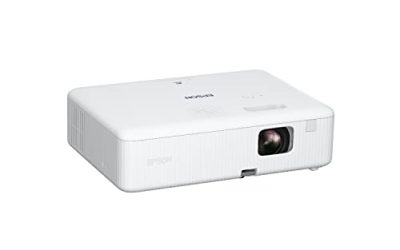
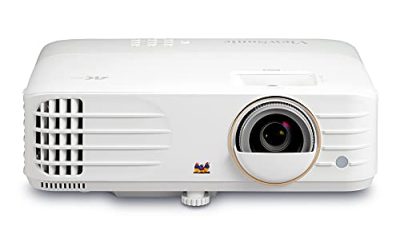
Our Short List of 3

- Best for: Viewers who want a complete, high-quality basement theater in one projector.
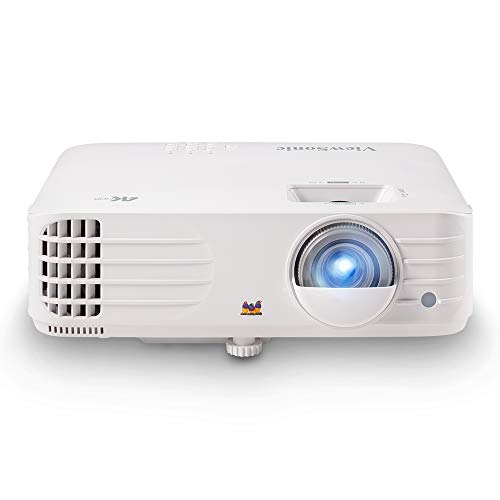
- Best for: Gamers and sports fans who want a big, bright 4K picture in the basement.

- Best for: Movie lovers who prioritize accurate, cinematic color in a dark basement.
All 4 Picks at a Glance
| Product | Specs | Action |
|---|---|---|
| Epson Home Cinema 2350 |
| Check price on Amazon |
| ViewSonic PX701-4K |
| Check price on Amazon |
| BenQ HT2060 |
| Check price on Amazon |
 Optoma HD146X |
| Check price on Amazon |
Our Top Picks
A basement is one of the best rooms in a house for a home theater. The windows are small or absent, the walls are easy to darken, and the space is naturally separated from the rest of the home, so sound stays contained and light stays out. That controlled darkness is exactly what a projector needs. The challenge is choosing a model that matches the room. Low ceilings, support posts, limited throw distance, and damp air all shape which projector will work well underground.
The best basement projectors balance brightness, contrast, resolution, and placement flexibility. In a dark basement, you do not need the extreme brightness required for a sunlit living room, but you do need deep blacks, accurate color, and a throw distance that fits the room. A projector that is too dim will look washed out on a large screen, while one with poor contrast will turn night scenes into a grey fog. This guide compares four home theater projectors that suit basement setups, based on specifications, features, and user feedback, and explains how to measure your room and avoid common placement mistakes.
Disclosure: As an Amazon Associate, we earn from qualifying purchases.
Quick Picks at a Glance
| Product | Key Spec | Best For |
|---|---|---|
| Epson Home Cinema 2350 | 4K PRO-UHD, 2,800 lumens, 3-chip 3LCD | Best overall basement theater |
| ViewSonic PX701-4K | True 4K, 3,200 ANSI lumens, 240Hz | Best 4K gaming and sports |
| BenQ HT2060 | 1080p HDR, 2,200 lumens, DCI-P3 color | Best color accuracy |
| Optoma HD146X | 1080p, 3,600 lumens, 16ms gaming mode | Best bright budget pick |
How to Choose
Brightness for a Dark Room
Basements are dark, which works in your favor. A projector rated between 2,000 and 3,600 lumens is usually plenty for a light-controlled basement, especially on screens up to 120 inches. Higher brightness helps if you sometimes leave a lamp on or use a larger screen. In a fully dark room, however, excessive brightness can hurt black levels, so look for good contrast and adjustable picture modes rather than chasing the highest lumen number alone.
Resolution and Image Sharpness
Resolution decides how crisp the picture looks at large sizes. A 1080p projector looks excellent on screens up to about 110 inches when you sit a normal distance away. A 4K or 4K PRO-UHD model adds finer detail that is noticeable on screens of 120 inches and above, and it pairs well with modern streaming services and game consoles. If your basement theater will be your main movie room, 4K is worth considering. If the room is smaller or the screen is modest, a sharp 1080p model can deliver a superb picture for less.
Contrast and Black Levels
Contrast matters more in a basement than in almost any other room because darkness exposes weak blacks. A projector with a high contrast ratio keeps shadows detailed instead of flat grey, which is vital for movies and moody dramas. Look for dynamic contrast figures and picture modes designed for cinema. DLP models often deliver strong native contrast, while 3LCD models tend to offer rich color and smooth images.
Throw Distance and Room Length
Throw distance is the distance from the lens to the screen, and it is the most common reason a basement setup fails. Measure your room from the wall or screen position to the mounting point, then check the throw ratio of any projector you consider. A standard throw projector typically needs about 10 to 14 feet for a 100 to 120 inch image. Shorter basements may need a short throw model or a smaller screen. Zoom range and lens shift give you more room to work with, so they are valuable in basements with low ceilings or off-center mounting points.
Lens Shift, Zoom, and Keystone
Basements often have low ceilings, ducts, and beams that force the projector into an awkward spot. Vertical lens shift lets you move the image up or down without tilting the projector, which keeps the picture square and sharp. Optical zoom lets you fine-tune the image size without moving the mount. Keystone correction can fix a tilted image, but it softens the picture slightly, so treat it as a backup rather than a primary tool. The more placement flexibility a projector offers, the easier your install will be.
Lamp Life and Running Costs
Projector lamps wear out, and replacing one is a real cost of ownership. Many home theater lamps last up to 15,000 hours in eco or dynamic mode, which covers years of regular movie nights. LED and laser light sources can last even longer. Check the rated lamp life, the availability of replacement lamps, and whether eco mode still looks bright enough in your dark basement. A long lamp life matters more in a basement theater you plan to use every evening than in a room you use only on weekends.
Connectivity and Sound
A basement theater needs clean connections for a streaming device, a game console, and a sound system. Look for at least two HDMI inputs, an audio output for a soundbar or receiver, and a USB port that can power a streaming stick. Built-in speakers are handy for casual viewing, but a dedicated sound system will sound far better in an enclosed basement. Bluetooth output is a useful bonus if you want to send audio to wireless speakers or headphones without running long cables through the ceiling.
Top Picks
Epson Home Cinema 2350
- Best for: Viewers who want a complete, high-quality basement theater in one projector.
Viewers who want a complete, high-quality basement theater in one projector.
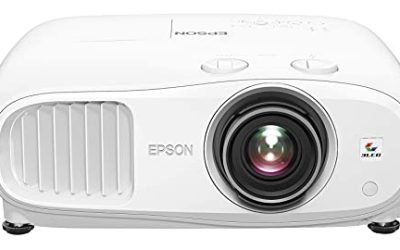
The Epson Home Cinema 2350 is a strong all-round choice for a dedicated basement theater, based on specifications, features, and user feedback. It uses 4K PRO-UHD pixel-shift technology to deliver a sharp, detailed image, along with 3-chip 3LCD color that keeps reds, greens, and blues rich and accurate. With 2,800 lumens of color and white brightness, it has enough output for a large screen in a dark room, and it can also cope when a lamp is on. HDR10 and HLG support add depth to compatible movies and shows, while Android TV puts streaming apps on the projector itself. A 10 watt speaker covers casual viewing, and Bluetooth lets you send sound to external speakers. Low latency makes it a capable gaming projector too, and vertical lens shift plus keystone correction help it fit awkward basement mounting positions.
Pros:
– 4K PRO-UHD resolution with HDR10 and HLG support
– 2,800 lumens with 3-chip 3LCD color technology
– Built-in Android TV for direct streaming
– Vertical lens shift for flexible basement placement
Cons:
– 4K PRO-UHD uses pixel shifting rather than native 4K
– Built-in speaker is modest for a large basement room
– Lamp will eventually need replacement
ViewSonic PX701-4K
- Best for: Gamers and sports fans who want a big, bright 4K picture in the basement.
Gamers and sports fans who want a big, bright 4K picture in the basement.
The ViewSonic PX701-4K suits basements that double as gaming rooms and sports dens, based on specifications, features, and user feedback. It delivers true 4K UHD resolution at 3840 x 2160, with 3,200 ANSI lumens that keep the picture bright on screens up to 300 inches. Gamers will value the 240Hz refresh rate and 4.2ms input lag, which keep fast action smooth and responsive on a huge screen. HDR support adds punch to movies and games, while a 1.1x optical zoom, auto vertical keystone, and four-corner adjustment make setup straightforward even when the mounting position is not perfect. Dual HDMI inputs cover a console and a streaming device at once, and a USB power output can run a streaming dongle. SuperEco mode extends lamp life up to 20,000 hours, which is generous for a projector used most evenings.
Pros:
– True 4K UHD resolution with 3,200 ANSI lumens
– 240Hz refresh rate and 4.2ms input lag for gaming
– Image sizes up to 300 inches with flexible setup tools
– Long lamp life up to 20,000 hours in SuperEco mode
Cons:
– No built-in smart streaming system, so you need a dongle
– Fan noise can be noticeable in a quiet, enclosed basement
– No lens shift, which limits placement flexibility
BenQ HT2060
- Best for: Movie lovers who prioritize accurate, cinematic color in a dark basement.
Movie lovers who prioritize accurate, cinematic color in a dark basement.
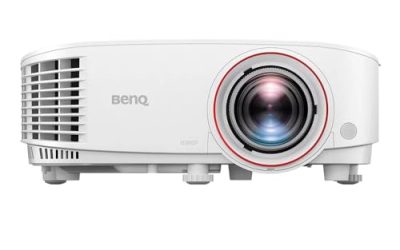
The BenQ HT2060 is the color-accuracy pick for basement movie lovers, based on specifications, features, and user feedback. It is a 1080p HDR LED home theater projector with DCI-P3 and Rec.709 wide color gamut coverage, which helps films look the way their makers intended. Its 2,200 lumens are well matched to a dark basement, where deep blacks and accurate color matter more than raw brightness. The LED light source is rated for long life, so you can enjoy many years of movie nights without worrying about a lamp change. An 8.3ms response time at 120Hz keeps gaming smooth, and 3D support adds another way to enjoy films. Vertical lens shift, 2D keystone correction, and a 1.3x zoom give you real placement freedom, which is valuable under low basement ceilings. Built-in 10 watt speakers handle casual viewing, and HDMI 2.0 and S/PDIF connections cover sound systems and consoles.
Pros:
– DCI-P3 and Rec.709 wide color gamut for accurate cinema color
– LED light source with long rated life and low maintenance
– Vertical lens shift and 1.3x zoom for flexible placement
– Low 8.3ms response time for smooth gaming
Cons:
– 1080p resolution rather than 4K
– 2,200 lumens is best in a fully dark room
– Built-in speakers suit casual viewing more than a big theater
Optoma HD146X
- Best for: Budget-conscious buyers who want the brightest picture for a large basement screen.
Budget-conscious buyers who want the brightest picture for a large basement screen.
The Optoma HD146X is a bright, straightforward budget option for a first basement theater, based on specifications, features, and user feedback. Its 3,600 lumens make it the brightest projector in this guide, so it handles larger screens and rooms where a little ambient light sneaks in around a window or stairwell. Native 1080p resolution at 1920 x 1080 keeps the picture crisp, and a 25,000:1 contrast ratio helps dark scenes hold their depth. Enhanced Gaming Mode delivers a 16ms response time for console play, while a six-segment color wheel supports vivid home cinema color. The lamp is rated up to 15,000 hours in Dynamic mode, which translates to many years of regular use. A 1.1x zoom and vertical keystone correction help with placement, HDMI-CEC lets one remote control connected devices, and quiet 26dB eco-mode operation keeps the projector from distracting during quiet films.
Pros:
– Very bright 3,600 lumens for large screens and some ambient light
– Native 1080p with 25,000:1 contrast ratio
– Enhanced Gaming Mode with 16ms response time
– Long lamp life up to 15,000 hours in Dynamic mode
Cons:
– 1080p only, with no 4K support
– Some users report visible rainbow artifacts on DLP models
– Single-chip DLP design can show fan noise in quiet scenes
Comparison Table
| Projector | Resolution | Brightness | Contrast | Lamp Life | Best Feature |
|---|---|---|---|---|---|
| Epson Home Cinema 2350 | 4K PRO-UHD | 2,800 lumens | High dynamic contrast | Long lamp life | Android TV and 3LCD color |
| ViewSonic PX701-4K | True 4K UHD | 3,200 ANSI lumens | High dynamic contrast | Up to 20,000 hours in SuperEco | 240Hz gaming performance |
| BenQ HT2060 | 1080p HDR | 2,200 lumens | High dynamic contrast | Long-life LED source | DCI-P3 color accuracy |
| Optoma HD146X | 1080p | 3,600 lumens | 25,000:1 | Up to 15,000 hours in Dynamic | Brightest picture |
Buying Guide
Start with the room, not the projector. Measure the distance from your screen wall to the seating and to the ceiling mount position, and note the ceiling height, the location of ducts and beams, and any windows or stairwell light. A 100 inch screen is a good starting point for most basements, while a 120 inch screen suits rooms with at least 12 feet of throw distance. Sit about 10 to 12 feet back from a 100 inch screen, and further back for larger screens.
Choose your screen carefully. A matte white screen works well in a dark basement and preserves accurate color. A grey screen can deepen blacks if your walls are light colored and reflect some light back onto the image. A fixed frame screen gives the flattest, most cinema-like surface, while a retractable screen is useful if the basement doubles as a playroom or gym. Paint the walls and ceiling a dark, matte color if you can, because light walls bounce the projected image back and wash out contrast.
Mounting matters in a basement. A ceiling mount keeps the projector out of the way and aligns it with the center of the screen. Check the weight limit of the mount and the ceiling joists, and run HDMI and power cables neatly along the joists or through conduit. Leave space around the projector for ventilation, because basements can trap heat and humidity. A small dehumidifier helps protect both the projector and the screen in damp basements.
Think about sound early. A basement is naturally good for sound because the walls contain it, but bare concrete and hard floors create echo. Add a rug, soft seating, and fabric wall panels or curtains to tame reflections. A soundbar is a simple upgrade over built-in speakers, while a receiver with surround speakers turns the basement into a real cinema. Run speaker cables before you finish the ceiling if you plan a permanent install.
Avoid the most common mistakes. Do not buy a projector before checking its throw distance against your room, and do not mount it at an extreme angle and rely on keystone correction to fix the image. Do not ignore lamp life and replacement availability, and do not place the projector where a support post blocks part of the image. Test the setup with a temporary table placement before you drill a ceiling mount, so you can confirm the screen size, focus, and seating position work together.
Frequently Asked Questions
How many lumens do I need for a basement projector?
In a light-controlled basement, 2,000 to 3,600 lumens is usually enough for screens up to 120 inches. Lower brightness works well in total darkness, while higher brightness helps if you watch with a lamp on or use a larger screen. Contrast and black levels matter just as much as brightness in a dark room.
Is 1080p enough for a basement home theater?
Yes, 1080p looks excellent on screens up to about 110 inches at normal seating distances. A 4K projector adds finer detail that is most noticeable on larger screens and with high-quality streaming and gaming sources. Choose 4K if the basement is your main movie room and the screen is 120 inches or larger.
What throw distance do I need in a basement?
Most standard throw projectors need about 10 to 14 feet to fill a 100 to 120 inch screen. Measure from the lens to the screen wall, then check the throw ratio of the model you are considering. Short basements may need a smaller screen, a short throw model, or a different mounting position.
Can I mount a projector on a low basement ceiling?
Yes, if the ceiling is at least seven feet high and the mount places the lens near the top of the screen. Vertical lens shift helps a great deal here, because it lets you align the image without tilting the projector. Check the projector’s offset and shift range before buying a mount.
Do basement projectors need special care for humidity?
Basements can be damp, so good ventilation and a dehumidifier are wise. Keep the projector away from direct moisture, leave space around its vents, and let it cool before covering it. Check the filter and vents regularly, and store a spare lamp in a dry place if your model uses one.
Should I use a screen or a painted wall in a basement?
A proper screen gives a flatter, brighter, and more consistent image than most painted walls, and it is worth the investment for a dedicated theater. A smooth, matte painted wall can work as a temporary option, but it rarely matches a screen for color accuracy and even brightness across the whole image.
Conclusion
A basement is a natural home theater, and the right projector turns it into a room you will use every week. The Epson Home Cinema 2350 is the best overall pick for most basements, with 4K PRO-UHD detail, strong 3LCD color, and built-in streaming. The ViewSonic PX701-4K is the best choice for gamers and sports fans who want true 4K and fast response times. The BenQ HT2060 suits viewers who care most about accurate, cinematic color in a dark room. The Optoma HD146X is the brightest and most affordable route to a large-screen basement theater.
Measure your room, choose a screen size that fits the throw distance, and pick the projector whose strengths match how you will actually use the space. With the lights off and a good film playing, a well-chosen basement projector delivers a cinema experience that a television of the same size simply cannot match.
More from Amazon
Programs that pair well with the guide above. Offers and eligibility are set by Amazon and may change.
Free shipping on eligible items, Prime Video and more. Eligible new members can start with a free trial.
Start a Prime free trialAd-free music streaming. Eligible new subscribers can start with a free trial.
Try Music Unlimited freeA Prime membership for ages 18-24 with a trial period. Eligibility is set by Amazon.
See Prime for Young AdultsAudiobooks and podcasts to listen to on the go. Eligible new members can start with a free trial.
Try Audible freeAs an Amazon Associate we earn from qualifying purchases.