Our Short List of 3

- Best for: a permanent theater or media room where the mount cannot sit dead-center.
- Resolution: 4K PRO-UHD, pixel-shifted from 1920 x 1080 3LCD panels
- Brightness: 3,000 lumens color brightness and 3,000 lumens white brightness
- Contrast: up to 100,000:1 with Auto Iris enabled
- Throw ratio: 1.32 to 2.15:1 with 1.62x manual zoom

- Best for: a light-controlled room where film color matters more than raw brightness.
- Resolution: 4K UHD 3840 x 2160 on screen via DLP pixel shifting
- Brightness: 2,200 ANSI lumens
- Color: 95% DCI-P3 and 100% Rec.709 coverage, CinematicColor calibration
- HDR: HDR10, HDR10+ and HLG with HDR-PRO tone mapping

- Best for: a projector that moves between rooms or gets set up fresh for each movie night.
- Resolution: 4K UHD 3840 x 2160 with Dolby Vision, HDR10 and HLG
- Brightness: 2,300 ISO lumens
- Light source: Dual Light LED and laser hybrid, rated 25,000 hours
- Throw ratio: 1.2 to 1.5:1 with motorized optical zoom
All 3 Picks at a Glance
| Product | Specs | Action |
|---|---|---|
| Epson Home Cinema 3800 |
| Check price on Amazon |
| BenQ HT3560 |
| Check price on Amazon |
| XGIMI Horizon Ultra |
| Check price on Amazon |
Our Top Picks
At this tier, the real decision is no longer whether the picture is sharp. Every serious model here puts a 4K image on the wall. What separates them is what happens after the first movie: whether the lens can actually fit your room, whether the light source is a lamp you will replace or a laser hybrid you will not, and whether the color you saw in the demo survives a calibrated picture mode. Placement range, light-source life and honest brightness are the three arguments worth having.
This shortlist is for three kinds of buyers: someone building a fixed theater with a ceiling mount and a real screen, someone upgrading a living room who needs color accuracy for films, and someone who wants a smart projector that sets itself up each time it moves. Every pick below was chosen from its Amazon product title and listing specifications, and the three use different light engines, so the trade-offs are genuine rather than cosmetic.
Quick Picks
As an Amazon Associate we earn from qualifying purchases.
| Product | Best for | Key spec from title |
|---|---|---|
| Epson Home Cinema 3800 | Fixed installs that need lens shift | 4K PRO-UHD 3-chip 3LCD with HDR |
| BenQ HT3560 | Dark-room movie color on a lamp budget | True 4K UHD with 95% DCI-P3 coverage |
| XGIMI Horizon Ultra | Rooms where the projector moves often | 4K with Dolby Vision and auto setup |
How to Choose
Start with the light source, not the resolution
Lamp, LED and laser designs age differently, and at this level that difference runs for years. A lamp model costs less up front and gives you a replaceable light source, but its rated life is measured in thousands of hours and drops further in the brightest mode. Laser and LED hybrids are typically rated in the tens of thousands of hours and hold brightness more steadily, yet when the light engine fades there is no lamp swap to save it. Decide which ownership pattern suits how often the projector will actually run each week.
Do the throw-distance math before falling for a spec sheet
Throw ratio times screen width equals the distance the lens needs from the wall, and no picture setting can rescue a projector that physically cannot fit the room. A wide zoom range and optical lens shift let a fixed install land off-center or high on a shelf without digital correction. Motorized zoom and automatic keystone suit a projector that moves between rooms. Check the published ratio against your measured distance, and remember that keystone correction always costs some sharpness and brightness at the edges.
Separate color coverage from brightness claims
Brightness figures at this tier are published under different standards, ANSI, ISO and IDMS among them, so a bigger number on one box is not automatically a brighter projector than a smaller number on another. Color coverage is the more comparable figure: a model that publishes a wide DCI-P3 percentage is telling you how much of the film color space it can reproduce, which is what HDR content is mastered in. Also confirm which HDR formats the listing names, because HDR10, HDR10+ and Dolby Vision are not interchangeable.
Decide how sources and sound will reach the projector
Some models in this class are pure displays with no smart platform at all, which is fine if a receiver or streaming stick already lives in your rack, and a real limitation if it does not. Count the HDMI inputs on the listing, check for eARC if a soundbar or receiver needs to take audio back down the same cable, and note the built-in speaker wattage only as a stopgap. A projector with automatic focus and keystone still needs a stable surface and a clear path, so plan the mount or shelf as part of the purchase.
The 3 Best Options
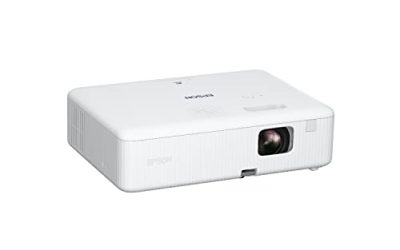
Epson Home Cinema 3800
- Best for: a permanent theater or media room where the mount cannot sit dead-center.
- Resolution: 4K PRO-UHD, pixel-shifted from 1920 x 1080 3LCD panels
- Brightness: 3,000 lumens color brightness and 3,000 lumens white brightness
- Contrast: up to 100,000:1 with Auto Iris enabled
- Throw ratio: 1.32 to 2.15:1 with 1.62x manual zoom
a permanent theater or media room where the mount cannot sit dead-center.
the lamp is a consumable, and its rated life falls in the brightest mode; there is no smart platform, so budget a streaming source if your rack lacks one.
The Home Cinema 3800 is the placement specialist of this group, built around a 3-chip 3LCD engine that produces color and white brightness from the same optical path, so there is no color-wheel rainbow effect to worry about. Its wide zoom and generous optical lens shift make it the easiest of the three to mount off-center, high, or farther back than planned, which is exactly the situation most real rooms present. It is a lamp design with no built-in streaming, so it suits a fixed install where sources already run through a receiver and the projector’s only job is the picture.
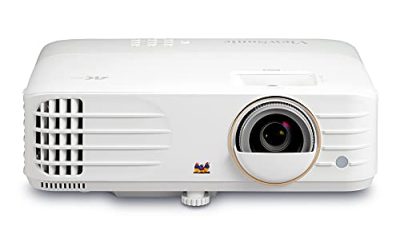
BenQ HT3560
- Best for: a light-controlled room where film color matters more than raw brightness.
- Resolution: 4K UHD 3840 x 2160 on screen via DLP pixel shifting
- Brightness: 2,200 ANSI lumens
- Color: 95% DCI-P3 and 100% Rec.709 coverage, CinematicColor calibration
- HDR: HDR10, HDR10+ and HLG with HDR-PRO tone mapping
a light-controlled room where film color matters more than raw brightness.
on Amazon this model is sold by third-party sellers, so confirm the seller and warranty terms on the listing before ordering; sensitive viewers may notice DLP rainbow artifacts.
The HT3560 is the film-first pick, a single-chip DLP design whose listing leads with color: factory-calibrated CinematicColor covering 95% of the DCI-P3 space, plus HDR10+ and HLG support through BenQ’s HDR-PRO tone mapping. Its brightness rating is the most modest here, which makes it a dark-room projector rather than a living-room one, but in a controlled room that trade buys color accuracy the brighter models do not claim. Three HDMI inputs and eARC give it a proper place in a receiver-based setup, and its low input lag figures keep it usable for casual gaming between films.
XGIMI Horizon Ultra
- Best for: a projector that moves between rooms or gets set up fresh for each movie night.
- Resolution: 4K UHD 3840 x 2160 with Dolby Vision, HDR10 and HLG
- Brightness: 2,300 ISO lumens
- Light source: Dual Light LED and laser hybrid, rated 25,000 hours
- Throw ratio: 1.2 to 1.5:1 with motorized optical zoom
a projector that moves between rooms or gets set up fresh for each movie night.
XGIMI also sells bundle listings of this model with stands or mounts under different codes, so confirm the listing you open is the standalone projector; no contrast ratio is published for it.
The Horizon Ultra is the convenience pick, a lifestyle projector whose listing centers on setup automation: Intelligent Screen Adaption 3.0 handles keystone, focus, obstacle avoidance and even wall-color adaptation, and the zoom is motorized rather than manual. Its Dual Light engine mixes LED and laser for a long rated life with no lamp to replace, and it is the only model here that lists Dolby Vision. The honest trade is brightness: its published figure uses the ISO scale and sits below the other two, so this is a projector for rooms that can be darkened and screens inside its recommended size band.
Which One Fits Your Situation
Your mount has to sit off-center or on a high shelf
Choose the Epson Home Cinema 3800. Its optical lens shift range is the widest here by a distance, and optical shift moves the image without the softening that digital keystone introduces. The wide zoom ratio gives you a second adjustment if the throw distance turns out shorter or longer than the plan, which makes it the forgiving option for a first permanent install.
You watch films in a dark room and care about color
Choose the BenQ HT3560. Its published DCI-P3 coverage and factory calibration are aimed at exactly this use, and its tone mapping handles HDR10+ content that the other two do not list. The modest brightness rating is a genuine limit in a lit room, but in a darkened theater it stops mattering, and the lamp design keeps a replacement path open years from now.
The projector lives on a shelf and moves for gatherings
Choose the XGIMI Horizon Ultra. Automatic keystone, autofocus and obstacle avoidance remove the fiddly part of every fresh setup, the motorized zoom adjusts from the remote, and the hybrid light source is rated far beyond either lamp model. Keep the screen inside the recommended size range and darken the room as much as the occasion allows, because its brightness ceiling is the lowest of the three.
You want one box that streams without extra hardware
None of these three is a full streaming platform on its own in the way a smart TV is, but the Horizon Ultra comes closest to an all-in-one routine for casual viewing, while the Epson and BenQ expect a source device or receiver in the chain. If a stick or console already feeds your current display, all three slot in; if nothing does, add a streaming device to the shopping list alongside whichever projector you pick.
Common Mistakes
- Comparing brightness numbers across standards, treating an ISO figure and an ANSI figure as if they were measured the same way.
- Ordering before measuring throw distance, then discovering the image cannot fill the screen from the only shelf or mount position available.
- Assuming every 4K badge means a native 4K chip, when most models at this level pixel-shift a lower-resolution panel to reach the on-screen count.
- Forgetting that a lamp is a consumable with a rated life that shortens in the brightest picture mode.
- Buying a bundle listing of a projector with a stand or mount when the standalone unit was the one being compared.
Frequently Asked Questions
Is pixel-shifted 4K visibly worse than native 4K?
On typical seating distances with film content, pixel shifting is difficult to distinguish from native 4K, because the shifted frames overlap faster than the eye tracks them. The difference shows up mainly in fine test patterns and very close viewing. At this tier every mainstream model pixel-shifts, so judge the picture on color, contrast and brightness rather than on the chip count alone.
How many lumens do I need for a living room with windows?
There is no single threshold, because screen size, screen material and how much light you can block all change the answer. As a working rule, pick the highest honestly rated brightness your shortlist offers if the room cannot be darkened, and expect any calibrated picture mode to run dimmer than the headline figure. Blackout curtains improve the picture more cheaply than a brighter projector does.
Lamp or laser: which light source is the safer long-term buy?
A lamp model trades a shorter rated life for a replaceable part and a lower entry point, while a laser or LED hybrid is rated for far longer with no swap available when it eventually fades. Heavy daily use favors the hybrid ratings; occasional movie nights make a lamp’s rated hours stretch across many calendar years, which is why the right answer depends on your routine.
Do I need a screen, or is a wall enough?
A smooth white wall works for a first setup, but a fixed screen gives you a flat, bordered surface with predictable gain, and it hides the small brightness and focus imperfections a wall shows. If the projector will be ceiling-mounted permanently, a screen is part of the install rather than an accessory. For a projector that moves between rooms, start with the wall and add a portable screen only if the routine sticks.
More from Amazon
Programs that pair well with the guide above. Offers and eligibility are set by Amazon and may change.
Free shipping on eligible items, Prime Video and more. Eligible new members can start with a free trial.
Start a Prime free trialAd-free music streaming. Eligible new subscribers can start with a free trial.
Try Music Unlimited freeA Prime membership for ages 18-24 with a trial period. Eligibility is set by Amazon.
See Prime for Young AdultsAudiobooks and podcasts to listen to on the go. Eligible new members can start with a free trial.
Try Audible freeAs an Amazon Associate we earn from qualifying purchases.