Our Short List of 3

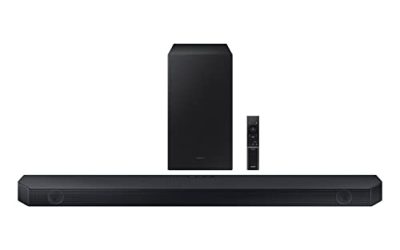
- Best for: households wanting a complete flagship surround system whose bar also replaces the TV as the connection hub.
- Channels: 11.1.4
- HDMI inputs: 2 (HDMI 2.1)
- HDMI output: 1 with eARC
- Passthrough: 4K at 120Hz

- Best for: multi-console households that want three full inputs and rear speakers without running any speaker wire.
- Channels: 11.1.4
- Speaker maximum output power: 1170 Watts
- HDMI inputs: 3
- HDMI output: 1 with eARC

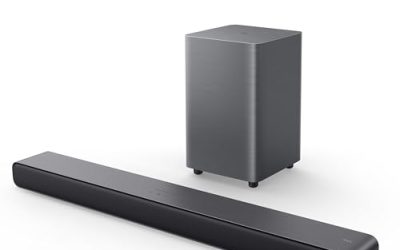
- Best for: large rooms and movie-first setups that want dual subwoofers, four physical surround speakers and legacy inputs.
- Channels: 9.2.4 with SSE Max
- Maximum output power: 1300 Watts
- HDMI inputs: 3
- HDMI output: 1 with eARC
All 3 Picks at a Glance
| Product | Specs | Action |
|---|---|---|
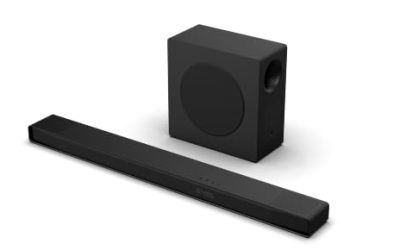
| Samsung HW-Q990D |
| Check price on Amazon |
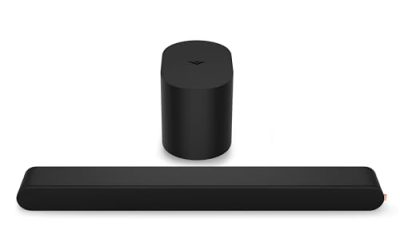
| JBL Bar 1300X |
| Check price on Amazon |
| Nakamichi Shockwafe Ultra 9.2.4 |
| Check price on Amazon |
Key takeaways
- Four soundbars whose listings state two or more HDMI inputs: Samsung Q990D, JBL Bar 1300X, Nakamichi Shockwafe Ultra and LG S95QR compared by ports.
The real decision is where your sources plug in. A TV with three HDMI ports fills up fast once a console, a streaming box and a disc player all want a socket, and the port carrying eARC back to the soundbar is already spoken for. A soundbar with its own HDMI inputs solves that by acting as the switcher: sources feed the bar, the bar feeds the TV, and full-quality audio never has to travel down from the television at all.
This guide is for console gamers short on TV ports, movie watchers running a disc player beside a streamer, and anyone whose TV lacks eARC. Every pick below was chosen from the names and specifications on its Amazon product page, and each listing states two or more HDMI inputs.
Quick Picks
As an Amazon Associate we earn from qualifying purchases.
| Product | Best for | Key spec from title |
|---|---|---|
| Samsung HW-Q990D | A complete surround system in one box | 2 HDMI 2.1 inputs with 4K 120Hz passthrough |
| JBL Bar 1300X | The most sources wired into one bar | 3 HDMI inputs |
| Nakamichi Shockwafe Ultra 9.2.4 | Big rooms that want dual subwoofers | 3 HDMI inputs |
| LG S95QR | LG TV owners who want a matched system | 2 HDMI inputs |
How to Choose
Count the inputs against your source list
Write down every device that sends video and sound together: consoles, a streaming box, a disc player, a cable box, maybe a PC. Each one needs its own input on the bar, because swapping cables behind a TV stand gets old within a week. Two inputs cover most households. Three inputs suit a two-console setup with a player to spare. Remember that the bar’s HDMI output is separate; it carries the combined picture to the TV and brings TV audio back through eARC, so it never counts toward your source total.
Check what the passthrough actually passes
An input is only useful if the picture survives the trip through the bar unchanged. Look for the formats named on the listing: 4K at 120Hz matters for current consoles, Dolby Vision and HDR10 cover the two HDR formats most discs and streamers use, and variable refresh support keeps game motion smooth. Older bars often cap passthrough at 4K 60Hz, which is fine for film sources but holds a console back. Match the stated ceiling to your fastest source, not to the average one, because the bar passes every connected device at its own best signal only if the port supports it.
Confirm the audio formats the inputs accept
Plugging a player into the bar pays off most with lossless soundtracks, so check that the listing names Dolby Atmos and DTS:X decoding, plus Dolby TrueHD and DTS-HD Master Audio for disc audio. When a source connects to the TV instead and the TV sends sound down over plain ARC, those lossless formats often get compressed or dropped entirely. Direct connection to the bar avoids that detour. Also confirm the bar decodes what your player outputs rather than relying on the TV to convert it, since conversion settings vary widely between television models.
Weigh what else arrives in the box
Two bars can share an input count and still be very different purchases. Some are single bars that lean on virtual surround, while others bundle a wireless subwoofer and separate rear speakers for genuine surround channels. Rear speakers may need power outlets nearby or, in one case below, they detach and run on batteries. Room calibration features tune the system to your seating position, and Wi-Fi streaming support decides whether music apps play without reaching for a phone’s Bluetooth menu. Decide how much hardware your room can host before the input count seduces you.
The 4 Best Options
Samsung HW-Q990D
- Best for: households wanting a complete flagship surround system whose bar also replaces the TV as the connection hub.
- Channels: 11.1.4
- HDMI inputs: 2 (HDMI 2.1)
- HDMI output: 1 with eARC
- Passthrough: 4K at 120Hz
households wanting a complete flagship surround system whose bar also replaces the TV as the connection hub.
the rear speakers and subwoofer each need their own power outlet, and the full Q-Symphony benefit only applies with a compatible Samsung TV.
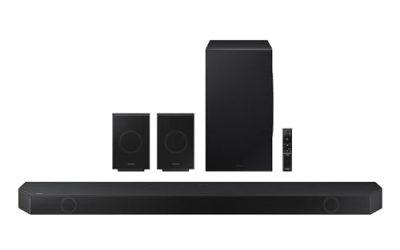
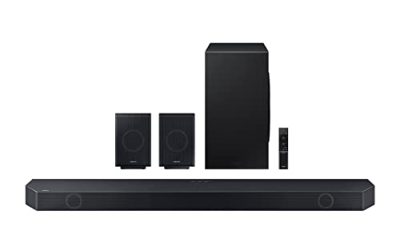
Samsung’s flagship bundle is the pick for buyers who want the switching and the surround system settled in one purchase. Its two HDMI 2.1 inputs accept a console and a player at full speed, passing 4K at 120Hz onward to the TV, while the included wireless subwoofer and rear speakers deliver a true 11.1.4 layout rather than a simulated one. Q-Symphony lets a compatible Samsung TV’s speakers work alongside the bar, and SpaceFit Sound Pro adjusts output to the room. Wireless Dolby Atmos support also means the TV connection itself can stay cable-free with matching Samsung sets.
Watch out for: the rear speakers and subwoofer each need their own power outlet, and the full Q-Symphony benefit only applies with a compatible Samsung TV.
JBL Bar 1300X
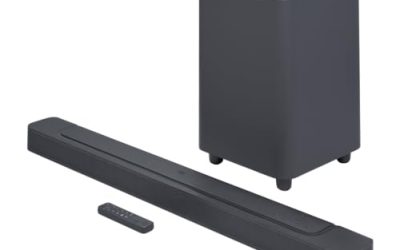
- Best for: multi-console households that want three full inputs and rear speakers without running any speaker wire.
- Channels: 11.1.4
- Speaker maximum output power: 1170 Watts
- HDMI inputs: 3
- HDMI output: 1 with eARC
multi-console households that want three full inputs and rear speakers without running any speaker wire.
the detachable speakers need recharging by docking them back on the bar, so a long movie weekend can drain them if you forget.
The Bar 1300X offers the joint-highest input count here, with three HDMI inputs ready for two consoles and a disc player at once. Its party trick is the pair of detachable surround speakers: they dock on the bar’s ends to charge, then lift off and sit behind the sofa for real rear channels, and each can even work as a standalone Bluetooth speaker elsewhere in the house. Six up-firing drivers handle Dolby Atmos and DTS:X height effects, MultiBeam widens the front stage, and the 12-inch wireless subwoofer supplies the low end. Built-in Wi-Fi brings AirPlay, Chromecast built-in and Alexa Multi-Room Music for streaming.
Watch out for: the detachable speakers need recharging by docking them back on the bar, so a long movie weekend can drain them if you forget.
Nakamichi Shockwafe Ultra 9.2.4
- Best for: large rooms and movie-first setups that want dual subwoofers, four physical surround speakers and legacy inputs.
- Channels: 9.2.4 with SSE Max
- Maximum output power: 1300 Watts
- HDMI inputs: 3
- HDMI output: 1 with eARC
large rooms and movie-first setups that want dual subwoofers, four physical surround speakers and legacy inputs.
on Amazon this system is sold by Nakamichi LLC rather than by Amazon.com itself, and the surround speakers connect by cable to the subwoofers, so the rear of the room still needs wiring and outlets.
Nakamichi builds the largest system in this group: a 45-inch bar, two wireless 10-inch subwoofers and four separate surround speakers, driven by up to 1300 watts. Three HDMI inputs with Dolby Vision and 4K HDR passthrough take a full rack of sources, and older gear is covered too, with optical, coaxial and 3.5mm auxiliary inputs that the other bars here mostly skip. SSE Max processing spreads sound across the 9.2.4 layout, and Bluetooth with aptX HD handles higher-quality wireless audio from phones and computers. This is the option for a dedicated media room where footprint and cabling are secondary concerns.
Watch out for: on Amazon this system is sold by Nakamichi LLC rather than by Amazon.com itself, and the surround speakers connect by cable to the subwoofers, so the rear of the room still needs wiring and outlets.
LG S95QR
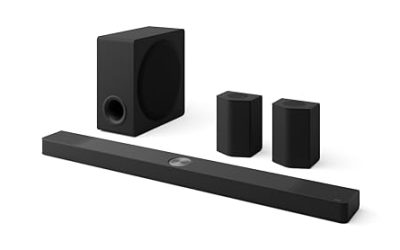
LG’s system suits owners of LG televisions who want everything speaking the same language, down to controlling the bar with the TV remote. Two HDMI inputs take a console and a player, the output carries eARC back from the TV, and the bundle adds a wireless subwoofer plus wireless rear speakers with up-firing drivers. The center channel also fires upward, a layout LG uses to keep dialogue anchored to the screen. Support for Dolby Atmos, DTS:X and IMAX Enhanced covers disc and streaming formats, and AI Room Calibration Pro tunes the 9.1.5 channels to the room’s shape after a short setup routine.
Specs
- Channels: 9.1.5
- Total output power: 810 Watts
- HDMI inputs: 2
- HDMI output: 1 with eARC
- Formats: Dolby Atmos, DTS:X, IMAX Enhanced
- Subwoofer: wireless, included
- Rear speakers: wireless with up-firing drivers, included
- Center speaker: up-firing design
- Room tuning: AI Room Calibration Pro
- Other inputs: optical, USB
Best for: LG TV owners who want a matched 9.1.5 system with two inputs, wireless rears and single-remote control.
Watch out for: stock on this listing runs thin at times, so confirm the exact bundle contents on the page before ordering, since several similar LG model names are sold side by side.
Which One Fits Your Situation
Two consoles, one streaming box, not enough TV ports
Start with the three-input bars. The JBL Bar 1300X keeps both consoles and the streamer permanently wired, and its detachable rears solve the surround problem in rooms where speaker cable cannot cross the floor. The Nakamichi Shockwafe Ultra also offers three inputs, plus coaxial and optical sockets that rescue an older cable box or CD player the JBL leaves out.
A movie room where bass and rear coverage come first
Choose the Nakamichi Shockwafe Ultra 9.2.4. Dual 10-inch subwoofers and four physical surround speakers fill a larger room more convincingly than a single bar bouncing sound off walls, and its three inputs accept a disc player, a streamer and a console together. Just plan the rear wiring and the space two subwoofers occupy before it arrives.
A Samsung TV and a tidy, matched setup
The Samsung HW-Q990D fits best. Q-Symphony pairs the bar with a compatible Samsung TV’s own speakers instead of muting them, SpaceFit Sound Pro handles room tuning, and the two HDMI 2.1 inputs pass a console’s 4K 120Hz signal without compromise. Everything needed, including rear speakers and a wallmount kit, is already in the box.
An LG TV in a flat where rears cannot be wired
Pick the LG S95QR. Its rear speakers connect wirelessly, the up-firing center keeps dialogue clear at modest volumes that suit shared walls, and the bar follows the LG TV remote for daily control. Two inputs are enough for a console and a player, while eARC returns the TV’s own apps in full quality.
Common Mistakes
- Counting the HDMI output as an input; the output goes to the TV, so a bar advertised with three HDMI ports may only accept two sources.
- Assuming every input passes the same signal, when some bars limit one port or cap passthrough at 4K 60Hz.
- Plugging a disc player into the TV and expecting lossless audio over plain ARC, instead of using the bar’s own inputs.
- Forgetting that bundled rear speakers and subwoofers need power outlets, floor space, or recharging docks.
- Mixing up similar model names at checkout; a single letter often separates a bar with two inputs from one with a single input.
Frequently Asked Questions
Does a soundbar HDMI input work like the ones on a TV?
Yes, in practice. A source plugged into the bar sends its picture through the bar’s output to the TV while the bar keeps the audio for itself. Switching sources then happens on the bar’s remote or app. The TV simply stays on the one input fed by the soundbar.
Will passing video through the bar add lag for gaming?
A passthrough port that supports your console’s full signal, such as 4K at 120Hz with variable refresh on the Samsung HW-Q990D, keeps delay minimal because the bar forwards the video rather than processing it. Problems start when the bar caps the signal below what the console outputs, forcing a lower refresh rate.
Can I still connect older gear without HDMI?
Often, yes. Every bar here includes an optical input, and the Nakamichi Shockwafe Ultra adds coaxial and 3.5mm auxiliary sockets for older players and computers. Optical cannot carry lossless Dolby TrueHD or DTS-HD Master Audio, though, so keep disc players on HDMI and reserve the legacy inputs for secondary sources.
Do I still need eARC if my sources plug into the bar?
Yes, for anything the TV itself plays. Built-in TV apps, broadcast tuners and devices connected directly to the TV send their sound to the bar over the eARC connection. Sources wired into the bar do not use that path, but the TV’s own audio still depends on it, so use an eARC-rated cable between bar and TV.
More from Amazon
Programs that pair well with the guide above. Offers and eligibility are set by Amazon and may change.
Free shipping on eligible items, Prime Video and more. Eligible new members can start with a free trial.
Start a Prime free trialAd-free music streaming. Eligible new subscribers can start with a free trial.
Try Music Unlimited freeA Prime membership for ages 18-24 with a trial period. Eligibility is set by Amazon.
See Prime for Young AdultsAudiobooks and podcasts to listen to on the go. Eligible new members can start with a free trial.
Try Audible freeAs an Amazon Associate we earn from qualifying purchases.