
Our Short List of 3

- Best for: Custom wireless typing and remapping.
- QMK/VIA open-source firmware support
- Wireless Bluetooth and wired USB-C connection
- Hot-swappable switch sockets
- Tenkeyless layout
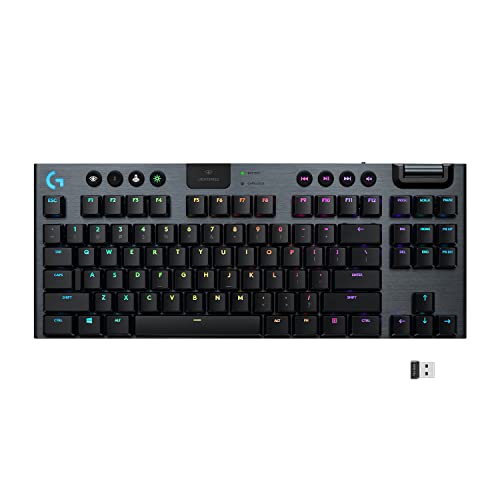
- Best for: Low-profile wireless gaming with fast response.
- Lightspeed wireless receiver included
- Low-profile GL Tactile mechanical switches
- RGB backlighting
- Tenkeyless layout

- Best for: Slim travel keyboard with full customisation.
- QMK/VIA open-source firmware support
- Low-profile mechanical switches
- Wireless Bluetooth and wired USB-C connection
- Hot-swappable switch sockets
All 3 Picks at a Glance
| Product | Specs | Action |
|---|---|---|
| Keychron K8 Pro |
| Check price on Amazon |
| Logitech G915 TKL |
| Check price on Amazon |
| Keychron K3 Max |
| Check price on Amazon |
Key takeaways
- Find the best bluetooth mechanical keyboards for wireless typing and gaming. Compare switch feel, layout, battery life and connectivity before you choose.
A wireless mechanical keyboard frees your desk from cables while keeping the tactile feel that membrane boards cannot match. Bluetooth adds the freedom to move between a laptop, a tablet and a desktop without replugging anything, and a good mechanical switch makes long typing sessions easier on the fingers. The challenge is that wireless and mechanical do not always go together well: some boards add lag, others drain their battery quickly, and a few feel mushy despite the mechanical label.
This guide is for typists who want a cleaner desk, gamers who play from the couch or a laptop, and remote workers who switch between devices all day. Every keyboard below was chosen from the name and specifications shown on its Amazon product page, with attention to switch type, wireless design and layout. We rank four boards that stay responsive over Bluetooth and still feel like proper mechanical keyboards. A solid frame matters too, since a board that flexes under your fingers gets old fast.
Quick Picks
As an Amazon Associate we earn from qualifying purchases
| Product | Best for | Key spec from title |
|---|---|---|
| Keychron K8 Pro | Custom wireless typing | QMK/VIA firmware support |
| Logitech G915 TKL | Low-profile wireless gaming | Lightspeed wireless connection |
| Keychron K3 Max | Slim travel keyboard | Low-profile QMK/VIA design |
| Razer DeathStalker V2 Pro TKL | Fast optical wireless play | Low-profile optical switches |
How to Choose
Judge the switch before anything else
Switches decide how a keyboard feels under your fingers, so they matter more than any other feature. Tactile switches give a small bump as they actuate, linear switches glide straight down, and clicky switches add an audible snap. Low-profile switches sit closer to the desk and suit fast typing, while full-height switches give a deeper travel that many typists prefer. If you can, try the switch type in a store or borrow a friend’s board, because the wrong feel will annoy you every day no matter how good the wireless is. Try each switch type first if you can, since the difference becomes obvious after a hundred keystrokes.
Check how Bluetooth handles latency
Bluetooth is convenient but it is not the fastest wireless link, so look at what each board offers beyond it. Some keyboards add a 2.4GHz receiver for lower latency gaming, while others rely on Bluetooth alone and suit typing better than competitive play. Multipoint Bluetooth lets you pair with several devices and switch between them with a keypress, which matters if you move between a work laptop and a personal machine. Match the connection options to how you actually use the board. A board with both Bluetooth and a 2.4GHz receiver covers every situation, from a quiet office to a fast-paced match.
Size the layout to your desk
Tenkeyless layouts drop the number pad and give your mouse more room, which helps both gamers and small desks. Full-size boards keep the number pad for spreadsheets and data entry, while compact layouts go further and shrink the board for travel. Think about the keys you press every day and the space on your desk. A board that is too wide forces your mouse arm outward, while a board that is too small leaves you hunting for keys you used to reach without thinking. Measure your desk before ordering, and leave room for the mouse to travel freely beside the board.
Battery life decides how wireless it feels
A wireless keyboard that needs charging every few days is barely wireless at all, so check the battery rating and the charging method on the product page. Larger boards with bigger batteries can run for weeks or months on a charge, while slim boards with small cells need more frequent top-ups. USB-C charging is the modern standard and lets you charge from the same cable as your laptop. Backlighting drains power fast, so a board with RGB will need charging sooner than one with the lights off. Check whether the board charges over USB-C while you keep typing, since that removes the downtime entirely.
The 4 Best Options
Keychron K8 Pro
- Best for: Custom wireless typing and remapping.
- QMK/VIA open-source firmware support
- Wireless Bluetooth and wired USB-C connection
- Hot-swappable switch sockets
- Tenkeyless layout
Custom wireless typing and remapping.
Full-height switches make it taller than slim boards.
The Keychron K8 Pro is the most flexible board in this group, built around QMK and VIA firmware that lets you remap any key and build custom layers without extra software. Its hot-swappable sockets mean you can change switches later without soldering, so the board grows with your taste. Wireless Bluetooth connects to three devices, and the tenkeyless layout fits most desks while keeping the keys typists use daily. For anyone who wants a mechanical keyboard they can tune to their own hands, this is the strongest pick. The aluminium frame keeps the board planted during fast typing, and the south-facing LEDs stay visible without glare.
Logitech G915 TKL
- Best for: Low-profile wireless gaming with fast response.
- Lightspeed wireless receiver included
- Low-profile GL Tactile mechanical switches
- RGB backlighting
- Tenkeyless layout
Low-profile wireless gaming with fast response.
Low-profile switches feel different from full-height ones.
The Logitech G915 TKL brings gaming speed to a wireless mechanical board through its Lightspeed receiver, which keeps latency low enough for competitive play. Its low-profile GL Tactile switches actuate quickly with a small bump, and the slim aluminium frame looks at home on any desk. RGB lighting runs across the tenkeyless layout, and the board pairs over Bluetooth or the included receiver. Gamers who want a mechanical feel without a cable will find this the fastest option here. Dedicated media keys sit along the top edge, and the slim profile slides easily under a monitor arm or shelf.
Keychron K3 Max
- Best for: Slim travel keyboard with full customisation.
- QMK/VIA open-source firmware support
- Low-profile mechanical switches
- Wireless Bluetooth and wired USB-C connection
- Hot-swappable switch sockets
Slim travel keyboard with full customisation.
Compact size means a learning curve for new users.
The Keychron K3 Max is the travel pick, packing a full mechanical feel into a slim low-profile frame. QMK and VIA support lets you remap keys just like its larger sibling, and Bluetooth connects to multiple devices for work on the go. The low-profile switches keep the board thin enough to slip into a laptop bag, while the hot-swappable design still allows switch changes. If you type on the move and want a board that disappears into your bag, this is the one to carry. The low profile also keeps wrist strain down during long sessions, and the board wakes from sleep the moment you touch a key.
Razer DeathStalker V2 Pro TKL
The Razer DeathStalker V2 Pro TKL is built for speed, using low-profile optical switches that actuate with light and linear travel. HyperSpeed wireless keeps the connection fast for gaming, and the board also connects over Bluetooth or a wired cable when you want it. Its slim frame and tenkeyless layout leave room for wide mouse movements, and the switches are rated for long life. For a gamer who wants the quickest wireless board in this group, this is the sharpest tool. The optical switches actuate at a light touch, which keeps fatigue down during long matches and late-night sessions.
Specs
- Low-profile optical switches, Linear Red
- HyperSpeed wireless connection
- Bluetooth and wired USB-C modes
- Tenkeyless layout
Best for: Fast optical wireless play in a slim frame.
Watch out for: Linear switches give no tactile bump for typing.
ASIN: B0B5FP7WCG
Which One Fits Your Situation
The customiser who types all day
If you remap keys, swap switches and tune layers, the Keychron K8 Pro is the obvious match. QMK and VIA support plus hot-swappable sockets mean the board adapts to your hands instead of forcing you to adapt to it. Its tenkeyless layout suits a desk where the mouse needs room, and Bluetooth keeps three devices within reach. Swap switches later if your taste changes, since the sockets accept most standard stems.
The gamer who wants speed without cables
Competitive play over wireless calls for the Logitech G915 TKL or the Razer DeathStalker V2 Pro TKL. Both use a dedicated 2.4GHz link for low latency, and both keep a slim profile that suits fast play. Pick the G915 for tactile feedback and the DeathStalker for the lightest, fastest optical switches. Keep the receiver plugged into the monitor hub so the link stays strong wherever the board sits.
The traveller with a laptop bag
A keyboard that travels well must be thin, light and quick to pair, which is exactly what the Keychron K3 Max offers. Its low-profile design slides into a bag beside a laptop, and multipoint Bluetooth switches between devices in seconds. It is the best companion for hotel desks, cafes and shared workspaces. Tuck it beside the laptop and you have a full typing setup anywhere with a flat surface.
The remote worker switching devices
Moving between a work laptop, a personal desktop and a tablet all day rewards a board with strong multipoint Bluetooth. The Keychron K8 Pro and K3 Max both pair with several devices and switch with a keypress, so your keyboard follows your attention. Choose the K8 Pro for a full-size feel at home and the K3 Max when you carry it with you. Both remember paired devices, so switching takes a single keypress.
Common Mistakes
- Buying a Bluetooth-only board for competitive gaming, where the extra latency shows up in fast matches and quick reactions suffer.
- Choosing a switch type without trying it, then finding the feel wrong after weeks of typing and wishing you had tested first.
- Picking a full-size board for a small desk, leaving no room for the mouse to move freely and crowding every other item on it.
- Leaving RGB lighting at full brightness and wondering why the battery drains in days instead of lasting for weeks.
- Forgetting that some boards need a wired connection for firmware updates and first-time setup before they work wirelessly at all.
Frequently Asked Questions
Is Bluetooth fast enough for gaming keyboards?
For casual and single-player gaming, yes. Bluetooth adds a small delay that most players never notice, but competitive players should use the 2.4GHz receiver that boards like the G915 TKL and DeathStalker V2 Pro include. That link keeps latency low enough for fast-paced matches. For typing and slower games, Bluetooth alone works fine.
What does hot-swappable mean on a keyboard?
Hot-swappable means you can pull switches out of their sockets and press new ones in without soldering. It lets you change the feel of a board later, replace a worn switch, or mix switch types across the layout. Both Keychron boards in this guide offer it. No soldering is involved, so anyone can swap a switch in seconds.
How long do wireless mechanical keyboards last on a charge?
It varies widely by board and by backlight use. Larger boards can run for weeks or months with the lighting off, while slim boards with RGB at full brightness may need charging within days. Turning the backlight down or off is the simplest way to stretch battery life. Wired mode also helps, since the board charges while you work.
Are low-profile switches good for typing?
Many typists like them for their short travel and fast actuation, especially on the move. Others prefer the deeper travel of full-height switches for long writing sessions. The best test is to try both styles before committing, since switch feel is personal and hard to judge from a listing alone. Low-profile boards also travel better, which matters if the keyboard leaves the house.
More from Amazon
Programs that pair well with the guide above. Offers and eligibility are set by Amazon and may change.
Free shipping on eligible items, Prime Video and more. Eligible new members can start with a free trial.
Start a Prime free trialAd-free music streaming. Eligible new subscribers can start with a free trial.
Try Music Unlimited freeA Prime membership for ages 18-24 with a trial period. Eligibility is set by Amazon.
See Prime for Young AdultsAudiobooks and podcasts to listen to on the go. Eligible new members can start with a free trial.
Try Audible freeAs an Amazon Associate we earn from qualifying purchases.









