
Our Short List of 3
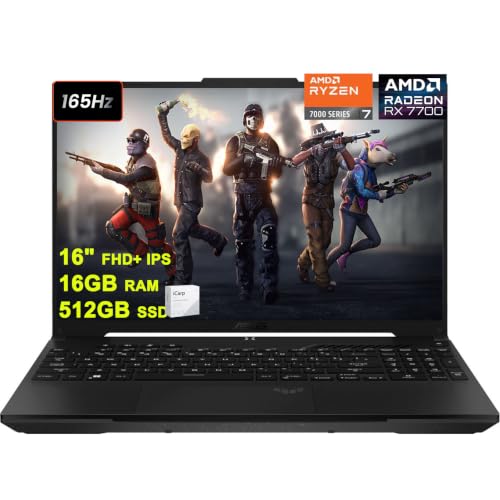
- Best for: Students who want a durable 16-inch laptop that handles games and coursework equally well.
- 16-inch WUXGA 1920 x 1200 display, 165Hz, 7ms, 100% sRGB
- AMD Ryzen 7 7735HS processor
- AMD Radeon RX 7700S graphics, 8GB dedicated memory
- 16GB DDR5 RAM, 512GB SSD

- Best for: Students who want the most affordable route to smooth 1080p gaming and reliable schoolwork.
- 15.6-inch Full HD 1920 x 1080 IPS display, 144Hz, 300 nits, 100% sRGB
- AMD Ryzen 7 170 processor, 8 cores, up to 4.75GHz
- NVIDIA GeForce RTX 4050 graphics, 6GB GDDR6
- 16GB DDR5 RAM, 512GB PCIe SSD

- Best for: Students who want a big-screen laptop with strong graphics and plenty of memory for games and projects.
- 16.1-inch Full HD display, 144Hz
- Intel Core i7-14700HX processor, 20 cores, up to 5.5GHz
- NVIDIA GeForce RTX 4060 graphics, 8GB GDDR6
- 32GB DDR5 RAM, 1TB SSD
All 4 Picks at a Glance
| Product | Specs | Action |
|---|---|---|
| ASUS TUF Gaming A16 |
| Check price on Amazon |
| Lenovo LOQ 15 |
| Check price on Amazon |
| HP Victus 16 |
| Check price on Amazon |
 Acer Nitro V 15 |
| Check price on Amazon |
Key takeaways
- Find the best computer for gaming and school with our November 2026 guide to gaming laptops with strong graphics that handle classwork by day and games after.
A computer for gaming and school has to survive two very different days. In class it needs to stay quiet, last through lectures and run documents, browsers and video calls without fuss. After school it needs to run modern games at smooth frame rates, stay cool under load and drive a fast display. A laptop that only does one of those jobs well will frustrate you in the other half of the day, so the balance matters more than any single specification.
This guide is for students who game and gamers who study. We picked four gaming laptops from the names and specifications on their Amazon pages, covering a tough 16-inch all-rounder, a compact 15-inch value pick, a powerful 16-inch performer and a high-memory 15-inch machine.
Quick Picks
As an Amazon Associate we earn from qualifying purchases
| Product | Best for | Key spec from title |
|---|---|---|
| ASUS TUF Gaming A16 | Tough all-round gaming laptop | 16-inch 165Hz, Ryzen 7, RX 7700S |
| Lenovo LOQ 15 | Best value for class and play | 15.6-inch 144Hz, Ryzen 7, RTX 4050 |
| HP Victus 16 | Powerful 16-inch performer | 16.1-inch 144Hz, Core i7, RTX 4060 |
| Acer Nitro V 15 | High-memory multitasker | 15.6-inch 144Hz, Core i9, RTX 4060 |
How to Choose
Graphics Card and Gaming Performance
The graphics card decides which games run smoothly and at what settings. An RTX 4060 handles modern games at high settings on a 1080p or 1440p screen, while an RTX 4050 suits medium settings and lighter titles, and a Radeon RX 7700S sits between the two for most current games. Check the card’s power limit as well, because the same GPU performs differently at different wattages, and a laptop with a higher power limit stays smoother in long sessions. Match the card to the games you actually play, not to the most demanding title on the market.
Processor and Memory for Schoolwork
Schoolwork rewards a fast processor and plenty of memory, because research means dozens of browser tabs, documents and video calls running at once. A modern Ryzen 7 or Core i7 with eight or more cores handles that load easily, and 16GB of memory is the sensible minimum for multitasking, while 32GB or 64GB suits video editing and large projects. Check whether the memory can be upgraded later, because a laptop that starts at 16GB and grows to 32GB lasts longer through a degree. Storage matters too, and 512GB fills quickly with games.
Screen, Weight and Battery
A gaming laptop for school must be carried, so weight and battery life matter as much as the screen. A 15-inch model around five pounds fits a backpack more easily than a heavier 16-inch machine, and a 144Hz or 165Hz display makes both games and scrolling feel smooth. Battery life varies widely, because gaming drains a battery in a couple of hours, while note-taking and browsing can stretch much further, so check the battery size and whether the laptop charges over USB-C. A bright, anti-glare screen helps in classrooms with strong light.
Cooling, Noise and Build
Cooling decides whether a laptop stays fast and quiet or throttles and roars under load. Look for dual fans, large vents and a design that draws cool air from below, and check whether the laptop has a quiet mode for lectures and libraries. Build quality matters for a machine that travels daily, so a sturdy hinge, a solid keyboard and a lid that resists flex are worth more than a flashy finish. A backlit keyboard helps in dim lecture halls, and a good port selection covers monitors, storage and headsets without a dongle.
The 4 Best Options
ASUS TUF Gaming A16
- Best for: Students who want a durable 16-inch laptop that handles games and coursework equally well.
- 16-inch WUXGA 1920 x 1200 display, 165Hz, 7ms, 100% sRGB
- AMD Ryzen 7 7735HS processor
- AMD Radeon RX 7700S graphics, 8GB dedicated memory
- 16GB DDR5 RAM, 512GB SSD
Students who want a durable 16-inch laptop that handles games and coursework equally well.
The listing is sold as an upgraded bundle, so confirm the exact configuration and seller on the product page before ordering.
The ASUS TUF Gaming A16 is the tough all-rounder for students who want one laptop for class and games. Its 16-inch WUXGA display runs at 165Hz with a fast 7ms response and full sRGB coverage, so games look smooth and coursework stays sharp. The Ryzen 7 7735HS processor and Radeon RX 7700S graphics with 8GB of dedicated memory handle modern games well, while 16GB of DDR5 memory and a 512GB SSD keep multitasking and loading times comfortable. FreeSync Premium and a MUX switch smooth the picture further, and USB4 plus a backlit keyboard cover docking and late-night work.
Watch out for: The listing is sold as an upgraded bundle, so confirm the exact configuration and seller on the product page before ordering.
Lenovo LOQ 15
- Best for: Students who want the most affordable route to smooth 1080p gaming and reliable schoolwork.
- 15.6-inch Full HD 1920 x 1080 IPS display, 144Hz, 300 nits, 100% sRGB
- AMD Ryzen 7 170 processor, 8 cores, up to 4.75GHz
- NVIDIA GeForce RTX 4050 graphics, 6GB GDDR6
- 16GB DDR5 RAM, 512GB PCIe SSD
Students who want the most affordable route to smooth 1080p gaming and reliable schoolwork.
The 512GB drive fills quickly with several large games installed, so budget for external storage or a larger drive later.
The Lenovo LOQ 15 is the value pick for students who need solid gaming performance without a heavy laptop or a heavy burden on their bag. Its 15.6-inch Full HD IPS display runs at 144Hz with 300 nits of brightness and full sRGB coverage, which suits both games and long reading sessions. The Ryzen 7 170 processor with eight cores and the RTX 4050 graphics card with 6GB of memory run modern games at sensible settings, while 16GB of DDR5 memory and a 512GB SSD handle schoolwork with ease. The backlit keyboard, USB-C port and Wi-Fi 6 cover daily needs.
Watch out for: The 512GB drive fills quickly with several large games installed, so budget for external storage or a larger drive later.
HP Victus 16
- Best for: Students who want a big-screen laptop with strong graphics and plenty of memory for games and projects.
- 16.1-inch Full HD display, 144Hz
- Intel Core i7-14700HX processor, 20 cores, up to 5.5GHz
- NVIDIA GeForce RTX 4060 graphics, 8GB GDDR6
- 32GB DDR5 RAM, 1TB SSD
Students who want a big-screen laptop with strong graphics and plenty of memory for games and projects.
The bundled external SSD adds bulk to the package, so check what is in the box before ordering.
The HP Victus 16 is the powerful 16-inch performer for students who want strong gaming hardware and a big screen. Its 16.1-inch Full HD display runs at 144Hz, and the Intel Core i7-14700HX processor with 20 cores pairs with RTX 4060 graphics and 8GB of memory to run demanding games and heavy school projects alike. The 32GB of DDR5 memory and 1TB SSD leave room for games, editing software and large files without juggling storage, and the RGB backlit keyboard, RJ-45 port and Wi-Fi 6 cover wired and wireless setups. The listing bundles a 512GB external SSD for extra space.
Watch out for: The bundled external SSD adds bulk to the package, so check what is in the box before ordering.
Acer Nitro V 15
- Best for: Heavy multitaskers who want huge memory for school projects and smooth gaming after class.
- 15.6-inch Full HD 1920 x 1080 IPS display, 144Hz
- Intel Core i9-13900H processor
- NVIDIA GeForce RTX 4060 graphics, 8GB GDDR6
- 64GB DDR5 RAM, 1TB SSD
Heavy multitaskers who want huge memory for school projects and smooth gaming after class.
The listing is sold as an upgraded bundle with the seal opened for the memory and storage upgrade, so confirm the seller and warranty terms first.
The Acer Nitro V 15 is the high-memory multitasker for students who keep many apps open at once. Its 15.6-inch Full HD IPS display runs at 144Hz, and the Intel Core i9-13900H processor pairs with RTX 4060 graphics and 8GB of memory for smooth gaming and fast rendering. The 64GB of DDR5 memory is the largest in this guide, so dozens of browser tabs, documents and editing tools run together without slowing down, and the 1TB SSD holds games and coursework with room to spare. Wi-Fi 6 and a backlit keyboard round out a laptop built for long days.
Watch out for: The listing is sold as an upgraded bundle with the seal opened for the memory and storage upgrade, so confirm the seller and warranty terms first.
Which One Fits Your Situation
For a Student on a Tight Budget
A tight budget calls for the lowest-cost laptop that still games well and lasts through lectures. The Lenovo LOQ 15 fits best, because its RTX 4050 graphics and Ryzen 7 processor handle modern games at sensible settings, and its 15.6-inch body travels easily. Keep the game library small to protect the 512GB drive, and use cloud storage for coursework so the laptop stays fast.
For a Gamer Who Also Studies
Gamers who study need strong graphics without giving up portability or battery life. The ASUS TUF Gaming A16 leads here, with its 165Hz display, RX 7700S graphics and tough build handling long gaming sessions and full school days alike. Use the quiet mode in lectures, plug in for games, and enjoy a screen that makes both coursework and play look sharp.
For Demanding Games and Big Projects
Demanding games and big school projects reward the strongest hardware in the guide. The HP Victus 16 is the pick, because its Core i7 processor, RTX 4060 graphics and 32GB of memory run heavy games and editing software together. The 1TB drive plus the bundled external SSD give you room for a large game library and large project files.
For Heavy Multitasking
Heavy multitasking means dozens of tabs, documents and apps open at once, and memory is the bottleneck. The Acer Nitro V 15 fits best, because its 64GB of DDR5 memory dwarfs the other laptops here and keeps everything running smoothly. Pair it with the fast RTX 4060 graphics for gaming after class, and let the 1TB drive hold your whole semester.
Common Mistakes
- Buying the most powerful graphics card and forgetting that a heavy laptop still has to be carried to every lecture.
- Choosing 8GB of memory for a gaming laptop, then watching it slow down with a game, a browser and a video call open at once.
- Filling a 512GB drive with games in the first month, then having no room left for coursework and projects.
- Ignoring fan noise, then discovering the laptop roars during quiet lectures and library sessions.
- Skipping the warranty and seller details on upgraded bundles, then finding the upgrade voids part of the cover.
Frequently Asked Questions
How much RAM do I need for gaming and school?
Most students do well with 16GB of memory, because it handles games, browsers, documents and video calls running together without slowing down. Heavy multitaskers, video editors and anyone who keeps dozens of tabs open should look for 32GB, while 64GB suits large projects and future-proofing. Check whether the laptop’s memory can be upgraded later.
Is an RTX 4050 enough for modern games?
An RTX 4050 runs most games well at 1080p with medium to high settings, and it handles lighter titles and esports games at high frame rates. Demanding games may need lower settings or upscaling to stay smooth, so check the games you play most. If you want high settings on the newest titles, step up to an RTX 4060.
Can a gaming laptop last a full school day on battery?
A gaming laptop rarely lasts a full school day on battery when gaming, because games drain power quickly, but it can last much longer for notes, browsing and documents. Battery life depends on screen brightness, background apps and power settings, so use the quiet or balanced mode in class and keep the charger in your bag.
Should I buy a 15-inch or 16-inch laptop for school?
A 15-inch laptop suits most students, because it fits a backpack easily and still gives a screen for games and coursework. A 16-inch laptop offers a larger display and often stronger cooling, but it weighs more and takes more desk space in lecture halls. Try both sizes if you can, and weigh the laptop with its charger before deciding.
More from Amazon
Programs that pair well with the guide above. Offers and eligibility are set by Amazon and may change.
Free shipping on eligible items, Prime Video and more. Eligible new members can start with a free trial.
Start a Prime free trialAd-free music streaming. Eligible new subscribers can start with a free trial.
Try Music Unlimited freeA Prime membership for ages 18-24 with a trial period. Eligibility is set by Amazon.
See Prime for Young AdultsAudiobooks and podcasts to listen to on the go. Eligible new members can start with a free trial.
Try Audible freeAs an Amazon Associate we earn from qualifying purchases.









