Our Short List of 3

- Best for: Everyday viewing, evening shows and films in a bedroom or second room.
- Screen size: 50 inches
- Display technology: LED
- Resolution: 4K (2160p)
- Refresh rate: 60 Hz

- Best for: Films and console gaming in a dark or dim room.
- Screen size: 65 inches
- Display technology: OLED evo
- Resolution: 4K
- Refresh rate: native 120Hz in the listing description; the specification table lists 144 Hz
- Best for: Big-screen gaming and fast-paced sport in a large living room.
- Screen size: 75 inches (74.5 inches panel)
- Display technology: Mini-LED ULED 4K with QLED
- Resolution: 4K UHD
- Refresh rate: 144 Hz
All 3 Picks at a Glance
| Product | Specs | Action |
|---|---|---|
| Samsung 50-Inch CU7000 Crystal UHD 4K Smart TV |
| Check price on Amazon |
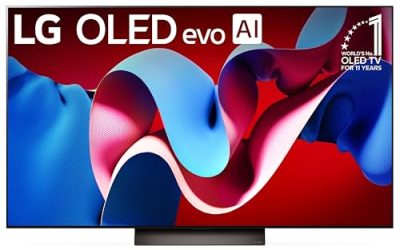
| LG 65-Inch OLED evo C4 Series Smart TV |
| Check price on Amazon |
| Hisense 75-Inch U8N Mini-LED ULED 4K Smart TV |
| Check price on Amazon |
Key takeaways
- Confused by 60Hz, 120Hz and 144Hz TV refresh rates? Compare four TVs at each rate and learn which refresh rate fits movies, sports and gaming.
Refresh rate is the number that decides whether a football sliding across the screen stays sharp or smears into a blur, and whether a fast camera pan in a film feels smooth or judders. Most shoppers fixate on screen size and resolution first, then discover too late that the panel underneath refreshes only 60 times per second while the match they love most turns into a trail of ghosts. The real decision is not chasing the biggest number on the box, but matching the panel rate to the motion you actually watch every week.
This guide is for living-room viewers who watch films and evening shows, sports fans who follow live matches, and console players who want responsive play on a big screen. Every television below was picked from its Amazon listing, and each one represents a different refresh-rate tier, so you can see what 60Hz, 120Hz and 144Hz each buy you in practice.
Quick Picks
As an Amazon Associate we earn from qualifying purchases.
| Product | Best for | Key spec from title |
|---|---|---|
| Samsung 50-Inch CU7000 Crystal UHD 4K Smart TV | Everyday viewing and evening shows | 60Hz refresh rate, 4K LED panel |
| Samsung 55-Inch QN90D Neo QLED 4K Smart TV | Bright rooms and live sport | 120Hz refresh rate, Neo QLED Mini LED |
| LG 65-Inch OLED evo C4 Series Smart TV | Films and console gaming in a dark room | Native 120Hz refresh rate, OLED evo panel |
| Hisense 75-Inch U8N Mini-LED ULED 4K Smart TV | Big-screen gaming and fast action | 144Hz refresh rate, Mini-LED ULED panel |
How to Choose
Match the rate to what you watch
A 60Hz panel redraws the picture 60 times per second, which is enough for news, drama, documentaries and most streaming shows, because that material is usually filmed at 24 or 30 frames per second. Sport and fast action are different: a ball crossing the frame or a player sprinting moves a long way between refreshes, so a 120Hz panel has twice as many chances to place the object and the motion looks cleaner. Console games that output 120 frames per second need a 120Hz panel to show every frame. List the three things you watch most, then let that list set the minimum rate rather than letting a specification sheet push you toward a number you will never use.
Read the native panel rate, not the motion label
Television makers love motion labels, and those labels are where shoppers get misled. A listing may advertise a motion feature with a large number while the panel underneath still refreshes at 60Hz or 120Hz, because the feature inserts extra frames or backlight tricks rather than changing how often the screen itself updates. The figure that matters is the native panel refresh rate, usually shown as Refresh Rate in the specification table of the listing. When the description and the specification table disagree, treat the lower figure as the safe reading and check the listing again before deciding. A television that honestly states 120Hz will always serve motion better than one that hides a 60Hz panel behind a grand motion name.
Check gaming support beyond the headline number
A high refresh rate alone does not make a television good for gaming. The console has to reach the panel at that rate, which means the HDMI ports must support the bandwidth the frame rate needs, and the television must accept a variable refresh signal so the picture does not tear when the frame rate dips. Look for four HDMI 2.1 inputs on the listing, plus a named game mode and variable refresh support, before assuming a 120Hz or 144Hz panel will actually run games at that speed. A 60Hz panel with low input lag can feel more responsive than a 144Hz panel whose ports throttle the signal, so read the port and game-mode lines alongside the refresh figure.
Weigh size, seating distance and panel type together
Refresh rate does not work in isolation. A 75-inch screen in a small room makes every motion flaw obvious, because the same blur covers a larger share of your view, while the same panel in a large room at a sensible distance forgives far more. Panel type matters too: OLED panels switch pixels almost instantly, so motion stays crisp even at 120Hz, while LED and Mini-LED panels rely on backlight control and processing to keep up. Bright rooms favour Mini-LED and Neo QLED panels, which hold their punch in daylight, whereas dark rooms let OLED show its strength. Choose the rate, the size and the panel as one decision, not three separate ones.
The 4 Best Options
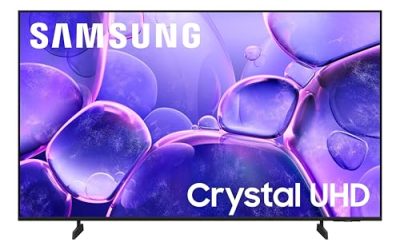
Samsung 50-Inch CU7000 Crystal UHD 4K Smart TV
- Best for: Everyday viewing, evening shows and films in a bedroom or second room.
- Screen size: 50 inches
- Display technology: LED
- Resolution: 4K (2160p)
- Refresh rate: 60 Hz
Everyday viewing, evening shows and films in a bedroom or second room.
The 60Hz panel will show more blur on fast sport than a 120Hz set, so check your viewing habits before choosing it as the main living-room television.
This is the straightforward choice for a household that mainly watches evening shows, news and films, and wants a dependable 4K screen without paying for speed it will not use. The 60Hz panel suits material filmed at ordinary frame rates, and the Crystal Processor with 4K upscaling sharpens lower-resolution programmes so older shows do not look soft on a 50-inch screen. PurColor and HDR support keep colours lively for drama and documentaries, while the Gaming Hub and Alexa built-in cover casual streaming and voice control. It is a sensible fit for a bedroom or a second room where the television runs a few hours a day.
Watch out for: The 60Hz panel will show more blur on fast sport than a 120Hz set, so check your viewing habits before choosing it as the main living-room television.
Samsung 55-Inch QN90D Neo QLED 4K Smart TV
The QN90D is the pick for a bright living room where sport dominates the schedule and the television faces windows for much of the day. Its 120Hz panel refreshes twice as often as a standard set, so a ball in flight and a winger cutting across the box stay defined instead of smearing. Quantum Matrix Mini LEDs drive the Neo QLED picture, giving the brightness needed to hold contrast in daylight, while Motion Xcelerator is the motion handling that works with the 120Hz panel. Dolby Atmos, Object Tracking Sound and Real Depth Enhancer Pro round out a set built for shared viewing rather than solitary late-night sessions.
Specs
- Screen size: 55 inches
- Display technology: Neo QLED 4K with Quantum Matrix Mini LEDs
- Resolution: 4K
- Refresh rate: 120 hertz
- Model year: 2024
- Dolby Atmos and Object Tracking Sound
- Motion Xcelerator and Real Depth Enhancer Pro
- Alexa Built-in
Best for: Live sport and daytime viewing in a bright living room.
Watch out for: The listing also carries Motion Xcelerator 144Hz marketing, while the specification table states a 120 hertz panel, so treat 120Hz as the panel rate when comparing sets.
LG 65-Inch OLED evo C4 Series Smart TV
- Best for: Films and console gaming in a dark or dim room.
- Screen size: 65 inches
- Display technology: OLED evo
- Resolution: 4K
- Refresh rate: native 120Hz in the listing description; the specification table lists 144 Hz
Films and console gaming in a dark or dim room.
The listing disagrees with itself on refresh rate, stating native 120Hz in the description and 144 Hz in the specification table, so use 120Hz as the safe figure and confirm the listing before buying.
The C4 is the set for film lovers and console players who watch in a dim room and notice every frame. Its OLED evo panel switches pixels in a fraction of the time an LED panel needs, so motion stays crisp and dark scenes keep their depth without the grey wash cheaper panels show. Four HDMI 2.1 inputs let a console and a streaming box sit side by side without swapping cables, and the 0.1ms response time keeps fast games feeling immediate. The next-generation alpha 9 Gen7 AI Processor handles picture and sound tuning, and the Magic Remote with Alexa built-in keeps navigation simple from the sofa.
Watch out for: The listing disagrees with itself on refresh rate, stating native 120Hz in the description and 144 Hz in the specification table, so use 120Hz as the safe figure and confirm the listing before buying.
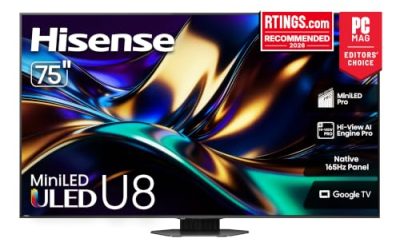
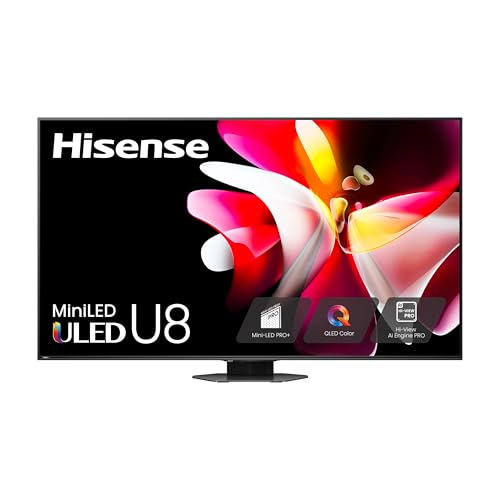
Hisense 75-Inch U8N Mini-LED ULED 4K Smart TV
- Best for: Big-screen gaming and fast-paced sport in a large living room.
- Screen size: 75 inches (74.5 inches panel)
- Display technology: Mini-LED ULED 4K with QLED
- Resolution: 4K UHD
- Refresh rate: 144 Hz
Big-screen gaming and fast-paced sport in a large living room.
A 75-inch screen needs generous wall space and viewing distance, so measure the room and check the stand width against your unit before ordering.
The U8N is the big-screen option for households that want the highest refresh rate in this guide and watch a lot of fast action. Its 144Hz panel gives games and sport more frames to work with than any other set here, and the Mini-LED ULED backlight with Full Array Local Dimming Pro keeps bright highlights punchy on a 75-inch screen. Dolby Vision IQ adapts the picture to the room light, Dolby Atmos handles the soundstage, and 144Hz Game Mode Pro is the gaming mode that pairs the high rate with the panel. Google TV puts streaming apps in one place, and Alexa compatibility covers voice control for the household.
Watch out for: A 75-inch screen needs generous wall space and viewing distance, so measure the room and check the stand width against your unit before ordering.
Which One Fits Your Situation
You mostly watch films and evening shows
Pick the Samsung CU7000 if your evenings are drama, documentaries and streaming series, because 60Hz covers that material comfortably and the 50-inch screen suits a bedroom or smaller room. The 4K upscaling keeps older programmes watchable, and the straightforward feature set means there is nothing to configure before settling in. Save the higher refresh rates for a room where sport or games actually dominate the schedule.
You watch live sport every week
Pick the Samsung QN90D, because its 120Hz panel and bright Neo QLED picture are built for the exact problem sport creates: fast objects crossing a bright screen in a sunlit room. The panel refreshes often enough to keep the ball readable, and the Mini LED backlight holds contrast while daylight floods the room. The LG C4 is the alternative only if your sport watching happens mostly after dark.
You play console games on the big screen
Pick the Hisense U8N for the highest refresh rate and the largest screen, since its 144Hz panel and dedicated game mode give fast games the smoothest motion in this guide. If your room is smaller or darker, the LG C4 is the better gaming pick instead, because its OLED panel and four HDMI 2.1 inputs pair instant pixel response with room for several consoles at once.
You want one television for a bright family room
Pick the Samsung QN90D, because it balances a 120Hz panel with the brightness a sunlit family room demands, and it handles sport, films and casual gaming without a weak spot. The Hisense U8N suits the same room only when the wall and the seating distance can take a 75-inch screen, while the LG C4 belongs in a darker space where its OLED contrast can shine.
Safety Notes
Televisions run on mains electricity, so place the set where air can move around the vents, keep liquids away from the screen and the rear panel, and route the power cord where it will not be pinched by furniture or walked on. If you wall-mount the set, use a mount rated for the size and weight of your model and follow the mounting instructions in the manual, and unplug the television before moving it or cleaning behind it.
Common Mistakes
- Buying the biggest refresh number without checking whether the panel rate or a motion label is behind it.
- Choosing a 60Hz television as the main set in a household that watches live sport every week.
- Assuming a 144Hz panel will run games at that rate when the HDMI ports and game mode do not support it.
- Picking a 75-inch screen for a room where the seating distance is too short to take it in comfortably.
- Ignoring panel type and room light, then wondering why a set that looked great in a dark shop looks washed out at home.
Frequently Asked Questions
Is 120Hz better than 60Hz for watching films?
For films, the difference is small, because most films are shot at 24 frames per second and both panels can display that cadence. The advantage of 120Hz shows up in camera pans, sport and anything with fast sideways motion, where extra refreshes keep moving objects sharper. If your viewing is mostly films and drama, a 60Hz set is fine; if sport shares the schedule, 120Hz earns its place.
Do I need 144Hz for console gaming?
Most console games output no more than 120 frames per second, so a 120Hz panel already covers the fastest console output available today. A 144Hz panel adds headroom for PC gaming and future console modes, but it is not required for a good console experience. Put the money toward HDMI 2.1 ports, variable refresh support and low input lag first, then treat 144Hz as a bonus.
Does a higher refresh rate make ordinary channels look better?
A higher refresh rate improves motion clarity, but it cannot add detail that is missing from a low-resolution broadcast, and it will not fix a weak signal or heavy compression. Ordinary channels benefit most from good upscaling and a clean signal, with the refresh rate mattering only when the picture itself moves quickly. Check the resolution and the upscaling processor alongside the refresh figure for everyday channels.
What should I check on the listing before buying?
Check the Refresh Rate line in the specification table, not the headline, and read it as the native panel rate. Then confirm the screen size against your wall, the HDMI 2.1 inputs, the named game mode, and whether the listing states the model year and the smart platform. If description and table disagree on the refresh rate, use the lower figure and ask the seller to confirm before ordering.
More from Amazon
Programs that pair well with the guide above. Offers and eligibility are set by Amazon and may change.
Free shipping on eligible items, Prime Video and more. Eligible new members can start with a free trial.
Start a Prime free trialAd-free music streaming. Eligible new subscribers can start with a free trial.
Try Music Unlimited freeA Prime membership for ages 18-24 with a trial period. Eligibility is set by Amazon.
See Prime for Young AdultsAudiobooks and podcasts to listen to on the go. Eligible new members can start with a free trial.
Try Audible freeAs an Amazon Associate we earn from qualifying purchases.