
Our Short List of 3
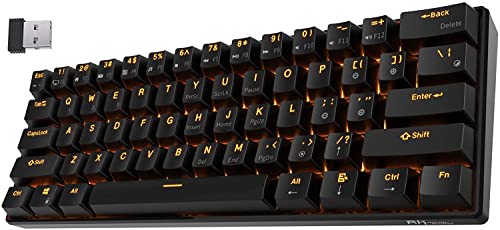
- Best for: Travellers and multi-device users who want one small board for laptop, tablet and desk.
- Layout: 60%, 61 keys
- Connectivity: Bluetooth 5.0, 2.4 GHz wireless, USB-C wired
- Switches: hot-swappable Red
- Backlighting: RGB
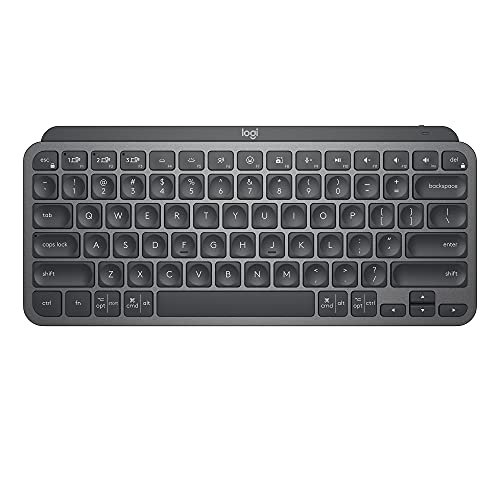
- Best for: Writers and office users who want a quiet low-profile board that hops between computer, tablet and phone.
- Layout: minimalist compact, no number pad
- Switches: membrane scissor (not mechanical)
- Connectivity: Bluetooth, pairs with up to 3 devices
- Backlighting: backlit keys

- Best for: Keyboard enthusiasts and macro users who want deep remapping in a board that still has a function row.
- Layout: 75% with rotary knob
- Switches: hot-swappable K Pro Brown
- Programmability: QMK/VIA
- Connectivity: wired USB Type-C, 1000 Hz polling, NKRO
All 4 Picks at a Glance
| Product | Specs | Action |
|---|---|---|
| RK Royal Kludge RK61 (Black, Red Switch) |
| Check price on Amazon |
| Logitech MX Keys Mini (Graphite) |
| Check price on Amazon |
| Keychron V1 (Carbon Black, K Pro Brown Switches, Knob Version) |
| Check price on Amazon |
 Razer Huntsman Mini (Black, Purple Clicky Optical Switch) |
| Check price on Amazon |
Key takeaways
- Four compact keyboards compared by layout, switch and connection, from a triple-mode 60% board to a low-profile mini and an optical gaming pick.
Shrinking your keyboard is really a decision about which keys you can live without. A compact board frees room for your mouse, a notebook or a second screen, but the number pad, function row and even the arrow keys may move onto a layer or disappear entirely. Buyers who pick by footprint alone often end up with a board that fights their daily shortcuts, so the layout percentage matters more than the brand on the box.
This roundup groups compact boards by how people actually use them: a wireless 60% board for travellers and multi-device desks, a low-profile membrane mini for quiet all-day typing, a 75% board with a knob for remappers, and a 60% optical board for gamers. Each pick was chosen from its Amazon listing name and specifications, with layout, switch type and connection method checked against the product page rather than marketing claims.
Quick Picks
As an Amazon Associate we earn from qualifying purchases.
| Product | Best for | Key spec |
|---|---|---|
| RK Royal Kludge RK61 | Travelling between laptop, tablet and desk | Triple-mode 60% board with hot-swappable Red switches |
| Logitech MX Keys Mini | Quiet all-day typing across three devices | Low-profile membrane with Bluetooth multi-device pairing |
| Keychron V1 | Remapping, macros and shortcut-heavy work | 75% QMK/VIA board with knob and K Pro Brown switches |
| Razer Huntsman Mini | Competitive gaming on a small desk | 60% layout with Purple Clicky Optical switches |
How to Choose
Layout Percentage Decides Which Keys You Lose
A 60% board such as the RK61 or Huntsman Mini keeps only the main alphanumeric cluster, so arrows, the function row and navigation keys sit on a Function layer you reach with a modifier. A 75% board like the Keychron V1 squeezes a function row and a compact navigation column into a slightly larger frame. The MX Keys Mini takes a third route, dropping the number pad while keeping a familiar low-profile arrangement. List the keys you press daily, especially arrows and F-keys, and match them against the layout before anything else.
Switch Type Sets the Feel of Every Keystroke
Three of these boards use mechanical or optical switches, and each switch in this roundup belongs to its own listing: the RK61 ships with linear Red switches, the Keychron V1 with tactile K Pro Brown switches, and the Huntsman Mini with clicky Purple optical switches that actuate via light. The MX Keys Mini is the exception — it uses membrane scissor switches, like a laptop, and is not mechanical. Decide first whether you want a quiet linear press, a tactile bump or an audible click, then check the exact switch named on the listing.
Connectivity Has to Match Your Desk and Devices
Connection options split this group cleanly. The RK61 is triple-mode, moving between Bluetooth 5.0, a 2.4 GHz receiver and a USB-C cable, which suits a desk shared between a work laptop and a personal machine. The MX Keys Mini uses Bluetooth and remembers up to three devices, but has no wired mode. The Keychron V1 and Huntsman Mini are wired boards — the V1 polls at 1000 Hz over USB Type-C, while the Huntsman’s detachable cable favours portability over wireless freedom. Count your devices before choosing.
Programmability Replaces the Keys You Gave Up
On a board with fewer physical keys, software does the heavy lifting. The Keychron V1 runs QMK/VIA, so you can remap any key, record macros and build layers that put arrows or media controls where your fingers expect them, and its knob adds volume control without a key. The RK61 offers programmable software for its layer and lighting, while the MX Keys Mini keeps customisation light and leans on its function row shortcuts. If you rely on macros, prioritise real remapping support over lighting effects.
The 4 Best Options
RK Royal Kludge RK61 (Black, Red Switch)
- Best for: Travellers and multi-device users who want one small board for laptop, tablet and desk.
- Layout: 60%, 61 keys
- Connectivity: Bluetooth 5.0, 2.4 GHz wireless, USB-C wired
- Switches: hot-swappable Red
- Backlighting: RGB
Travellers and multi-device users who want one small board for laptop, tablet and desk.
The 60% layout has no dedicated arrow keys or function row, so check the layer shortcuts in the manual before relying on them for everyday work shortcuts.
The RK Royal Kludge RK61 is the pick for buyers who want the smallest footprint without giving up wireless freedom. Its 60% layout trims the board to 61 keys, so the function row and arrows live on a secondary layer, and the triple-mode connection (Bluetooth 5.0, 2.4 GHz and USB-C) lets it pair with a laptop, tablet or desktop. Hot-swappable Red switches keep keystrokes light and linear, the PBT keycaps resist shine, and RGB backlighting plus programmable software round out a board that travels as easily as it types at home.
Watch out for: The 60% layout has no dedicated arrow keys or function row, so check the layer shortcuts in the manual before relying on them for everyday work shortcuts.
Logitech MX Keys Mini (Graphite)
- Best for: Writers and office users who want a quiet low-profile board that hops between computer, tablet and phone.
- Layout: minimalist compact, no number pad
- Switches: membrane scissor (not mechanical)
- Connectivity: Bluetooth, pairs with up to 3 devices
- Backlighting: backlit keys
Writers and office users who want a quiet low-profile board that hops between computer, tablet and phone.
It is not mechanical and the switches are not swappable, so if you want a tactile mechanical feel, pick one of the mechanical boards in this roundup instead.
The Logitech MX Keys Mini serves a different compact buyer: someone who types for a living and wants a quiet, tidy desk rather than a gaming board. It is a low-profile membrane keyboard with scissor switches, not a mechanical model, and that distinction shapes its soft, laptop-like key feel. The minimalist layout drops the number pad to save width, Bluetooth pairs with up to three devices, and the backlit keys, USB-C charging and metal build suit long writing sessions across macOS, Windows and other platforms.
Watch out for: It is not mechanical and the switches are not swappable, so if you want a tactile mechanical feel, pick one of the mechanical boards in this roundup instead.
Keychron V1 (Carbon Black, K Pro Brown Switches, Knob Version)
- Best for: Keyboard enthusiasts and macro users who want deep remapping in a board that still has a function row.
- Layout: 75% with rotary knob
- Switches: hot-swappable K Pro Brown
- Programmability: QMK/VIA
- Connectivity: wired USB Type-C, 1000 Hz polling, NKRO
Keyboard enthusiasts and macro users who want deep remapping in a board that still has a function row.
Availability signals for this exact Brown-switch knob listing conflict, so confirm a live featured offer for ASIN B09NLWG6X1 on the product page before ordering, and check you are not looking at a barebone kit or a different switch variant.
The Keychron V1 is the compact board for tinkerers who still want everyday keys within reach. Its 75% layout keeps a function row and adds a rotary knob, while QMK/VIA support lets you remap keys, build macros and adjust layers from a browser-based tool. This is the Carbon Black knob version with hot-swappable K Pro Brown switches, wired over USB Type-C with 1000 Hz polling and NKRO, and it works across Mac, Windows and Linux out of the box.
Watch out for: Availability signals for this exact Brown-switch knob listing conflict, so confirm a live featured offer for ASIN B09NLWG6X1 on the product page before ordering, and check you are not looking at a barebone kit or a different switch variant.
Razer Huntsman Mini (Black, Purple Clicky Optical Switch)
- Best for: FPS and competitive players who want maximum mouse room and a fast, clicky optical switch.
- Layout: 60% compact gaming keyboard
- Switches: Razer Clicky Optical (Purple)
- Keycaps: doubleshot PBT
- Cable: detachable USB-C
FPS and competitive players who want maximum mouse room and a fast, clicky optical switch.
Signals for this exact Purple-switch listing conflict and refreshed Huntsman Mini variants circulate under different codes, so confirm a live featured offer for ASIN B089QP4QNB before ordering, and check the switch type named on the page matches this model.
The Razer Huntsman Mini is the gaming-first 60% board in this group, built around Razer’s Purple Clicky Optical switches, which actuate with light rather than a metal contact and give each press an audible click. The compact frame keeps a small desk clear for wide mouse movements, doubleshot PBT keycaps hold up to heavy play, and the detachable USB-C cable makes it easy to pack for a LAN or a second setup. Note this listing is the original Purple-switch model, so judge it on those switches alone.
Watch out for: Signals for this exact Purple-switch listing conflict and refreshed Huntsman Mini variants circulate under different codes, so confirm a live featured offer for ASIN B089QP4QNB before ordering, and check the switch type named on the page matches this model.
Which One Fits Your Situation
You Split Time Between a Laptop Bag and a Desk
Choose the RK Royal Kludge RK61. Its 61-key frame is the easiest here to carry, and triple-mode connectivity means the same board pairs over Bluetooth at a cafe, drops onto a 2.4 GHz receiver at your desk and charges or runs wired over USB-C. The Red switches stay quiet enough for shared spaces, and hot-swap sockets let you change the feel later without replacing the whole board.
You Type All Day and Want a Calm, Tidy Desk
Choose the Logitech MX Keys Mini. Its low-profile membrane keys feel familiar to anyone coming from a laptop, the backlighting helps in dim rooms, and Bluetooth pairing for three devices covers a work computer, a tablet and a phone from one board. The metal build keeps it planted, and dropping the number pad leaves proper room for a mouse on a narrow desk.
You Remap Keys and Live on Shortcuts
Choose the Keychron V1 in its Brown-switch knob version. QMK/VIA support means your shortcuts, macros and layers travel with the board rather than one computer’s software, and the 75% layout keeps a function row so common commands stay on single keys. The rotary knob handles volume or scrolling, and the wired 1000 Hz connection keeps inputs consistent for fast, repetitive work.
You Game Hard at a Small Desk
Choose the Razer Huntsman Mini with Purple Clicky Optical switches. The 60% frame leaves the widest possible sweep for your mouse, the optical switches actuate quickly for competitive play, and doubleshot PBT keycaps keep legends readable through heavy use. The detachable USB-C cable makes it simple to move between a home setup and a friend’s PC or a LAN event.
Common Mistakes
- Buying a 60% board for spreadsheet-heavy work, then discovering the arrows and function keys live on a layer you must hold a modifier to reach.
- Assuming every compact keyboard is mechanical — the MX Keys Mini uses membrane scissor switches, so its feel is closer to a laptop than to a gaming board.
- Ordering by model name alone: the Keychron V1 also sells as a barebone kit and in other switch colours, and the Huntsman Mini has refreshed variants, so check the exact listing and switch before checkout.
- Ignoring the connection question — the V1 and Huntsman Mini are wired-only, so a buyer who needs Bluetooth for a tablet should pick the RK61 or MX Keys Mini instead.
- Judging size by width only; a 75% board is barely wider than a 60% yet keeps a function row, which matters more than an inch of depth for many desks.
Frequently Asked Questions
What is the difference between a 60% and a 75% keyboard?
A 60% keyboard keeps roughly the alphanumeric block only, so arrows, navigation keys and the function row move onto a Function layer. A 75% keyboard adds a function row and a compact navigation column in a frame only slightly larger. If you use F-keys or arrows constantly, 75% usually feels less disruptive; if desk space is the priority, 60% wins.
Are compact keyboards comfortable for all-day typing?
Yes, provided the switch and layout suit your work. Low-profile boards like the MX Keys Mini feel familiar to laptop users, while mechanical boards such as the RK61 and Keychron V1 offer more travel and switch choice. The main adjustment is reaching layered keys; most typists adapt within a week, but heavy spreadsheet users may miss a number pad.
Can a 60% keyboard work well for gaming?
Absolutely — many competitive players prefer 60% boards because the small frame leaves more room for low-sensitivity mouse movement. Optical boards like the Huntsman Mini add fast actuation, and layered keys still cover the few extra commands most games need. The trade-off appears in titles that lean on the function row, where a 75% board is more convenient.
Do these compact keyboards work with both Mac and Windows?
Mostly yes. The MX Keys Mini lists compatibility with macOS, iOS, Windows, Linux and Android, and the Keychron V1 supports Mac, Windows and Linux with QMK/VIA configuration. The RK61 connects over Bluetooth, 2.4 GHz and USB-C to a wide range of devices. Check the listing for your exact operating system, since companion software features can vary by platform.
More from Amazon
Programs that pair well with the guide above. Offers and eligibility are set by Amazon and may change.
Free shipping on eligible items, Prime Video and more. Eligible new members can start with a free trial.
Start a Prime free trialAd-free music streaming. Eligible new subscribers can start with a free trial.
Try Music Unlimited freeA Prime membership for ages 18-24 with a trial period. Eligibility is set by Amazon.
See Prime for Young AdultsAudiobooks and podcasts to listen to on the go. Eligible new members can start with a free trial.
Try Audible freeAs an Amazon Associate we earn from qualifying purchases.









