
Our Short List of 3

- Best for: professionals who split the day between a desktop and a laptop and type into the evening.
- Layout: full-size, 104 keys, low profile
- Backlighting: single-colour, proximity sensing with automatic brightness
- Connectivity: Bluetooth Low Energy and Logi Bolt USB receiver, pairs with 3 devices
- Battery: rechargeable Li-Po 1500 mAh, USB-C charging, up to 10 days with backlighting on or up to 5 months with it off

- Best for: full-time typists with wrist or forearm discomfort who want a certified ergonomic frame.
- Layout: full-size, curved and split keyframe with number pad
- Wrist rest: pillowed, memory foam, stain-resistant fabric
- Palm lift: adjustable tilt legs at 0, -4 and -7 degrees
- Connectivity: Bluetooth and USB receiver

- Best for: office workers who want gentler wrist posture without the learning curve of a split board.
- Layout: compact with number pad, wavy keyframe
- Palm rest: cushioned, memory foam, integrated
- Connectivity: Bluetooth Low Energy and Logi Bolt USB receiver (included), Easy-Switch for up to 3 devices
- Battery: 2 AAA batteries (included), up to 36 months
All 5 Picks at a Glance
| Product | Specs | Action |
|---|---|---|
| Logitech MX Keys S |
| Check price on Amazon |
| Logitech Ergo K860 |
| Check price on Amazon |
| Logitech Wave Keys |
| Check price on Amazon |
 Keychron K5 Max |
| Check price on Amazon |
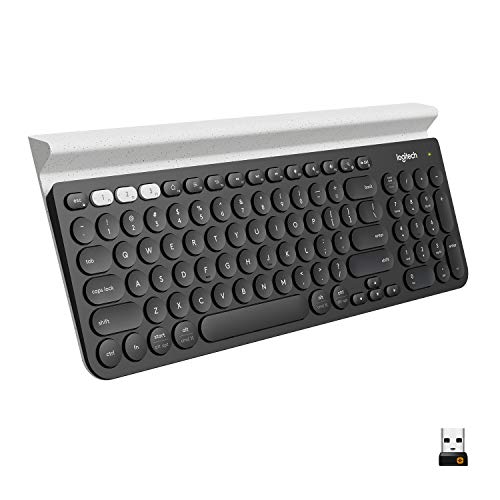 Logitech K780 Multi-Device |
| Check price on Amazon |
Key takeaways
- Compare five work keyboards for long typing days, from split ergonomic frames to low-profile multi-device boards, with the listing specs that matter.
The real decision behind a work keyboard is not how it looks on day one. It is whether your wrists, shoulders and concentration still feel fine at hour six of a document-heavy day, and whether the board keeps up when your work moves between a desktop, a laptop and a tablet. Layout shape, key travel and connection type decide that, and they matter more than lighting effects or gaming extras.
This shortlist is for people who type for a living: writers, analysts, support staff, programmers and anyone sharing a desk with several devices. Every pick below was chosen from its Amazon product title and listing specifications, with attention to posture features, switch type, multi-device pairing and battery routine rather than headline claims.
Quick Picks
As an Amazon Associate we earn from qualifying purchases
| Product | Best for | Key spec from title |
|---|---|---|
| Logitech MX Keys S | All-round desk typing with smart backlighting | Low profile, Bluetooth and Logi Bolt, USB-C rechargeable |
| Logitech Ergo K860 | Wrists that ache on a flat board | Curved split keyframe with pillowed wrist rest |
| Logitech Wave Keys | A gentler shape without relearning to type | Wavy keyframe, cushioned palm rest, 3-year battery |
| Keychron K5 Max | Mechanical feel in a slim full-size frame | Low-profile Gateron switches, 2.4 GHz, Bluetooth and wired |
| Logitech K780 | Typing across computer, tablet and phone | Easy-Switch keys with integrated device cradle |
How to Choose
Start with the shape your wrists live in
A flat, straight board forces your hands to angle inward and your wrists to bend upward, which is fine for short sessions and tiring across a full work week. Split and curved frames, like the Ergo K860, let each hand rest closer to shoulder width, while a wave shape such as the Wave Keys softens the same problem without changing where the letters sit. If your wrists already complain, prioritise the frame and a padded rest over everything else; if they do not, a low, flat board with a slight tilt is usually enough.
Match the switch to your room, not your hobby
Scissor and membrane keys are short-travel and quiet, which suits open offices, shared homes and call-heavy jobs where a microphone sits nearby. Low-profile mechanical switches, like the Gateron switches in the Keychron K5 Max, add a firmer, more defined press while keeping the board slim enough that your wrists stay near desk level. Full-height mechanical boards feel great but raise your hands and often need a separate wrist rest. Decide who else hears your typing before you decide how it should feel.
Count your devices before you count features
Many work desks now hold a desktop, a work laptop and a phone or tablet for messages and authentication apps. Boards with Easy-Switch keys or Bluetooth channels for three devices let you answer on each screen from one keyboard, and a USB receiver such as Logi Bolt or a Unifying dongle covers machines where Bluetooth is locked down by IT policy. If you only ever type on one computer, that hardware is wasted money; if you hot-desk or switch between personal and work machines daily, it becomes the feature you use most.
Plan the battery routine you will actually keep
Rechargeable boards like the MX Keys S run for days or months per charge depending on backlight use, and they charge over USB-C while you keep working. Boards on replaceable AAA cells, such as the Wave Keys and K780, stretch that interval to years but leave you hunting for batteries the one morning they die. Backlighting is the biggest drain on any rechargeable board, so if your office is bright, a non-backlit model removes the charging habit entirely. Pick the routine that matches your patience, not the biggest number.
The 5 Best Options
Logitech MX Keys S
- Best for: professionals who split the day between a desktop and a laptop and type into the evening.
- Layout: full-size, 104 keys, low profile
- Backlighting: single-colour, proximity sensing with automatic brightness
- Connectivity: Bluetooth Low Energy and Logi Bolt USB receiver, pairs with 3 devices
- Battery: rechargeable Li-Po 1500 mAh, USB-C charging, up to 10 days with backlighting on or up to 5 months with it off
professionals who split the day between a desktop and a laptop and type into the evening.
the headline battery figure collapses when the backlight stays on, so heavy backlight users should expect to plug in roughly every week and a half.
The MX Keys S is the safest single recommendation for a mixed work desk. Its low-profile keys are spherically dished to match fingertip shape, which helps accuracy during long drafting sessions, and the backlight switches on as your hands approach and adjusts to room light on its own. Smart Actions in the Logi Options+ app turn repeated multi-step routines into a single keystroke, and pairing covers three devices across Bluetooth Low Energy or the included Logi Bolt receiver. It suits professionals who want one polished board for a desktop and a laptop without thinking about it again.
Logitech Ergo K860
- Best for: full-time typists with wrist or forearm discomfort who want a certified ergonomic frame.
- Layout: full-size, curved and split keyframe with number pad
- Wrist rest: pillowed, memory foam, stain-resistant fabric
- Palm lift: adjustable tilt legs at 0, -4 and -7 degrees
- Connectivity: Bluetooth and USB receiver
full-time typists with wrist or forearm discomfort who want a certified ergonomic frame.
the split layout takes an adjustment period if you have years of flat-board muscle memory, and there is no backlighting for dim rooms.
The Ergo K860 is built for people whose wrists have already started negotiating. Its curved, split keyframe places each half of the keyboard under the hand that uses it, and Logitech states the design reduces wrist bending by 25 percent while the pillowed, memory-foam wrist rest offers 54 percent more wrist support than a standard board without one. Adjustable palm lift legs set the board flat or tilted at 0, minus 4 or minus 7 degrees, which also helps at standing desks. The board is certified by United States Ergonomics, a detail few rivals in this class can match.
Logitech Wave Keys
- Best for: office workers who want gentler wrist posture without the learning curve of a split board.
- Layout: compact with number pad, wavy keyframe
- Palm rest: cushioned, memory foam, integrated
- Connectivity: Bluetooth Low Energy and Logi Bolt USB receiver (included), Easy-Switch for up to 3 devices
- Battery: 2 AAA batteries (included), up to 36 months
office workers who want gentler wrist posture without the learning curve of a split board.
there is no backlight and no rechargeable battery, and the Graphite version’s recycled plastic content differs from the lighter colours, so check the exact variant on the listing.
Wave Keys takes a middle path for people who like the idea of an ergonomic board but do not want to relearn typing. The keyframe rises and falls in a wave so fingers land at more natural heights, and the layout stays familiar, just in a compact footprint that still keeps a number pad. A cushioned palm rest with memory foam runs along the front edge. Easy-Switch keys move between three devices over Bluetooth or the included Logi Bolt receiver, and the two AAA batteries are rated for up to three years, so charging simply leaves your routine.
Keychron K5 Max
- Best for: programmers and heavy typists who want mechanical feedback without a tall board or a wrist rest workaround.
- Layout: 100 percent full-size with number pad
- Switches: low-profile Gateron mechanical, hot-swappable on this version
- Keycaps: low-profile double-shot PBT
- Connectivity: 2.4 GHz receiver, Bluetooth 5.1 (up to 3 devices) and USB-C wired
programmers and heavy typists who want mechanical feedback without a tall board or a wrist rest workaround.
low-profile mechanical switches still sound louder than scissor keys, and the remapping tools reward people willing to spend setup time in the software.
The K5 Max answers a specific complaint: mechanical keyboards feel precise but sit too tall for comfortable all-day typing. Its low-profile Gateron switches are 31 percent slimmer than conventional switches, so the full-size aluminium body stays close to laptop height while still giving a mechanical press and double-shot PBT keycaps. It connects three ways, over a 2.4 GHz receiver, Bluetooth 5.1 or a USB-C cable, and QMK/VIA support lets you remap keys and build macros for repetitive work. Mac and Windows keycaps are both covered, which suits mixed-OS desks.
Logitech K780 Multi-Device
- Best for: hybrid workers who answer messages on a phone or tablet while drafting on a computer.
- Layout: full-size with number pad
- Cradle: integrated rubberised slot, holds devices up to a 12.9-inch iPad Pro
- Connectivity: Bluetooth Smart and Logitech Unifying USB receiver, Easy-Switch for 3 devices
- Battery: 2 AAA batteries (pre-installed), up to 24 months
hybrid workers who answer messages on a phone or tablet while drafting on a computer.
only one USB receiver is included for three devices, and the cradle angle is fixed, so taller tablets sit at the angle Logitech chose rather than yours.
The K780 treats the phone and tablet on your desk as part of the workstation rather than distractions. A rubberised cradle runs along its top edge and holds devices up to a 12.9-inch iPad Pro at a reading angle, while Easy-Switch keys move your typing between three paired devices, a computer, a tablet and a phone, without re-pairing. The board recognises each operating system and maps its keys to the layout that device expects. Large, concave PerfectStroke keys keep typing quiet, which helps in shared rooms, and the weighted base stays planted while you work.
Which One Fits Your Situation
Your wrists hurt by mid-afternoon
Start with the Ergo K860. The split, curved frame and the memory-foam rest address posture directly, and the negative tilt settings help whether you sit or stand. If a split layout feels like too big a change, the Wave Keys is the gentler step: same brand of support, familiar letter positions, and a padded rest, at the cost of less radical wrist positioning.
You type on a computer, a tablet and a phone every day
The K780 was designed for exactly this desk. Its cradle keeps the phone and tablet upright where you can read them, and the Easy-Switch keys move your typing to whichever screen needs a reply. The MX Keys S also pairs with three devices and adds backlighting, so choose it if your extra screens are a second computer rather than a phone.
You miss mechanical keys but hate tall keyboards
The Keychron K5 Max keeps the mechanical press and full number pad while staying close to laptop height, so your wrists do not climb to reach the keys. Its three connection modes and remapping software also fit programmers and spreadsheet users who build shortcuts into their day. Just confirm your office tolerates slightly louder typing before ordering.
You share a room and type during calls
Quiet scissor keys matter more than posture extras here. The MX Keys S is built around precise, low-noise typing and its backlight helps on video-call-heavy evenings, while the K780’s large concave keys are similarly subdued and add the device cradle. Either keeps your keyboard off the call recording; a mechanical board, even a low-profile one, is the riskier choice.
Common Mistakes
- Buying a gaming keyboard for office work, then discovering the tall frame, loud switches and missing number pad fight your actual job.
- Choosing a split ergonomic board and giving up after two days, before the adjustment period the layout honestly requires.
- Ignoring receiver policy at work: some employers block Bluetooth, so a board with a USB dongle in the box saves a return.
- Paying for backlighting you will rarely use, then living with weekly charging that a non-backlit board would have avoided for years.
- Forgetting to check operating system keycaps and layout, especially on boards shared between a Windows desktop and a Mac laptop.
Frequently Asked Questions
Is a split keyboard really better for office work?
A split frame helps if your discomfort comes from wrists bending inward or upward, because each hand types closer to its natural shoulder-width position. The Ergo K860 states measured reductions in wrist bending against a standard board. It is not a medical fix, though, and anyone with persistent pain should treat the keyboard as one part of a desk setup that also includes chair height and screen position.
Can one keyboard work with both my work laptop and personal desktop?
Yes, if it supports multi-device pairing. Boards like the MX Keys S, Wave Keys and K780 each hold three connections and switch with a dedicated key, mixing Bluetooth with a USB receiver where needed. Check that at least one connection type is allowed on your work machine, since some employers restrict Bluetooth while permitting approved USB receivers.
Are low-profile mechanical keyboards good for typing all day?
They can be, because the shorter key travel and lower deck height keep wrists flatter than a full-height mechanical board while retaining a defined keypress. The Keychron K5 Max is the example in this list. The trade-off is sound: mechanical switches, even slim ones, are usually louder than the scissor keys in boards like the MX Keys S, which matters in shared spaces.
How long should a work keyboard battery last?
It depends on the power source. Rechargeable boards with backlighting, like the MX Keys S, are rated in days with the light on and months with it off. Boards running on AAA cells trade convenience for longevity: the Wave Keys is rated up to three years and the K780 up to two. Match the rating style to whether you prefer occasional charging or rare battery swaps.
More from Amazon
Programs that pair well with the guide above. Offers and eligibility are set by Amazon and may change.
Free shipping on eligible items, Prime Video and more. Eligible new members can start with a free trial.
Start a Prime free trialAd-free music streaming. Eligible new subscribers can start with a free trial.
Try Music Unlimited freeA Prime membership for ages 18-24 with a trial period. Eligibility is set by Amazon.
See Prime for Young AdultsAudiobooks and podcasts to listen to on the go. Eligible new members can start with a free trial.
Try Audible freeAs an Amazon Associate we earn from qualifying purchases.









