
Our Short List of 3

- Best for: Competitive shooter players who aim with claw or fingertip grip
- Sensor: HERO 2 optical
- Resolution: up to 44,000 DPI
- Polling rate: up to 8 kHz
- Weight: 60 g

- Best for: MMO, strategy and variety players who bind abilities to the mouse
- Sensor: HERO 25K optical
- Resolution: 100 to 25,600 DPI
- Weight: 106 g
- Programmable controls: 13
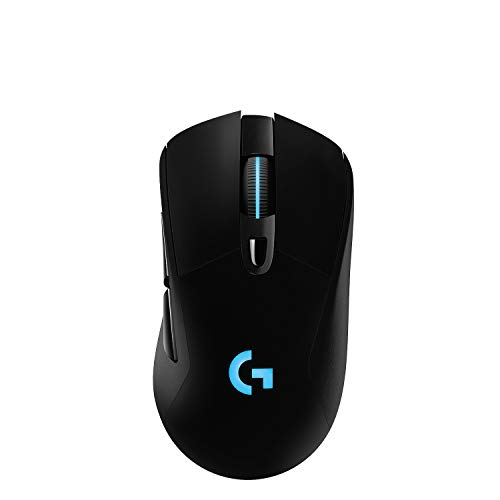
- Best for: Palm-grip players who want wireless comfort for long sessions
- Sensor: HERO 25K optical
- Resolution: 100 to 25,600 DPI
- Weight: 95 g, plus optional 10 g weight
- Buttons: 6 programmable
All 5 Picks at a Glance
| Product | Specs | Action |
|---|---|---|
| Logitech G PRO X Superlight 2 |
| Check price on Amazon |
| Logitech G502 X Plus |
| Check price on Amazon |
| Logitech G703 Lightspeed |
| Check price on Amazon |
 Logitech G502 HERO |
| Check price on Amazon |
 Logitech G305 Lightspeed |
| Check price on Amazon |
Key takeaways
- Five Logitech G gaming mice compared on sensor, weight, buttons and battery, from the 60 g Superlight 2 to the G305 and its 250-hour AA cell.
Choosing a Logitech gaming mouse is less about finding a good sensor, since every model here tracks cleanly, and more about matching three things to your hand and your games: the shell shape, the weight, and how many buttons you actually reach for. A 60-gram esports shell and a button-covered G502 solve different problems, and picking the wrong one leaves you with a mouse that fights your grip for months.
This guide is for shooter players who want the lightest shell Logitech sells, MMO and strategy players who live on side buttons, and anyone replacing an older G mouse who wants to stay inside the G HUB ecosystem. Every pick below is a current Logitech G model, and the specs quoted come straight from each Amazon product title and listing.
Quick Picks
As an Amazon Associate we earn from qualifying purchases
| Product | Best for | Key spec from title |
|---|---|---|
| Logitech G PRO X Superlight 2 | Competitive shooter players | 60 g with 44K DPI HERO 2 sensor |
| Logitech G502 X Plus | Players who want maximum buttons | 13 programmable controls, LIGHTSPEED wireless |
| Logitech G703 Lightspeed | Palm-grip comfort with wireless freedom | 95 g with HERO 25K sensor |
| Logitech G502 HERO | Wired play with tunable weight | 11 buttons and five 3.6 g weights |
| Logitech G305 Lightspeed | A first wireless gaming mouse | 250-hour battery on one AA cell |
How to Choose
Match the shell to your grip and hand size
Logitech sells two broad shape families. The PRO X Superlight 2 uses a low, symmetrical shell that suits claw and fingertip grips and smaller to medium hands, while the G502 line and the G703 use taller right-handed shapes with a thumb rest that suit palm grips. Measure your hand before ordering: if your palm is longer than about 20 centimeters, a compact shell can force your fingers into a cramped claw. Grip style matters as much as size, because a shape that fits on paper still feels wrong if it fights how you hold it.
Decide how much weight you want to move
Weight changes how a mouse feels more than any sensor figure. The Superlight 2 weighs 60 grams, so fast flicks and wide arm sweeps take little effort, but some players find it almost too light for slow, controlled tracking. The G502 X Plus weighs 106 grams and the wired G502 HERO starts at 121 grams, with five removable 3.6-gram weights for fine-tuning. Heavier shells feel planted and steady, which suits low-sensitivity players who track rather than flick. There is no correct number here, only the number that matches your aim style.
Count the buttons your games really use
Button count splits this lineup cleanly. The Superlight 2 has five buttons and nothing extra, which is all a shooter player needs but leaves nothing for MMO skill bars. The G502 HERO offers 11 programmable buttons and the G502 X Plus offers 13 programmable controls, including a removable DPI-shift button and a dual-mode scroll wheel that tilts sideways. If you bind push-to-talk, melee, and two abilities to your mouse, the G502 shape earns its bulk. If your left hand already covers those jobs on the keyboard, extra buttons are just weight.
Pick a power setup you will not think about
Four of these mice are wireless, but they charge in different ways. The Superlight 2 and G502 X Plus use rechargeable cells with USB-C charging, rated at up to 95 and 130 hours respectively, and both the G502 X Plus and G703 can charge continuously on a POWERPLAY mat, sold separately. The G305 takes the opposite route: one AA battery rated for 250 hours, so there is nothing to plug in, but you will replace cells a few times a year. The wired G502 HERO removes the question entirely.
The 5 Best Options
Logitech G PRO X Superlight 2
- Best for: Competitive shooter players who aim with claw or fingertip grip
- Sensor: HERO 2 optical
- Resolution: up to 44,000 DPI
- Polling rate: up to 8 kHz
- Weight: 60 g
Competitive shooter players who aim with claw or fingertip grip
The symmetrical shell is right-hand use only in practice and offers no side buttons beyond the two thumb keys, so MMO players should look at the G502 models instead
This is the mouse Logitech builds for players who treat weight as a performance spec. At 60 grams it is the lightest model in this guide, and the HERO 2 sensor tracks up to 44,000 DPI with an 8 kHz polling rate over LIGHTSPEED wireless, so the cursor keeps up with high-refresh monitors. The five-button layout is deliberately plain, the LIGHTFORCE hybrid switches give a crisp click, and the battery is rated for up to 95 hours per charge. It suits claw and fingertip grips best.
Logitech G502 X Plus
- Best for: MMO, strategy and variety players who bind abilities to the mouse
- Sensor: HERO 25K optical
- Resolution: 100 to 25,600 DPI
- Weight: 106 g
- Programmable controls: 13
MMO, strategy and variety players who bind abilities to the mouse
The large right-handed shell overwhelms small hands, and battery life drops sharply with the RGB lighting left on, so check the listing variant before ordering
The G502 X Plus is the pick for players whose mouse hand does more than aim. It carries 13 programmable controls, including a dual-mode scroll wheel that switches between free-spin and ratcheted scrolling and tilts for two extra inputs. The HERO 25K sensor covers 100 to 25,600 DPI, LIGHTFORCE switches handle the main clicks, and the 8-zone LIGHTSYNC RGB can be switched off to stretch the battery toward its 130-hour rating. At 106 grams it is a substantial mouse, and that heft suits palm grips and deliberate, tracking-heavy aim.
Logitech G703 Lightspeed
- Best for: Palm-grip players who want wireless comfort for long sessions
- Sensor: HERO 25K optical
- Resolution: 100 to 25,600 DPI
- Weight: 95 g, plus optional 10 g weight
- Buttons: 6 programmable
Palm-grip players who want wireless comfort for long sessions
The battery rating is the shortest in this guide, so players who forget to charge should either budget for a POWERPLAY mat or pick the G305
The G703 takes the comfortable route: a rounded right-handed shell with rubber side grips, a moderate 95-gram weight, and an optional 10-gram weight if you want the back end to feel heavier. Its HERO 25K sensor spans 100 to 25,600 DPI, six programmable buttons cover the essentials without crowding the shell, and LIGHTSPEED wireless keeps the desk clear. Battery life is rated at up to 35 hours with the default lighting and up to 60 hours with lighting off, and POWERPLAY support means a compatible mat can keep it charged as you play.
Logitech G502 HERO
- Best for: Desk-bound players who want many buttons and zero charging routine
- Sensor: HERO 25K optical
- Resolution: 100 to 25,600 DPI
- Weight: 121 g, plus five removable 3.6 g weights
- Buttons: 11 programmable
Desk-bound players who want many buttons and zero charging routine
At 121 grams before any added weights this is the heaviest mouse here, and the cable needs a clear run across the desk or a bungee to avoid drag
The wired G502 HERO remains the workhorse of the lineup. Eleven programmable buttons, a dual-mode hyper-fast scroll wheel, and onboard memory that stores your profiles on the mouse itself make it easy to move between PCs without reinstalling anything. The HERO 25K sensor runs from 100 to 25,600 DPI, and the tunable weight system lets you place up to five 3.6-gram weights inside the shell to shift the balance point. Because it is wired, there is no battery to manage and no receiver to lose, which suits a fixed desk setup.
Logitech G305 Lightspeed
- Best for: New wireless players and laptop gamers who hate charging cables
- Sensor: HERO optical
- Resolution: 200 to 12,000 DPI
- Weight: 3.4 oz with battery
- Battery life: up to 250 hours on one AA battery
New wireless players and laptop gamers who hate charging cables
There is no rechargeable cell or RGB lighting, and the 12,000 DPI ceiling and small shell will feel limiting to palm-grip players with large hands
The G305 strips the formula down to the parts that matter for a first wireless gaming mouse. The HERO sensor reaches 12,000 DPI, which covers the sensitivity range most players actually use, and LIGHTSPEED wireless runs up to 250 hours on a single AA battery, so charging cables never enter the picture. Six programmable buttons and onboard memory round out a compact shell that weighs about 3.4 ounces with the battery fitted. The symmetrical shape works for claw and fingertip grips, and the receiver stores inside the body for travel between a desktop and a laptop.
Which One Fits Your Situation
You play ranked shooters most nights
Take the G PRO X Superlight 2. The 60-gram shell, 8 kHz polling and HERO 2 sensor are built for fast flicks and repeated micro-corrections, and the plain five-button layout keeps nothing under your fingers by accident. Players who prefer a heavier, more planted feel for tracking should cross-check the G703 before deciding.
Your mouse carries half your keybinds
Take the G502 X Plus if you want wireless, or the wired G502 HERO if the desk never changes. Both give you a deep bench of programmable inputs, a tilting dual-mode wheel and onboard profiles, so abilities, push-to-talk and DPI shifts all live under your right hand instead of stretching your left across the keyboard.
You want comfort for long mixed sessions
Take the G703 Lightspeed. Its rounded palm shape, rubber grips and mid-range weight are easy to live with across shooters, strategy games and desktop work in the same evening. Add the optional 10-gram weight if the back of the mouse feels light, and turn the lighting off to reach the longer battery rating.
You are buying your first wireless mouse
Take the G305 Lightspeed. The AA battery removes charging from your routine for months at a time, the sensor is more than accurate enough while you learn your sensitivity, and the compact shell travels well between a desk and a laptop bag. It is the simplest ownership experience in this guide.
Common Mistakes
- Choosing by maximum DPI alone, when every sensor here already tracks far beyond the sensitivity most players set in game.
- Buying an ultralight shell for a palm grip, then blaming aim when the real problem is a shape that leaves the palm unsupported.
- Leaving RGB lighting on full time and then judging a wireless mouse by the shorter battery figure that results.
- Ignoring the scroll wheel, even though the G502 models use theirs for tilt inputs and mode switching that other mice cannot copy.
- Forgetting that POWERPLAY charging needs a separate mat, so the mouse alone does not give you charge-while-you-play.
Frequently Asked Questions
Does the polling rate on the Superlight 2 actually matter?
It can, on the right setup. The listing rates the Superlight 2 at up to 8 kHz polling, which sends position updates far more often than a standard 1 kHz mouse. On a high-refresh monitor that can make cursor movement look smoother, but the benefit shrinks on a 60 Hz screen, and battery drains faster at the highest setting.
Are the G502 X Plus and G502 HERO the same mouse?
No. They share the G502 shape family and the HERO 25K sensor, but the X Plus is wireless with LIGHTFORCE switches, 13 programmable controls and a rechargeable battery, while the HERO is wired, has 11 buttons and adds a tunable weight system with five removable 3.6-gram weights. Pick based on connection and weight, not the name.
How long do these wireless mice really last between charges?
The listings rate the Superlight 2 at up to 95 hours, the G502 X Plus at up to 130 hours with lighting off, the G703 at up to 35 hours with default lighting, and the G305 at up to 250 hours on one AA battery. Lighting, polling rate and play style all shorten those figures, so treat them as best cases.
Can I use one of these mice with a laptop and a desktop?
Yes. The wireless models connect through a USB LIGHTSPEED receiver you can move between machines, and the G305 stores its receiver inside the shell for travel. Onboard memory on models like the G502 HERO also keeps your button and DPI profiles on the mouse itself, so settings follow you without reinstalling software on the second PC.
More from Amazon
Programs that pair well with the guide above. Offers and eligibility are set by Amazon and may change.
Free shipping on eligible items, Prime Video and more. Eligible new members can start with a free trial.
Start a Prime free trialAd-free music streaming. Eligible new subscribers can start with a free trial.
Try Music Unlimited freeA Prime membership for ages 18-24 with a trial period. Eligibility is set by Amazon.
See Prime for Young AdultsAudiobooks and podcasts to listen to on the go. Eligible new members can start with a free trial.
Try Audible freeAs an Amazon Associate we earn from qualifying purchases.









