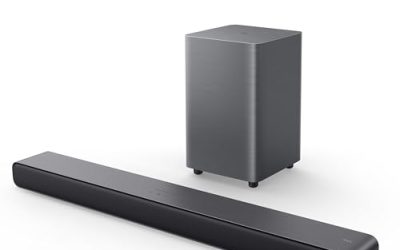
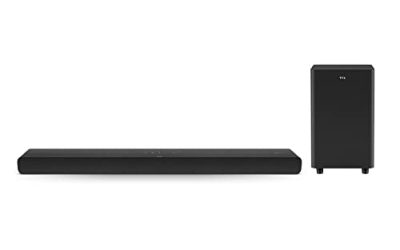
Our Short List of 3

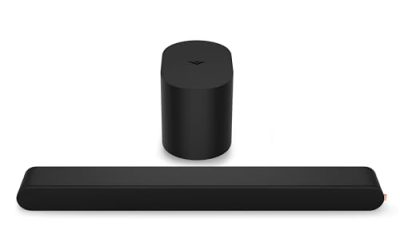
- Best for: A single-monitor desk that needs one tidy bar for work, video and music.
- Two full-range racetrack drivers, 2 x 12W RMS and up to 48W peak power
- USB digital audio and Bluetooth 5.3 connections
- Clear Dialog and Surround processing by Sound Blaster
- Powered by a wall adapter, with an IR remote control included
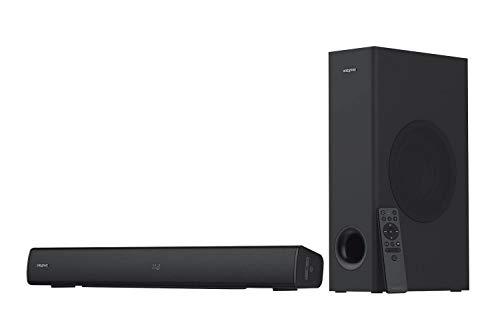
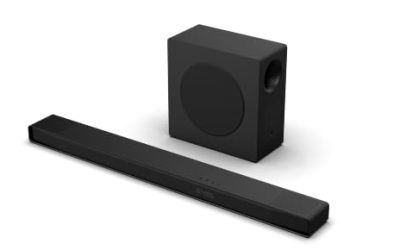
- Best for: Desks with floor space for a subwoofer, used for films and music as much as work.
- 2.1 system: soundbar plus wired subwoofer with a 5.25-inch driver
- Up to 160W peak power; bar dimensions 680 x 100 x 78 mm
- USB audio, 3.5 mm AUX-in, optical-in and TV ARC connections
- Bluetooth 5.0 for wireless streaming

- Best for: Small desks with no spare outlet, and anyone who wants one bar to move between rooms.
- Two full-range racetrack drivers, 2 x 5W RMS and 20W peak power
- USB audio, 3.5 mm AUX-in and Bluetooth 5.3 connections
- Built-in 2200 mAh rechargeable battery, up to 6 hours of playback
- Side-mounted playback and volume controls
All 4 Picks at a Glance
| Product | Specs | Action |
|---|---|---|
| Creative Stage SE |
| Check price on Amazon |
| Creative Stage V2 |
| Check price on Amazon |
| Creative Stage Air V2 |
| Check price on Amazon |
 Dell Slim Conferencing Soundbar SB522A |
| Check price on Amazon |
Key takeaways
- Compare the best soundbars for computers, from under-monitor USB bars to a 2.1 set with a subwoofer, with connections, sizes and desk fit checked.
A soundbar for a computer has to solve a specific problem: the speakers built into monitors and all-in-one PCs are small, rear-facing and short on clarity, yet a desk rarely has room for a full speaker system either. The real decision is how much bar your desk can hold and what you listen to most. A slim under-monitor bar that sharpens voices is the right answer for calls and video, while a wider bar with a subwoofer suits desks that double as entertainment stations.
This guide is for desktop PC and Mac users who work, watch and listen at one desk: home office workers on calls all day, people with small desks who cannot fit a speaker pair, and anyone whose monitor also serves for films and music in the evening. Every pick below is a single soundbar taken from its Amazon product title and listing, chosen for computer connections such as USB audio, Bluetooth or a 3.5 mm input rather than for a living room television.
Quick Picks
As an Amazon Associate we earn from qualifying purchases
| Product | Best for | Key spec from title |
|---|---|---|
| Creative Stage SE | Everyday desk use under one monitor | Under-monitor soundbar with USB digital audio and Bluetooth 5.3 |
| Creative Stage V2 | Films and music at a desk that has floor space | 2.1 soundbar with subwoofer, Clear Dialog and USB audio |
| Yamaha SR-C20A | A desk that also works as a small TV corner | Compact sound bar with built-in subwoofer and Bluetooth |
| Creative Stage Air V2 | Desks with no spare outlet, or a bar that moves rooms | Compact under-monitor soundbar with battery and Bluetooth 5.3 |
| Dell Slim Conferencing Soundbar SB522A | Call-heavy work on a Dell monitor setup | Slim conferencing soundbar, Microsoft Teams certified |
How to Choose
Start with how the bar connects to the computer
The connection decides both sound quality and daily hassle. USB digital audio is the cleanest route for a computer: the bar appears as its own audio device, the signal stays digital until it reaches the bar, and there is no dependence on the quality of the computer’s headphone jack. A 3.5 mm analog input works with almost anything, including older desktops and monitors with a headphone output. Bluetooth removes the cable and lets a phone join in, but it adds a pairing step and a small delay, which matters more for calls and video than for music. Pick a bar that offers at least two of these, so a change of computer does not strand it.
Measure the space under the monitor first
Soundbars for computers range from about 16 inches wide to nearly 27 inches, and that spread decides whether a bar looks integrated or awkward. Measure the width of your monitor stand and the clearance between the desk and the bottom edge of the screen. Most under-monitor bars stand between roughly 2.5 and 4 inches tall, which clears most fixed monitor stands but can clash with low ergonomic arms. If the measurements are tight, a compact bar is the safer choice than a wide one with more output.
Decide how much low end the desk really needs
A single slim bar with passive radiators gives voices and everyday video a clear lift over monitor speakers, and it is enough for calls, lessons and casual listening. A built-in subwoofer inside the bar adds body for films without a second box on the floor. A separate wired subwoofer, like the one paired with the Creative Stage V2 below, produces the strongest bass of the three layouts, but it needs floor space beside or under the desk and a cable run back to the bar. Think about shared walls and late hours as well: strong low end is the first thing neighbours hear through a floor.
Check the controls and the call features
Small details decide whether a desk soundbar is pleasant to live with. A volume knob or buttons on the bar itself save you from hunting through software every time a video gets loud, while a remote control suits a bar you also use from a chair across the room. If the desk is a call station, look for dialogue modes that lift speech, and, at the top end, a built-in microphone with platform certification, as on the Dell bar below. Also confirm how the bar is powered before you buy: some run from USB or a battery, others need their own adapter and a free wall outlet.
The 5 Best Options
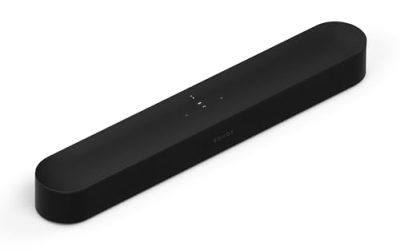
Creative Stage SE
- Best for: A single-monitor desk that needs one tidy bar for work, video and music.
- Two full-range racetrack drivers, 2 x 12W RMS and up to 48W peak power
- USB digital audio and Bluetooth 5.3 connections
- Clear Dialog and Surround processing by Sound Blaster
- Powered by a wall adapter, with an IR remote control included
A single-monitor desk that needs one tidy bar for work, video and music.
It needs a free wall outlet for its adapter, and there is no optical or HDMI input for a television.
The Stage SE is the most straightforward upgrade in this guide: one 16-inch bar that slides under a monitor, connects to the computer over a single USB cable, and runs from its own power adapter. Two full-range racetrack drivers with oversized radiators deliver up to 48W of peak power, a clear step up from monitor speakers without needing a subwoofer. Sound Blaster’s Clear Dialog and Surround processing can be switched on for films and calls, Bluetooth 5.3 covers phone streaming, and the included remote handles volume, input and tone from your chair. It suits a desk that stays in one place and wants tidy, capable sound.
Watch out for: It needs a free wall outlet for its adapter, and there is no optical or HDMI input for a television.
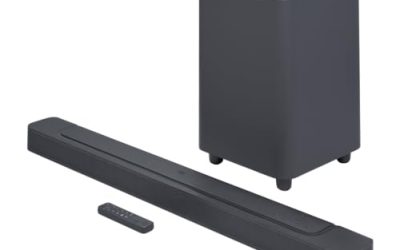
Creative Stage V2
- Best for: Desks with floor space for a subwoofer, used for films and music as much as work.
- 2.1 system: soundbar plus wired subwoofer with a 5.25-inch driver
- Up to 160W peak power; bar dimensions 680 x 100 x 78 mm
- USB audio, 3.5 mm AUX-in, optical-in and TV ARC connections
- Bluetooth 5.0 for wireless streaming
Desks with floor space for a subwoofer, used for films and music as much as work.
The bar is nearly 27 inches wide and the set weighs 11.68 pounds, so measure the desk and the subwoofer’s floor spot first.
The Stage V2 is the pick for a desk that doubles as an entertainment setup. The 26.8-inch bar pairs with a wired subwoofer whose 5.25-inch driver supplies the low end that slim bars cannot reach, and the system reaches 160W of peak power. Clear Dialog and Surround processing carry over from the smaller Creative bars, and the connection list is the widest here: USB audio and a 3.5 mm input for the computer, optical and TV ARC if the desk monitor is ever swapped for a small television, plus Bluetooth 5.0. A remote adjusts volume, bass, treble and the processing modes.
Watch out for: The bar is nearly 27 inches wide and the set weighs 11.68 pounds, so measure the desk and the subwoofer’s floor spot first.
Yamaha SR-C20A
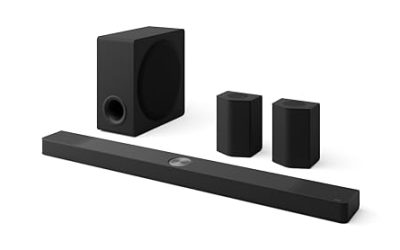
The SR-C20A takes a different route to bass: instead of a separate box, a 3-inch subwoofer is built into the bar itself, flanked by two 1.8-inch front drivers and two passive radiators. Output is rated at 100W in total, and Yamaha’s Clear Voice mode lifts dialogue for news, calls and films. At just under 24 inches wide it fits in front of a larger monitor where a full television bar would overhang. For a computer it connects over Bluetooth or the 3.5 mm analog input, and its optical input and HDMI ARC also let it serve a small television in the same room. Four sound modes, including Movie and Game, round out a bar that bridges desk and TV duties.
Specs
- 2.1-channel bar with two 1.8-inch front drivers and a built-in 3-inch subwoofer
- 100W total output (20W per front channel, 60W subwoofer)
- HDMI ARC, optical-in and 3.5 mm analog inputs; Bluetooth 5.0
- Clear Voice dialogue mode and Stereo, Standard, Movie and Game modes
- Dimensions: 23.63 x 2.56 x 3.69 inches; weight 3.9 pounds
Best for: A wide desk or a combined monitor-and-TV corner that wants bass without a separate subwoofer box.
Watch out for: There is no USB audio input, so a computer connects by Bluetooth or the analog cable rather than digitally.
Creative Stage Air V2
- Best for: Small desks with no spare outlet, and anyone who wants one bar to move between rooms.
- Two full-range racetrack drivers, 2 x 5W RMS and 20W peak power
- USB audio, 3.5 mm AUX-in and Bluetooth 5.3 connections
- Built-in 2200 mAh rechargeable battery, up to 6 hours of playback
- Side-mounted playback and volume controls
Small desks with no spare outlet, and anyone who wants one bar to move between rooms.
Output is the lowest here, so it suits near-field listening at a desk rather than filling a large room.
The Stage Air V2 is built for desks where outlets and space are both scarce. It is a compact 16.1-inch bar with two full-range racetrack drivers and an oversized passive radiator, rated at 2 x 5W RMS with 20W of peak power. A built-in rechargeable battery gives up to 6 hours of playback away from a cable, which makes this the one pick that can move from the desk to a kitchen counter or a bedroom and back. At the desk it connects by USB audio for a digital feed from the computer, with a 3.5 mm input and Bluetooth 5.3 as alternatives. Playback and volume buttons sit on the side of the bar, within easy reach.
Watch out for: Output is the lowest here, so it suits near-field listening at a desk rather than filling a large room.
Dell Slim Conferencing Soundbar SB522A
- Best for: Call-heavy workdays on a compatible Dell monitor, where desk space is at a premium.
- Slim soundbar with magnetic attachment for select Dell monitors
- Microsoft Teams certified and Zoom certified, with a dedicated Teams button
- Built-in microphone with AI-based noise cancellation
- Call answer and end, mute and volume controls on the bar
Call-heavy workdays on a compatible Dell monitor, where desk space is at a premium.
The magnetic mount and certification features are designed for select Dell monitors only, so check your monitor model before buying.
The SB522A is the specialist in this guide: a slim conferencing soundbar that attaches magnetically to the bottom of select Dell monitors, so it takes no desk space at all. It is certified for Microsoft Teams and Zoom, with a dedicated Teams button, call answer and end controls, a mute button and an integrated volume knob on the bar. Its built-in microphone uses AI-based noise cancellation to keep your voice clear in meetings, and a single USB connection handles audio. Music and film output is modest next to the entertainment bars above, but for a work desk where calls come first and the monitor is a compatible Dell model, nothing else here is as purpose-built.
Watch out for: The magnetic mount and certification features are designed for select Dell monitors only, so check your monitor model before buying.
Which One Fits Your Situation
Your desk is a call station from nine to five
Choose the Dell SB522A if your monitor is a compatible Dell model: the certified microphone, Teams button and magnetic mount are built for back-to-back meetings, and it leaves the desk completely clear. If your monitor is another brand, the Creative Stage SE is the fallback, since its Clear Dialog mode keeps voices forward and its USB connection is fuss-free.
The desk turns into a cinema after work
Take the Creative Stage V2. The separate subwoofer gives films and games the low end that a slim bar cannot produce, and the optical and ARC inputs mean the same system can serve a small television later. Just confirm you have floor space for the subwoofer and a wide enough desk for the bar before ordering.
One monitor, minimal clutter, nothing extra on the desk
The Creative Stage SE is the balanced choice: one bar, one USB cable to the computer, and enough output for video, music and calls. If there is no free wall outlet near the desk, switch to the Creative Stage Air V2, which runs from USB and its own battery and can leave the desk entirely when you want sound elsewhere.
The same corner holds a monitor and a small television
Pick the Yamaha SR-C20A. Its analog and Bluetooth inputs cover the computer, while optical and HDMI ARC cover the television, and the built-in subwoofer keeps bass respectable without a second box. At under 24 inches wide it sits comfortably in front of either screen.
Common Mistakes
- Buying a wide television soundbar for a desk without measuring, then finding it overhangs the edges or blocks the bottom of the screen.
- Assuming every computer soundbar runs from USB power, when several models need their own adapter and a free wall outlet.
- Relying on Bluetooth for video calls and live video, where its small delay can put sound slightly behind the picture; a wired USB connection avoids this.
- Overlooking where the volume control lives, then discovering the bar has no knob and every adjustment means reaching for software or a remote.
- Expecting deep bass from a slim single bar alone; if low end matters, choose a model with a built-in or separate subwoofer from the start.
Frequently Asked Questions
Can a soundbar replace a pair of desktop speakers?
For most desk tasks, yes. A soundbar gives up some left-right separation compared with a spaced pair of speakers, because its drivers sit close together in one cabinet. In return it takes one footprint, one cable run and no balancing of two cabinets around the monitor. For calls, video and casual music at near-field distance, that trade is usually worth it.
Does a USB soundbar still need a power cable?
It depends on the model. Some bars draw both audio and power from the USB connection or run on a built-in battery, like the Creative Stage Air V2 above. More powerful bars, such as the Creative Stage SE and Stage V2, use USB for the audio signal but draw their power from a separate adapter, so check the listing and your outlet situation before buying.
Will a soundbar fit under my monitor?
Measure two things: the width between your monitor stand’s feet, and the height from the desk to the bottom edge of the screen. The bars in this guide run from about 16 to 27 inches wide and roughly 2.5 to 4 inches tall. A taller bar can sit in front of the stand instead, as long as it does not block the screen.
Can I use one of these soundbars with a phone or television as well?
Usually, yes, within the limits of its inputs. Every bar here offers Bluetooth, so a phone or tablet can stream to any of them. Television use needs an optical input or HDMI ARC, which the Creative Stage V2 and Yamaha SR-C20A provide. The Dell SB522A is the exception: it is a USB conferencing bar for a computer and a compatible monitor, not a television speaker.
More from Amazon
Programs that pair well with the guide above. Offers and eligibility are set by Amazon and may change.
Free shipping on eligible items, Prime Video and more. Eligible new members can start with a free trial.
Start a Prime free trialAd-free music streaming. Eligible new subscribers can start with a free trial.
Try Music Unlimited freeA Prime membership for ages 18-24 with a trial period. Eligibility is set by Amazon.
See Prime for Young AdultsAudiobooks and podcasts to listen to on the go. Eligible new members can start with a free trial.
Try Audible freeAs an Amazon Associate we earn from qualifying purchases.