
Our Short List of 3

- Best for: Serious FPS players who value strobed motion clarity over color and viewing angles.
- 24.5-inch Fast TN panel, 1920 x 1080 resolution
- 240Hz refresh rate
- DyAc 2 motion clarity technology
- XL Setting to Share for copying display profiles

- Best for: Players who want IPS color and viewing angles with strobe-based motion clarity.
- 24-inch Fast IPS panel, 1920 x 1080 resolution
- 240Hz refresh rate, 0.5ms response time
- AMD FreeSync Premium and NVIDIA G-Sync Compatible
- VESA DisplayHDR 400

- Best for: 1440p gamers who also plug a current console into the same monitor.
- 27-inch IPS panel, 2560 x 1440 resolution
- 240Hz refresh rate, 1ms response time (GtG)
- VESA DisplayHDR 400
- NVIDIA G-Sync Compatible and AMD FreeSync Premium
All 4 Picks at a Glance
| Product | Specs | Action |
|---|---|---|
| BenQ ZOWIE XL2546X |
| Check price on Amazon |
| ViewSonic XG2431 |
| Check price on Amazon |
| LG UltraGear 27GR83Q-B |
| Check price on Amazon |
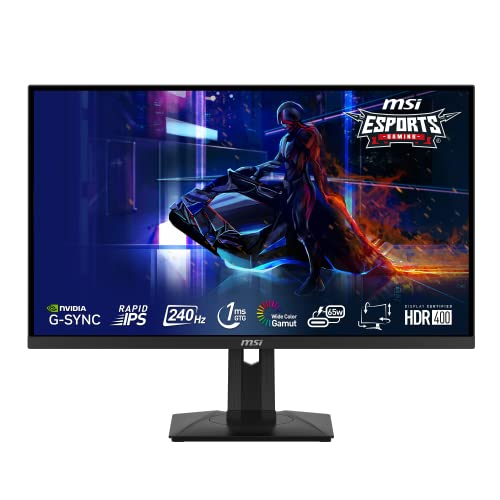 MSI G274QPX |
| Check price on Amazon |
Key takeaways
- Compare the best 240Hz monitors for competitive and fast-paced gaming, from 1080p esports panels with DyAc to 1440p IPS models with HDMI 2.1 ports.
The real decision with a 240Hz monitor is not whether the panel is fast, because every screen here refreshes 240 times per second. It is what you trade away to get that speed. At 1080p you give up sharpness in exchange for frames your graphics card can actually deliver, while at 1440p you keep the detail and pay for it in GPU load. Panel design matters just as much: a Fast TN screen with backlight strobing tracks a moving target very differently from a Fast IPS screen with wider viewing angles and richer color.
This roundup is for competitive shooter players stepping up from 144Hz, racing and sports gamers who want calmer motion in fast pans, and console owners who also play on PC. Every pick below is a monitor whose Amazon listing states a 240Hz refresh rate, and the specifications quoted come from those listings: size, resolution, panel type, ports and stand. Match the screen to your rig and desk first, and the right choice becomes obvious.
Quick Picks
As an Amazon Associate we earn from qualifying purchases
| Product | Best for | Key spec from title |
|---|---|---|
| Samsung Odyssey G4 25-Inch | Esports players who want a full ergonomic stand | 25-inch FHD IPS, 240Hz, 1ms |
| BenQ ZOWIE XL2546X | Tournament FPS players chasing motion clarity | 24.5-inch Fast TN, 240Hz, DyAc 2 |
| ViewSonic XG2431 | IPS color with Blur Busters strobe tuning | 24-inch FHD Fast IPS, 240Hz, 0.5ms |
| LG UltraGear 27GR83Q-B | 1440p PC play plus console on one desk | 27-inch QHD IPS, 240Hz, HDMI 2.1 |
| MSI G274QPX | A gaming PC and a work laptop sharing a screen | 27-inch QHD Rapid IPS, 240Hz, 1ms |
How to Choose
Pick the resolution your GPU can feed at 240Hz
A 240Hz panel only shows its advantage when your games actually render close to 240 frames per second. At 1920 x 1080 that is realistic in Valorant, CS2, Apex Legends and Rocket League on a midrange card, which is why most esports models stay at 1080p. At 2560 x 1440 the pixel count jumps by roughly three quarters, and holding high frame rates in heavier titles takes a much stronger GPU. Check the frame rates you get today at each resolution before choosing, because a 1440p 240Hz monitor fed at 120 frames per second feels no smoother than a cheaper 144Hz screen.
Decide how much motion clarity help you want
Raw refresh rate is only part of motion clarity. BenQ builds the ZOWIE line around DyAc backlight strobing, which sharpens moving objects at the cost of brightness and can bother flicker-sensitive eyes. ViewSonic takes a similar route with its Blur Busters tuned strobing on an IPS panel, which keeps better color and viewing angles. Plain Fast IPS models from Samsung, LG and MSI skip strobing and rely on fast pixel transitions plus adaptive sync. If you mostly track targets in shooters, strobing is worth having; if you split time between games, video and work, a clean IPS image is usually the happier compromise.
Check the ports, because they set the real ceiling
The panel may be 240Hz, but the input decides what reaches it. DisplayPort is the safe route to full 240Hz at either resolution in this roundup. HDMI varies: the LG below carries HDMI 2.1, while several 1080p esports models use HDMI 2.0, which can cap the refresh rate below the panel maximum on some sources. Consoles add their own limit, since the PS5 and Xbox Series X output at most 120Hz, so a 240Hz screen still helps a console through lower input lag and headroom, not through extra frames. Read the port list on the listing, not just the headline refresh rate.
Match size and stand to your desk
Esports models cluster at 24 to 25 inches because a smaller screen keeps the whole scene in view without head movement, and their stands usually add height, tilt, swivel and pivot adjustment. A 27-inch 1440p panel gives you more room for mixed gaming and desktop work, but it needs more desk depth to sit at a comfortable distance. If you plan a monitor arm, confirm the VESA mount on the listing instead of assuming one. Also check what the stand cannot do: a tilt-only base on a fixed desk can leave a tall or short player looking up or down at the screen all session.
The 5 Best Options
Samsung Odyssey G4 25-Inch
The Odyssey G4 is the straightforward esports pick: a 25-inch IPS panel at 1080p and 240Hz, with G-Sync compatibility and FreeSync Premium to keep frames tear-free on either GPU brand. Unlike many smaller gaming monitors, the stand is fully adjustable for height, tilt, swivel and pivot, so it suits shared desks and taller players who cannot use a fixed base. HDR10 support and the Ultrawide Game View mode are extras rather than the point here. Buy it if you want a mainstream 240Hz screen from a big brand, with an IPS image that stays usable for video and browsing between matches.
Specs
- 25-inch IPS panel, 1920 x 1080 resolution
- 240Hz refresh rate, 1ms response time (GtG)
- NVIDIA G-Sync Compatible and AMD FreeSync Premium
- HDR10 support
- DisplayPort and HDMI inputs
- Fully adjustable stand with height, tilt, swivel and pivot
- Model LS25BG402ENXGO
Best for: Competitive players who want 240Hz IPS plus a stand that fits any desk setup.
Watch out for: Use DisplayPort for the full 240Hz on PC; the HDMI input is the slower path on this model, and HDR10 here is entry level.
ASIN: B0B45998BM
BenQ ZOWIE XL2546X
- Best for: Serious FPS players who value strobed motion clarity over color and viewing angles.
- 24.5-inch Fast TN panel, 1920 x 1080 resolution
- 240Hz refresh rate
- DyAc 2 motion clarity technology
- XL Setting to Share for copying display profiles
Serious FPS players who value strobed motion clarity over color and viewing angles.
TN panels shift color off angle and look washed out for movies; DyAc strobing also reduces brightness and can tire flicker-sensitive eyes.
ZOWIE builds monitors for tournament desks, and the XL2546X follows that formula strictly: a 24.5-inch Fast TN panel at 1080p and 240Hz, with DyAc 2 backlight strobing for the clearest moving image in this roundup. The included S Switch puck stores and recalls display profiles, and XL Setting to Share lets you copy settings used by other players. There are no speakers and no attempt at pretty color, because the design assumes a headset and a single game. If your priority is tracking targets in tactical shooters and you accept TN viewing angles, this is the specialist tool for it.
ViewSonic XG2431
- Best for: Players who want IPS color and viewing angles with strobe-based motion clarity.
- 24-inch Fast IPS panel, 1920 x 1080 resolution
- 240Hz refresh rate, 0.5ms response time
- AMD FreeSync Premium and NVIDIA G-Sync Compatible
- VESA DisplayHDR 400
Players who want IPS color and viewing angles with strobe-based motion clarity.
Strobing lowers brightness while it is on, and 1080p on a 24-inch screen still looks soft for text-heavy work compared with 1440p.
The XG2431 answers a specific complaint about esports IPS monitors: motion blur. Its 24-inch Fast IPS panel runs 240Hz with a 0.5ms response time figure, and its backlight strobing was tuned under the Blur Busters program, which is rare at this size. You keep the viewing angles and color stability that TN panels give up, and the stand still offers full ergonomic adjustment for long sessions. FreeSync Premium and G-Sync compatibility cover both GPU brands. Pick it if you want strobe clarity for shooters without accepting a TN image for everything else you do on the same screen.
LG UltraGear 27GR83Q-B
- Best for: 1440p gamers who also plug a current console into the same monitor.
- 27-inch IPS panel, 2560 x 1440 resolution
- 240Hz refresh rate, 1ms response time (GtG)
- VESA DisplayHDR 400
- NVIDIA G-Sync Compatible and AMD FreeSync Premium
1440p gamers who also plug a current console into the same monitor.
Feeding 1440p at high frame rates takes a strong GPU, and DisplayHDR 400 is a modest HDR step rather than true HDR impact.
The 27GR83Q-B is the step up to 1440p without leaving 240Hz behind. Its 27-inch IPS panel pairs the higher resolution with a 1ms response time, DisplayHDR 400 and both G-Sync compatibility and FreeSync Premium. The port selection is the differentiator: two HDMI 2.1 inputs alongside DisplayPort, so a PS5 or Xbox Series X can run at 1440p and 120Hz on the same screen your PC uses at full speed. A four-pole headphone output with DTS Headphone:X covers headsets with microphones. Choose it if your desk hosts both a capable gaming PC and a current console.
MSI G274QPX
- Best for: Mixed work-and-play desks that want 1440p 240Hz plus single-cable laptop docking.
- 27-inch Rapid IPS panel, 2560 x 1440 resolution
- 240Hz refresh rate, 1ms response time (GtG)
- NVIDIA G-Sync Compatible
- VESA DisplayHDR 400
Mixed work-and-play desks that want 1440p 240Hz plus single-cable laptop docking.
Confirm the USB-C configuration on the listing before ordering, since regional variants of this model differ in port details.
MSI’s G274QPX takes the same 27-inch 1440p 240Hz formula and tunes it for a desk that also does office duty. The Rapid IPS panel is rated at 1ms, with G-Sync compatibility and HDR 400, and the stand adjusts for tilt, swivel, height and pivot, including a portrait turn for reading or a second-screen role. A USB-C input with power delivery appears in the listing specification, which lets a work laptop drive the screen and charge over one cable between gaming sessions. If you split the day between spreadsheets and shooters and want one panel for both, this is the balanced option here.
Which One Fits Your Situation
You play ranked shooters on a midrange PC
Stay at 1080p, where your card can hold the frame rates a 240Hz panel needs. The Samsung Odyssey G4 gives you IPS color, both sync systems and a proper adjustable stand, while the ViewSonic XG2431 adds strobe tuning if motion blur is what bothers you most. Either is a cleaner upgrade from 144Hz than a 1440p screen your GPU cannot feed.
You compete and care about clarity above everything
The BenQ ZOWIE XL2546X is built for you. DyAc 2 strobing, the S Switch profile puck and the smaller 24.5-inch TN panel all serve target tracking in tactical shooters, and nothing in its design is spent on entertainment features. Accept the viewing angles and the missing speakers as the price of that focus, and pair it with a good headset.
Your desk runs a gaming PC and a console
Take the LG UltraGear 27GR83Q-B. Its HDMI 2.1 inputs let a PS5 or Xbox Series X run 1440p at 120Hz while DisplayPort keeps the PC at the full 240Hz, so neither machine needs the lesser port. The 27-inch 1440p panel also suits the slower, prettier console games that a 1080p esports screen would undersell.
One screen has to cover workdays and game nights
The MSI G274QPX fits that split life. The 1440p resolution keeps text and timelines readable, the stand pivots if you read long documents, and the USB-C input with charging means a laptop docks with one cable. When work ends, the same panel runs 240Hz over DisplayPort, so you are not keeping a second monitor for gaming.
Common Mistakes
- Leaving Windows or the game set to 60Hz or 144Hz after connecting a 240Hz monitor, so the new panel never runs at full speed.
- Plugging into the HDMI port or cable that caps the signal below 240Hz, instead of using DisplayPort for the PC connection.
- Buying a 1440p 240Hz monitor for a GPU that only reaches 100 frames per second in the games you actually play.
- Expecting a PS5 or Xbox to output 240Hz; both consoles stop at 120Hz, so judge a monitor for console use by its HDMI version and resolution.
- Turning on backlight strobing and adaptive sync at the same time without checking whether the model supports both together.
Frequently Asked Questions
Is 240Hz a real upgrade over 144Hz?
Yes, but it is a smaller step than going from 60Hz to 144Hz. Motion looks calmer and inputs feel more direct in fast shooters, especially when your frame rate stays near 240. Players in slower genres may barely notice. The upgrade makes the most sense when your current GPU already pushes well past 144 frames per second in your main games at your chosen resolution.
Can a PS5 or Xbox Series X use a 240Hz monitor?
Yes, and the monitor will work well, but both consoles cap output at 120Hz. You gain lower input lag and a screen that is ready for a PC later, not extra frames today. For the cleanest console result, pick a model with HDMI 2.1 and a 1440p panel, like the LG in this roundup, so the console can run at its best resolution and refresh rate together.
Do I need DisplayPort to run 240Hz?
For a PC, treat DisplayPort as the default choice. It carries 240Hz at 1080p and 1440p on every model here without negotiation. HDMI can work when both the port version and the cable support it, but HDMI 2.0 inputs on several esports models limit the rate from some sources. If a listing is vague about the HDMI version, assume DisplayPort is the full-speed path.
Should I choose 1080p or 1440p at 240Hz?
Choose 1080p if competitive shooters are the priority and your GPU is midrange, because frame rate is the whole point of this category. Choose 1440p if your card is strong, you play a mix of single-player and multiplayer titles, or the monitor doubles as your work screen. The 27-inch 1440p models here also age better as GPUs improve, since you can grow into the resolution.
More from Amazon
Programs that pair well with the guide above. Offers and eligibility are set by Amazon and may change.
Free shipping on eligible items, Prime Video and more. Eligible new members can start with a free trial.
Start a Prime free trialAd-free music streaming. Eligible new subscribers can start with a free trial.
Try Music Unlimited freeA Prime membership for ages 18-24 with a trial period. Eligibility is set by Amazon.
See Prime for Young AdultsAudiobooks and podcasts to listen to on the go. Eligible new members can start with a free trial.
Try Audible freeAs an Amazon Associate we earn from qualifying purchases.









