
Our Short List of 3
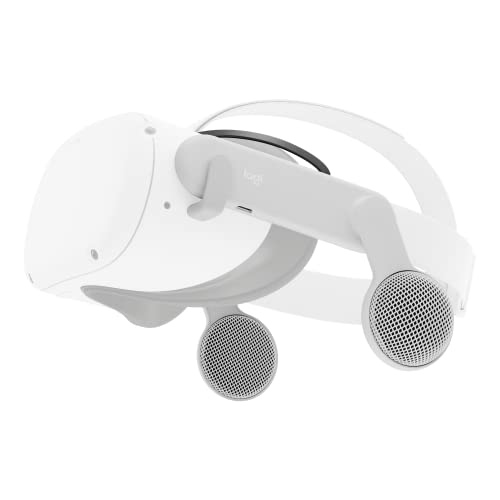
- Best for: players who want a permanent, nothing-in-the-ear audio upgrade for everyday Quest 2 use.
- Form factor: off-ear headset that attaches to the Quest 2 strap arms
- Compatibility: Meta Quest 2; fits the stock strap, Elite Strap and Elite Strap with Battery
- Connection: USB-C plug with a USB-C passthrough port
- Power: powered by the Quest 2, no battery required
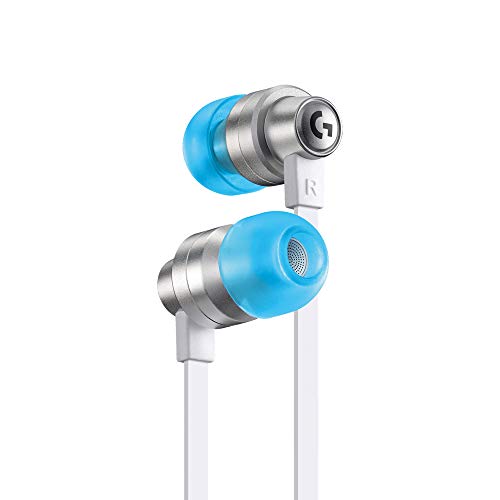
- Best for: players who want zero-latency wired audio, including PC VR users whose USB-C port is busy with a Link cable.
- Drivers: dual drivers per earbud, separate drivers for bass and for mids and highs
- Connection: 3.5 mm aux, wired
- Cable: custom length made for the Quest 2, with cable management straps included
- Housing: aluminum
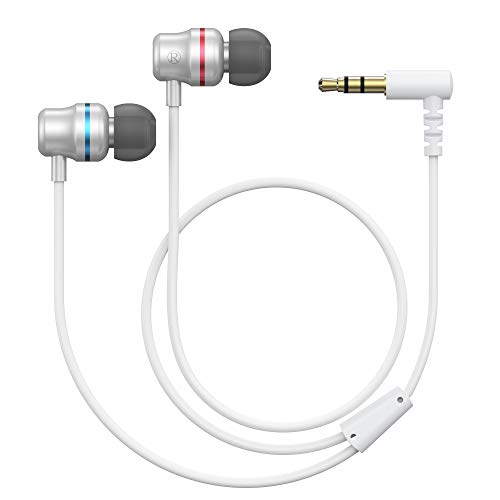
- Best for: shared-room and late-night players who need isolation and privacy more than wireless freedom.
- Driver: 10 mm neodymium magnet driver
- Frequency response: 20 Hz to 20 kHz
- Impedance: 32 ohms
- Ear tips: custom silicone caps in S, M and L included
All 4 Picks at a Glance
| Product | Specs | Action |
|---|---|---|
| Logitech Chorus VR Off-Ear Headset |
| Check price on Amazon |
| Logitech G333 VR Gaming Earphones |
| Check price on Amazon |
| KIWI design Noise-Isolating In-Ear Headphones |
| Check price on Amazon |
 AMVR Noise Isolating Earbuds |
| Check price on Amazon |
Key takeaways
- Five headsets and earbuds built for the Quest 2, from off-ear speakers to low-latency wireless buds, compared on fit, connection and strap compatibility.
The Quest 2’s built-in speakers are convenient, but they leak your game audio to everyone in the room and flatten the bass and directional cues that make VR feel real. The real decision is how you want sound delivered once the headset is on your face: speakers that hover off your ears, sealed earbuds that shut the room out, or a wireless link that adds no cable at all. That choice is constrained by the hardware itself, because the Quest 2 gives you exactly one 3.5 mm headphone jack and one USB-C port to work with.
This roundup is for Quest 2 owners who play in shared rooms, fitness players who move hard enough to dislodge normal earbuds, PC VR users running a Link cable, and anyone who also wants their audio gear to serve a console or handheld. Every pick below is sold on Amazon with Meta Quest 2 compatibility stated in its listing, and the specs are taken from those product pages rather than from brand marketing.
Quick Picks
As an Amazon Associate we earn from qualifying purchases
| Product | Best for | Key spec from title |
|---|---|---|
| Logitech Chorus VR Off-Ear Headset | Players who dislike anything in or on their ears | Off-ear speakers with USB-C passthrough |
| Soundcore VR P10 Wireless Gaming Earbuds | Wireless play plus phone calls mid-session | 2.4GHz dongle, under 30 ms latency |
| Logitech G333 VR Gaming Earphones | Zero-lag wired audio on a short, tidy cable | Dual drivers, custom-length 3.5 mm cable |
| KIWI design Noise-Isolating In-Ear Headphones | Sealing out a noisy household | 10 mm neodymium drivers, silicone seal |
| AMVR Noise Isolating Earbuds | A simple wired upgrade with earbud holders | 10 mm drivers, 3D 360-degree sound |
How to Choose
Decide Between Off-Ear, On-Strap and In-Ear Designs
Form factor changes the whole session. Off-ear speakers like the Chorus hover beside your ears, so nothing presses or plugs, and you stay aware of the room; the trade-off is that people nearby can faintly hear loud passages. In-ear buds seal the canal, which blocks household noise and keeps your audio private, but some players find the seal uncomfortable after an hour and dislike pulling buds out every time someone talks to them. Clip-on and strap-mounted designs sit in between. Start from where and how you play, not from driver size, because a technically better earbud you remove after twenty minutes is the wrong purchase.
Match the Connection to the Quest 2’s Two Ports
The Quest 2 offers a 3.5 mm jack and a single USB-C port, and every audio accessory competes for one of them. Wired earbuds on the 3.5 mm jack are the simplest path: no battery, no pairing, no latency worth mentioning, and the USB-C port stays free for charging or a Link cable. USB-C accessories such as the Chorus draw power from the headset and should offer passthrough if you ever charge while playing. Wireless earbuds need a dedicated 2.4GHz dongle to stay in sync with fast gameplay; plain Bluetooth pairing with the headset is the option most likely to introduce audible delay.
Sort Out the Microphone Before Multiplayer
Upgrading audio does not automatically upgrade your voice. The Quest 2 has a built-in microphone array, and many audio accessories simply leave voice capture to it, which works fine in most games. Some earbuds add their own microphones, and the Soundcore VR P10 can even hold a Bluetooth connection to your phone at the same time as the dongle link, so a call does not force you out of the game. If you play social or competitive titles where teammates depend on clear callouts, check where the mic lives on the accessory you are eyeing and whether muting is a physical motion or a menu dive.
Check Strap Fit and Added Weight
Anything that mounts to the headset has to agree with your strap. The Chorus is shaped for the three official Quest 2 strap options, stock and Elite alike, while clip-on headphones from accessory brands are often built around specific strap arms and may not grip a third-party halo strap. Earbuds sidestep the question entirely and pair with any strap, including battery straps. Weight matters too: audio that hangs off the headset adds leverage at the front, so lighter designs and balanced mounting points protect your neck during long sessions better than a heavier unit with stronger headline specs.
The 5 Best Options
Logitech Chorus VR Off-Ear Headset
- Best for: players who want a permanent, nothing-in-the-ear audio upgrade for everyday Quest 2 use.
- Form factor: off-ear headset that attaches to the Quest 2 strap arms
- Compatibility: Meta Quest 2; fits the stock strap, Elite Strap and Elite Strap with Battery
- Connection: USB-C plug with a USB-C passthrough port
- Power: powered by the Quest 2, no battery required
players who want a permanent, nothing-in-the-ear audio upgrade for everyday Quest 2 use.
the passthrough port passes charging power only and does not carry Link cable data, so PC VR over Link means removing it or switching to the 3.5 mm jack.
The Chorus replaces the Quest 2’s open speakers with larger off-ear drivers that sit closer and aim better, without putting anything inside your ear canal. It is the natural pick for players who find earbuds fatiguing, wear glasses, or jump in and out of conversation with people in the room. Because it runs off the headset’s own power, there is no second battery to manage, and flipping the speakers up mutes them when someone walks in. It also keeps your ears open to a doorbell or a child calling from the next room, which some households treat as a feature.
Watch out for: the passthrough port passes charging power only and does not carry Link cable data, so PC VR over Link means removing it or switching to the 3.5 mm jack.
Soundcore VR P10 Wireless Gaming Earbuds
The VR P10 is the wireless route done properly for VR: a USB-C dongle using a 2.4GHz link keeps latency under 30 ms, so gunshots and rhythm notes land when they should instead of trailing the action the way plain Bluetooth can. The earbuds are authorized under the Made for Meta program for Quest 2, and the dual connection is genuinely useful, holding the dongle link to the headset and a Bluetooth link to your phone simultaneously. The dongle also passes charging power through to the headset, which softens the fact that it occupies the only USB-C port during play.
Specs
- Drivers: 11 mm drivers with BassUp
- Latency: under 30 ms via the LightningSync 2.4GHz connection
- Connection: USB-C dongle (2.4GHz) plus Bluetooth, usable at the same time
- Dongle: supports pass-through charging of the headset while playing
- In the box: earbuds, USB-C dongle, charging case, S/M/L ear tips, USB-C cable
- Model: A3850, Made for Meta authorized for Meta Quest 2
Best for: players who want cable-free audio on the Quest 2 and also game on PS5, Switch, PC or Steam Deck with the same buds.
Watch out for: the earbuds and case carry their own batteries, so a flat case ends the session; keep game audio on the dongle rather than Bluetooth to hold the low latency.
Logitech G333 VR Gaming Earphones
- Best for: players who want zero-latency wired audio, including PC VR users whose USB-C port is busy with a Link cable.
- Drivers: dual drivers per earbud, separate drivers for bass and for mids and highs
- Connection: 3.5 mm aux, wired
- Cable: custom length made for the Quest 2, with cable management straps included
- Housing: aluminum
players who want zero-latency wired audio, including PC VR users whose USB-C port is busy with a Link cable.
the short cable is a virtue on the headset and a limitation off it; these are not practical as everyday phone earbuds, and there is no wireless option.
The G333 VR is the official earphone answer from the Quest 2 era: wired buds built around a cable that is deliberately short, sized to run from the headset’s jack without a loop of slack swinging in front of your face. Dual drivers in each bud split the work, with separate drivers handling bass and the mid and high range, which helps footsteps and dialogue stay distinct in busy scenes. Cable straps are included to pin the lead against the head strap. There is nothing to charge and nothing to pair, which makes it the dependable option for long or tethered sessions.
Watch out for: the short cable is a virtue on the headset and a limitation off it; these are not practical as everyday phone earbuds, and there is no wireless option.
KIWI design Noise-Isolating In-Ear Headphones
- Best for: shared-room and late-night players who need isolation and privacy more than wireless freedom.
- Driver: 10 mm neodymium magnet driver
- Frequency response: 20 Hz to 20 kHz
- Impedance: 32 ohms
- Ear tips: custom silicone caps in S, M and L included
shared-room and late-night players who need isolation and privacy more than wireless freedom.
the Quest 2-only fit is literal; the listing excludes the Quest 3, so these will not follow you to a newer headset, and the seal can feel warm in long sessions.
KIWI design built these earbuds specifically around the Quest 2 and Rift S, with a silicone seal that does the privacy work: game audio stays in your ears and household noise stays out, which is exactly what late-night players in thin-walled homes need. The 10 mm neodymium drivers are a clear step up from the open built-in speakers for bass weight, and three sizes of custom silicone caps help the buds stay seated when you turn your head quickly. They are wired, so there is no battery to think about, and the whole setup adds almost no weight to the headset.
Watch out for: the Quest 2-only fit is literal; the listing excludes the Quest 3, so these will not follow you to a newer headset, and the seal can feel warm in long sessions.
AMVR Noise Isolating Earbuds
- Best for: Quest 2 owners who want an inexpensive wired isolation upgrade and a tidy place to park the buds.
- Drivers: 10 mm neodymium drivers
- Frequency range: 20 Hz to 20 kHz
- Connection: 3.5 mm jack
- Build: aluminum alloy and TPE, about 20 g
Quest 2 owners who want an inexpensive wired isolation upgrade and a tidy place to park the buds.
like the KIWI set, these are Quest 2-specific and wired only; the holders fit the Quest 2 shell, so budget for new audio if you change headsets.
AMVR’s earbuds take a similar wired, in-ear approach with a couple of practical twists. The listing promises 3D 360-degree sound from 10 mm drivers, and the package includes silicone holders that park the earbuds on the headset itself when you take a break, so they are not dangling or lost in the couch. At around 20 grams they add almost nothing to the front of the Quest 2, and the aluminum alloy and TPE build shrugs off being tossed in a carry case. For players who want a straightforward upgrade over the stock speakers without entering premium territory, this is the simple answer.
Watch out for: like the KIWI set, these are Quest 2-specific and wired only; the holders fit the Quest 2 shell, so budget for new audio if you change headsets.
Which One Fits Your Situation
You Play Fitness and Rhythm Games Hard
Movement is the enemy of ordinary earbuds, and sweat makes seals slip. The Chorus stays mounted to the strap and moves with the headset, with nothing in your ears to work loose mid-session. If you prefer a sealed fit for immersion, choose the VR P10 and use the snug ear tip size; its dongle link keeps fast rhythm cues in time while the cable-free design removes anything that can snag during a swing.
Your Household Hears Every Game You Play
Open speakers broadcast your session to the room. Sealed in-ear options fix that: the KIWI design earbuds and the AMVR earbuds isolate in both directions, keeping game audio private and the television out of your ears. Between them, pick the KIWI set for its custom silicone caps if fit is a problem, or the AMVR set if the parking holders appeal. The Chorus improves on stock speakers but remains an open design, so it is not the isolation answer.
You Split Time Between Standalone and PC VR
A Link cable claims the USB-C port, which rules out USB-C audio for those sessions. The G333 VR runs from the 3.5 mm jack and leaves the port entirely to the Link cable, with wired latency that competitive players trust. When you go back to standalone play, the same buds keep working with no reconfiguration. The VR P10 is the alternative if you accept swapping the dongle and Link cable between sessions rather than owning a wired set as well.
One Purchase Has to Cover Several Machines
If the same audio gear must serve a Quest 2, a console and a handheld, the VR P10 is the only pick designed for that life: its dongle moves between the Quest 2, PS5, PC and Switch, and Bluetooth covers your phone. The trade-off is battery management and a higher commitment than the wired sets. Players who only use the Quest 2 get the same in-game result from the G333 VR or the Chorus with a simpler routine.
Common Mistakes
- Pairing ordinary Bluetooth earbuds with the Quest 2 and expecting tight sync; standard Bluetooth audio can lag the picture noticeably in fast games.
- Assuming every USB-C accessory leaves the port usable, then finding charging or Link data blocked because the passthrough is power-only.
- Buying Quest 3 audio accessories for a Quest 2, or the reverse; several listings in this category state the exclusion outright, so read the compatibility line.
- Reaching for full-size over-ear headphones that collide with the head strap and shift every time you look down.
- Forgetting the microphone question until the first multiplayer session, then discovering the accessory has no mic and voice relies on the headset’s built-in array.
Frequently Asked Questions
Can I just use my regular headphones with a Quest 2?
Often, yes. The Quest 2 has a 3.5 mm jack, so most wired headphones and earbuds work immediately, and short-cable models made for the headset simply route more neatly. Full-size over-ear headphones are the awkward case, since their headbands fight the Quest 2 strap for the same space. Bluetooth headphones can pair through the headset’s experimental Bluetooth setting, but latency varies and fast games expose it.
Will any of these headsets also work on a Quest 3?
Treat Quest 2 audio accessories as Quest 2-only unless the listing says otherwise. The KIWI design and AMVR earbuds state plainly that they are not compatible with Quest 3, and the Chorus is shaped around Quest 2 straps. The Soundcore VR P10 is the exception in spirit, since its dongle works across many USB-C devices, but check its current listing before assuming Quest 3 support.
Does my voice chat still work with earbuds plugged in?
In most cases, yes. The Quest 2’s built-in microphone array handles your voice when you plug audio into the 3.5 mm jack, so friends still hear you. Some accessories add microphones of their own, and the VR P10 holds a phone Bluetooth connection alongside the game link. If a specific game or party setup matters to you, confirm the mic path on the product page before ordering.
Is off-ear audio private enough for a shared room?
It is more private than the stock speakers at moderate volume, because the drivers sit closer to your ears and aim inward, but it is still an open design and loud passages will be faintly audible nearby. If true privacy is the goal, sealed in-ear options from this list, the KIWI design, AMVR or Soundcore buds, are the correct tool for that job.
More from Amazon
Programs that pair well with the guide above. Offers and eligibility are set by Amazon and may change.
Free shipping on eligible items, Prime Video and more. Eligible new members can start with a free trial.
Start a Prime free trialAd-free music streaming. Eligible new subscribers can start with a free trial.
Try Music Unlimited freeA Prime membership for ages 18-24 with a trial period. Eligibility is set by Amazon.
See Prime for Young AdultsAudiobooks and podcasts to listen to on the go. Eligible new members can start with a free trial.
Try Audible freeAs an Amazon Associate we earn from qualifying purchases.









