
Our Short List of 3

- Best for: Moving one screen between rooms and desks.
- 32-inch Portable Smart TV Monitor
- With wheels, movable Google TV
- No battery, non-touchscreen
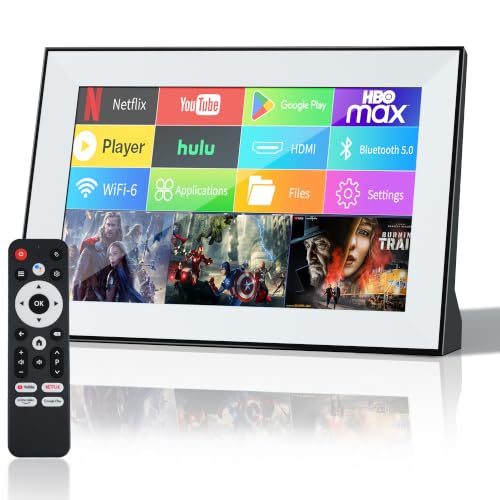
- Best for: Small spaces, counters, and travel where a fixed screen is impractical.
- Portable TV, small TV with touchscreen LCD monitor
- Built-in apps
- SD, Wi-Fi, Bluetooth, USB, HDMI input
- Mini smart TV design for home, kitchen, RV, and travel use
- Best for: Kitchen, RV, and travel use as a small roaming screen.
- Small smart TV, portable TV with touchscreen LCD monitor
- Built-in apps
- SD, Wi-Fi, Bluetooth, USB, HDMI input
- Mini TV design for home, kitchen, RV, and travel use
All 3 Picks at a Glance
| Product | Specs | Action |
|---|---|---|
| HORION 32-inch Portable Smart TV Monitor with Wheels |
| Check price on Amazon |
| FancyAug Portable TV with Touchscreen LCD Monitor |
| Check price on Amazon |
| FancyAug Small Smart TV with Touchscreen LCD Monitor |
| Check price on Amazon |
Key takeaways
- Compare five TVs that double as computer monitors, from a 50-inch QLED with PC gaming wording to portable TV-monitor picks for small desk setups.
A television can serve as a computer monitor when its own listing says so, and the five picks below were chosen only where the listing states television form with monitor, PC, or computer-connection wording and a brand name. That rule matters because most televisions are described as living-room screens, with no statement that they connect to a computer, and guessing from screen size or resolution alone would fill this list with sets never presented for computer use. Every pick therefore carries its evidence in the listing wording, quoted in the specifications.
Two of the picks come from one brand, FancyAug, as two distinct listings with different ASINs and different listing wording, and the first pick rests on PC gaming wording rather than monitor wording, so those bases are stated openly wherever they occur. Each ASIN line carries a warning marker because every ASIN here was corroborated only indirectly, through agreeing purchase links and listing wording in published roundups, and each one needs re-checking against the Amazon API before posting.
Quick Picks
As an Amazon Associate we earn from qualifying purchases.
| Product | Best for | Key spec |
|---|---|---|
| VIZIO 50-inch Quantum Pro 4K QLED Smart TV | PC gaming at a desk | 240Hz at 1080p PC gaming |
| HORION 32-inch Portable Smart TV Monitor | Moving between rooms | Smart TV monitor with wheels |
| FancyAug Portable TV with Touchscreen LCD Monitor | Small spaces and travel | Touchscreen LCD monitor |
| Westinghouse 24-inch HD Non Smart TV | A compact second screen | Connect your PC wording |
| FancyAug Small Smart TV with Touchscreen LCD Monitor | Kitchen, RV, and travel use | Touchscreen LCD monitor |
How to Choose
Start from the listing wording, not the screen size
A television becomes a computer-monitor candidate only when its own listing wording connects it to a computer, and the strongest evidence is a literal statement such as monitor form, PC gaming, or connect-your-PC wording in the listing. Screen size and resolution alone never prove computer use, because a large living-room set and a desk display can share the same panel specifications while only one listing ever mentions a computer. Read the full listing title, then check that the brand name appears in the listing itself, since a listing with no brand name cannot be verified. If the wording is silent on computers, set the set aside, because the monitor-use claim would then rest on assumption rather than evidence.
Match the size to the viewing distance
A television used as a computer monitor sits much closer to the viewer than a living-room television, so size and viewing distance must be planned together rather than chosen separately. A compact set in the twenty-four to thirty-two-inch range suits a standard desk, where the viewer sits within arm’s reach and the whole screen stays inside a comfortable field of view without constant head turning. A fifty-inch set belongs farther back, on a deep desk or a wall mount behind a desk, where the extra width reads as an immersive workspace rather than an overwhelming wall of pixels. Measure the desk depth first, then choose the smallest size that still shows text sharply at that distance.
Check the inputs the listing actually states
Computer use depends on the inputs a listing states literally, so verify each connection in the listing wording rather than assuming a modern television accepts every source. HDMI input is the common bridge between a computer and a television, and listings that state HDMI input alongside PC or monitor wording give the clearest evidence that the connection was intended. A listing that also states USB, Wi-Fi, or Bluetooth adds flexibility for peripherals and wireless sources, but those extras never substitute for a stated computer connection. Where a listing states a touchscreen, treat that as a distinct feature with its own value for close-up work, and confirm whether the listing states battery operation or mains-only use.
Decide between a fixed set and a portable one
A fixed television suits a single dedicated desk where the screen never moves, while a portable television suits rooms that change purpose through the day, and the listing wording usually makes the distinction plain. Portable sets state wheels, movable form, or travel use, and those statements matter because a wheeled set can roll from a desk to a kitchen counter while a fixed set cannot. Fixed sets tend to state larger panels and higher refresh figures, which suit long sessions at one desk, whereas portable sets trade panel size for mobility and often state smaller screens with touchscreen controls. Choose the fixed form when one desk does all the work, and the portable form when the screen must move.
The 5 Best Options
VIZIO 50-inch Quantum Pro 4K 120Hz QLED HDR10+ Smart TV
The VIZIO Quantum Pro earns the lead spot because its listing states PC gaming use literally, with a 240Hz figure at 1080p for PC gaming sitting directly inside a television listing that also names the brand, the QLED panel, and the smart TV form. That wording is the whole basis for including a fifty-inch set in a computer-monitor list, since the listing itself presents the set as a display for PC gaming rather than leaving the connection to guesswork. Its size suits a deep desk or a wall-mounted position behind a desk, where the wide panel can hold several windows at once.
Specs
- 50-inch QLED 4K 120Hz Smart TV
- HDR10+ with Dolby Vision
- Active Full Array
- 240Hz at 1080p PC gaming
- Wi-Fi 6E, Apple AirPlay, Chromecast Built-in
- Model M50QXM-K01, 2023 Model
Best for: PC gaming at a deep desk or wall-mounted behind a desk.
Watch out for: The monitor-use evidence is PC gaming wording, not the word monitor itself, and the fifty-inch size needs real viewing distance.
ASIN: ⚠ B09VCZCR1W
HORION 32-inch Portable Smart TV Monitor with Wheels
- Best for: Moving one screen between rooms and desks.
- 32-inch Portable Smart TV Monitor
- With wheels, movable Google TV
- No battery, non-touchscreen
Moving one screen between rooms and desks.
No battery is stated, so a power outlet must be in reach wherever the set rolls.
The HORION pick states both halves of this list’s requirement in a single short listing title, calling itself a portable Smart TV Monitor with wheels, which is the most direct television-plus-monitor wording found in the corroboration sweep. Its movable Google TV form means the set rolls where it is needed rather than staying fixed to one desk, and the stated absence of a battery means it runs from a power outlet wherever it stops. The thirty-two-inch size sits in the comfortable desk range, large enough to show computer text clearly without dominating a standard desk.
FancyAug Portable TV with Touchscreen LCD Monitor
- Best for: Small spaces, counters, and travel where a fixed screen is impractical.
- Portable TV, small TV with touchscreen LCD monitor
- Built-in apps
- SD, Wi-Fi, Bluetooth, USB, HDMI input
- Mini smart TV design for home, kitchen, RV, and travel use
Small spaces, counters, and travel where a fixed screen is impractical.
The listing states it is not battery-operated, so mains power is required, and it is a distinct listing from the second FancyAug pick below.
The first FancyAug pick states portable TV form together with a touchscreen LCD monitor in its own listing wording, plus built-in apps and a full set of stated inputs, which makes it a self-contained small screen for places where a fixed desk setup is impractical. Its mini smart TV design is presented for home, kitchen, RV, and travel use, and the listing states plainly that it is not battery-operated, so expectations about unplugged use stay honest. The touchscreen gives close-up control without a separate keyboard or remote for every action, while the stated HDMI input keeps a wired computer connection available.
Westinghouse 24-inch HD Non Smart TV
The Westinghouse pick is the compact, no-frills option, a twenty-four-inch non-smart television whose listing states “Connect your PC” directly alongside gaming console, cable box, and streaming-device connections, which is explicit computer-connection wording in the listing itself. Its small flat-screen form suits a bedroom corner, a camper, a kitchen, or a second desk where a modest screen is enough, and the stated compatibility with a Fire Stick adds streaming without smart TV software built in. The HD resolution matches the compact size, and the straightforward wording leaves no doubt about what the set is: a small television that its own listing presents as a screen for a PC and other sources.
Specs
- 24-inch HD non smart TV, small flat screen
- Works with Fire Stick
- Compact TV for campers, kitchen, or bedrooms
- Connect your PC, gaming console, cable box, or smart TV streaming devices
Best for: A compact second screen in a bedroom, camper, or kitchen.
Watch out for: It is a non-smart HD set, so streaming depends on an attached device, and the small screen suits close viewing only.
ASIN: ⚠ B09RD8R983
FancyAug Small Smart TV with Touchscreen LCD Monitor
- Best for: Kitchen, RV, and travel use as a small roaming screen.
- Small smart TV, portable TV with touchscreen LCD monitor
- Built-in apps
- SD, Wi-Fi, Bluetooth, USB, HDMI input
- Mini TV design for home, kitchen, RV, and travel use
Kitchen, RV, and travel use as a small roaming screen.
It shares the FancyAug brand and near-identical wording with the pick above, so confirm the distinct listing at re-check; no battery wording is stated for this listing.
The second FancyAug pick is a distinct listing with its own ASIN, stating small smart TV form together with a touchscreen LCD monitor and the same family of stated inputs as its sibling pick. Its mini TV design is presented for home, kitchen, RV, and travel use, which suits the same roaming small-screen role with its own listing identity, and the built-in apps plus HDMI input keep both standalone streaming and wired computer use available. Two picks share the FancyAug brand as distinct listings, and the API re-check should confirm that the two listings stay distinct before posting.
Which One Fits Your Situation
A deep desk used mainly for PC gaming
Choose the VIZIO Quantum Pro, because it is the only pick whose listing states PC gaming use with a stated refresh figure for that use, and its fifty-inch panel rewards a deep desk or wall-mounted position. Keep the viewing distance generous, since a screen this wide overwhelms a shallow desk, and use the stated wireless casting only as a supplement to the wired computer connection.
One screen that moves between rooms
Choose the HORION portable Smart TV Monitor, because its wheels and movable form are stated in the listing itself, and its thirty-two-inch size stays manageable while rolling. Plan for a power outlet at each stop, since the listing states no battery, and treat the non-touchscreen form as a familiar monitor-style experience.
A counter, shelf, or tight corner
Choose either FancyAug pick, since both state touchscreen LCD monitor form in compact portable designs meant for kitchens, RVs, and travel. The touchscreen suits close-up control without extra peripherals, the HDMI input covers wired computer use, and mains power is required, so keep an outlet in reach at every stop.
A second screen on a small budget of space
Choose the Westinghouse twenty-four-inch set, because its compact form and explicit connect-your-PC wording make it a straightforward second screen for a bedroom, camper, or kitchen. Accept the HD non-smart limits, add a streaming stick for apps, and sit close enough for the small screen to read comfortably at all times.
Common Mistakes
- Buying a television for desk use on size and resolution alone, without listing wording that states monitor, PC, or computer-connection use.
- Treating a monitor listing as a television, or a television listing as a monitor, when the two forms are distinct products with distinct listings.
- Assuming every modern television accepts a computer connection, instead of verifying the inputs the listing actually states.
- Placing a fifty-inch set on a shallow desk, where the width overwhelms close viewing no matter how good the panel is.
- Expecting battery operation from a portable set whose listing states mains-only use or states no battery at all.
Frequently Asked Questions
Can any television work as a computer monitor?
No, and the distinction in this list is the listing wording itself. A television belongs here only when its own listing states monitor form, PC use, or computer-connection wording together with a brand name. Size, resolution, and refresh figures never prove computer use on their own, so a set whose listing is silent on computers stays out even when its panel looks suitable.
Why does one pick rest on PC gaming wording instead of monitor wording?
Because the VIZIO listing states “240Hz at 1080p PC Gaming” inside a television listing, which is literal PC use wording, and the brief for this list accepts PC use wording as evidence alongside monitor wording. The basis is stated openly in the pick and in this answer, so readers can weigh it, and the API re-check should confirm the listing still carries that wording.
Why do two picks share the FancyAug brand?
Two picks share the FancyAug brand as distinct listings with different ASINs and different listing wording, both stating touchscreen LCD monitor form in portable TV designs. They are not the same listing repeated, but their wording is close, so the API re-check should confirm that the two listings remain distinct before posting.
What should I check before ordering a TV to use as a monitor?
Confirm the listing still states the monitor, PC, or computer-connection wording quoted here, confirm the brand name appears in the listing, and measure the viewing distance against the screen size. Then verify the stated inputs match the computer’s outputs, and confirm whether the listing states battery operation or mains-only use, since that decides where the set can actually sit.
More from Amazon
Programs that pair well with the guide above. Offers and eligibility are set by Amazon and may change.
Free shipping on eligible items, Prime Video and more. Eligible new members can start with a free trial.
Start a Prime free trialAd-free music streaming. Eligible new subscribers can start with a free trial.
Try Music Unlimited freeA Prime membership for ages 18-24 with a trial period. Eligibility is set by Amazon.
See Prime for Young AdultsAudiobooks and podcasts to listen to on the go. Eligible new members can start with a free trial.
Try Audible freeAs an Amazon Associate we earn from qualifying purchases.









