
Key takeaways
- Looking for a tablet that still runs Windows 10? The Microsoft Surface Pro 7 is the one verified Windows 10 Home tablet we can recommend buying by ASIN.
Most Windows tablets sold today ship with Windows 11, and that creates a real problem for anyone who specifically needs Windows 10: a work application that has not been cleared for the newer system, a managed software image, older peripherals, or simply a familiar environment that a team does not want to retrain on. If you shop by headline alone, it is easy to order a current tablet and discover only at setup that it runs Windows 11. This guide takes the opposite approach. We checked Amazon US listings page by page for tablets whose own product pages publish Windows 10 as the operating system, and exactly one model passed that check: the Microsoft Surface Pro 7, in the configuration that ships with Windows 10 Home. Everything below is built around that single verified pick, why the pool is so small, and how to decide whether this older but genuine Windows 10 tablet is the right buy for you.
As an Amazon Associate, we earn from qualifying purchases.
Quick answer
The Microsoft Surface Pro 7 (ASIN B07YNJGMH6) is the pick. Its Amazon US product page publishes Windows 10 Home as the operating system, and the configuration pairs a 12.3-inch 2736×1824 touchscreen with a 10th Gen Intel Core i5 processor, 8 GB of RAM, a 128 GB SSD, Intel Iris Plus graphics, Wi-Fi 6, and Bluetooth 5.0, with a Type Cover included and a published battery life of 10.5 hours. One caution before you order: when we checked the listing, we could not confirm a buy box on the page, so availability is unconfirmed — verify that the exact ASIN is in stock and sold by a seller you trust before you commit. If you need Windows 10 specifically, this is the verified route; if you do not, a current Windows 11 tablet will almost always be the better long-term purchase.
Key takeaways
- Only one tablet passed verification: the Surface Pro 7 is the single model whose Amazon US page publishes Windows 10 (Windows 10 Home) as its operating system.
- The verified configuration is the 10th Gen Core i5 model with 8 GB RAM and a 128 GB SSD — enough for office work, browsing, and light creative tasks, not for heavy workloads.
- The 12.3-inch 2736×1824 display is sharp for documents and media, and the included Type Cover turns the tablet into a usable laptop-style machine.
- Availability is unconfirmed: no buy box was confirmed on the listing at check time, so confirm stock on the exact ASIN before ordering.
- Windows 10 is a legacy operating system. Buy this tablet because you need Windows 10, not as a general-purpose recommendation over newer Windows 11 hardware.
The pick
Microsoft Surface Pro 7 — the verified Windows 10 Home tablet
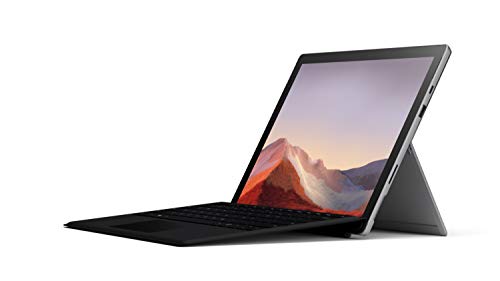
The Surface Pro 7 is Microsoft’s 2-in-1 detachable tablet, and the reason it anchors this guide is simple: its Amazon US product page states Windows 10 Home in the specification field and again in the description. That matters more than it might sound. Many listings for older Surface models are vague about the operating system, and many current tablets that look similar ship with Windows 11. Here, the OS is published on the page itself, so you know what you are getting before the box arrives. For buyers whose software, workplace policy, or personal preference pins them to Windows 10, that published confirmation is the whole point of the purchase.
As a piece of hardware, the Pro 7 remains a sensible machine for everyday work. The 10th Gen Intel Core i5 and Intel Iris Plus graphics handle documents, spreadsheets, video calls, web apps, and light photo work without drama, and the 128 GB SSD keeps Windows responsive in a way older spinning-disk machines never were. The 12.3-inch display runs at 2736×1824, which is noticeably crisp for reading and detailed documents, and the published weight of 1.1 lb keeps it genuinely portable for a full Windows PC. The included Type Cover means you are not buying a keyboard separately to get real typing done, and the published 10.5-hour battery life covers a normal working day away from the charger for lighter use. Wi-Fi 6 and Bluetooth 5.0 round out connectivity that still matches modern routers and accessories.
Specs
- Operating system: Windows 10 Home (as published on the product page)
- Display: 12.3-inch, 2736×1824
- Processor: 10th Gen Intel Core i5
- Memory: 8 GB RAM
- Storage: 128 GB SSD
- Graphics: Intel Iris Plus
- Wireless: Wi-Fi 6, Bluetooth 5.0
- Battery life: up to 10.5 hours (as published)
- Weight: 1.1 lb (as published)
- Included: Type Cover
Buy it here: Microsoft Surface Pro 7 on Amazon
How to choose
Because the verified Windows 10 pool is a single model, choosing is less about comparing rivals and more about checking that this specific tablet fits your situation. Start with the operating system itself. Confirm that Windows 10 is a requirement rather than a habit: if your key applications run fine on Windows 11, a newer tablet gives you a longer support runway and faster hardware for similar money. If a line-of-business app, exam software, industrial tool, or employer image genuinely requires Windows 10, the Pro 7’s published Windows 10 Home install is exactly what you need — but note the edition. It is Windows 10 Home, not Pro, so features tied to the Pro edition, such as domain joining or BitLocker management through group policy, are not part of this configuration.
Next, sanity-check the hardware against your workload. The Core i5, 8 GB of RAM, and 128 GB SSD suit office documents, email, browsing, video calls, and media playback. They are not sized for large spreadsheets with heavy macros, big photo libraries, video editing, or running multiple demanding programs at once, and 128 GB fills quickly if you store media locally — plan on cloud storage or an external drive if your files are large. The 12.3-inch screen is comfortable for one document at a time; if you live in split-screen multitasking, the size will feel tight. Battery expectations should be modest too: 10.5 hours is the published figure, and real-world use with video calls and high brightness will land below that.
Also think about the support horizon before you spend. A Windows 10 tablet bought today is a tool for a defined job, not a five-year platform, so match the purchase to the length of the project or contract that requires Windows 10. If your need is open-ended, ask whether the software vendor has a Windows 11 timeline you can wait for instead. And if several people on a team need the same setup, buy the units together from the same listing while the verified configuration is available, rather than assuming identical stock will be there months later.
Finally, buy carefully. Availability on this listing was unconfirmed when we checked — no buy box was confirmed on the page — so open the listing, confirm the ASIN matches B07YNJGMH6, confirm the seller and condition (new versus refurbished listings for older Surface models are easy to confuse), and confirm the page still describes Windows 10 Home before you pay. Older models attract third-party listings with shifting configurations; the ASIN is your anchor. If the exact configuration is unavailable, treat that as a stop sign rather than a reason to substitute a different model whose page does not publish Windows 10.
Who should skip
Skip this tablet if you do not have a specific reason to run Windows 10. Windows 11 tablets are newer, faster, supported longer, and widely available, and they are the right default for almost everyone. Skip it if you need Windows 10 Pro features, since this configuration ships with Windows 10 Home. Skip it if your work involves heavy multitasking, large local file storage, video editing, or demanding creative software — 8 GB of RAM and 128 GB of storage will frustrate you quickly. Skip it if you want a tablet primarily for entertainment apps, where an Android tablet or iPad offers a deeper app ecosystem. And skip it if the listing’s availability or seller looks unclear when you check: an unconfirmed buy box and a shifting third-party market mean patience is better than a risky order.
FAQ
Why is there only one tablet in this guide?
Because we only recommend products we can verify. We checked Amazon US listings for tablets whose own product pages publish Windows 10 as the operating system, and current tablets overwhelmingly publish Windows 11 instead. The Surface Pro 7 is the one model whose page publishes Windows 10 Home. Rather than pad the list with Windows 11 machines relabeled as Windows 10 picks, we would rather give you one honest, verified option.
Is the Surface Pro 7 still a good buy in 2026?
It depends entirely on why you are buying it. As a Windows 10 machine for compatible software and everyday office work, its Core i5 processor, SSD storage, sharp 2736×1824 display, and included Type Cover still make a coherent package. As a general purchase, it is older hardware running a legacy operating system, and a current Windows 11 tablet will age better. Buy it for the operating system, not in spite of it.
Does this Surface Pro 7 come with a keyboard?
Yes — the listing records the Type Cover as included, which is what turns the tablet into a practical laptop-style device for typing. That said, configurations and bundles for older Surface models vary between sellers, so confirm the Type Cover is listed in the box contents on the exact listing before you order.
What should I check before ordering?
Three things. First, the ASIN: make sure the listing is B07YNJGMH6, the configuration verified here. Second, the operating system: confirm the page still publishes Windows 10 Home, because sellers sometimes consolidate variants under one page. Third, availability and seller: no buy box was confirmed when we checked, so verify the tablet is in stock, note whether it is new or refurbished, and buy from a seller you trust.
Final verdict
The honest headline is that “best Windows 10 tablets” is now a one-product category on Amazon US, and that product is the Microsoft Surface Pro 7. Its page publishes Windows 10 Home, and the hardware behind it — a 10th Gen Core i5, 8 GB RAM, 128 GB SSD, a sharp 12.3-inch 2736×1824 display, Wi-Fi 6, and an included Type Cover at a published 1.1 lb — remains well matched to everyday work. If Windows 10 is a hard requirement for your software or your workplace, this is the verified way to get it in a tablet. Just order carefully: confirm the ASIN, the operating system, and live availability on the listing before you buy, because stock on this older model is not guaranteed.
Product and ASIN Reference
| Product | ASIN | Operating system (as published) | Configuration |
|---|---|---|---|
| Microsoft Surface Pro 7 | B07YNJGMH6 | Windows 10 Home | 12.3″ 2736×1824, 10th Gen Core i5, 8 GB RAM, 128 GB SSD, Type Cover included |
More from Amazon
Programs that pair well with the guide above. Offers and eligibility are set by Amazon and may change.
Free shipping on eligible items, Prime Video and more. Eligible new members can start with a free trial.
Start a Prime free trialAd-free music streaming. Eligible new subscribers can start with a free trial.
Try Music Unlimited freeA Prime membership for ages 18-24 with a trial period. Eligibility is set by Amazon.
See Prime for Young AdultsAudiobooks and podcasts to listen to on the go. Eligible new members can start with a free trial.
Try Audible freeAs an Amazon Associate we earn from qualifying purchases.









