
Our Short List of 3

- Triple-mode connectivity: Bluetooth, 2.4GHz and USB-C wired
- Hot-swappable switches with no soldering required
- 61-key 60 percent layout with double-shot keycaps
- Coiled aviator cable included in the box
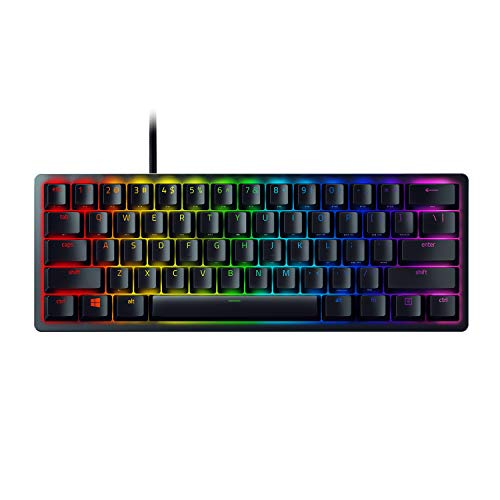
- Linear optical switches for fast, consistent actuation
- Compact 60 percent layout with a small desk footprint
- Doubleshot PBT keycaps that resist legend wear
- Chroma RGB with per-key lighting control

- Aluminum body with a firm, planted feel
- Linear HyperX Red switches suited to gaming and typing
- Double-shot PBT keycaps with side-printed Fn legends
- RGB LED backlighting with NGENUITY software support
All 5 Picks at a Glance
| Product | Specs | Action |
|---|---|---|
| 1. RK ROYAL KLUDGE RK61 — Best value wireless pick |
| Check price on Amazon |
| 2. Razer Huntsman Mini — Best for fast competitive play |
| Check price on Amazon |
| 3. HyperX Alloy Origins 60 — Best overall |
| Check price on Amazon |
 4. Logitech G PRO X 60 — Best wireless pro board |
| Check price on Amazon |
 5. Ducky One 2 Mini Pro — Best for build quality and customisation |
| Check price on Amazon |
Key takeaways
- Compare the best 60 mechanical keyboards for gaming, typing and travel, from compact wireless boards to pro-grade optical models, with switches explained.
As an Amazon Associate I earn from qualifying purchases.
The Short Answer
The best 60 mechanical keyboards pack a full typing and gaming experience into a 61-key layout, dropping the number pad, the function row and the navigation cluster to leave more room for your mouse hand. The HyperX Alloy Origins 60 is the most balanced pick: a 61-key board with an aluminum body, linear switches and double-shot PBT keycaps. If you want wireless freedom at a lower entry point, the RK ROYAL KLUDGE RK61 connects over Bluetooth, 2.4GHz and USB-C and lets you swap switches without soldering. Competitive players should look at the Razer Huntsman Mini and the Logitech G PRO X 60, both built around fast optical switches, while the Ducky One 2 Mini Pro is the pick for anyone who values classic build quality and deep on-board customisation.
A 60 percent board is a different layout, not a shrunken full keyboard: the keys you lose are reached through a function layer. That trade suits many gamers and streamers, but not anyone who leans on a number pad all day. This guide compares five genuine 60 percent mechanical keyboards with 61-key layouts.
Our Top Picks
- Best overall: HyperX Alloy Origins 60 — aluminum body, linear HyperX Red switches, double-shot PBT keycaps, wired USB-C.
- Best value wireless pick: RK ROYAL KLUDGE RK61 — triple-mode connectivity, hot-swappable switches, RGB backlighting, 61 keys.
- Best for fast competitive play: Razer Huntsman Mini — linear optical switches, compact 60 percent layout, doubleshot PBT keycaps.
- Best wireless pro board: Logitech G PRO X 60 — LIGHTSPEED wireless, Bluetooth, GX Optical Tactile switches, LIGHTSYNC RGB.
- Best for build quality and customisation: Ducky One 2 Mini Pro — 60 percent layout, RGB backlighting, double-shot PBT keycaps, Gateron Red switches.
Quick Comparison
| Keyboard | Keys | Switches | Connection | Backlight | Keycaps |
|---|---|---|---|---|---|
| RK ROYAL KLUDGE RK61 | 61 | Hot-swappable RK Brown (this listing) | Bluetooth, 2.4GHz, USB-C wired | RGB | Double-shot |
| Razer Huntsman Mini | 61 | Linear optical | USB-C wired | Chroma RGB | Doubleshot PBT |
| HyperX Alloy Origins 60 | 61 | HyperX Red linear | USB-C wired | RGB LED | Double-shot PBT |
| Logitech G PRO X 60 | 61 | GX Optical Tactile | LIGHTSPEED wireless, Bluetooth, USB-C | LIGHTSYNC RGB | Dual-shot PBT |
| Ducky One 2 Mini Pro | 61 | Gateron Red | USB-C wired (confirm on the listing) | RGB | Double-shot PBT |
How to Choose
Understand the 60 percent layout
A 60 percent keyboard keeps the main letter block, the number row and the modifiers, and removes everything else. Arrows, Home, End, Page Up, Page Down and the function keys live on a second layer, reached by holding the Fn key. If you play first-person shooters or stream from a small desk, the extra mouse space is a real advantage. If you enter numbers all day, a 60 percent board will slow you down, and a 65 percent or tenkeyless board is a better match.
Switch feel matters more than brand
Mechanical switches fall into three broad families. Linear switches travel straight down with no bump and no click, which suits fast double-taps in games. Tactile switches add a small bump partway down so you can feel the key register, which many typists prefer. Clicky switches add a bump and an audible click, which is satisfying at home and loud in a shared room.
Wired or wireless
Three of the boards here are wired only: plug in the USB-C cable and play, with no battery to manage. The RK61 and the Logitech G PRO X 60 add wireless options. Bluetooth suits a laptop or tablet setup, while a 2.4GHz dongle or Logitech LIGHTSPEED connection is the wireless route most competitive players choose, since it is built for low-latency gaming. If you play ranked matches, a dedicated wireless gaming link or a wired connection is the safer choice over plain Bluetooth.
Keycaps and case
Double-shot PBT keycaps, used by four of the five boards here, are moulded in two layers so the legends cannot wear off, and the PBT plastic resists the shine that develops on cheaper ABS caps. The RK61 is the exception: its keycaps are double-shot ABS. The case matters too: the HyperX Alloy Origins 60 uses an aluminum body, which gives it a firm, planted feel and helps it survive being carried in a bag.
Software and on-board controls
The HyperX board uses NGENUITY software, the Logitech board uses G HUB, and the RK61 has its own software. Ducky takes a different path, with deep on-board controls that let you change lighting and macros from the keyboard itself, without installing anything. If you move between computers often, on-board controls are a genuine advantage; if you want per-game lighting profiles, a software suite is the better tool.
The Picks in Detail
1. RK ROYAL KLUDGE RK61 — Best value wireless pick
- Triple-mode connectivity: Bluetooth, 2.4GHz and USB-C wired
- Hot-swappable switches with no soldering required
- 61-key 60 percent layout with double-shot keycaps
- Coiled aviator cable included in the box
The RK61 is the most flexible board in this guide, and the easiest to recommend to a first-time compact keyboard buyer. Its listing describes a 60 percent mechanical keyboard with 61 keys, triple-mode connectivity over Bluetooth, 2.4GHz wireless and USB-C wired, and a hot-swappable PCB. This listing ships with RK Brown switches: a gentle tactile bump with no click, a sensible middle ground for gaming and typing.
The headline feature is the hot-swappable design: the switches pull out of the PCB without soldering, so you can replace a worn switch or change the whole board to a different feel later. The board includes a coiled aviator cable, and its RGB backlighting covers 18 RGB modes and 8 monochrome modes according to the listing. The listing states a 1450mAh battery, a 1000Hz polling rate and an 8-degree ergonomic angle, and dimensions of 11.4 x 3.9 x 1.7 inches. It pairs with up to three devices over Bluetooth, so one board can serve a laptop, a desktop and a tablet.
Pros:
Cons:
2. Razer Huntsman Mini — Best for fast competitive play
- Linear optical switches for fast, consistent actuation
- Compact 60 percent layout with a small desk footprint
- Doubleshot PBT keycaps that resist legend wear
- Chroma RGB with per-key lighting control
The Razer Huntsman Mini is the competitive gamer’s entry in this guide. This listing is the linear optical switch version in black, built on a compact 60 percent layout with a detachable USB-C cable. Optical switches register with a beam of light instead of a metal contact, which is why this family is known for fast, consistent actuation, and the linear travel suits rapid repeated presses and strafing movements.
The board uses doubleshot PBT keycaps and Chroma RGB lighting, tuned through Razer’s software for per-key effects and game integrations. The aluminum construction keeps the small frame rigid, and the detachable cable makes the board easy to pack for a LAN event. On-board memory is stated on the wider Huntsman Mini family — confirm on the listing whether this applies to this exact variant. It is a wired 60 percent gaming keyboard built around one idea: the fastest possible key press in the smallest possible frame.
Pros:
Cons:
3. HyperX Alloy Origins 60 — Best overall
- Aluminum body with a firm, planted feel
- Linear HyperX Red switches suited to gaming and typing
- Double-shot PBT keycaps with side-printed Fn legends
- RGB LED backlighting with NGENUITY software support
The HyperX Alloy Origins 60 is the best overall pick because it gets the fundamentals right with no weak point. Its listing describes an ultra-compact 60 percent mechanical gaming keyboard with 61 keys, linear HyperX Red switches, double-shot PBT keycaps, RGB LED backlighting and NGENUITY software compatibility, in model number HKBO1S-RB-US/G. The aluminum case gives the board a dense, planted feel that cheaper plastic boards cannot match, and helps it survive daily transport.
HyperX Red switches are linear, with a smooth travel and a light touch, which suits both fast gaming and long typing sessions. The double-shot PBT keycaps have their legends moulded through the cap, so they will not fade or wear smooth, and the side-printed secondary legends make the Fn layer easier to learn. RGB lighting is controlled through NGENUITY software, which also handles macros and key remapping, and the wired USB-C connection keeps input latency out of the picture entirely.
Pros:
Cons:
4. Logitech G PRO X 60 — Best wireless pro board
- LIGHTSPEED wireless plus Bluetooth and USB-C wired
- GX Optical Tactile switches: fast actuation with a tactile bump
- Dual-shot PBT keycaps with clear secondary legends
- LIGHTSYNC RGB with G HUB software support
The Logitech G PRO X 60 is the only board in this guide built from the start for professional wireless play. This listing is the black model with GX Optical Tactile switches, described as an ultra-compact 60 percent mechanical keyboard for Windows PC with LIGHTSYNC RGB, dual-shot PBT keycaps and model number 920-011902. It connects over LIGHTSPEED wireless, Bluetooth and USB-C, so it covers a desktop setup, a laptop and a tournament bag with the same board.
GX Optical Tactile switches combine the speed of an optical design with a tactile bump, giving competitive players fast registration plus the feedback that tells your fingers a key has registered. Logitech states that the board was designed with input from esports athletes, and the secondary functions are printed on the keycaps so the Fn layer is easy to learn under pressure. LIGHTSYNC RGB lighting is managed through G HUB, which also handles key remapping and game profiles.
Pros:
Cons:
5. Ducky One 2 Mini Pro — Best for build quality and customisation
- Classic Ducky build quality in a 60 percent layout
- Double-shot PBT keycaps with long-lasting legends
- Gateron Red linear switches for smooth, fast presses
- Deep on-board controls with no software install required
The Ducky One 2 Mini Pro carries the name that made the 60 percent layout popular, and the Pro model brings the classic formula up to date. Its listing describes a 60 percent keyboard with a 61-key layout, RGB backlighting, double-shot PBT keycaps and Gateron Red switches, first available in March 2025. Gateron Red switches are linear, with a smooth travel that suits fast gaming and quiet typing.
Ducky’s strength has always been on-board control: the One 2 Mini Pro lets you change lighting, record macros and adjust settings from the keyboard itself, using key combinations rather than a software install. That matters if you use the board across several computers or on a machine where you cannot install drivers. It does not chase wireless modes; instead it delivers a well-built 60 percent board with excellent keycaps, smooth linear switches and a hot-swappable PCB.
Pros:
Cons:
Who Should Choose What
- First compact keyboard: Start with the RK61. Triple-mode wireless and hot-swappable switches make it forgiving to learn on, and you can change the switch feel later without buying a new board.
- Gaming-first buyer: Pick the HyperX Alloy Origins 60 for its aluminum body and linear switches, or the Razer Huntsman Mini for optical switch speed.
- Wireless tournament player: The Logitech G PRO X 60 is the clear choice, with a dedicated gaming wireless link, Bluetooth and a wired fallback.
- Typist who also games: The Ducky One 2 Mini Pro and the RK61 with Brown switches are the most typing-friendly options here.
- Small desk or travel setup: Any of the five works, but the RK61 and the Huntsman Mini are the lightest to pack.
- Mac user: The RK61 is the most Mac-friendly pick, with system switching built in. The Logitech and HyperX boards are Windows-focused, so confirm on the listing that the software features you want work on your system.
Common Mistakes
Buying a 60 percent board for number-heavy work. If your day involves spreadsheets or data entry, the missing number pad will cost you time every day. Pair it with a separate number pad if you need one, or choose a larger layout.
Assuming all 60 percent boards have arrow keys. They do not. Arrows live on the Fn layer, and the exact combination varies by brand. Before you buy, check how your chosen board reaches the arrows, and be honest about how often you use them.
Picking switches by brand name alone. Two boards can share the word “Red” in the switch name and feel different, because switch names are not standardised across brands. Read the switch description on the listing: linear, tactile or clicky matters more than the colour or the brand.
Forgetting to check the listing variant. Most of these boards come in several switch and colour variants, each with its own listing. The ASIN in this guide points to one specific variant, so check the switch type, colour and layout on the listing before you order.
Ignoring the function layer learning curve. The first week with a 60 percent board is slower, as function-key combinations for volume, media and navigation need practice. Give it a full week of daily use before you decide whether the layout works for you.
Skipping the keycap check. Printed ABS legends wear smooth and shiny with use, while double-shot PBT legends last. Four of the five boards here use double-shot PBT keycaps (the RK61 uses double-shot ABS) — if you compare other boards elsewhere, keycap material is one of the first specifications to check.
FAQ
What does 60 percent mean on a keyboard?
It means the keyboard keeps about 60 percent of a full-size layout — the letter block, number row and modifiers, with 61 keys in total. The number pad, function row and navigation keys are removed, and those functions move to a second layer reached with the Fn key.
Is a 60 percent keyboard good for gaming?
Yes, for most game types. The small footprint leaves more room for mouse movement, which suits first-person shooters and fast-paced games. The trade is the Fn layer: if a game needs frequent function-key or arrow-key presses, a larger layout may be more comfortable.
Is a 60 percent keyboard good for typing?
It can be, once you learn the Fn layer. The main typing keys are in their normal positions, so touch typing feels familiar. Arrows, Home, End and function keys need a key combination, so heavy writers who use those keys constantly may prefer a 65 percent board.
What is the difference between 60 percent and 65 percent keyboards?
A 65 percent board adds a column of keys on the right, usually including dedicated arrows and a Delete key, while keeping the compact footprint. A 60 percent board has 61 keys and no dedicated arrows — the 65 percent layout is the middle ground if you want compact size with easier arrow access.
Are hot-swappable keyboards worth it?
Hot-swappable boards let you pull switches out and press new ones in without soldering, which makes it easy to change the typing feel or replace a faulty switch. The RK61 and the Ducky One 2 Mini Pro are the hot-swappable picks here, and either is worth choosing if you are unsure which switch feel suits you.
Do 60 percent keyboards work with Mac?
Most do, including the boards in this guide, but the software for lighting and remapping is often Windows only. The RK61 handles system switching from the board itself, which makes it the most Mac-friendly pick here.
Conclusion
The best 60 mechanical keyboards prove that a small board does not have to feel like a compromise. The HyperX Alloy Origins 60 is the best overall pick, with an aluminum body, linear switches and double-shot PBT keycaps. The RK ROYAL KLUDGE RK61 is the flexible wireless choice, with triple-mode connectivity and hot-swappable switches. The Razer Huntsman Mini brings optical switch speed to competitive play, the Logitech G PRO X 60 brings pro-grade wireless to a 60 percent frame, and the Ducky One 2 Mini Pro brings classic build quality and on-board control.
Choose by how you play and type, not by the specification sheet alone. If you game on a small desk and want the most mouse room, any of these five will serve you well. If you type all day and game at night, lean toward the tactile RK61 or the Ducky.
More from Amazon
Programs that pair well with the guide above. Offers and eligibility are set by Amazon and may change.
Free shipping on eligible items, Prime Video and more. Eligible new members can start with a free trial.
Start a Prime free trialAd-free music streaming. Eligible new subscribers can start with a free trial.
Try Music Unlimited freeA Prime membership for ages 18-24 with a trial period. Eligibility is set by Amazon.
See Prime for Young AdultsAudiobooks and podcasts to listen to on the go. Eligible new members can start with a free trial.
Try Audible freeAs an Amazon Associate we earn from qualifying purchases.









