Our Short List of 3

- Best for: A bright, standard-size meeting room that presents spreadsheets and slides all day.
- Brand: Epson
- Model: EX3280
- Display technology: 3-chip 3LCD
- Native resolution: XGA, 1024 by 768

- Best for: Small meeting rooms and classrooms where the projector sits close to the screen.
- Brand: ViewSonic
- Model: PS502X
- Brightness: 4,000 ANSI lumens
- Native resolution: XGA, 1024 by 768

- Best for: Widescreen presentations and video in changing rooms where portability matters.
- Brand: Epson
- Model: CO-W01
- Display technology: 3-chip 3LCD
- Brightness: 3,000 lumens color and white brightness
All 3 Picks at a Glance
| Product | Specs | Action |
|---|---|---|
| Epson EX3280 3-Chip 3LCD XGA Projector |
| Check price on Amazon |
| ViewSonic PS502X Short Throw Projector |
| Check price on Amazon |
| Epson EpiqVision Flex CO-W01 Portable Projector |
| Check price on Amazon |
Key takeaways
- Compare digital projectors for business presentations, with brightness, resolution, throw and speaker details from their listings, for meeting rooms of different sizes.
Buying a projector for business use is really a decision about light and text. The room’s ambient light decides how much brightness you need before a spreadsheet stays readable, and the size of your smallest text decides whether XGA resolution is enough or widescreen detail matters. A projector that dazzles with video in a dark room can still fail a Monday morning meeting if the blinds stay open and the figures wash out, which is why business buyers should start from the room, not from the specification headline.
This guide is for office managers equipping a meeting room, consultants who present in client spaces, and trainers who need slides and video to read clearly for a full day. It covers general business use rather than any single budget band. The three projectors below were chosen from their Amazon listings and manufacturer details, and they divide neatly by room type: a standard-throw XGA workhorse, a short-throw model for small rooms, and a widescreen portable for mixed presentation and video work.
Quick Picks
As an Amazon Associate we earn from qualifying purchases.
| Product | Best for | Key spec from title |
|---|---|---|
| Epson EX3280 3-Chip 3LCD XGA Projector | Bright, well-lit meeting rooms with standard throw distance | 3,600 lumens color and white brightness, HDMI, built-in speaker |
| ViewSonic PS502X Short Throw Projector | Small meeting rooms where the projector sits close to the screen | 4,000 lumens XGA HDMI short throw projector for office |
| Epson EpiqVision Flex CO-W01 Portable Projector | Widescreen slides and video in rooms that change often | 3,000 lumens color and white brightness, 5W speaker |
How to Choose
Brightness is the first business specification
Ambient light is the enemy of projected text, so brightness decides whether people can take notes with the lights on. The projectors here range from 3,000 to 4,000 lumens of rated brightness, and the two Epson models quote equal color and white brightness, which matters because a chart’s colored sections fade faster than black text when color brightness lags. For a small room with controlled light, 3,000 lumens can be enough; for a glass-walled meeting room, favour the higher figures. Judge brightness against your worst normal meeting, at midday with the blinds as you actually keep them, not against a darkened demo.
Resolution should follow your smallest content
Slides forgive a lot; spreadsheets do not. XGA resolution, 1024 by 768, remains common in business projectors like the EX3280 and the PS502X, and it renders standard slides and large figures cleanly. Widescreen WXGA, as in the CO-W01, suits modern laptops whose screens are wide, so slides fill the image without black bars or scaling. If your meetings lean on detailed dashboards, design files or video, the wider format earns its place. If they lean on bullet slides and printed handouts, XGA is a rational match. Match the projector to the laptop fleet people will actually connect, including older machines with only HDMI out.
Throw distance decides where the projector can live
A standard-throw projector needs a table or ceiling mount several feet from the screen, while a short-throw model like the PS502X, with a throw ratio of 0.616, produces a large image from close range. Short throw removes the shadow problem, where a presenter walking to the screen blocks the image, and it suits small rooms where the table ends near the wall. Standard throw suits a fixed installation with a ceiling mount and a screen across the room. Measure your room before choosing: the distance available between the projector position and the screen is a fact no specification can change.
Speakers, ports and lamp life decide daily friction
Business projectors earn their keep in small conveniences. A built-in speaker matters when video joins the meeting: the PS502X lists a 16W speaker, while the portable Epson models list smaller speakers suited to a huddle rather than a hall. Ports decide setup speed, and dual HDMI, as the ViewSonic lists, lets two laptops stay connected. Finally, look at the light source: the PS502X uses a lamp rated at 4,000 hours in normal mode and 12,000 hours in its dynamic eco mode, so a heavily used training room should budget for lamp care, while a laser model would trade that upkeep for a different design entirely.
The 3 Best Options
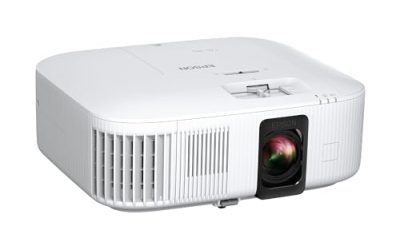
Epson EX3280 3-Chip 3LCD XGA Projector
- Best for: A bright, standard-size meeting room that presents spreadsheets and slides all day.
- Brand: Epson
- Model: EX3280
- Display technology: 3-chip 3LCD
- Native resolution: XGA, 1024 by 768
A bright, standard-size meeting room that presents spreadsheets and slides all day.
The native XGA image is 4 by 3 in shape, so widescreen laptop output will not fill the frame the way a WXGA model does.
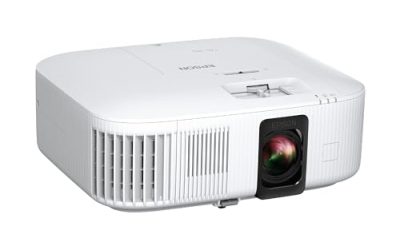
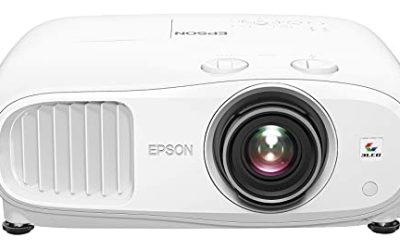
This is the standard meeting-room choice. Its 3,600 lumens of color and white brightness are aimed at large-group presentations, spreadsheets and videos in well-lit rooms, and the 3-chip 3LCD design with a 15,000 to 1 contrast ratio keeps text edges firm. It connects by HDMI, carries a built-in speaker for the occasional video clip, and accepts content up to 4K input according to the manufacturer’s description, which gives modern laptops headroom even though the native image is XGA. For an office that needs one dependable projector on a cart or a ceiling mount, this is the balanced option in this guide.
ViewSonic PS502X Short Throw Projector
- Best for: Small meeting rooms and classrooms where the projector sits close to the screen.
- Brand: ViewSonic
- Model: PS502X
- Brightness: 4,000 ANSI lumens
- Native resolution: XGA, 1024 by 768
Small meeting rooms and classrooms where the projector sits close to the screen.
It is a lamp model, so a room that runs it all day should plan for lamp replacement within its rated hours.
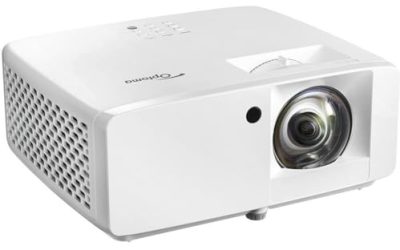
Choose this model when the room is small and the projector has to sit close to the screen. It is the brightest unit here at 4,000 ANSI lumens, its short-throw lens works at a 0.616 throw ratio, and the image size runs from 60 to 300 inches according to its specifications. The built-in speaker is rated at 16W, the strongest here, and it lists two HDMI 1.4 inputs alongside VGA in and out, which suits a room where a desktop and a guest laptop both stay connected. Its lamp is rated at 4,000 hours in normal use and 12,000 hours in dynamic eco mode, and the whole unit weighs 2.87 kilograms.
Epson EpiqVision Flex CO-W01 Portable Projector
- Best for: Widescreen presentations and video in changing rooms where portability matters.
- Brand: Epson
- Model: CO-W01
- Display technology: 3-chip 3LCD
- Brightness: 3,000 lumens color and white brightness
Widescreen presentations and video in changing rooms where portability matters.
At 3,000 lumens it is the least bright option here, so a glass-walled room at midday will push it harder than the other two.
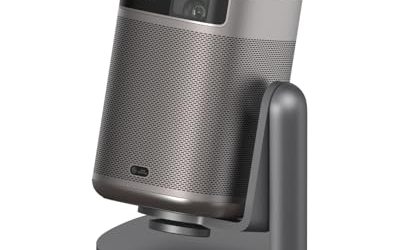
Pick this projector when the work moves between rooms and the content mixes slides with video. It is a portable 3-chip 3LCD model with 3,000 lumens of color and white brightness, a widescreen image that suits modern laptops, and a stated picture size of up to 300 inches for larger spaces. The built-in speaker is 5W, enough for a small group around a table, and the listing positions it for work and streaming as well as home entertainment, which fits the hybrid pattern of a projector that presents by day and shows video after hours. At the lowest brightness here, it prefers rooms where the light can be at least partly controlled.
Which One Fits Your Situation
Your meeting room is bright and the blinds stay open
Pick the Epson EX3280 if the room has a normal projector distance, or the ViewSonic PS502X if it does not. Both quote brightness figures built for lit rooms, 3,600 and 4,000 lumens respectively. The deciding factor is geometry: measure from the intended projector position to the screen, and let that distance, not the headline brightness, choose between standard and short throw.
Your room is small and presenters keep blocking the image
Pick the ViewSonic PS502X. Its 0.616 short throw puts a large image on the screen from close range, so the presenter can stand beside the screen without casting a shadow across the figures. The 16W speaker also covers video sound for a small room without extra equipment, and the dual HDMI inputs let the room’s own computer stay plugged in.
You present in different rooms and venues each week
Pick the Epson EpiqVision Flex CO-W01. It is the portable design here, its widescreen image matches the laptops most people now carry, and it can still produce a large picture when a venue offers the space. Carry an HDMI cable and arrive early enough to dim what light you can, since its 3,000 lumens reward a partly darkened room.
Your meetings are mostly spreadsheets and figures
Start with the Epson EX3280. Equal color and white brightness at 3,600 lumens helps colored charts stay legible, and XGA renders standard office documents cleanly at normal viewing distances. If your figures live in widescreen dashboards instead, step across to the CO-W01 for the wider frame, and accept the lower brightness as the trade for the format.
Common Mistakes
- Choosing by video performance in a dark room, then discovering that slides and spreadsheets wash out in the lit room where meetings actually happen.
- Ignoring throw distance and buying a standard-throw projector for a small room, so the image is tiny or the presenter stands inside the beam all meeting.
- Matching a widescreen laptop to a 4 by 3 projector without thinking, and losing screen area to bars or scaling on every slide deck the team owns.
- Forgetting the speaker until the first video plays, when a small built-in speaker has to fill a room it was never sized for and nobody can follow the audio.
- Never budgeting for a lamp in a lamp-based model, so the projector dims slowly for months and the replacement cost arrives as a surprise in a busy quarter.
Frequently Asked Questions
How many lumens does a business projector need?
It depends on the room’s light and the screen size. The projectors here run from 3,000 to 4,000 lumens: the lower figure suits smaller rooms where light can be controlled, while 3,600 to 4,000 lumens is the safer zone for well-lit meeting rooms where notes are taken with the lights on. Bigger screens spread the same brightness thinner, so a large image in a bright room needs the top of that range.
Is XGA resolution enough for presentations?
For standard slides, documents and large figures, yes: both XGA models here are built for exactly that work, and text stays readable at normal meeting distances. Widescreen WXGA, like the CO-W01, is the better match when your laptops and dashboards are wide format. Very fine spreadsheet detail at a large screen size is the case that pushes buyers toward higher resolutions than any of these three.
What is the advantage of a short-throw projector in an office?
A short-throw model makes a large image from a short distance, so it fits small rooms and keeps the presenter out of the beam. The PS502X works at a 0.616 throw ratio and covers 60 to 300 inch images. The trade is placement discipline: the projector must sit at the right distance and square to the screen, because small misalignments show quickly at short range.
Can one projector handle both meetings and video?
Yes, within limits. All three models here list business use alongside video-friendly features such as built-in speakers and HDMI input, and the CO-W01 is explicitly positioned for work and entertainment. The honest limit is sound and darkness: a built-in speaker suits a meeting room, not a hall, and video looks its best in the same controlled light that makes presentation text easy to read.
More from Amazon
Programs that pair well with the guide above. Offers and eligibility are set by Amazon and may change.
Free shipping on eligible items, Prime Video and more. Eligible new members can start with a free trial.
Start a Prime free trialAd-free music streaming. Eligible new subscribers can start with a free trial.
Try Music Unlimited freeA Prime membership for ages 18-24 with a trial period. Eligibility is set by Amazon.
See Prime for Young AdultsAudiobooks and podcasts to listen to on the go. Eligible new members can start with a free trial.
Try Audible freeAs an Amazon Associate we earn from qualifying purchases.