
Our Short List of 3
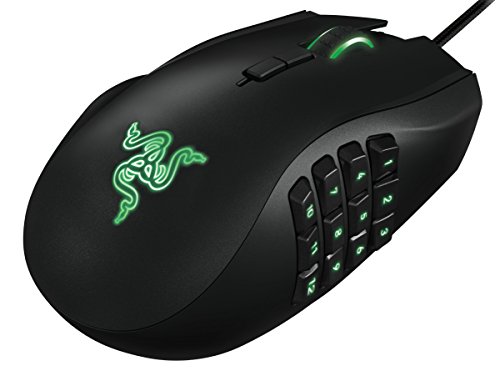
- Best for: A left-handed MMO or MOBA player who wants a full 12-button thumb grid under the left thumb and accepts an older wired design to get a genuinely mirrored shell.
- Hand orientation: Left-handed (true mirrored ergonomic shell)
- Sensor: 8,200 DPI laser sensor, adjustable
- Thumb buttons: 12 programmable thumb buttons
- Connection: Wired USB

- Best for: A left-handed FPS player who wants a light, current wireless mouse with working thumb buttons on the correct side and nothing extra bolted onto the shell.
- Hand orientation: Ambidextrous (symmetrical shell)
- Sensor: HERO 2, up to 44,000 DPI
- Side buttons: Up to 4 magnetic side buttons, switchable between sides, covers included
- Switches: LIGHTFORCE hybrid switches

- Best for: A left-handed player who wants flagship wireless performance and battery life, with side buttons on the flank their thumb uses and the option to add weight.
- Hand orientation: Ambidextrous (symmetrical shell)
- Sensor: HERO 25K, up to 25,600 DPI
- Buttons: Up to 11 programmable; removable side buttons (2 left, 2 right) and covers included
- Battery life: 140+ hours per charge
All 4 Picks at a Glance
| Product | Specs | Action |
|---|---|---|
| Razer Naga Left-Handed Edition |
| Check price on Amazon |
| Logitech G PRO 2 Lightspeed |
| Check price on Amazon |
| Logitech G903 Lightspeed |
| Check price on Amazon |
 Corsair M75 Wireless |
| Check price on Amazon |
Key takeaways
- Left-handed gaming mice compared: one true mirrored shell plus ambidextrous models with thumb buttons you can move to the side your left hand uses.
A left-handed player shopping for a gaming mouse faces a decision right-handed players never think about: almost every shell on the shelf is sculpted for a right hand, so the real choice is between the rare mouse that is genuinely mirrored for the left hand and a symmetrical mouse whose side buttons can be moved to the flank your thumb actually rests on. Picking wrong means a thumb with nothing to press and a ring finger doing work it was never shaped for.
This guide is for left-handed MMO players who need a full thumb grid, left-handed FPS players who want a light wireless mouse, and anyone who shares a desk or switches genres. Every pick was chosen from the names and specifications on its Amazon product page. Only one pick below is a true left-handed design; the other three are ambidextrous, and each entry says so plainly.
Quick Picks
As an Amazon Associate we earn from qualifying purchases
| Product | Best for | Key spec from title |
|---|---|---|
| Razer Naga Left-Handed Edition | Left-handed MMO players who need a full thumb grid | 12 programmable thumb buttons, 8,200 DPI |
| Logitech G PRO 2 Lightspeed | Left-handed FPS players who want light wireless speed | 44K DPI sensor, switchable magnetic side buttons |
| Logitech G903 Lightspeed | Left-handed players who want flagship battery life | HERO 25K sensor, 140+ hour battery |
| Corsair M75 Wireless | Left-handed players who want swappable buttons and long battery | 26,000 DPI sensor, swappable side buttons |
How to Choose
Decide Between a Mirrored Shell and a Symmetrical One
A true left-handed mouse is a mirror image of a right-handed ergonomic design: the thumb rest, the button grid and the palm swell all sit where a left hand expects them. Razer is the only major gaming brand still listing one, and its Naga Left-Handed Edition is an older wired model. Symmetrical mice make no promise about contour; the shell feels the same in either hand, which suits claw and fingertip grips well but gives a palm-grip player less support. Decide which trade you accept before comparing sensors, because shape decides comfort over a long session more than any specification number does.
Check Where the Thumb Buttons Sit, Not Just How Many
A button count means nothing if the buttons are fixed under your ring finger. For a left-handed player, the useful layouts are a grid built onto the right flank, as on the Naga, or side buttons that physically move: the G PRO 2 Lightspeed clips magnetic buttons onto either side, the G903 ships removable buttons for both flanks, and the Corsair M75 swaps its side-button sets between sides. Read the listing for words like switchable, swappable or removable. A symmetrical mouse with buttons moulded on the left side only is a right-handed mouse wearing a symmetric costume.
Put Sensor Numbers in Perspective
Listings compete on maximum DPI, and the gap looks dramatic: 8,200 on the older Naga against 44,000 on the G PRO 2 Lightspeed. In play, almost everyone uses a small fraction of the top figure, and every sensor here tracks far beyond what a hand can deliberately control. What matters more is that the sensor is optical or a well-behaved laser with no listed smoothing surprises, and that the mouse holds your chosen setting in onboard memory or software you are willing to run. Treat headline DPI as a tiebreaker between mice you already like, never as the reason to buy one.
Weigh Wired Simplicity Against Wireless Freedom
The only true left-handed pick here is wired, which means no battery to manage and no receiver to lose, but a cable your left hand drags across the desk unless you add a bungee. The three ambidextrous picks are wireless with rechargeable batteries rated from 105 to over 140 hours per charge in their listings, so charging becomes a weekly habit rather than a mid-match risk. Wireless also means a USB receiver occupying a port and, on some models, optional extras such as charging mats sold separately. Choose based on your desk, not on fashion.
The 4 Best Options
Razer Naga Left-Handed Edition
- Best for: A left-handed MMO or MOBA player who wants a full 12-button thumb grid under the left thumb and accepts an older wired design to get a genuinely mirrored shell.
- Hand orientation: Left-handed (true mirrored ergonomic shell)
- Sensor: 8,200 DPI laser sensor, adjustable
- Thumb buttons: 12 programmable thumb buttons
- Connection: Wired USB
A left-handed MMO or MOBA player who wants a full 12-button thumb grid under the left thumb and accepts an older wired design to get a genuinely mirrored shell.
This listing dates from 2013 and its stock comes and goes, so confirm a live offer before ordering; it is the older laser-sensor edition, not the later optical-sensor Naga that shares the name.
This is the one genuine left-handed gaming mouse in the guide: a mirrored ergonomic shell built for the left hand, with its grid of 12 programmable thumb buttons on the right flank where a left thumb actually rests. That layout is why MMO and MOBA players keep seeking it out, because no symmetrical design can fit a full thumb grid under the correct thumb. The listing for this ASIN is the original edition, with an 8,200 DPI laser sensor, a wired USB connection and a tilt-click scroll wheel, so read it as the older model it is rather than a current flagship.
Watch out for: This listing dates from 2013 and its stock comes and goes, so confirm a live offer before ordering; it is the older laser-sensor edition, not the later optical-sensor Naga that shares the name.
Logitech G PRO 2 Lightspeed
- Best for: A left-handed FPS player who wants a light, current wireless mouse with working thumb buttons on the correct side and nothing extra bolted onto the shell.
- Hand orientation: Ambidextrous (symmetrical shell)
- Sensor: HERO 2, up to 44,000 DPI
- Side buttons: Up to 4 magnetic side buttons, switchable between sides, covers included
- Switches: LIGHTFORCE hybrid switches
A left-handed FPS player who wants a light, current wireless mouse with working thumb buttons on the correct side and nothing extra bolted onto the shell.
The shape is symmetrical, so there is no left-hand contour or thumb rest; you also have to clip the buttons onto your side yourself and keep the spare covers somewhere safe.
The G PRO 2 Lightspeed is an ambidextrous mouse, not a left-handed shell, and its listing says so while solving the button problem properly: up to four magnetic side buttons clip onto either flank, with blank covers for the side you leave empty, so a left-handed player runs real thumb buttons on the right side. The symmetrical 80 gram shape suits claw and fingertip grips, the HERO 2 sensor is listed up to 44K DPI, and LIGHTSPEED wireless with USB-C charging keeps it current in a way the older wired pick cannot match.
Watch out for: The shape is symmetrical, so there is no left-hand contour or thumb rest; you also have to clip the buttons onto your side yourself and keep the spare covers somewhere safe.
Logitech G903 Lightspeed
- Best for: A left-handed player who wants flagship wireless performance and battery life, with side buttons on the flank their thumb uses and the option to add weight.
- Hand orientation: Ambidextrous (symmetrical shell)
- Sensor: HERO 25K, up to 25,600 DPI
- Buttons: Up to 11 programmable; removable side buttons (2 left, 2 right) and covers included
- Battery life: 140+ hours per charge
A left-handed player who wants flagship wireless performance and battery life, with side buttons on the flank their thumb uses and the option to add weight.
It is the heaviest mouse here even before the optional weight, and the button layout needs setting up in Logitech software on day one; the spare caps are small and easy to lose.
The G903 is the ambidextrous flagship a left-handed player can configure properly. Its listing describes a configurable button layout for left- or right-handed use, with removable side buttons that can be fitted on both sides of the symmetrical shell, giving up to 11 programmable functions once the layout is set. The HERO 25K sensor tops out at 25,600 DPI, the battery is rated at more than 140 hours per charge, and the dual-mode tilt wheel adds horizontal scrolling. An optional 10 gram weight lets you tune the feel, and POWERPLAY compatibility allows charging on a compatible mat.
Watch out for: It is the heaviest mouse here even before the optional weight, and the button layout needs setting up in Logitech software on day one; the spare caps are small and easy to lose.
Corsair M75 Wireless
- Best for: A left-handed player who wants a current wireless mouse with movable side buttons, a mid-weight shell and battery life that stretches past a week of play.
- Hand orientation: Ambidextrous
- Sensor: CORSAIR MARKSMAN optical sensor, 26,000 DPI
- Side buttons: Swappable side buttons
- Switches: Optical switches
A left-handed player who wants a current wireless mouse with movable side buttons, a mid-weight shell and battery life that stretches past a week of play.
The shell is symmetrical with no left-hand contour, and button swapping is a physical change rather than a software toggle, so settle your layout before a session rather than during one.
Corsair’s M75 Wireless is an ambidextrous mouse built around swappable side buttons, so the button set can be moved to the side a left-handed thumb uses instead of sitting fixed on the wrong flank. Its MARKSMAN optical sensor is rated at 26,000 DPI, the shell weighs 89 grams, and the listing gives an average battery life of 105 hours, with SLIPSTREAM wireless, Bluetooth and a wired USB connection covering desk and travel use. Optical switches handle the main clicks. It is the middle path here: lighter than the G903, longer-lasting per charge than the G PRO 2, and current rather than vintage.
Watch out for: The shell is symmetrical with no left-hand contour, and button swapping is a physical change rather than a software toggle, so settle your layout before a session rather than during one.
Which One Fits Your Situation
You Play MMOs and Need Spells Under Your Thumb
Take the Razer Naga Left-Handed Edition while its listing has a live offer: it is the only pick here with 12 thumb buttons on the correct side for a left hand, and no ambidextrous mouse in this guide can reproduce that grid. Accept the wired cable and the older sensor as the price of a genuinely mirrored shell, and order a cable bungee if your desk setup makes the drag noticeable during long raid sessions.
You Play Competitive Shooters Left-Handed
The Logitech G PRO 2 Lightspeed fits this desk best. At 80 grams with a symmetrical shell, it moves the way a fingertip or claw grip expects, the magnetic buttons clip onto your thumb side in seconds, and the HERO 2 sensor and LIGHTSPEED connection are current flagship hardware. Blank off the far side so your ring finger never fires an accidental input mid-round, and store the spare buttons in the box rather than a drawer.
You Want One Mouse for Every Genre on the Desk
Choose the Logitech G903 Lightspeed if your week mixes shooters, strategy and desktop work. The configurable layout lets you run a left-handed button map with up to 11 programmable functions, the tilt wheel helps in timelines and spreadsheets, and the battery rating above 140 hours means charging rarely interrupts anything. It is heavier than the FPS picks, so players who flick at low sensitivity all evening may prefer the G PRO 2 instead.
You Want Wireless Freedom Without Flagship Bulk
The Corsair M75 Wireless is the balanced option: swappable side buttons for your left thumb, an 89 gram shell that will not tire a wrist over a long session, and 105 hours of rated battery life. Bluetooth makes it easy to pair with a laptop away from your main desk, while SLIPSTREAM covers play at home. If you switch between a gaming PC and a work machine daily, this is the pick that asks the least of you.
Common Mistakes
- Assuming a symmetrical shell means the mouse suits a left hand, when its side buttons are moulded on the left flank only and land under your ring finger.
- Chasing the highest DPI figure on the listing while ignoring where the thumb buttons sit, which is the detail that decides whether the mouse works for you at all.
- Buying the Naga Left-Handed Edition without checking the listing is live, since that 2013 listing’s availability comes and goes.
- Clipping swappable buttons onto your side and throwing the covers and spare buttons away, then being unable to reconfigure or resell the mouse later.
- Leaving the far-side buttons active on an ambidextrous mouse, so a ring or pinky finger triggers inputs you never intended during a match.
Frequently Asked Questions
Is the Razer Naga Left-Handed Edition still being made?
The Amazon listing used here is the original edition first available in 2013, and the listing itself does not mark the model as discontinued by the manufacturer. Availability on that ASIN is intermittent rather than steady, which is why this guide treats the three ambidextrous flagships as the dependable route and the Naga as the pick to grab when its offer is live.
Can a left-handed player use an ambidextrous mouse comfortably?
Yes, provided the side buttons can move. A symmetrical shell feels the same in either hand, and models like the G PRO 2 Lightspeed, G903 and Corsair M75 let you fit working buttons on the right flank where a left thumb rests. What you give up versus a true left-handed design is the sculpted contour and thumb rest, which palm-grip players notice most over long sessions.
Should I swap the primary click buttons in software for left-handed use?
Many left-handed players do, so the index finger handles the primary click as it would on a right-handed setup, and both Windows and Logitech or Corsair software allow the swap. Others keep the standard layout because shared computers and work machines stay familiar. There is no performance difference; pick the arrangement your hand already expects, and set it once per mouse profile.
Why are there so few true left-handed gaming mice?
Left-handed players are a minority of buyers, and a mirrored shell needs its own moulds and production run, so most brands choose a symmetrical shell with movable buttons instead. That is why the only genuine left-handed option here is an older Razer model, while every current flagship is ambidextrous. If a mirrored shape matters most, check the Naga listing first and buy when it is live.
More from Amazon
Programs that pair well with the guide above. Offers and eligibility are set by Amazon and may change.
Free shipping on eligible items, Prime Video and more. Eligible new members can start with a free trial.
Start a Prime free trialAd-free music streaming. Eligible new subscribers can start with a free trial.
Try Music Unlimited freeA Prime membership for ages 18-24 with a trial period. Eligibility is set by Amazon.
See Prime for Young AdultsAudiobooks and podcasts to listen to on the go. Eligible new members can start with a free trial.
Try Audible freeAs an Amazon Associate we earn from qualifying purchases.









