
Our Short List of 3

- Best for: Large single-story homes that need the widest rated coverage from one unit.
- WiFi 7 (802.11be) tri-band router, BE19000 class
- Wireless speed up to 19 Gbps
- Coverage up to 3,500 sq. ft.
- Supports up to 200 connected devices

- Best for: Multi-gig households that want one fast wired room alongside wide WiFi coverage.
- WiFi 7 tri-band router
- Wireless speed up to 17 Gbps
- Coverage up to 3,300 sq. ft.
- Supports up to 150 connected devices
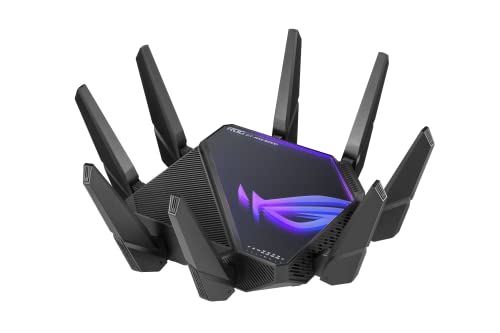
- Best for: Gaming homes that need reach across floors and plenty of wired ports.
- Quad-band WiFi 6E (802.11ax) gaming router
- Wireless speed up to 16000 Mbps
- RangeBoost Plus coverage technology
- 2.0 GHz quad-core processor
All 4 Picks at a Glance
| Product | Specs | Action |
|---|---|---|
| NETGEAR Nighthawk RS700S |
| Check price on Amazon |
| NETGEAR Nighthawk BE17000 |
| Check price on Amazon |
| ASUS ROG Rapture GT-AXE16000 |
| Check price on Amazon |
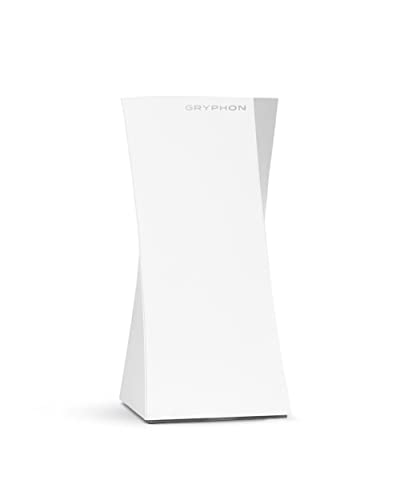 Gryphon Tower |
| Check price on Amazon |
Key takeaways
- One router, whole house: four single routers rated for up to 3,500 sq. ft. of coverage, compared on antennas, bands, ports and WiFi generation.
The real decision behind a long range router is whether one box can honestly cover your floor plan, or whether you are paying flagship money for a coverage number measured in an empty test space. Every rating below is a manufacturer figure, and walls, floors and metal ducting all shrink it. What separates the picks is how each one earns its reach: antenna design, band layout and the radios it can fall back on at the far end of the house.
This guide is for owners of long ranch homes, spread-out single-story houses and anyone whose office or TV sits at the opposite end of the building from the modem. Each pick is a single router, not a mesh kit, and every coverage figure, port count and speed class comes straight from its Amazon product title and specification table, so you can compare the claims on equal terms.
Quick Picks
As an Amazon Associate we earn from qualifying purchases
| Product | Best for | Key spec from title |
|---|---|---|
| NETGEAR Nighthawk RS700S | The widest rated coverage from one box | Covers up to 3,500 sq. ft., WiFi 7 BE19000 |
| NETGEAR Nighthawk BE17000 | Multi-gig internet with wired rooms | Covers 3,300 sq. ft., 10 Gig internet port |
| ASUS ROG Rapture GT-AXE16000 | Gaming households spread over floors | RangeBoost Plus, quad-band WiFi 6E |
| Gryphon Tower | Families who want security built in | Up to 3,000 sq. ft. per single unit |
How to Choose
Read the Coverage Rating Like a Skeptic
A square-foot figure on a router box is the manufacturer’s own number, usually reached in open conditions with few obstructions. Treat it as a ranking tool, not a promise: a router rated for 3,500 square feet will out-reach one rated for 2,000 in the same house, but neither figure survives brick walls and concrete floors untouched. Match the rating to your layout. A long, narrow ranch needs signal thrown sideways from a central spot, while a two-story home needs it pushed through a floor, which costs far more range than open air does.
Bands and Antennas Decide Real Reach
Distance is mostly a story about frequency. The 2.4 GHz band travels farthest and passes walls best, while 5 GHz is faster but shorter, and 6 GHz is shortest of all. A tri-band or quad-band router lets far rooms ride the long-reaching band while nearby devices take the fast lanes. Antenna design matters alongside this: high-performance external antennas and beamforming focus energy toward your devices instead of spraying it in every direction. When a listing names a range technology, such as ASUS RangeBoost Plus, that is the manufacturer telling you where its reach comes from.
Placement Beats Raw Power
The strongest router in this roundup still wastes half its signal if it sits in a corner cabinet at one end of the house. A long range model earns its rating from a central, elevated position with clear air around the antennas. Before buying, walk your home and pick the spot: near the middle, up on a shelf, away from thick masonry and large metal appliances. If your modem line enters at the far end of the building, budget for a longer Ethernet run so the router can live where the coverage math actually works.
Ports and Expandability Protect the Purchase
Range is today’s problem, but the router should not become next year’s bottleneck. A 10 Gig or 2.5 Gig internet port matters if your provider sells multi-gig plans, and fast LAN ports let you wire the rooms that WiFi still cannot reach well. Also check the escape hatch: several picks here can later join a mesh system from the same brand, AiMesh in the ASUS case, so if one box falls short in a new home you can add a node instead of starting over. That option is worth more than a small speed difference.
The 4 Best Options
NETGEAR Nighthawk RS700S
- Best for: Large single-story homes that need the widest rated coverage from one unit.
- WiFi 7 (802.11be) tri-band router, BE19000 class
- Wireless speed up to 19 Gbps
- Coverage up to 3,500 sq. ft.
- Supports up to 200 connected devices
Large single-story homes that need the widest rated coverage from one unit.
It is a router only, with no built-in modem, and the included Armor year ends, so check the renewal terms before you rely on it.
The RS700S carries the largest single-box coverage claim in this group, up to 3,500 square feet, paired with NETGEAR’s fastest WiFi 7 class. That combination suits the buyer whose home is simply big: long hallways, bedrooms at both ends, and a living room in the middle that still needs full speed. Its 10 Gig internet port means the range does not come at the cost of capping a multi-gig fiber plan, and capacity for up to 200 devices covers a house full of smart gear without the router becoming the weak link.
NETGEAR Nighthawk BE17000
- Best for: Multi-gig households that want one fast wired room alongside wide WiFi coverage.
- WiFi 7 tri-band router
- Wireless speed up to 17 Gbps
- Coverage up to 3,300 sq. ft.
- Supports up to 150 connected devices
Multi-gig households that want one fast wired room alongside wide WiFi coverage.
The 6 GHz band is the shortest-reaching of the three, so the farthest rooms will fall back to 5 GHz or 2.4 GHz service.
The BE17000 rates its coverage slightly lower at 3,300 square feet, but it is the pick for homes where the far rooms are wired as well as wireless. Alongside the 10 Gig internet port it carries a 10 Gig LAN port and three 1 Gig LAN ports, so a distant office or media room can take a wired feed at full speed while the rest of the house rides the WiFi. With capacity for up to 150 devices and VPN support in the listing, it fits a busy household that mixes work, streaming and gaming across a wide floor plan.
ASUS ROG Rapture GT-AXE16000
- Best for: Gaming homes that need reach across floors and plenty of wired ports.
- Quad-band WiFi 6E (802.11ax) gaming router
- Wireless speed up to 16000 Mbps
- RangeBoost Plus coverage technology
- 2.0 GHz quad-core processor
Gaming homes that need reach across floors and plenty of wired ports.
It is a large unit at 13.94 x 13.94 x 7.6 inches and 5.35 pounds per the listing, so measure your shelf space first.
ASUS takes a different route to distance: instead of quoting a big square-foot number, its listing points to RangeBoost Plus, which the company says improves coverage by up to 38 percent compared with a WiFi 5 router without the technology. The GT-AXE16000 is a quad-band WiFi 6E gaming router with four bands to spread devices across, dual 10G ports and a 2.5G WAN port. For a gaming household spread over two floors, the extra 5 GHz band keeps consoles and PCs off the crowded lanes while the range technology pushes signal further than a standard design.
Gryphon Tower
- Best for: Families who want one router to cover the house and filter what reaches the kids.
- AC3000 tri-band WiFi router
- Wireless speed up to 3 Gbps
- Coverage up to 3,000 sq. ft. per single unit
- 4×4 MU-MIMO
Families who want one router to cover the house and filter what reaches the kids.
It is a WiFi 5 (AC) generation router, so there is no 6 GHz band and no WiFi 6 or WiFi 7 feature set.
The Gryphon Tower is the security-first entry, and its listing makes a precise claim the others do not: up to 3,000 square feet of coverage off a single Tower router. That per-unit honesty matters if your home sits right at that size, because one unit is the whole purchase. The trade is generation: this is an AC3000 tri-band WiFi 5 design with 4×4 MU-MIMO, so it gives up the 6 GHz band and WiFi 7 speeds in exchange for an advanced firewall, parental controls and content filters aimed at families who want protection managed in one place.
Which One Fits Your Situation
A Long Ranch With Bedrooms at Both Ends
Pick the NETGEAR Nighthawk RS700S. Its 3,500 square foot rating is the largest single-box claim here, and a ranch layout is exactly where that headroom helps, because the signal travels horizontally through ordinary interior walls rather than through floors. Place it near the center of the house and the far bedrooms stay on the faster bands instead of clinging to a weak signal.
Fast Fiber and a Wired Office Far From the Router
Choose the NETGEAR Nighthawk BE17000. The 10 Gig internet port takes your full plan, and the 10 Gig LAN port lets a remote office or media room run wired at the same speed while WiFi covers the remaining 3,300 square feet. It is the only pick here that treats the far room as a wired destination and a wireless one at the same time.
A Gaming Household Spread Over Two Floors
Take the ASUS ROG Rapture GT-AXE16000. Quad-band WiFi 6E gives gaming traffic its own lanes, RangeBoost Plus is ASUS’s stated answer to pushing coverage further, and AiMesh support means a second ASUS unit can join later if one floor still struggles. The dual 10G ports also suit a wired gaming PC sitting near the router.
Parents Who Want Coverage and Control Together
Go with the Gryphon Tower. One unit is rated to cover up to 3,000 square feet, and the built-in firewall, parental controls and content filters remove the need for separate subscriptions or extra boxes to manage what children can reach. Accept the older WiFi generation as the price of that simplicity, and add a second Tower later only if the house outgrows the first.
Common Mistakes
- Buying by the square-foot number alone, without checking whether the rating fits your wall materials and floor plan.
- Placing the new router in the same corner cabinet where the old one failed, then blaming the hardware.
- Expecting the 6 GHz band to reach the far bedroom; it is the fastest band and the shortest-ranging one.
- Forgetting that a router-only model still needs a separate modem between it and your internet line.
- Skipping the wired option entirely, when one Ethernet run to a far room solves the worst dead zone outright.
Frequently Asked Questions
Does a 3,500 square foot rating guarantee no dead zones?
No. That figure is the manufacturer’s rating, reached under favorable conditions, and your walls, floors and furniture all reduce it. Use the number to compare routers against each other, then place the unit centrally and elevated. If a room still struggles after that, the fix is a wired run or a mesh node from the same brand, not a bigger rating.
Is one long range router better than a mesh system?
For many homes, yes: one strong router is simpler, cheaper to manage and avoids handoff issues between nodes. Mesh wins in very large, multi-story or masonry-heavy houses where no single position can see every room. The middle path is a router with mesh expandability, like the AiMesh support on the ASUS pick, so you can add a node later only if you truly need one.
Which WiFi band reaches the farthest rooms?
The 2.4 GHz band travels farthest and passes through walls best, which is why distant smart plugs and cameras live on it. The 5 GHz band is faster over medium distances, and 6 GHz is fastest but shortest in reach. A good long range router manages all three at once, steering each device to the fastest band that can still hold a stable connection at that distance.
Will these routers work with my current internet provider?
Each pick here is a standalone router, so it works behind the modem or gateway your provider supplies, whether that is cable, fiber or DSL. What you must check is the port speed: a multi-gig plan needs a router with a 2.5 Gig or 10 Gig internet port, like the NETGEAR and ASUS models above, or the plan’s speed is capped at the router no matter how good the WiFi is.
More from Amazon
Programs that pair well with the guide above. Offers and eligibility are set by Amazon and may change.
Free shipping on eligible items, Prime Video and more. Eligible new members can start with a free trial.
Start a Prime free trialAd-free music streaming. Eligible new subscribers can start with a free trial.
Try Music Unlimited freeA Prime membership for ages 18-24 with a trial period. Eligibility is set by Amazon.
See Prime for Young AdultsAudiobooks and podcasts to listen to on the go. Eligible new members can start with a free trial.
Try Audible freeAs an Amazon Associate we earn from qualifying purchases.









