
Our Short List of 3

- Best for: A compact desk where wireless switching between devices matters.
- Form: 75 percent wireless mechanical keyboard with knob
- Switches: Pre-lubed Reaper switches, hot swappable
- Backlighting: RGB backlit
- Keycaps: Side-printed PBT keycaps
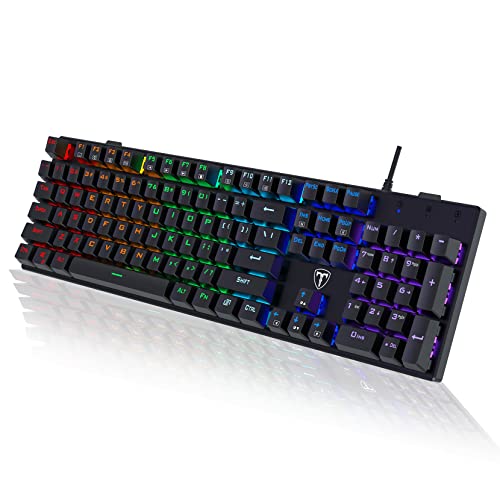
- Best for: A fixed desk where a full-size frame and a wired connection are wanted.
- Form: 104-key full-size wired keyboard
- Switches: Blue Switch
- Backlighting: RGB, ultra-slim LED backlit
- Keycaps: ABS keycaps

- Best for: A small desk, a travel bag, or a second keyboard for a tight setup.
- Form: 60 percent mini wired keyboard, 68 keys
- Switches: Red Switch
- Backlighting: LED blue backlit
- Compatibility: Windows laptop, PC, Mac
All 5 Picks at a Glance
| Product | Specs | Action |
|---|---|---|
| AULA F75 Pro |
| Check price on Amazon |
| RisoPhy Mechanical Gaming Keyboard |
| Check price on Amazon |
| MageGee Portable 60 Percent Mechanical Gaming Keyboard |
| Check price on Amazon |
 Keychron V5 Max |
| Check price on Amazon |
 HyperX Alloy Origins Core |
| Check price on Amazon |
Key takeaways
- Compare five mechanical keyboards for gaming, from a compact 60 percent board to a full-size model, with switch types, layouts, and connections explained.
A mechanical keyboard puts a separate switch under every key, so each press registers with a defined feel instead of a membrane board’s soft press. The five keyboards below were picked because each listing states the same three things literally: a keyboard form, mechanical switch wording, and a brand name. The set spans a compact 60 percent board, a 75 percent board with a knob, a tenkeyless board, a 100-key board with a number pad, and a full-size 104-key board, so the choice comes down to desk space, switch feel, and connection.
Two honesty notes before the picks. Every pick was corroborated from listing cards in keyboard roundups on other sites, since this site holds no general article, so each carries a cross-site-overlap flag, and every ASIN line carries a warning marker because each code was corroborated indirectly and still needs an Amazon API re-check. The HyperX pick rests on a card pairing of an image alt, one product-page link, and an agreeing data tag, stated openly.
Quick Picks
As an Amazon Associate we earn from qualifying purchases.
| Product | Best for | Key spec from title |
|---|---|---|
| AULA F75 Pro | A compact desk with wireless freedom | 75 percent hot-swappable, pre-lubed Reaper switches |
| RisoPhy Mechanical Gaming Keyboard | A full-size wired setup | 104 keys, Blue Switch, RGB |
| MageGee Portable 60 Percent | A small desk or a bag | 60 percent, 68 keys, Red Switch |
| Keychron V5 Max | Typing and gaming on Mac or Windows | Hot-swap Gateron Jupiter Brown Switch |
| HyperX Alloy Origins Core | Tenkeyless competitive play | Linear HyperX Red Switch, RGB |
How to Choose
Match the Switch Feel First
Switch feel decides how a board sounds and how each press registers. Linear switches travel straight down with no bump, which suits fast repeated presses in games, while tactile switches add a small bump that marks registration without a click. Clicky switches add both a bump and an audible click, which shared rooms may not welcome. The picks cover linear, tactile, and clicky options: the AULA and HyperX boards use linear switches, the Keychron uses a tactile brown switch, and the RisoPhy and MageGee boards use clicky-feeling blue and red switches as stated in their listings. Read the switch name in the listing, not the board name: one model can ship with several switch options under separate listings.
Match the Layout to the Desk
Layout decides how much desk a board takes and which keys stay within reach. A 60 percent board drops the number pad, the function row, and the dedicated arrow keys, which frees mouse room but forces layered key combinations for arrows and media controls. A 75 percent board keeps arrows in a compressed frame, a tenkeyless board keeps the function row and arrows while dropping only the number pad, and a full-size board keeps everything at the cost of the widest footprint. The 100-key Keychron sits between tenkeyless and full-size, keeping a number pad in a tighter frame. Measure the desk, then check the key count in the listing, since key counts differ between listings of the same model line.
Check the Connection and Compatibility
Connection type decides where a board can sit and which devices it can serve. A wired USB-C connection suits a fixed desk and removes charging from the routine, while tri-mode boards add 2.4GHz wireless and Bluetooth for switching between a PC, a laptop, and a tablet. The AULA F75 Pro and the Keychron V5 Max both state three connection modes in their listings, while the RisoPhy and MageGee boards state wired USB connections only. Platform wording matters too: several picks state Mac and Windows compatibility literally, and the RisoPhy listing adds Xbox, while the HyperX listing states no platform at all, so confirm the platform in the listing before ordering.
Weigh Hot-Swap and Build Details
Hot-swappable boards let the switches be pulled and replaced without soldering, which matters most for anyone who wants to change switch feel later without buying a new board. Two of the five picks state hot-swappable switches literally, the AULA F75 Pro and the Keychron V5 Max, while the other three do not, so do not assume the feature from the board style. Keycap material is the other detail worth reading: the AULA listing states side-printed PBT keycaps, the Keychron listing states PBT keycaps, and the RisoPhy listing states ABS keycaps, and the listing wording is the only source used here. Extras such as a knob, RGB backlighting, and a compact frame are stated per pick below.
The 5 Best Options
AULA F75 Pro
- Best for: A compact desk where wireless switching between devices matters.
- Form: 75 percent wireless mechanical keyboard with knob
- Switches: Pre-lubed Reaper switches, hot swappable
- Backlighting: RGB backlit
- Keycaps: Side-printed PBT keycaps
A compact desk where wireless switching between devices matters.
The compressed 75 percent frame puts keys closer together than a tenkeyless board, so large hands should check the layout before buying.
The AULA F75 Pro is the most flexible board in this set, pairing a compressed 75 percent frame with a control knob, RGB backlighting, and three connection modes covering 2.4GHz wireless, USB-C wired, and Bluetooth 5.0. Its listing states pre-lubed Reaper switches that are hot-swappable, so the switch feel can be changed later without soldering, and the side-printed PBT keycaps keep legends readable from the front of each key. The same listing states the board as a mechanical gaming keyboard in its own wording, and the 75 percent frame keeps arrow keys within reach while freeing desk space beside the mouse.
Watch out for: The compressed 75 percent frame puts keys closer together than a tenkeyless board, so large hands should check the layout before buying.
RisoPhy Mechanical Gaming Keyboard
- Best for: A fixed desk where a full-size frame and a wired connection are wanted.
- Form: 104-key full-size wired keyboard
- Switches: Blue Switch
- Backlighting: RGB, ultra-slim LED backlit
- Keycaps: ABS keycaps
A fixed desk where a full-size frame and a wired connection are wanted.
The listing states no hot-swappable switches and no wireless mode, so switch changes and cable-free use are not part of this board.
The RisoPhy board is the only full-size pick here, with 104 keys, an ultra-slim frame, and a wired USB connection for a fixed desk setup. Its listing states a Blue Switch under each key, RGB backlighting across the board, anti-ghosting for simultaneous presses, and spill resistance, with ABS keycaps and compatibility stated for PC, Mac, and Xbox. The full-size frame keeps the number pad, the function row, and the dedicated arrow keys in their usual places, which suits anyone moving from a standard office keyboard who does not want to relearn key positions. The listing states the mechanical form, the switch type, and the RisoPhy brand literally.
Watch out for: The listing states no hot-swappable switches and no wireless mode, so switch changes and cable-free use are not part of this board.
MageGee Portable 60 Percent Mechanical Gaming Keyboard
- Best for: A small desk, a travel bag, or a second keyboard for a tight setup.
- Form: 60 percent mini wired keyboard, 68 keys
- Switches: Red Switch
- Backlighting: LED blue backlit
- Compatibility: Windows laptop, PC, Mac
A small desk, a travel bag, or a second keyboard for a tight setup.
The compact frame has no dedicated arrow keys or number pad, and the listing states no hot-swappable switches, so check the layered layout before buying.
The MageGee board is the smallest pick in this set, a 60 percent board with 68 keys in a mini wired frame. Its listing states a Red Switch, an LED blue backlight, and compatibility with Windows laptops, PC, and Mac, with the MageGee brand and mechanical form stated literally. The 68-key frame drops the number pad, the function row, and the dedicated arrows, so media and navigation keys sit on layered combinations, which takes a few days to learn. For a second keyboard, a travel board, or a desk where mouse room matters more than a number pad, the compact frame is the point.
Watch out for: The compact frame has no dedicated arrow keys or number pad, and the listing states no hot-swappable switches, so check the layered layout before buying.
Keychron V5 Max
- Best for: Typing and gaming on Mac or Windows where a number pad is still wanted.
- Form: 100-key wireless mechanical keyboard with number pad
- Switches: Hot-swap Gateron Jupiter Brown Switch
- Backlighting: RGB backlight
- Keycaps: PBT keycaps
Typing and gaming on Mac or Windows where a number pad is still wanted.
The listing states no gaming-specific wording and the 100-key frame is wider than a tenkeyless board, so measure the desk first.
The Keychron V5 Max is the only pick here that keeps a number pad in a frame tighter than full-size, with 100 keys, QMK and VIA programmable macros, and three connection modes. Its listing states a hot-swap Gateron Jupiter Brown Switch, RGB backlighting, PBT keycaps, and compatibility with Mac and Windows, with the Keychron brand and the mechanical form stated literally. The brown switch gives a tactile bump without a click, which suits shared rooms better than a clicky switch. Note that this listing states no gaming-specific wording, so the gaming fit rests on the switches, macros, and layout, not on gaming wording.
Watch out for: The listing states no gaming-specific wording and the 100-key frame is wider than a tenkeyless board, so measure the desk first.
HyperX Alloy Origins Core
- Best for: Competitive play where mouse room and a tenkeyless frame matter most.
- Form: Tenkeyless mechanical gaming keyboard, compact form factor
- Switches: Linear HyperX Red Switch
- Backlighting: RGB LED backlit
- Customization: Software-controlled light and macro customization
Competitive play where mouse room and a tenkeyless frame matter most.
The listing states no platform wording and no hot-swappable switches, so confirm the platform and accept the fixed switches before buying.
The HyperX Alloy Origins Core is the tenkeyless pick, dropping the number pad while keeping the function row and arrows. Its listing states a Linear HyperX Red Switch, software-controlled light and macro customization, RGB LED backlighting, and a black finish, with the HyperX brand and the mechanical form stated literally. The linear switch travels straight down with no bump, which suits fast repeated presses, and the compact frame leaves more mouse room. This pick rests on a card pairing of an image alt, one product-page link, and an agreeing data tag, stated openly here, and the listing states no platform wording, so confirm compatibility before ordering.
Watch out for: The listing states no platform wording and no hot-swappable switches, so confirm the platform and accept the fixed switches before buying.
Which One Fits Your Situation
A Small Desk With Little Room to Spare
A small desk rewards the smallest board that still covers the keys used daily. The MageGee 60 percent board frees the most mouse room, while the AULA F75 Pro keeps arrow keys in a slightly larger frame with wireless modes for switching devices. The Keychron V5 Max keeps a number pad in a tighter frame for number entry, and the full-size RisoPhy board belongs only on desks with room to spare. Measure the free space beside the mouse before choosing.
A Shared Room Where Clicking Carries
A shared room makes switch sound a household decision. Linear switches and tactile brown switches register without a click, so the AULA, Keychron, and HyperX picks suit shared spaces better. The RisoPhy Blue Switch and the MageGee Red Switch listings state their switch types plainly, so anyone sensitive to sound should read the switch name before ordering. A quiet switch choice made early avoids a board that gets moved to another room.
A Desk That Doubles for Work and Play
A desk shared between work and play needs a board that types well all day and responds fast in games. The Keychron V5 Max covers this best, with a tactile brown switch, a number pad, and programmable macros. The AULA F75 Pro adds wireless switching between laptop and PC, while the HyperX Core keeps the frame compact. Switch feel matters more than backlighting, since feel is what the hands meet all day.
A First Mechanical Board on a Modest Setup
A first mechanical board should be easy to live with. The RisoPhy full-size board keeps every key in its familiar place with a wired connection, which suits a first board on a fixed desk. The MageGee compact board suits a first board for a small desk, with the warning that layered keys take learning. The hot-swappable AULA and Keychron add a later upgrade path without a new board, which matters most for anyone unsure about switch feel.
Common Mistakes
- Treating “mechanical feeling” or “mech-dome” wording as a mechanical switch: only listings that state mechanical switches literally count, and membrane boards with mechanical-feel wording were excluded here.
- Buying a keyboard and mouse combo when only a keyboard is wanted: combos are separate products, and the keyboard inside a combo is not the standalone listing.
- Ignoring the layout: a 60 percent board has no dedicated arrows or number pad, so anyone who uses those keys daily should choose a 75 percent, tenkeyless, or larger frame.
- Mixing switch and colour variants: one model can ship under separate listings for each switch type and colour, so match the switch name and the ASIN together before ordering.
- Assuming every RGB board is hot-swappable: only two of the five picks state hot-swappable switches, so read the listing rather than the lighting.
Frequently Asked Questions
Are all five keyboards really mechanical?
Yes. Every pick rests on a listing that states a keyboard form, mechanical switch wording, and a brand name literally in its own wording, and “mechanical feeling” and membrane listings were rejected. Each listing states the mechanical form and a named switch type. The HyperX pick rests on a card pairing of an image alt, one product-page link, and an agreeing data tag.
What is the difference between linear, tactile, and clicky switches?
Linear switches travel straight down with no bump, which suits fast repeated presses. Tactile switches add a small bump that marks registration without a click, which suits shared rooms. Clicky switches add a bump and an audible click, which housemates may not prefer. The picks cover all three families as stated in their listings, so choose by sound and feel first.
Do I need a hot-swappable keyboard?
Hot-swappable switches can be pulled and replaced without soldering, which matters for changing switch feel later without a new board. Two of the five picks state hot-swappable switches literally, the AULA F75 Pro and the Keychron V5 Max, while the other three do not state the feature. If switch feel is settled, a fixed-switch board is fine; anyone unsure should weigh the two hot-swappable picks more heavily.
Will these keyboards work with a Mac?
Four of the five listings state Mac compatibility literally: the AULA F75 Pro, the RisoPhy board, the MageGee board, and the Keychron V5 Max. The HyperX listing states no platform wording at all, so its compatibility must be confirmed in the listing before ordering. Listing wording governs, so check the exact listing and its ASIN before ordering.
More from Amazon
Programs that pair well with the guide above. Offers and eligibility are set by Amazon and may change.
Free shipping on eligible items, Prime Video and more. Eligible new members can start with a free trial.
Start a Prime free trialAd-free music streaming. Eligible new subscribers can start with a free trial.
Try Music Unlimited freeA Prime membership for ages 18-24 with a trial period. Eligibility is set by Amazon.
See Prime for Young AdultsAudiobooks and podcasts to listen to on the go. Eligible new members can start with a free trial.
Try Audible freeAs an Amazon Associate we earn from qualifying purchases.









