Our Short List of 3

- Size: 930 x 300 mm (36.6 x 11.8 in)
- Thickness: 3 mm
- Surface: High-density hybrid woven cloth, spill-proof coating
- Base: Natural rubber, anti-slip
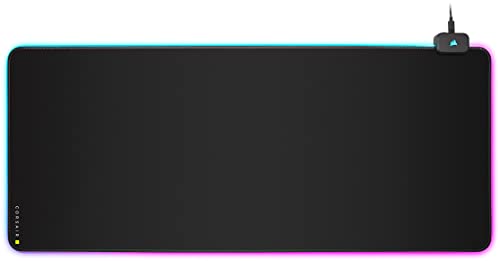
- Size: 930 x 400 mm (36.6 x 15.8 in)
- Thickness: 4 mm
- Surface: Cloth, micro-weave
- Base: 4 mm rubber construction

- Size: 900 x 400 mm (35.4 x 15.7 in)
- Thickness: 3 mm (0.12 in)
- Surface: Performance-tuned cloth, moderate friction
- Base: Stable rubber base
All 4 Picks at a Glance
| Product | Specs | Action |
|---|---|---|
| 1. Corsair MM500 v2 Hybrid Cloth Extended |
| Check price on Amazon |
| 3. Corsair MM700 RGB Extended |
| Check price on Amazon |
| 4. Logitech G840 XL |
| Check price on Amazon |
 5. HyperX Pulsefire Mat RGB XL |
| Check price on Amazon |
Key takeaways
- Compare five extended mouse pads for streamers, from thick cloth control mats to an RGB desk mat with a USB hub, and find the right fit for your desk.
Disclosure: As an Amazon Associate, I earn from qualifying purchases.
A streamer’s desk works harder than a normal desk. The keyboard, the mouse, and a microphone arm all share one surface, and the mouse needs a long, even sweep that never runs off the edge mid-game. A small pad forces constant repositioning, and a bare desk makes the mouse glide unevenly. An extended mouse pad solves both problems: it covers the keyboard and mouse area with one consistent surface, keeps the keyboard from drifting, and gives low-sensitivity players room to aim without lifting the mouse.
The five pads below are all extended desk mats, roughly 900 mm wide or more. They cover the main trade-offs: a spill-proof hybrid cloth mat, a wide foam-backed mat, an RGB mat with a built-in hub, a thin low-profile mat, and a large RGB mat with two lighting zones. Every pick lists its real dimensions, thickness, surface, and base so the fit can be checked before ordering.
How to Choose a Mouse Pad for Streaming
Start with width, then depth
Width matters most. A pad around 900 mm wide fits a full-size keyboard plus a mouse with room for a wide sweep; a 940 mm pad adds a little more. Depth matters too: 400 mm leaves mouse room in front of a standard keyboard, while 410 mm adds a small margin. The shallowest pad here is 300 mm deep, which fits only when the keyboard sits near the front edge, so check depth as carefully as width. Measure the clear, flat part of the desk first, and leave room for monitor stands, microphone arms, and desk edges. A pad that overhangs the edge can catch or curl over time.
Pick a thickness for the feel wanted
Thickness changes how the pad feels under the wrist and how it handles an uneven desk. A 4 mm pad cushions the wrist and smooths out small bumps, which suits long sessions. A 3 mm pad sits lower and feels closer to the desk, which some players prefer for fast, flat tracking. A 2 mm pad suits a minimal setup but hides desk imperfections less well. The choice is between cushioning and a low, flat feel.
Match the surface to the aiming style
Most streaming pads use a micro-weave cloth surface, but the weave changes the glide. A fine, tightly woven cloth gives a controlled glide with strong stopping power, which suits precise aiming in shooters. A smoother cloth gives a faster glide, which suits quick flicks and broad movement. A spill-resistant coating lets liquid bead up so it can be wiped away instead of soaking in. Stitched edges protect the rim from fraying, while an unstitched edge feels softer against the wrist.
Check the base and the extras
A non-slip rubber base is essential. It keeps the pad planted during fast mouse movement and stops it bunching up under the keyboard, and a textured rubber base grips better on slick desks. An RGB mat adds lighting that shows on camera, but it needs a USB connection for power. A built-in USB hub gives back ports for a mouse dongle or a headset, though some hubs pass data only and do not charge devices, so confirm what the hub does before counting on it.
Plan for cleaning
Cloth pads collect dust, skin oils, and drink spills. A pad with a spill-resistant coating wipes clean with a damp cloth, while a plain cloth pad needs a gentle hand wash with mild soap and a full air dry, laid flat. Never fold a rubber-backed pad sharply or machine dry it, since both can warp the base.
Quick Comparison
| Mouse Pad | Size | Thickness | Surface | Standout Feature |
|---|---|---|---|---|
| Corsair MM500 v2 Hybrid Cloth Extended | 930 x 300 mm | 3 mm | Hybrid cloth, spill-proof | Spill-proof hybrid cloth |
| Razer Gigantus V2 XXL | 940 x 410 mm | 4 mm | Textured micro-weave cloth | Widest footprint here |
| Corsair MM700 RGB Extended | 930 x 400 mm | 4 mm | Cloth, RGB edge | Three-zone RGB, USB hub |
| Logitech G840 XL | 900 x 400 mm | 3 mm | Performance-tuned cloth | Thin, low profile |
| HyperX Pulsefire Mat RGB XL | 900 x 420 mm | 4 mm | Densely woven cloth, RGB edge | Two-zone RGB, touch sensor |
The 5 Best Mouse Pads for Streamers
1. Corsair MM500 v2 Hybrid Cloth Extended
- Size: 930 x 300 mm (36.6 x 11.8 in)
- Thickness: 3 mm
- Surface: High-density hybrid woven cloth, spill-proof coating
- Base: Natural rubber, anti-slip
The Corsair MM500 v2 Hybrid Cloth Extended is the spill-proof pick in this guide. Corsair lists it at 930 x 300 x 3 mm, with a high-density hybrid woven cloth surface, a spill-proof coating, anti-fray stitched edges, and a natural rubber base. The hybrid weave tracks movement in all directions, and the coating lets spilled liquid bead on the surface instead of soaking in, so it wipes away with a damp cloth.
The trade-off is depth: at 300 mm deep it is the shallowest pad here, so it suits a desk where the keyboard sits close to the front edge, or a setup where the mouse sweep stays tight. It still covers a full-size keyboard plus a mouse, but there is less room in front of the keyboard than on the 400 mm mats. The part number is CH-941B141-WW, which helps confirm the exact listing when ordering — note that the original MM500 3XL is a larger, discontinued model, so check the part number rather than the name alone. Some Corsair pages show the Extended size out of stock, so confirm a live offer before ordering.
2. Razer Gigantus V2 XXL
The Razer Gigantus V2 XXL is the widest pad in this guide at 940 x 410 mm, which gives a little more mouse room than the 900 mm mats. Razer specifies a 4 mm thickness for the XXL version, with a textured micro-weave cloth surface over thick, high-density rubber foam and a grippy underside. The extra width suits streamers who play at low sensitivity and need a long horizontal sweep.
The Gigantus V2 is a plain, no-lighting mat, which fits a desk where the lighting already comes from other gear. Its foam base is thicker and denser than a standard cloth pad, so it cushions the wrist and hides small desk bumps. The Classic Black version is the one to order for a neutral desk; Razer also sells themed editions of the same pad, so check the listing title and model number before ordering. The model number for the Classic Black XXL is RZ02-03330400-R3U1. One mirror listing showed this pad as unavailable, so confirm a live offer before ordering.
Specs
- Size: 940 x 410 mm (37 x 16.1 in)
- Thickness: 4 mm
- Surface: Textured micro-weave cloth
- Base: Thick, high-density rubber foam, anti-slip
- Edge: Standard cloth edge
- Model: RZ02-03330400-R3U1
- See it on Amazon
3. Corsair MM700 RGB Extended
- Size: 930 x 400 mm (36.6 x 15.8 in)
- Thickness: 4 mm
- Surface: Cloth, micro-weave
- Base: 4 mm rubber construction
The Corsair MM700 RGB Extended is the lighting pick in this guide, and the only pad here with a built-in hub. It measures 930 x 400 mm with a 4 mm rubber construction, and its 360-degree, three-zone RGB lighting runs around the full edge. The lighting is controlled through Corsair’s iCUE software or through twelve onboard profiles that cycle with a push button on the hub, so the pad lights up even when the software is not running.
The hub holds two USB ports for peripherals such as a headset or a mouse dongle, which helps on a desk where ports are scarce. The cloth surface is a balanced micro-weave that suits mixed gaming and work, and the thick rubber base keeps the pad planted on uneven desks. The part number is CH-9417070-WW. Note that the ASIN confirmation for this pad rests on mirror listings rather than a direct Amazon listing crawl, so confirm the listing details before ordering.
4. Logitech G840 XL
- Size: 900 x 400 mm (35.4 x 15.7 in)
- Thickness: 3 mm (0.12 in)
- Surface: Performance-tuned cloth, moderate friction
- Base: Stable rubber base
The Logitech G840 XL is the thin pick in this guide. It measures 900 x 400 mm and is only 3 mm thick, or 0.12 inches, which gives it the lowest profile of the five pads here. The surface is a performance-tuned cloth with moderate friction, designed for consistent sensor tracking, and the rubber base keeps it stable on the desk.
The G840 XL works well as a neutral base for a setup where the keyboard and mouse are the focus and the pad itself stays out of the way. It has no lighting and no hub, so it adds no cables of its own. Logitech sells the same pad in themed editions, so order the plain black version for a standard desk. The part number for the black XL is 943-000776.
5. HyperX Pulsefire Mat RGB XL
- Size: 900 x 420 mm (35.4 x 16.5 in)
- Thickness: 4 mm
- Surface: Densely woven cloth, precision-tuned
- Base: Anti-slip rubber
The HyperX Pulsefire Mat RGB XL is the second lighting pick in this guide, and the deepest pad here. It measures 900 x 420 x 4 mm, with a densely woven cloth surface tuned for precision and control over an anti-slip rubber base. Two RGB lighting zones run along the edge, controlled through HyperX NGENUITY software, with three lighting profiles stored in onboard memory and a touch sensor on the mat that switches profiles without opening the software.
The extra 20 mm of depth over the 400 mm mats gives a little more mouse room in front of the keyboard, which suits low-sensitivity play. The edges are stitched to resist fraying, and the mat rolls up for transport. The part number is 4S7T2AA and the model number is HMPM1R-A-XL. The Amazon listing crawl for this pad is about a year old, so confirm the listing details and a live offer before ordering.
Frequently Asked Questions
What size mouse pad should a streamer use?
An extended pad around 900 mm wide and 400 mm deep is the usual starting point, since it holds a full-size keyboard and leaves room for a wide mouse sweep. A 940 mm pad adds a little more room for low-sensitivity play. Measure the clear desk space first, including room for monitor stands and microphone arms.
Does thickness matter for a streaming mouse pad?
Yes, thickness changes the feel. A 4 mm pad cushions the wrist and smooths out small desk bumps, which suits long sessions. A 3 mm pad sits lower and feels closer to the desk, which suits fast, flat tracking. Neither is better in general; the choice is between cushioning and a low profile.
Are RGB mouse pads worth it for streamers?
An RGB pad earns its place when the desk is visible on camera, since the lighting frames the keyboard and mouse area. It needs a USB connection for power, and it adds a cable to manage. A plain cloth pad tracks just as well, so choose RGB for the look, not for tracking.
How do you clean a cloth mouse pad?
A spill-proof pad wipes clean with a damp cloth. A plain cloth pad needs a gentle hand wash with mild soap, then a full air dry laid flat. Never fold a rubber-backed pad sharply or machine dry it, since both can warp the base and leave the pad uneven.
Conclusion
For most streaming desks, start with the Corsair MM500 v2 Hybrid Cloth Extended for a spill-proof everyday mat with stitched edges, or the HyperX Pulsefire Mat RGB XL for a large RGB mat with two lighting zones. The Razer Gigantus V2 XXL is the pick for the widest sweep, and the Logitech G840 XL is the pick for a thin, low profile. The Corsair MM700 RGB Extended is the one to choose when a built-in USB hub matters as much as the lighting. Whichever pad fits the desk, measure first and confirm the listing before ordering.
More from Amazon
Programs that pair well with the guide above. Offers and eligibility are set by Amazon and may change.
Free shipping on eligible items, Prime Video and more. Eligible new members can start with a free trial.
Start a Prime free trialAd-free music streaming. Eligible new subscribers can start with a free trial.
Try Music Unlimited freeA Prime membership for ages 18-24 with a trial period. Eligibility is set by Amazon.
See Prime for Young AdultsAudiobooks and podcasts to listen to on the go. Eligible new members can start with a free trial.
Try Audible freeAs an Amazon Associate we earn from qualifying purchases.