
Our Short List of 3

- Best for: PC players who want one 1440p screen for both fast and story-driven games.
- Screen size: 27 inches
- Resolution: 2560×1440 (QHD)
- Panel: Fast IPS
- Refresh rate: 180Hz

- Best for: Competitive PC players with a strong graphics card who play at 1440p.
- Screen size: 27 inches
- Resolution: 2560×1440 (QHD)
- Panel: IPS
- Refresh rate: 240Hz
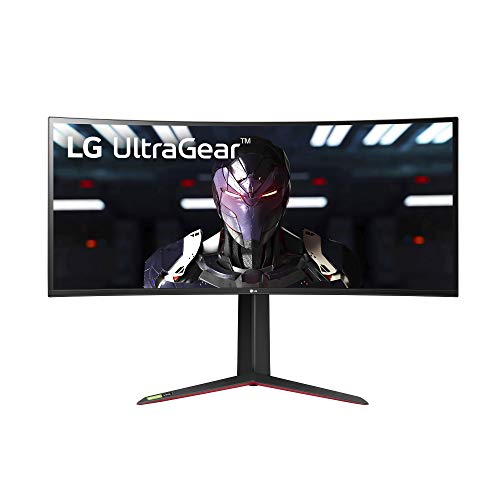
- Best for: Players who want an immersive ultrawide view for racing, sim and open-world games.
- Screen size: 34 inches
- Resolution: 3440×1440 (UWQHD), 21:9 curved
- Panel: Nano IPS
- Refresh rate: 144Hz native, 160Hz overclock via DisplayPort
All 4 Picks at a Glance
| Product | Specs | Action |
|---|---|---|
| ASUS ROG Strix XG27ACS |
| Check price on Amazon |
| LG UltraGear 27GR83Q-B |
| Check price on Amazon |
| LG UltraGear 34GP83A-B |
| Check price on Amazon |
 ASUS TUF Gaming VG259QMR5A |
| Check price on Amazon |
Key takeaways
- Compare the best PC gaming monitors by refresh rate, panel type and resolution, from a 310Hz esports screen to a 34-inch ultrawide, with listing specs.
Buying a gaming monitor for a PC is really a decision about what your graphics card can feed. A screen that refreshes 310 times per second is wasted on a card that renders 90 frames per second, and a sharp 1440p panel will expose every weak setting in a demanding game. The honest first step is matching the panel to the frame rates your rig actually produces in the titles you play most, then checking that the ports and stand fit your desk.
This roundup is for PC players across the main buying situations: competitive shooter players chasing the highest usable refresh rate, all-round players who want one 1440p screen for fast games and story titles, and players who want the wrap-around view of an ultrawide. Every pick below is a desktop gaming monitor, and its specifications are taken from the product title and listing details on its Amazon product page.
Quick Picks
As an Amazon Associate we earn from qualifying purchases
| Product | Best for | Key spec from title |
|---|---|---|
| ASUS ROG Strix XG27ACS | All-round 1440p PC gaming on one screen | 27-inch QHD, 180Hz, 1ms Fast IPS |
| LG UltraGear 27GR83Q-B | Competitive 1440p play at 240Hz | 27-inch QHD, 240Hz, 1ms, HDMI 2.1 |
| LG UltraGear 34GP83A-B | Ultrawide immersion for racing and open-world games | 34-inch 3440×1440 curved, 160Hz, Nano IPS |
| ASUS TUF Gaming VG259QMR5A | Esports shooters at the highest refresh rate | 24.5-inch 1080p, 310Hz, 0.3ms Fast IPS |
How to Choose
Match the refresh rate to your graphics card
Refresh rate only helps when your PC can render frames at that pace. A 310Hz screen paired with a card that averages 120 frames per second in your main game behaves like a 120Hz screen with extra cost attached. Before choosing, check the frame rates your card reaches at the resolution you plan to run, in the games you actually play. Esports titles at 1080p can feed very high refresh rates on mid-range cards, while 1440p story games often sit far lower. Buy the refresh rate your hardware can use most of the time, not the biggest number on the box.
Pick a resolution and size your desk and card can handle
Resolution sets both sharpness and workload. At 27 inches, 2560×1440 gives a clear step up from 1080p without the heavy rendering cost of 4K, which is why so many PC gaming monitors cluster there. A 34-inch ultrawide at 3440×1440 adds horizontal view for racing and strategy games but asks more of the card and needs a deeper desk. A 24.5-inch 1080p screen looks less fine on text, yet it keeps frame rates high and fits small desks. Measure your desk depth and viewing distance first, then let the card’s real output settle the resolution.
Read the panel and response time claims carefully
Fast IPS panels are the current default for PC gaming because they combine quick pixel response with wide viewing angles and decent color. The response figure in a title is measured under specific test settings, often with overdrive pushed hard, so treat 1ms and 0.3ms claims as a class indicator rather than a guarantee of identical motion clarity. What matters in practice is the combination of panel type, refresh rate, and a motion blur reduction mode such as ELMB Sync, which several monitors here list. Nano IPS variants add wider color coverage, stated as a DCI-P3 percentage on the listing.
Check ports, adaptive sync and the stand
On a PC, DisplayPort is the connection that carries the full refresh rate on every monitor in this roundup, so confirm your card has a free DisplayPort output before anything else. Adaptive sync matters because it ties the screen’s refresh to the card’s output and prevents tearing when frame rates fluctuate: listings here name G-Sync Compatible and FreeSync Premium support, and several models carry both, so your card brand does not lock you out. Finally, check the stand. Height and pivot adjustment sound minor until you spend long sessions at the desk, and tilt-only stands are a real limitation worth noticing in the specifications.
The 4 Best Options
ASUS ROG Strix XG27ACS
- Best for: PC players who want one 1440p screen for both fast and story-driven games.
- Screen size: 27 inches
- Resolution: 2560×1440 (QHD)
- Panel: Fast IPS
- Refresh rate: 180Hz
PC players who want one 1440p screen for both fast and story-driven games.
The 180Hz rate needs DisplayPort or USB-C; the HDMI 2.0 input will not carry the full refresh at this resolution.
This is the balanced pick for a PC that plays a bit of everything. The 27-inch Fast IPS panel runs at 2560×1440 and 180Hz, a combination most mid-range and better graphics cards can feed in shooters while still looking sharp in slower games. The listing adds DisplayHDR 400, 133 percent sRGB coverage, and a USB-C input alongside DisplayPort and HDMI, which makes it easy to share the screen with a laptop. Extreme Low Motion Blur Sync is there for players who want clearer motion in fast scenes.
LG UltraGear 27GR83Q-B
- Best for: Competitive PC players with a strong graphics card who play at 1440p.
- Screen size: 27 inches
- Resolution: 2560×1440 (QHD)
- Panel: IPS
- Refresh rate: 240Hz
Competitive PC players with a strong graphics card who play at 1440p.
Feeding 240Hz at 1440p takes a powerful card in demanding games; on a weaker rig the extra refresh headroom goes unused.
Players whose cards can push well past 180 frames per second at 1440p get more from this screen. It keeps the same 27-inch QHD footprint as the ASUS above but raises the refresh rate to 240Hz over both DisplayPort 1.4 and HDMI 2.1, so the PC connection is never the bottleneck. The listing states 1ms GtG response, DisplayHDR 400, and color coverage up to 95 percent of DCI-P3. The stand adjusts for tilt, height and pivot, and a four-pole headphone output with DTS Headphone:X covers wired headset users who run audio through the monitor.
LG UltraGear 34GP83A-B
- Best for: Players who want an immersive ultrawide view for racing, sim and open-world games.
- Screen size: 34 inches
- Resolution: 3440×1440 (UWQHD), 21:9 curved
- Panel: Nano IPS
- Refresh rate: 144Hz native, 160Hz overclock via DisplayPort
Players who want an immersive ultrawide view for racing, sim and open-world games.
The 160Hz overclock is DisplayPort only, and the extra pixels over standard 1440p lower frame rates on the same card.
The ultrawide option changes the shape of the experience rather than the speed. Its curved 34-inch Nano IPS panel stretches to 3440×1440 in a 21:9 aspect ratio, which racing games, flight sims and strategy titles use to fill your peripheral view, and it still refreshes at 144Hz natively with a 160Hz overclock over DisplayPort. The listing states 1ms GtG response, DisplayHDR 400 and 98 percent DCI-P3 coverage, the widest color figure in this roundup. Both G-Sync Compatible and FreeSync Premium are supported, and the panel mounts on a standard 100 x 100 VESA bracket.
ASUS TUF Gaming VG259QMR5A
- Best for: Esports and ranked shooter players who prioritize refresh rate over resolution.
- Screen size: 24.5 inches
- Resolution: 1920×1080 (Full HD)
- Panel: Fast IPS
- Refresh rate: 310Hz
Esports and ranked shooter players who prioritize refresh rate over resolution.
At 1080p on a 24.5-inch screen, text and fine detail are visibly less sharp than the 1440p models here, which matters if the PC also does a lot of reading and editing.
For esports shooters, this smaller screen is the specialist. The 24.5-inch Fast IPS panel runs at 1920×1080 and a 310Hz refresh rate with a stated 0.3ms response time, and 1080p is exactly the resolution competitive players choose so their cards can sustain those frame rates. The listing names G-Sync Compatible and FreeSync Premium support, Extreme Low Motion Blur Sync, and 99 percent sRGB coverage. It is part of ASUS’s TUF Gaming Series 5 line with DisplayWidget software control and a three-year warranty stated in the product title, which matters on a screen bought purely for ranked play.
Which One Fits Your Situation
You play ranked shooters and nothing else matters
Choose the ASUS TUF Gaming VG259QMR5A. Ranked play rewards the highest frame rate your card can hold, and its 310Hz 1080p panel is built for exactly that, with the 0.3ms response claim and motion blur sync aimed at fast target tracking. The trade is resolution, and for this use that trade is the right one.
You play a mix of fast games and big story titles
Choose the ASUS ROG Strix XG27ACS. Its 180Hz at 1440p is fast enough for shooters and detailed enough for slower games, and the USB-C input makes it the easiest screen here to share between a gaming PC and a laptop. It is the pick that asks the fewest compromises of a general gaming desk.
Your card is strong and you want maximum smoothness at 1440p
Choose the LG UltraGear 27GR83Q-B. The 240Hz refresh uses the headroom a high-end card provides at QHD, and full-rate support over both DisplayPort and HDMI 2.1 means the connection never limits you. The height and pivot stand also suits long sessions better than a tilt-only design.
You mostly play racing, flight sim or strategy games
Choose the LG UltraGear 34GP83A-B. The 21:9 curved panel puts more of the game in your peripheral vision, which is where these genres gain the most, and 144Hz native keeps motion smooth. Just confirm your desk is deep enough and your card can drive 3440×1440 at the frame rates you expect.
Common Mistakes
- Buying a refresh rate your graphics card cannot feed, then blaming the monitor when games still feel ordinary.
- Plugging the monitor into HDMI out of habit when the full refresh rate on the listing is only carried by DisplayPort.
- Leaving the monitor at its default 60Hz setting in the operating system after connecting it, so the high refresh rate never actually runs.
- Choosing 1440p or ultrawide resolutions without checking frame rates in your own games, then lowering settings everywhere to compensate.
- Ignoring the stand specifications and discovering after setup that the screen only tilts, sitting too low for long sessions.
Frequently Asked Questions
Is 1440p or 1080p better for PC gaming?
It depends on your card and games. 1080p lets mid-range cards reach the very high frame rates that 240Hz and 310Hz screens need, which suits competitive play. 1440p looks noticeably sharper at 27 inches and suits mixed gaming, as long as your card can hold the frame rates you want at that resolution.
Do I need G-Sync or FreeSync on a PC gaming monitor?
Adaptive sync prevents screen tearing when frame rates rise and fall during play, which happens in almost every game. Every monitor in this roundup lists G-Sync Compatible or FreeSync Premium support, and several list both, so the feature is worth having and rarely forces you to match a specific graphics card brand anymore.
Why does my new monitor only show 60Hz?
The monitor’s refresh rate has to be selected in your operating system’s display settings after connecting it, and the cable matters too. Use the DisplayPort cable and input where the listing ties the full refresh rate to DisplayPort, then set the highest available refresh rate in the advanced display settings.
Is an ultrawide monitor good for gaming?
For racing, flight simulation and strategy games, the wider 21:9 view adds real immersion, and the LG ultrawide here still refreshes at 144Hz. The costs are a lower frame rate than standard 1440p on the same card, a bigger desk footprint, and some games or menus that do not fill the wider screen cleanly.
More from Amazon
Programs that pair well with the guide above. Offers and eligibility are set by Amazon and may change.
Free shipping on eligible items, Prime Video and more. Eligible new members can start with a free trial.
Start a Prime free trialAd-free music streaming. Eligible new subscribers can start with a free trial.
Try Music Unlimited freeA Prime membership for ages 18-24 with a trial period. Eligibility is set by Amazon.
See Prime for Young AdultsAudiobooks and podcasts to listen to on the go. Eligible new members can start with a free trial.
Try Audible freeAs an Amazon Associate we earn from qualifying purchases.









