
Our Short List of 3

- Best for: A wide, clear console in the main living space.
- Wi-Fi 6E tri-band, AXE5400 class
- Speeds listed at 2402 Mbps on 6 GHz, 2402 Mbps on 5 GHz and 574 Mbps on 2.4 GHz
- 6 external high-performance antennas
- 1.7 GHz quad-core CPU

- Best for: A cramped desk that also holds a gaming PC or console.
- Wi-Fi 6 dual-band, AX5700 class
- 2.0 GHz quad-core processor with 1 GB of memory
- 1 port rated at 2.5 Gbps, plus gigabit WAN and LAN ports
- Dedicated gaming port and Mobile Game Mode

- Best for: A visible living-room table in an open-plan home.
- Wi-Fi 6E tri-band, AXE7800 class, up to 7.8 Gbps combined
- 8 Wi-Fi streams across 2.4 GHz, 5 GHz and 6 GHz bands
- Coverage listed up to 2,500 square feet and 40 devices
- 6 antennas housed in the folding wing design
All 5 Picks at a Glance
| Product | Specs | Action |
|---|---|---|
| TP-Link Archer AXE75 |
| Check price on Amazon |
| ASUS RT-AX86U Pro |
| Check price on Amazon |
| NETGEAR Nighthawk RAXE300 |
| Check price on Amazon |
 TP-Link Archer AX73 |
| Check price on Amazon |
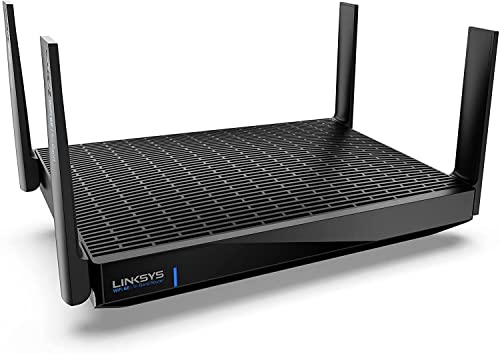 Linksys Hydra Pro 6E |
| Check price on Amazon |
Our Top Picks
Choosing a router for a table sounds simple until the box arrives and the antennas hit the shelf above, the power lead barely reaches, or the unit only really works screwed to a wall. The real decision is physical first: how much table depth the base eats, whether the antennas stand clear, and whether the ports face somewhere you can actually plug things in. Wireless speed matters after that fit is settled.
This roundup is for people placing a router on a desk, media console, hallway table or shelf rather than mounting it on a wall or ceiling. Every pick below is a desktop unit designed to sit on a flat surface, selected from the form factor, dimensions and hardware listed on its Amazon product page.
Quick Picks
As an Amazon Associate we earn from qualifying purchases
| Product | Best for | Key spec from title |
|---|---|---|
| TP-Link Archer AXE75 | A wide console with room for six antennas | AXE5400 tri-band Wi-Fi 6E |
| ASUS RT-AX86U Pro | A narrow desk where depth is tight | AX5700 dual-band Wi-Fi 6, upright body |
| NETGEAR Nighthawk RAXE300 | A living-room table that needs to look tidy | AXE7800 tri-band Wi-Fi 6E |
| TP-Link Archer AX73 | A streaming-heavy flat on one table | AX5400 dual-band Wi-Fi 6 |
| Linksys Hydra Pro 6E | A table near a multi-gig internet drop | AXE6600 tri-band Wi-Fi 6E, 5 Gbps WAN |
How to Choose
Measure the footprint, not just the shelf
A tabletop router lives or dies by its base dimensions and the space its antennas claim above it. Flat slab designs around ten inches wide need a console or desk with real depth once power and Ethernet cables bend behind them, while upright towers trade depth for height. Measure the surface, leave a few inches behind the unit for cable bend, and check the listed product dimensions on the listing rather than guessing from photos, which make large routers look smaller than they are.
Antennas need clear air above the table
External antennas only do their job when they can stand vertical and unobstructed. A router pushed under a wall-mounted television or a low shelf forces the antennas to fold flat, which changes the radiation pattern the maker intended. Count the antennas in the title, picture where each one points on your table, and prefer models whose antennas adjust or fold neatly if the surface sits in a busy room where the router gets nudged, dusted around or brushed past daily.
Ports should face the back edge
On a table, every cable is visible, so port layout shapes how tidy the setup stays. Rear-facing LAN ports let leads drop straight off the back edge, while a front or side USB port is easier to reach for a shared drive but adds clutter in view. Decide how many wired devices sit near the table — a console, a streamer, a desktop — and match that against the LAN count in the listing, plus a faster WAN port if your internet plan outgrows gigabit.
Match the bands to the room the table serves
A table-mounted router usually serves the room it sits in first, so its band layout should fit that room’s devices. Tri-band models with a 6 GHz band give newer laptops and phones a clear lane at short range, which suits a desk setup. Dual-band Wi-Fi 6 still covers a television and a few computers well. Check the speed class and band split in the title, and remember 6 GHz fades faster through walls, so it rewards the same-room placement a table gives.
The 5 Best Options
TP-Link Archer AXE75
- Best for: A wide, clear console in the main living space.
- Wi-Fi 6E tri-band, AXE5400 class
- Speeds listed at 2402 Mbps on 6 GHz, 2402 Mbps on 5 GHz and 574 Mbps on 2.4 GHz
- 6 external high-performance antennas
- 1.7 GHz quad-core CPU
A wide, clear console in the main living space.
The flat footprint plus rear cables needs genuine table depth, and there is no multi-gig port for faster internet plans.
The Archer AXE75 is the natural pick when the table is a wide media console with nothing above it. Its flat body spreads six adjustable antennas along the back and sides, so it wants horizontal room rather than height, and in return you get a tri-band Wi-Fi 6E layout with a dedicated 6 GHz lane for a laptop or phone sitting nearby. The gigabit LAN ports suit a console stacked with wired gear, and the USB port can host a shared drive right where the router already lives.
ASUS RT-AX86U Pro
- Best for: A cramped desk that also holds a gaming PC or console.
- Wi-Fi 6 dual-band, AX5700 class
- 2.0 GHz quad-core processor with 1 GB of memory
- 1 port rated at 2.5 Gbps, plus gigabit WAN and LAN ports
- Dedicated gaming port and Mobile Game Mode
A cramped desk that also holds a gaming PC or console.
The upright body is tall with antennas raised, so measure the vertical clearance under shelves before ordering.
Where table depth is the constraint, the RT-AX86U Pro stands upright instead of spreading out, so it claims a small rectangle of desk and grows upward. That tower shape fits a study desk or a narrow hallway table where a wide slab would crowd out everything else. It is a dual-band Wi-Fi 6 gaming-leaning router with a 2.5 Gbps port and a dedicated gaming port, so a wired PC or console sitting at the same desk gets priority treatment without extra hardware in the way.
NETGEAR Nighthawk RAXE300
- Best for: A visible living-room table in an open-plan home.
- Wi-Fi 6E tri-band, AXE7800 class, up to 7.8 Gbps combined
- 8 Wi-Fi streams across 2.4 GHz, 5 GHz and 6 GHz bands
- Coverage listed up to 2,500 square feet and 40 devices
- 6 antennas housed in the folding wing design
A visible living-room table in an open-plan home.
A separate Renewed listing circulates under a different code, so confirm the listing shows the new RAXE300-100NAS before ordering.
The RAXE300 suits a table that guests actually see. Its antennas hide inside two folding wings rather than bristling off the back, so on a living-room side table it reads as one sculpted box instead of a plastic hedgehog. Under that shell sits a tri-band Wi-Fi 6E radio rated AXE7800 with eight streams, aimed at homes streaming on several screens at once. NETGEAR lists coverage for mid-size homes and dozens of devices, which matches a central table position in an open-plan space.
TP-Link Archer AX73
- Best for: A TV bench serving a streaming-focused household.
- Wi-Fi 6 dual-band, AX5400 class
- Speeds listed up to 4804 Mbps on 5 GHz and 574 Mbps on 2.4 GHz
- 6 external high-performance antennas
- 1.5 GHz triple-core CPU
A TV bench serving a streaming-focused household.
No 6 GHz band, so newer Wi-Fi 6E and 7 devices fall back to 5 GHz even at close range.
The Archer AX73 covers the common case: one flat, one table, a television and a pile of streaming devices. It uses the same low, wide desktop shape as its 6E sibling, with six antennas across the back, but stays on dual-band Wi-Fi 6, which keeps it simpler for homes whose devices do not yet speak 6 GHz. Its 5 GHz band carries the heavy streaming load, the USB port shares a drive across the flat, and the whole unit settles onto a TV bench without dominating it.
Linksys Hydra Pro 6E
- Best for: A shallow table beside a fast fibre connection.
- Wi-Fi 6E tri-band, AXE6600 class, up to 6.6 Gbps combined
- Coverage listed up to 2,700 square feet and 55 or more devices
- 1 internet port rated at 5 Gbps and 4 gigabit LAN ports
- 1 USB 3.0 port
A shallow table beside a fast fibre connection.
Internal antennas cannot be aimed, so placement and orientation on the table are the only coverage adjustments you get.
The Hydra Pro 6E is a plain, low desktop slab with no external antennas at all, which makes it the easiest of these five to slide onto a crowded table or a shallow shelf. Linksys rates the tri-band Wi-Fi 6E system at AXE6600 and sells it as a mesh-capable router, so a second Linksys unit can join later if the table position cannot reach a far bedroom. Its headline hardware detail is wired: a 5 Gbps internet port feeding four gigabit LAN sockets, ready for a fast fibre drop.
Which One Fits Your Situation
Your router shares a desk with a work computer
Pick the ASUS RT-AX86U Pro. Its upright base leaves desk surface free for a keyboard and monitor stand, while the 2.5 Gbps port and dedicated gaming port give the wired machine next to it a clean path. The antennas rise behind the screen line instead of spreading across the desk, which keeps the workspace usable.
Your table is the family media console
The TP-Link Archer AXE75 fits here, provided the console is wide and open-topped. Four gigabit LAN ports wire the television, streamer and console in place, the 6 GHz band serves phones and laptops in the same room, and the flat body sits low under the screen without blocking it or crowding the soundbar beside it.
The router has to look acceptable in the living room
Choose the NETGEAR Nighthawk RAXE300. The folding-wing design hides its antennas, so the unit looks deliberate rather than improvised on a side table. It still brings tri-band Wi-Fi 6E and eight streams, so the tidy appearance does not force a performance compromise for streaming across an open-plan space. It is the pick when looks and throughput both matter to the household.
Your table is shallow and the internet plan is fast
The Linksys Hydra Pro 6E is built for that pairing. Its antenna-free slab is only a couple of inches tall and modest in depth, and the 5 Gbps internet port means a multi-gig fibre plan is not strangled at the first socket. Add a mesh unit later if one table position cannot cover the home.
Common Mistakes
- Measuring only the table width and forgetting the extra depth that power bricks and bent Ethernet cables need behind the router.
- Folding antennas flat to fit under a shelf, then blaming the router when coverage in the room drops off.
- Putting a wide slab router on a narrow hallway table where people brush past and knock antennas out of alignment.
- Choosing a model with too few LAN ports for the wired devices already gathered around the same table.
- Ignoring the WAN port speed, so a multi-gig internet plan arrives at a router that can only accept gigabit.
Frequently Asked Questions
Does a tabletop router cover a whole home from one table?
It depends on where the table sits. A central table in an open-plan space lets any of these routers reach most rooms, but 6 GHz signals fade quickly through walls. Homes with several closed rooms often do better with a mesh-ready model, such as the Linksys or TP-Link picks here, and a second unit added later.
Is an upright router better than a flat one for a desk?
Neither shape is stronger by default; they trade different space. An upright model like the ASUS uses little desk depth but needs clear height for its antennas. A flat slab needs a wider, deeper surface and open air above it. Measure your desk in both directions and let those numbers, not the styling, decide.
Can I wall-mount one of these instead of using a table?
These five are sold as desktop units that sit on a flat surface, and their antenna layouts assume that position. If your plan changes to a wall or ceiling mount, look at routers and access points designed and listed for mounting, rather than improvising brackets for a tabletop base that was never shaped for it.
Where on the table should the router sit?
Aim for the middle of the surface, away from the table edge where it can be knocked, and clear of large metal objects, mirrors and the back of a television, which can block signal. Leave the vents unobstructed and keep the antennas vertical. A central, slightly elevated table usually beats a corner floor position in the same room.
More from Amazon
Programs that pair well with the guide above. Offers and eligibility are set by Amazon and may change.
Free shipping on eligible items, Prime Video and more. Eligible new members can start with a free trial.
Start a Prime free trialAd-free music streaming. Eligible new subscribers can start with a free trial.
Try Music Unlimited freeA Prime membership for ages 18-24 with a trial period. Eligibility is set by Amazon.
See Prime for Young AdultsAudiobooks and podcasts to listen to on the go. Eligible new members can start with a free trial.
Try Audible freeAs an Amazon Associate we earn from qualifying purchases.









