
Our Short List of 3
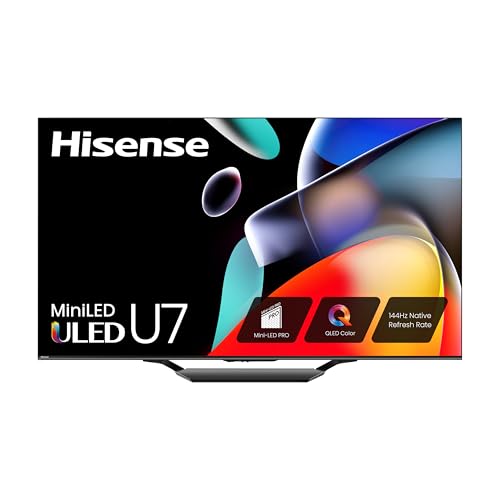
- Best for: PS4 Pro players who want the strongest HDR and game mode in this group.
- Screen size: 55 inches (54.6 inches measured diagonally)
- Display: Mini-LED ULED with QLED Quantum Dot Color
- Resolution: 4K UHD
- Refresh rate: Native 144Hz

- Best for: Bright rooms where glare usually ruins darker game scenes.
- Screen size: 55 inches
- Display: QD-Mini LED, QLED, 4K UHD
- Refresh rate: 144 Hz native
- Gaming rate: Game Accelerator 240 on this size
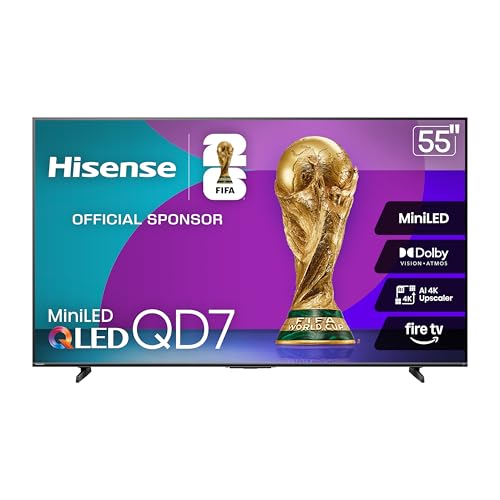
- Best for: Fire TV homes that want automatic game mode switching for a shared console.
- Screen size: 55 inches
- Display: Mini-LED, QLED
- Resolution: 4K UHD
- Model year: 2025
All 4 Picks at a Glance
| Product | Specs | Action |
|---|---|---|
| Hisense 55-Inch Class U7 Series Mini-LED ULED 4K Google TV (55U7N) |
| Check price on Amazon |
| TCL 55-Inch Class QM7K Series QD-Mini LED 4K Google Smart TV (55QM7K) |
| Check price on Amazon |
| Hisense 55-Inch Class QD7 Series Mini-LED 4K Fire TV (55QD7QF) |
| Check price on Amazon |
 INSIGNIA 55-Inch Class F30 Series LED 4K UHD Smart Fire TV |
| Check price on Amazon |
Key takeaways
- Five TVs that suit a PS4 or PS4 Pro, picked for low input lag, proper HDR and a real game mode, from bright Mini LED sets to a simple budget Fire TV.
A PS4 makes the TV decision simpler than most consoles do, and narrower. The console tops out at 60 frames per second, the base model renders at 1080p, and only the Pro pushes a 4K signal with HDR. So the screen that matters is not the one with the longest spec sheet; it is the one with a game mode that genuinely cuts input lag, HDR that stays bright enough to read in a lit room, and processing that leaves a 1080p image clean instead of smeared.
This roundup is for three kinds of PS4 owners: Pro players who want their 4K and HDR output handled properly, base PS4 players upgrading from an old 1080p panel, and anyone buying a second-room set where the console shares time with streaming apps. Every pick below was chosen from the names and specifications printed on its Amazon listing, with gaming features quoted from the listing itself rather than from review coverage.
Quick Picks
As an Amazon Associate we earn from qualifying purchases
| Product | Best for | Key spec from title |
|---|---|---|
| Hisense 55-Inch Class U7 Series Mini-LED ULED 4K Google TV (55U7N) | Pro owners who want the strongest game mode | Mini-LED ULED 4K, Native 144Hz |
| TCL 55-Inch Class QM7K Series QD-Mini LED 4K Google Smart TV (55QM7K) | Bright rooms and HDR-heavy games | QD-Mini LED 4K, 144Hz Native Refresh Rate |
| Hisense 55-Inch Class QD7 Series Mini-LED 4K Fire TV (55QD7QF) | Fire TV households that still game daily | Mini-LED QLED 4K, Game Mode Plus with ALLM |
| Samsung 55-Inch Class Crystal UHD U8000F 4K Smart TV | Players who also live in streaming apps | Crystal UHD 4K, Samsung Gaming Hub |
| INSIGNIA 55-Inch Class F30 Series LED 4K UHD Smart Fire TV | A spare room or a first 4K upgrade | LED 4K UHD, Fire TV with Alexa Voice Remote |
How to Choose
Input lag and the game mode matter more than refresh rate
A PS4 never sends more than 60 frames per second, so a 120Hz or 144Hz panel cannot show extra frames from this console. What you actually feel is input lag, the delay between a button press and the action appearing. A proper game mode strips out motion processing and cuts that delay hard. Panels with a native high refresh rate still help indirectly, because their game modes are usually the most developed, but the mode itself, not the hertz figure, is what your thumbs notice.
Match the panel to your console: 1080p versus 4K and HDR
The base PS4 outputs 1080p and supports HDR on compatible games, while the Pro adds a 4K output. If you own a Pro, a 4K HDR set is the correct match and the upgrade is visible in supported titles. If you own the base console, resolution matters less than upscaling quality, because the TV will be stretching a 1080p signal across a 4K panel either way. Either way, HDR support is worth having, since both models can send an HDR signal.
Local dimming decides how night scenes look
Open-world games spend half their time in caves, alleys and night races, and that is where backlight control shows. Mini LED sets with full array local dimming can darken one part of the screen while a lantern or headlight stays bright in another. A basic edge-lit or direct-lit panel without dimming washes those scenes toward grey. If you play story-driven games after dark, dimming zones are worth more than a slightly larger screen at the same money.
Count your inputs and check the smart platform
A PS4 rarely lives alone on a TV. A soundbar wants the eARC port, a streaming stick or a second console wants another socket, and suddenly a three-HDMI television is full. Check the port count on the listing before ordering, and note which smart platform you are getting: Google TV, Fire TV and Tizen each arrange apps and game settings differently, and the platform decides how quickly you can reach the game mode toggle every session.
The 5 Best Options
Hisense 55-Inch Class U7 Series Mini-LED ULED 4K Google TV (55U7N)
- Best for: PS4 Pro players who want the strongest HDR and game mode in this group.
- Screen size: 55 inches (54.6 inches measured diagonally)
- Display: Mini-LED ULED with QLED Quantum Dot Color
- Resolution: 4K UHD
- Refresh rate: Native 144Hz
PS4 Pro players who want the strongest HDR and game mode in this group.
The 144Hz panel is headroom a PS4 cannot use, so you are paying for future-proofing as much as for today.
The U7N is the most gaming-focused set here, and it suits a PS4 Pro owner who wants the console’s HDR output handled by a panel with real brightness behind it. Its 144Hz Game Mode Pro is far beyond what a PS4 can feed, but the underlying Mini LED backlight with full array local dimming is exactly what HDR games need, and the same headroom makes it a safe screen if a newer console arrives later. Google TV keeps the game settings close to the surface.
TCL 55-Inch Class QM7K Series QD-Mini LED 4K Google Smart TV (55QM7K)
- Best for: Bright rooms where glare usually ruins darker game scenes.
- Screen size: 55 inches
- Display: QD-Mini LED, QLED, 4K UHD
- Refresh rate: 144 Hz native
- Gaming rate: Game Accelerator 240 on this size
Bright rooms where glare usually ruins darker game scenes.
It is a heavy, feature-dense set; measure your stand depth and check the 48.3-inch width against your furniture.
The QM7K is the pick for a living room that never really gets dark. Its CrystGlow HVA panel is anti-reflective, the listing rates HDR peak brightness up to HDR 3000 on this size, and the Halo Control system manages up to LD2500 precise dimming zones, so a PS4 Pro game holds its contrast even with daylight coming through the window. Auto Game Mode switches the set when the console wakes, and audio by Bang and Olufsen with Dolby Atmos is the strongest built-in sound in this roundup.
Hisense 55-Inch Class QD7 Series Mini-LED 4K Fire TV (55QD7QF)
- Best for: Fire TV homes that want automatic game mode switching for a shared console.
- Screen size: 55 inches
- Display: Mini-LED, QLED
- Resolution: 4K UHD
- Model year: 2025
Fire TV homes that want automatic game mode switching for a shared console.
The panel is a 60Hz-class screen, which is fine for a PS4 but leaves no refresh headroom for newer consoles.
The QD7 brings Mini LED and local dimming down into a simpler package for households already built around Fire TV. The feature a PS4 owner should care about is ALLM: the set detects the console and switches into Game Mode Plus on its own, so nobody has to dig through menus before every session. Dolby Vision and HDR10+ cover the Pro’s HDR output, and the voice remote with Alexa built in keeps the streaming side effortless for the rest of the family.
Samsung 55-Inch Class Crystal UHD U8000F 4K Smart TV
The U8000F is the mainstream choice: a 2025 Crystal UHD set from Samsung with the Gaming Hub built in, which gathers the PS4’s input alongside cloud gaming services in one screen. Crystal Processor 4K upscales the base PS4’s 1080p output, HDR support covers the HDR signal both PS4 models can send, and three HDMI inputs leave room for a soundbar and one more device. The slim MetalStream design suits wall mounting in a tidy media setup.
Specs
- Screen size: 55 inches
- Display: Crystal UHD 4K
- Processor: Crystal Processor 4K
- Model: UN55U8000FFXZA, 2025 model
- HDR: HDR support
- Gaming: Samsung Gaming Hub
- Connectivity: 3 HDMI inputs
- Design: MetalStream design
- Security: Samsung Knox Security
- Voice: Compatible with Alexa
Best for: Mixed-use rooms where the PS4 shares the TV with heavy streaming.
Watch out for: There is no local dimming here, so very dark game scenes will look flatter than on the Mini LED picks above.
ASIN: B0DXMW74JZ
INSIGNIA 55-Inch Class F30 Series LED 4K UHD Smart Fire TV
- Best for: A first 4K upgrade for a base PS4, or a second TV in a spare room.
- Screen size: 55 inches
- Display: LED
- Resolution: 4K UHD
- HDR: HDR10
A first 4K upgrade for a base PS4, or a second TV in a spare room.
Confirm the exact model suffix on the listing before ordering, since the F30 family spans several model years with small differences.
The F30 is the straightforward budget route onto this list: a 55-inch 4K panel with Fire TV built in and an Alexa voice remote in the box. For a base PS4 it covers the essentials honestly, with a 4K screen that upscales the console’s 1080p signal and HDR10 support for the games that use it. It skips local dimming and any advanced game mode branding, which is exactly the trade a spare-room or first-upgrade set should make.
Which One Fits Your Situation
You own a PS4 Pro and play HDR titles
Start with the Hisense U7N. Its Mini LED backlight, full array local dimming and Dolby Vision IQ give the Pro’s 4K HDR output the contrast it was designed for, and Game Mode Pro keeps response snappy. The TCL QM7K is the alternative if your room is bright, trading a little of the U7N’s gaming focus for anti-reflective glass and higher HDR brightness.
Your base PS4 is staying for a few more years
The Samsung U8000F or the Hisense QD7 both upscale 1080p cleanly and add HDR, which the base console can still send. The QD7’s ALLM switching is the nicer daily convenience if the TV is shared; the Samsung’s Gaming Hub suits you better if streaming apps and other gaming services sit next to the console on the same screen.
The TV goes in a bright family room
Pick the TCL QM7K. The anti-reflective CrystGlow panel and the highest HDR brightness in this group keep midday sessions readable, and its built-in Bang and Olufsen audio means one less soundbar to buy for a shared room. Its Auto Game Mode also removes the settings ritual when kids and adults swap between shows and games.
You just need a cheap second screen for the console
The INSIGNIA F30 covers the job without paying for features a PS4 cannot use. It is a 4K Fire TV with HDR10 and a voice remote, big enough at 55 inches to feel like an upgrade over an aging 1080p set, and simple enough that nobody has to manage settings. Spend the savings on a spare controller or storage instead.
Common Mistakes
- Paying extra for a 144Hz panel only for a PS4, when the console caps at 60 frames per second and input lag is what you actually feel.
- Leaving the TV in its standard picture mode for gaming, which keeps motion processing on and adds delay; game mode has to be enabled per input on many sets.
- Buying a 4K TV for a base PS4 and expecting 4K games, when the base console renders at 1080p and the TV is only upscaling.
- Forgetting the soundbar when counting HDMI ports, then discovering the eARC socket was the one the console needed.
- Judging HDR by the logo alone; without local dimming or decent brightness, an HDR badge changes very little on screen.
Frequently Asked Questions
Does a PS4 need a 4K TV?
No. The base PS4 renders games at 1080p, so it works fully on a 1080p or 4K screen. A 4K TV still helps through upscaling and HDR, and it becomes close to essential with a PS4 Pro, which outputs a native 4K signal in supported games. Buy 4K for the Pro or for future use, not because the base console requires it.
Is 120Hz worth it for PS4 gaming?
Not for the PS4 itself, since the console never exceeds 60 frames per second and cannot feed a faster panel more frames. High-refresh TVs in this roundup earn their place through better backlights, dimming and game modes instead. The extra refresh only pays off directly if a PS5 or a gaming PC joins the same screen later.
What should I turn on when I first connect the PS4?
Enable the TV’s game mode on the HDMI input the console uses, set the PS4’s RGB range and HDR output in its video settings, and let the TV detect HDR automatically. On sets with ALLM, like the Hisense QD7 here, the game mode switch happens by itself once the console is recognised on that input.
How big should the TV be for a PS4 setup?
A 55-inch screen, the size used across this roundup, suits a viewing distance of roughly two to three metres and is big enough for split-screen play to stay readable. Smaller rooms or desk setups can drop to 43 or 50 inches in the same model families; the gaming features that matter here carry down through most size ranges.
More from Amazon
Programs that pair well with the guide above. Offers and eligibility are set by Amazon and may change.
Free shipping on eligible items, Prime Video and more. Eligible new members can start with a free trial.
Start a Prime free trialAd-free music streaming. Eligible new subscribers can start with a free trial.
Try Music Unlimited freeA Prime membership for ages 18-24 with a trial period. Eligibility is set by Amazon.
See Prime for Young AdultsAudiobooks and podcasts to listen to on the go. Eligible new members can start with a free trial.
Try Audible freeAs an Amazon Associate we earn from qualifying purchases.









