
Our Short List of 3

- Best for: Living-room players who want one self-contained combo for a TV PC or an Xbox.
- Connection: 2.4 GHz wireless through a single unified USB dongle
- Keyboard: mechanical, 1000Hz Ultrapolling, 50g actuation, mid-height keycaps
- Mouse: 16,000 DPI 5G optical sensor
- Battery: up to 43 hours for the keyboard and 50 hours for the mouse with lighting disabled; 11 and 30 hours with lighting enabled
- Best for: Laptop players and small-desk setups that switch between several devices.
- Model: S155-PRO
- Connection: Bluetooth, 2.4 GHz wireless, and USB-C wired
- Keyboard: 75 percent layout, membrane, quiet keys, macro keys, RGB backlit
- Mouse: up to 12,800 DPI, with software support

- Best for: Players who want one simple wireless link and a quiet set for a shared room.
- Connection: 2.4 GHz wireless, USB receiver stored at the bottom of the mouse
- Keyboard: RGB backlit, mechanical-feel keys, listed as quiet
- Power: rechargeable keyboard and mouse; the cable serves charging only
- Color: Blue White Purple
All 4 Picks at a Glance
| Product | Specs | Action |
|---|---|---|
| Razer Turret |
| Check price on Amazon |
| Redragon S155-PRO |
| Check price on Amazon |
| MageGee V560 |
| Check price on Amazon |
 LexonElec Wireless Gaming Keyboard and Mouse Combo |
| Check price on Amazon |
Key takeaways
- Compare four wireless gaming keyboard and mouse combos sold as one set, with single-dongle and tri-mode links, real gaming mice and rechargeable batteries.
Buying a keyboard and mouse as one wireless set sounds simple, but the real decision is whether the two devices in the box are genuinely built for games or just office parts with colored lights. Some combos pair a proper gaming mouse with a mechanical keyboard, while others cut costs on the sensor, the switches, or the battery, and those cuts only show up once you start playing.
This guide is for PC players clearing cables off a desk, couch gamers who want one unit that works with a TV setup or an Xbox, and laptop players who need a single set that travels. Every pick below is a true combo sold in one listing, and each product section is built from the specifications on its Amazon product page.
Quick Picks
As an Amazon Associate we earn from qualifying purchases
| Product | Best for | Key spec from title |
|---|---|---|
| Razer Turret | Couch and Xbox play from one self-contained unit | Mechanical keyboard, 40 hr battery |
| Redragon S155-PRO | Small desks and switching between several devices | Tri-mode combo, 12,800 DPI mouse |
| MageGee V560 | Quiet late-night play on a Mac or PC desk | RGB backlit, rechargeable set |
| LexonElec Wireless Gaming Keyboard and Mouse Combo | A full-size layout with a number pad and wrist rest | 3800mAh battery, metal panel |
How to Choose
Start With How the Set Connects
Most gaming combos run both devices through one 2.4 GHz USB dongle, which keeps latency low and setup to a single plug. That is the right pattern for a desktop or a couch setup that never moves. Tri-mode sets add Bluetooth and a wired USB-C fallback, which suits a gaming laptop that also pairs with a tablet or a work machine. Check whether the keyboard and mouse share one receiver or each needs its own, because two dongles can be a real problem on a laptop with few ports.
Separate True Mechanical Keys From Mechanical Feel
Only some combos in this category use real mechanical switches, and the difference matters for how the keys respond and how long they last. Many affordable sets use membrane keys described as mechanical feel, which are quieter and softer but cannot match switch feedback or per-switch repair. Neither is automatically wrong: membrane suits shared rooms and late sessions. The mistake is paying mechanical money for a membrane board, so read the listing wording carefully and match it to how you actually play.
Judge the Mouse as a Gaming Mouse
Combo mice range from genuine gaming sensors to basic office pointers with lights glued on. Look at the maximum DPI, whether the figure is adjustable in steps, and whether the listing names a gaming sensor at all. A mouse topping out near 2,400 DPI can still track fine for casual play, but it will not give the sensitivity range a shooter player expects. Buttons matter too: side buttons and a rated click life tell you more than the lighting pattern does.
Plan Around Batteries and Charging
Rechargeable sets save you swapping cells, but the hours that matter are the ones with the backlight on, which can be a fraction of the headline figure quoted with lighting off. Check whether both devices recharge or only one, whether the cable can also run the keyboard wired while it charges, and how the set sleeps when idle. A combo that wakes instantly from sleep and sips power between sessions is far easier to live with than one that needs charging every few days.
The 4 Best Options
Razer Turret
- Best for: Living-room players who want one self-contained combo for a TV PC or an Xbox.
- Connection: 2.4 GHz wireless through a single unified USB dongle
- Keyboard: mechanical, 1000Hz Ultrapolling, 50g actuation, mid-height keycaps
- Mouse: 16,000 DPI 5G optical sensor
- Battery: up to 43 hours for the keyboard and 50 hours for the mouse with lighting disabled; 11 and 30 hours with lighting enabled
Living-room players who want one self-contained combo for a TV PC or an Xbox.
Turning the lighting on cuts the keyboard’s rated battery life to 11 hours, so expect regular charging during heavy weeks.
The Turret is the one combo here designed from the start for the couch. Its mechanical keyboard carries a retractable magnetic mouse mat that slides out for the included mouse, so the whole set works on your lap in front of a TV with no desk at all. A single dongle links both devices, the mouse uses a proper gaming optical sensor, and Chroma RGB ties the lighting together. It is also the only pick that lists Xbox consoles alongside PC, which makes it the natural choice for a living-room setup.
Redragon S155-PRO
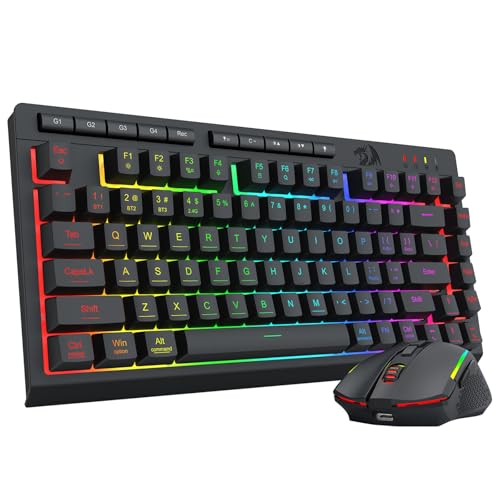
- Best for: Laptop players and small-desk setups that switch between several devices.
- Model: S155-PRO
- Connection: Bluetooth, 2.4 GHz wireless, and USB-C wired
- Keyboard: 75 percent layout, membrane, quiet keys, macro keys, RGB backlit
- Mouse: up to 12,800 DPI, with software support
Laptop players and small-desk setups that switch between several devices.
The keys are membrane rather than mechanical switches, and the 75 percent layout leaves out a dedicated number pad.
The S155-PRO suits players whose setup changes during the day. Its compact 75 percent keyboard connects three ways, over Bluetooth, 2.4 GHz, or a USB-C cable, so the same set can move between a gaming laptop, a desktop, and a tablet without re-pairing dongles. The keyboard is a quiet membrane design with macro keys and RGB backlighting, and the mouse reaches 12,800 DPI with software support for adjusting it. Because both pieces are rechargeable and the board drops the number pad, the whole combo packs neatly into a laptop bag.
MageGee V560
- Best for: Players who want one simple wireless link and a quiet set for a shared room.
- Connection: 2.4 GHz wireless, USB receiver stored at the bottom of the mouse
- Keyboard: RGB backlit, mechanical-feel keys, listed as quiet
- Power: rechargeable keyboard and mouse; the cable serves charging only
- Color: Blue White Purple
Players who want one simple wireless link and a quiet set for a shared room.
There is no Bluetooth mode, and the cable cannot run the set wired, so the dongle has to stay plugged in.
The V560 keeps things deliberately simple: one 2.4 GHz link, one receiver stored in the bottom of the mouse, and a rechargeable keyboard and mouse with RGB backlighting. The keys are a mechanical-feel membrane design that the listing describes as quiet, which makes this the easiest pick to share a room with. Its blue, white, and purple colorway also stands apart from the usual all-black gaming look. Compatibility covers Mac as well as Windows laptops and desktops, so it fits a mixed desk where the same set handles work in the day and games at night.
LexonElec Wireless Gaming Keyboard and Mouse Combo
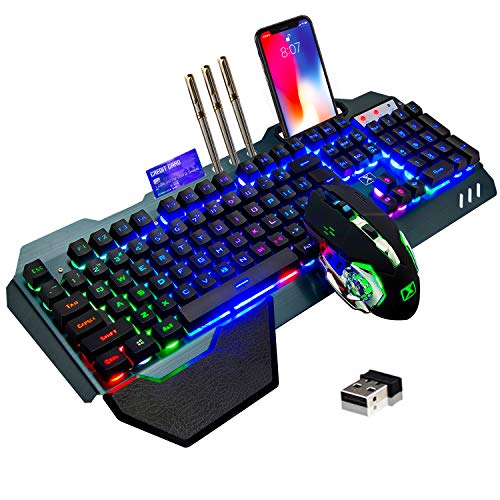
- Best for: Desk players who want a full-size board with a number pad and a wrist rest in the box.
- Keyboard: 104 keys, aluminum alloy brushed panel, removable hand rest, built-in phone holder
- Battery: 3,000 mAh keyboard and 800 mAh mouse, both rechargeable
- Lighting: rainbow backlit keyboard with adjustable brightness; 7-color breathing light on the mouse
- Mouse: 6 buttons, four DPI steps of 800, 1200, 1600, and 2400, quiet clicks
Desk players who want a full-size board with a number pad and a wrist rest in the box.
The rainbow backlight is a fixed pattern with brightness and breathing controls, not per-key RGB you can program.
This LexonElec set is the full-size option, built around a 104-key board on a brushed aluminum alloy panel with a removable hand rest and a phone holder along the top. Both devices recharge, with a 3,000 mAh battery in the keyboard and an 800 mAh battery in the mouse, and they share one 2.4 GHz receiver. The six-button mouse offers four DPI steps and quiet clicks, while the keyboard’s rainbow backlight has adjustable brightness. Both pieces sleep after five minutes idle and wake with a key press, which stretches the charge between sessions.
Which One Fits Your Situation
You Play From the Sofa or on an Xbox
Choose the Razer Turret. It is the only set here built to work without a desk: the mouse mat slides out of the keyboard, the mouse docks magnetically so it does not slide off your lap, and one dongle covers both devices. Its listed Xbox support also means the same combo can serve a console and a living-room PC without swapping hardware.
One Set Has to Cover a Laptop, a Desktop, and a Tablet
Choose the Redragon S155-PRO. Its three connection modes let the keyboard follow you between machines over Bluetooth while the 2.4 GHz link stays with your main rig, and the compact 75 percent board leaves room in a bag for the mouse beside it. No other pick here switches hosts as gracefully.
You Play Late in a Room Other People Use
Choose the MageGee V560. Its mechanical-feel membrane keys are listed as quiet, so keystrokes will not carry the way mechanical switches do, and the rechargeable design means no battery drawer raids at midnight. The single-dongle setup also keeps a shared family computer tidy, since nothing stays plugged in except one small receiver.
You Want a Full-Size Board and Type as Much as You Game
Choose the LexonElec combo. The 104-key layout keeps the number pad for spreadsheets and data entry, the metal panel gives the board a planted feel while typing, and the removable hand rest supports longer sessions. Its mouse tops out at 2,400 DPI, which is fine for strategy, simulation, and everyday play.
Common Mistakes
- Assuming every gaming combo has mechanical switches, when most sets in this category use mechanical-feel membrane keys.
- Counting two separate products as a combo; a true combo is one listing where the keyboard and mouse are designed to share a connection.
- Comparing battery figures without checking whether they were quoted with the backlight on or off.
- Ignoring the mouse specification and ending up with an office-grade sensor in a gaming box.
- Forgetting to check console compatibility, since most PC combos do not list Xbox or PlayStation support.
Frequently Asked Questions
Is a 2.4 GHz combo fast enough for competitive games?
For most players, yes. A 2.4 GHz dongle connection is the standard wireless link on gaming combos, and the Razer Turret pairs it with a 1000Hz polling rate on the keyboard. Bluetooth modes, where offered, are better kept for casual play and desktop use, since they are designed for convenience and multi-device pairing rather than the lowest possible latency.
Can I use one of these combos with an Xbox or PlayStation?
Only where the listing says so. The Razer Turret lists Xbox One and Xbox Series X and Series S support directly, and the Redragon S155-PRO lists PlayStation and Xbox among its compatible devices. The other sets here are listed for computers only, so check the compatibility line on the product page before assuming a console will recognize the dongle.
How long do rechargeable combo batteries actually last?
It depends heavily on lighting. The Razer Turret is rated at up to 43 hours for the keyboard and 50 hours for the mouse with lighting disabled, but those figures fall to 11 and 30 hours with lighting enabled. Treat the lighting-off number as a ceiling, and expect a set with the backlight on every night to need charging far more often.
What does mechanical feel mean on a keyboard listing?
It means the keys are membrane switches shaped and weighted to imitate some of the travel and resistance of a mechanical board, without individual switches under each key. The Redragon, MageGee, and LexonElec sets here all use this design. Expect a quieter, softer press than true mechanical keys, and no option to swap or replace a single switch.
More from Amazon
Programs that pair well with the guide above. Offers and eligibility are set by Amazon and may change.
Free shipping on eligible items, Prime Video and more. Eligible new members can start with a free trial.
Start a Prime free trialAd-free music streaming. Eligible new subscribers can start with a free trial.
Try Music Unlimited freeA Prime membership for ages 18-24 with a trial period. Eligibility is set by Amazon.
See Prime for Young AdultsAudiobooks and podcasts to listen to on the go. Eligible new members can start with a free trial.
Try Audible freeAs an Amazon Associate we earn from qualifying purchases.









