Our Short List of 3
All 5 Picks at a Glance
| Product | Specs | Action |
|---|---|---|
 Logitech MX Mechanical Wireless Keyboard | Check price on Amazon | |
 Keychron V6 Max Wireless Mechanical Keyboard | Check price on Amazon | |
 Keychron V5 Max Wireless Mechanical Keyboard | Check price on Amazon | |
 Keychron V6 Wired Mechanical Keyboard with Knob | Check price on Amazon | |
 Das Keyboard 6 Professional | Check price on Amazon |
Key takeaways
- Find the best mechanical keyboards for office use, from quiet low-profile wireless models to full-size tactile boards for shared and home workspaces.
A mechanical keyboard can make long office days easier on the fingers, but only if it fits the room it sits in. The loud, tall, gaming-focused boards that suit a closed bedroom desk can annoy colleagues in a shared office, distract people on calls, and take up space needed for a mouse, notebook, and documents. The right office model keeps the clear tactile feedback and durable switches that make mechanical typing satisfying, while adding quieter switch options, a sensible layout, and connectivity that works with a work laptop without extra fuss.
This guide focuses on mechanical keyboards suited to office use in the practical sense: tactile or otherwise work-friendly switches, layouts that handle spreadsheets and documents, and designs that look at home next to a monitor rather than next to a gaming rig. The picks range from a low-profile wireless board built specifically for quiet offices to full-size wired and wireless models with number pads, programmable keys, and media controls. Read the switch and layout notes carefully, because those two choices shape daily comfort more than backlighting or extra features ever will.
As an Amazon Associate, we earn from qualifying purchases.
How to Choose
Start with switch sound and feel
Switch choice is the single most important office decision. Clicky switches produce a distinct click on each press and are the hardest to justify in a shared room, on calls, or in a quiet home where other people are working nearby. Tactile switches give a small bump that confirms the press without that sharp click, which is why tactile quiet, brown, and banana-style tactile switches appear throughout this guide. Linear switches press straight down with no bump and can be quiet if typed lightly, but some typists find them easier to mistype on because there is less feedback at the point of registration.
Sound also comes from more than the switch. Keycaps bottoming out, a hollow case, and a hard desk surface all add noise, while foam layers, gasket mounting, and solid cases sound deeper and softer. In a very quiet office, a desk mat and a lighter typing touch help too.
Pick a layout that matches the work
Full-size keyboards keep a dedicated number pad, which matters for finance, data entry, inventory, and spreadsheet-heavy roles. The trade-off is width: a full-size board pushes the mouse farther to the side, which can strain the shoulder over a long day. A 96 percent layout keeps the number pad but compresses the spacing, giving most of the function in less width once the tighter arrangement becomes familiar. Tenkeyless boards drop the number pad entirely and suit writing, coding, email, and general office work where the mouse position matters more than rapid number entry.
If number entry happens only occasionally, a compact board may be more comfortable. If numbers are entered every hour, keep the pad built in and choose full-size or 96 percent from the start.
Decide between wired and wireless
Wireless keyboards clean up a desk and make hot-desking and laptop docking simpler. Bluetooth suits offices where a receiver port is scarce and switching between a laptop, tablet, and second computer is useful. A 2.4 GHz receiver usually gives a stable connection with a higher polling rate and can feel more responsive, but it occupies a port. Wired keyboards never need charging, never drop a wireless connection, and suit fixed desks, shared workstations, and secure environments where wireless devices are restricted.
Battery claims need context, because backlighting is the biggest drain: a board rated for months with lighting off may last only days or weeks with lighting on.
Check keycaps, height, and adjustability
Low-profile mechanical keyboards sit closer to laptop height and can reduce wrist extension, especially without a wrist rest. Standard-height boards offer a wider choice of switches and keycaps and often feel more substantial, but they may need a lower desk, a keyboard tray, or a wrist rest to keep the wrists neutral. Adjustable feet help either type, letting the angle change through the day.
PBT keycaps resist shine and keep their texture longer than basic ABS keycaps, which matters on a board used all day. Double-shot legends will not fade. Hot-swappable sockets add long-term value too, because a worn switch can be replaced and the feel of the board can be changed later without buying a new keyboard.
Look for office-specific extras
Multi-device pairing, Mac and Windows keycaps, programmable macros, and a volume knob all earn their place at work. A knob or media keys make call volume faster to adjust than on-screen controls, and a built-in USB hub, as on the Das Keyboard below, keeps a receiver or cable within reach. Programmable layers through QMK and VIA suit people with repetitive shortcuts.
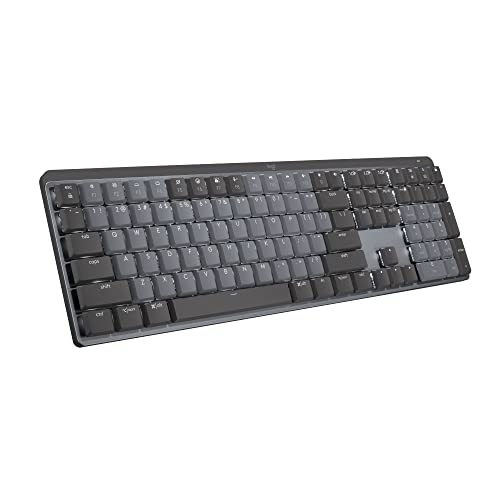
Logitech MX Mechanical Wireless Keyboard
The Logitech MX Mechanical is the most office-first design in this guide. It is a full-size, low-profile wireless keyboard in Graphite with Tactile Quiet switches, built to give mechanical feedback without the sound usually associated with mechanical boards. Smart backlighting lights the keys as hands approach and adjusts to the room, and the board pairs with up to three devices, which suits a work laptop, a personal computer, and a tablet sharing one desk.
For office buyers who want minimal setup, this is the straightforward pick. Logi Bolt and Bluetooth cover most work computers, USB-C charging is simple, and the low-profile case needs less wrist adjustment than a tall board. The main limits are that the switches are not hot-swappable and the layout is full-size only in this version, so anyone who wants a compact desk footprint or plans to change switches later should look at the Keychron models below.
Who It Suits
This suits professionals in shared or quiet offices who want tactile feedback with the least noise, people who switch between several devices, and anyone who prefers a low, laptop-like typing height. It is less suited to buyers who want to swap switches, customise key layouts in depth, or use a wired-only connection at a fixed workstation.
Keychron V6 Max Wireless Mechanical Keyboard
The Keychron V6 Max is a full-size wireless board for people who want a number pad, a knob, and deep customisation in one package. It uses a gasket mount design with acoustic foam and a latex bottom pad, which helps keep the typing sound softer and deeper than a basic tray-mounted board. The listing covered here uses the tactile Gateron Jupiter Banana switch, a firmer tactile option that gives clear feedback for long writing and data work.
Connectivity is a strength. The V6 Max works over 2.4 GHz wireless, Bluetooth 5.1, or a USB-C cable, and QMK support with the Keychron Launcher allows remapping and macros without treating the board as a closed system. Double-shot PBT keycaps in the OSA profile add durability and a taller, sculpted feel. It is larger and heavier than the Logitech, so it fits a permanent desk better than a bag carried between locations.
Who It Suits
This suits full-time typists, spreadsheet users, and programmers who want a full-size wireless board they can remap and maintain over time. The tactile Banana switches and sound-dampening build make it workable for a home office or a reasonably tolerant shared office. It is less suited to very small desks, frequent travel, or buyers who want the lowest possible profile.
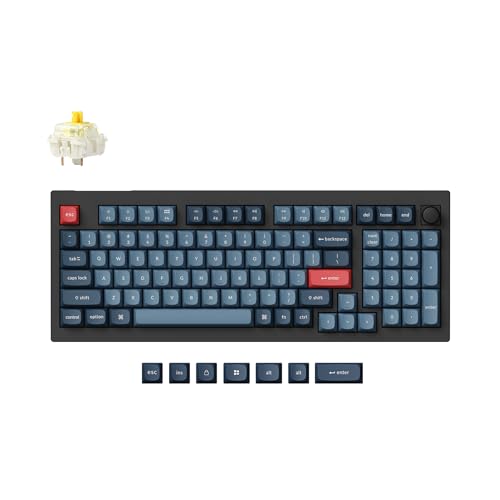
Keychron V5 Max Wireless Mechanical Keyboard
The Keychron V5 Max answers a common office problem: keeping the number pad without giving the keyboard the full width of a traditional board. Its 96 percent layout compresses the keys into a narrower frame, so the mouse sits closer while number entry, arrow keys, and a knob remain on board. Like the V6 Max, it uses a gasket mount structure with sound-absorbing material for a softer typing sound.
The version covered here uses tactile Gateron Jupiter Banana switches and supports QMK and VIA-style remapping through Keychron tools, plus three connection modes. That suits hybrid workers who dock a laptop at one main desk and also pair with other devices over Bluetooth. The compressed layout does take adjustment around the arrow keys and the keys above the number pad.
Who It Suits
This suits desk workers who need a number pad but have limited width, hybrid workers who want wireless multi-device pairing, and typists who prefer tactile switches with a damped sound. It is less suited to anyone who dislikes compressed key spacing, needs a traditional full-size spacing for data entry at speed from day one, or wants a wired-only board with no battery to manage.
Keychron V6 Wired Mechanical Keyboard with Knob
The wired Keychron V6 with knob is the value-minded full-size option in this group, and its simplicity is part of the appeal for office use. There is no battery to charge and no wireless pairing to manage, which suits a fixed desk, a shared workstation, or an employer-issued computer where the keyboard simply needs to work every morning. The version covered here uses hot-swappable Keychron K Pro Brown switches, a familiar tactile choice that balances feedback and moderate sound.
Despite the simpler connection, customisation is strong. QMK and VIA support allows key remapping and macros, the knob version adds quick volume or assignable control, and the hot-swappable sockets accept most three-pin and five-pin MX-style switches, so the feel can be softened later with quieter tactile or linear switches if a shared office demands it. South-facing backlighting and Mac and Windows keycaps round out a board that covers the office basics well.
Who It Suits
This suits office workers at a permanent desk who want a full-size tactile board without charging or pairing, plus buyers who like the option to change switches later. It is less suited to hot-desking, cable-free desks, or anyone who regularly moves between a laptop, tablet, and second computer during the day.
Das Keyboard 6 Professional
The Das Keyboard 6 Professional is a wired, full-size board built around a durable aluminum enclosure, Cherry MX Brown tactile switches, and practical desk features rather than wireless convenience. Shine-through keycaps and white backlighting keep legends readable in dim offices, dedicated media controls and a large volume knob sit within easy reach, and a two-port USB-C hub in the board itself can handle a receiver, a headset dongle, or a charging cable without reaching for the computer.
This is the pick for a traditional, fixed workstation. N-key rollover means fast typing and complex shortcuts register reliably, and the solid case feels planted in a way lighter plastic boards do not. It has no wireless mode or hot-swappable sockets, so it should be chosen for a permanent setup rather than as a portable all-rounder.
Who It Suits
This suits professionals at a fixed desk who value build solidity, a built-in hub, and physical media controls, including writers, analysts, and administrators who type all day in one place. It is less suited to wireless or hybrid setups, small desks, quiet offices where a heavier board and standard-height caps would be paired with hard typing, or buyers who want to experiment with different switches.
FAQ
Are mechanical keyboards too loud for a shared office?
Not necessarily, because loudness depends mainly on the switch, the case, and typing style. Tactile quiet, brown, and tactile banana switches without a click mechanism are far more office-friendly than clicky switches, and damped or gasket-mounted cases soften the sound further. Avoiding bottoming out hard, using a desk mat, and keeping the board off a hollow, resonant desk surface also help in a shared room.
Which layout is best for spreadsheet and finance work?
A full-size layout is the safest choice for frequent number entry because the dedicated number pad keeps one-handed data entry fast and familiar. A 96 percent layout is a close alternative that keeps the pad in less desk width, at the cost of tighter spacing that takes some adjustment. Tenkeyless boards suit writing and general office work better than number-heavy roles.
Is wireless reliable enough for full-time office work?
Yes for most office setups, provided the connection type matches the environment. A 2.4 GHz receiver gives a stable, responsive link for a main desk computer, while Bluetooth is convenient for switching between a laptop, tablet, and second machine. Keep the battery charged and the cable nearby as a backup for wired use while charging.
Can the switches be changed later if the sound is not right?
On the hot-swappable Keychron models in this guide, yes: the switches pull out and compatible MX-style replacements press in without soldering, so a board can move from a firmer tactile feel to a softer or quieter one. The Logitech MX Mechanical and the Das Keyboard 6 Professional use fixed switches, so their feel is set at purchase and the switch variant should be chosen carefully at the start.
Final Verdict
For most people searching for the best mechanical keyboards for office use, the Logitech MX Mechanical in its Tactile Quiet version is the easiest recommendation: it is low, quiet by mechanical standards, wireless across three devices, and clearly designed for work rather than adapted from gaming. Buyers who want a number pad with deeper customisation should look at the Keychron V6 Max, while anyone short on desk width should consider the 96 percent V5 Max instead. The wired Keychron V6 covers a fixed desk at a simpler level, and the Das Keyboard 6 Professional serves a permanent workstation where a metal case, a volume knob, and a built-in USB-C hub matter more than wireless freedom. Match the switch sound to the room, the layout to the numbers in the job, and the connection to the desk, and any of these boards can make a full day of typing more comfortable and more accurate.
Product and ASIN Reference
| Product | ASIN |
|---|---|
| Logitech MX Mechanical Wireless Keyboard | B09LK1P1RD |
| Keychron V6 Max Wireless Mechanical Keyboard | B0D14LQ9XW |
| Keychron V5 Max Wireless Mechanical Keyboard | B0CR16D8R2 |
| Keychron V6 Wired Mechanical Keyboard with Knob | B0B2DMKFM5 |
| Das Keyboard 6 Professional | B0BF62THHK |
More from Amazon
Programs that pair well with the guide above. Offers and eligibility are set by Amazon and may change.
Free shipping on eligible items, Prime Video and more. Eligible new members can start with a free trial.
Start a Prime free trialAd-free music streaming. Eligible new subscribers can start with a free trial.
Try Music Unlimited freeA Prime membership for ages 18-24 with a trial period. Eligibility is set by Amazon.
See Prime for Young AdultsAudiobooks and podcasts to listen to on the go. Eligible new members can start with a free trial.
Try Audible freeAs an Amazon Associate we earn from qualifying purchases.