Our Short List of 3
All 4 Picks at a Glance
| Product | Specs | Action |
|---|---|---|
 iBUYPOWER SlateMesh Gaming PC Desktop SlateMeshA5N4601 | Check price on Amazon | |
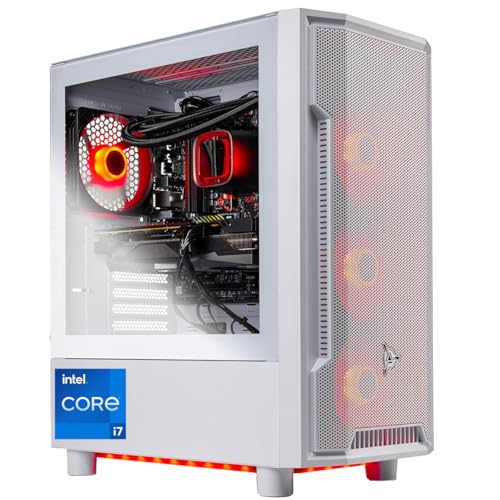 Skytech Gaming Archangel Gaming PC Desktop | Check price on Amazon | |
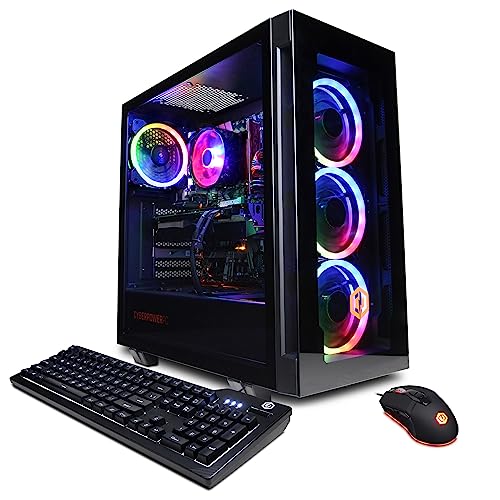 CyberPowerPC Gamer Xtreme VR Gaming PC GXiVR8040A14 | Check price on Amazon | |
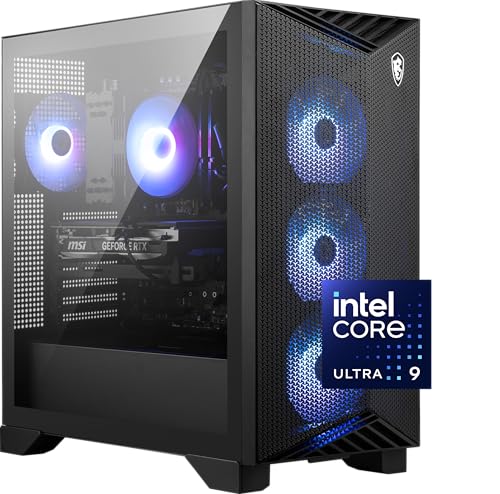 MSI Aegis R2 AI Gaming Desktop C2NVR9-1452US | Check price on Amazon |
Key takeaways
- Find the best PC for games with a clear build-or-buy breakdown, plus complete gaming desktops compared on graphics cards, CPUs, memory, and storage.
Choosing the best PC for games starts with a decision that shapes everything else: should you build a machine yourself, part by part, or buy a complete gaming desktop that arrives ready to play? Both routes can lead to a fast, enjoyable system. Building gives you control over every component, from the graphics card down to the power supply. Buying prebuilt gives you a finished system with Windows installed, a single point of support, and no time spent matching sockets, cables, and clearances.
This guide keeps that build-or-buy question at the center. The complete gaming desktops below are useful in two ways. For buyers who decide against building, they are ready-made options at different performance levels, from smooth 1080p and 1440p play to high-end 4K gaming. For readers leaning toward a custom build, they work as reference points, showing a balanced combination of processor, graphics card, memory, and storage that a self-built machine should aim to match or beat.
As an Amazon Associate, we earn from qualifying purchases.
How to Choose
Start With the Build-or-Buy Decision
Building your own gaming PC rewards patience and curiosity. You choose exactly which graphics card goes in, how much memory the system starts with, and how much room the case leaves for future upgrades, and you learn how the machine fits together, which makes later upgrades far less intimidating. The trade-offs are time and responsibility. Parts must be compatible, and if something fails, you deal with each component maker separately. A first build can take an afternoon or a full weekend, and a single incompatible part can delay the whole project.
Buying a complete gaming desktop removes most of that friction. The system arrives assembled, with the operating system installed, so the path from box to first game is short. Support usually comes from one company, and the warranty covers the machine as a whole. The trade-offs are less control over specific part brands and configurations that may pair a strong graphics card with modest memory or storage. Neither route is wrong; the right answer depends on whether you value control and learning more, or time and simplicity more.
A practical middle path is to compare honestly. Sketch the parts list you would build, then compare its processor, graphics card, memory, and storage against the desktops in this guide. If a prebuilt matches that balance and saves a weekend of assembly, buying can be the sensible call. If every prebuilt cuts a corner you care about, building lets you fix it yourself.
Put the Graphics Card First
For gaming, the graphics card matters more than any other single component. It determines which resolutions and settings a PC can handle comfortably. Cards in the class of the GeForce RTX 4060 are well suited to 1080p gaming and can handle 1440p in many titles, especially with upscaling features enabled. The RTX 4060 Ti with larger video memory adds headroom for higher texture settings at 1440p. At the top end, a card such as the GeForce RTX 5070 Ti targets high-refresh 1440p and 4K play, with more video memory to support demanding textures and ray tracing.
When comparing a self-build against a prebuilt, match the graphics card class first, then check that the rest of the system keeps up. A powerful card paired with too little memory or a small drive creates bottlenecks quickly, while a modest card in an oversized system wastes potential a better-balanced build would have spent on graphics.
Match the Processor to the Graphics Card
The processor feeds the graphics card and handles game logic, physics, and background tasks such as voice chat and streaming. Modern six-core and higher processors from the Intel Core i5, Core i7, AMD Ryzen 5, and Ryzen 7 families suit midrange graphics cards. Higher-end cards deserve stronger processors, such as a Core i7, Core i9, or Core Ultra 9, so frame rates stay consistent in processor-heavy scenes.
Builders should also think about the platform. A current socket with DDR5 support leaves more upgrade options open, while an older DDR4 platform can still game very well today but offers a shorter path forward. Prebuilt buyers should check the same detail, because the platform shapes how worthwhile a future upgrade will be.
Get Memory and Storage Right From the Start
Sixteen gigabytes of memory is a workable minimum for gaming today. Thirty-two gigabytes gives more breathing room for multitasking, streaming, modded games, and future titles, and is the configuration to prefer if you plan to keep the machine for many years. DDR5 is the current standard on newer platforms, while DDR4 remains perfectly serviceable on the platforms built around it.
For storage, a solid-state drive is essential, and every system here uses one. Five hundred gigabytes fills up quickly, so one terabyte is a more comfortable starting point, and two terabytes suits players who keep big libraries installed. Prebuilt buyers should confirm the case leaves room for an extra drive, because storage is usually the first upgrade a gaming PC needs.
Consider Cooling, Power, and Upgrade Room
Cooling keeps performance steady during long sessions. Air coolers are simple and reliable, liquid all-in-one coolers can offer quiet operation and a clean look, and case airflow matters as much as the cooler itself. Power supply capacity also deserves attention, since a quality unit leaves headroom for a future graphics upgrade. Finally, look at case size and expansion options: a standard tower with spare slots and drive bays is far easier to upgrade than a compact or proprietary design.
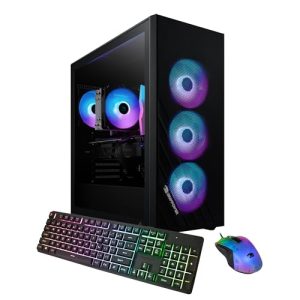
iBUYPOWER SlateMesh Gaming PC Desktop SlateMeshA5N4601
This SlateMesh configuration is the clearest entry point in the group for a buyer who wants current platform parts without stepping up to the highest performance tier. It pairs an AMD Ryzen 5 7600 processor with a GeForce RTX 4060 graphics card, a combination aimed at smooth 1080p gaming and capable 1440p play in many titles. Because it sits on the AM5 platform with DDR5 memory, it also makes an instructive comparison for builders: a self-built machine at this level should be measured against exactly this kind of balance, rather than against older DDR4 systems.
The main compromise is storage. The 500 gigabyte NVMe drive holds the operating system and a handful of large games, but active players will likely add a second drive before long. Memory starts at 16 gigabytes, with room to expand well beyond that. This suits a buyer who wants to play now and upgrade storage later, while a builder who wants two terabytes from day one may prefer to assemble that configuration directly.
Who It Suits
This desktop suits players focused on 1080p and lighter 1440p gaming who value a current DDR5 platform and a clear upgrade path. It is a good fit for someone who has decided that assembly time is not worth it at this performance level, but who still wants standard parts that can grow. Players with very large game libraries should plan on adding storage early, and builders comparing parts lists should note the drive size as the first place a custom build can improve on this configuration.
Skytech Gaming Archangel Gaming PC Desktop
The Archangel takes a different route to a similar performance class, pairing an Intel Core i7 12700F with a GeForce RTX 4060. The processor offers more cores than the SlateMesh above, which helps with multitasking, streaming software, and processor-heavy games, while the graphics card keeps the focus on detailed 1080p play and 1440p in many titles. A 240 millimeter liquid cooler and a white case with tempered glass give it a finished, display-friendly look that many home builders aim for on a first custom build.
Storage is more generous here, with a one terabyte NVMe drive that holds a reasonable library from the start. Memory is 16 gigabytes of DDR4, reflecting the older platform underneath. That platform still games well, but its upgrade path is shorter than a DDR5 system, and that is the central build-or-buy lesson of this model: a buyer who plans to keep the machine as it is for several years gets strong value from the pairing, while a buyer who expects to upgrade the processor later may prefer to build on a newer platform from the beginning.
Who It Suits
This desktop suits players who want strong multitasking headroom alongside 1080p and 1440p gaming, and who like the look of a white, glass-sided build without assembling one. It also suits households mixing school, work, and games. Readers who place a long upgrade runway above all else should weigh the DDR4 platform carefully, because that single detail is where a custom build on newer parts would differ most.
CyberPowerPC Gamer Xtreme VR Gaming PC GXiVR8040A14
The Gamer Xtreme VR steps the graphics up a class with a GeForce RTX 4060 Ti carrying 16 gigabytes of video memory, paired with an Intel Core i7-13700F and DDR5 memory. That extra video memory matters for higher texture settings and for holding detail at 1440p, which makes this configuration a natural target for players who have outgrown entry-level settings but do not need a flagship machine. For builders, it is a useful benchmark for what a balanced step-up system looks like: the graphics, processor, memory generation, and storage are all raised together rather than one part racing ahead of the rest.
The one terabyte NVMe drive matches the Archangel on capacity, and 16 gigabytes of DDR5 memory is adequate for gaming while leaving a clear first upgrade for heavy multitaskers. Its mid-tower case leaves room that makes adding memory or storage straightforward. As a comparison point, it shows builders the minimum balance a custom parts list should maintain at this graphics level.
Who It Suits
This desktop suits players targeting high settings at 1440p who want more video memory for textures and longevity, along with a modern DDR5 platform. It fits streamers and multitaskers who benefit from the Core i7 processor, and buyers who want a meaningful step up without jumping to the premium tier below. Custom builders should treat its balance as the standard to beat: a parts list with this graphics card but slower memory or a much smaller drive would be a step backward, not a saving.
MSI Aegis R2 AI Gaming Desktop C2NVR9-1452US
The Aegis R2 AI is the high-end option in this guide, built around an Intel Core Ultra 9 285 processor and a GeForce RTX 5070 Ti graphics card with 16 gigabytes of video memory. That pairing targets high-refresh 1440p gaming and 4K play, with the processor headroom to handle streaming, recording, and creative work alongside games. Memory and storage are sized to match: 32 gigabytes of DDR5 and a two terabyte M.2 NVMe drive mean neither is likely to need attention for a long time.
This is also the model where the build-or-buy calculation changes character. At the premium end, experienced builders can fine-tune part choices more precisely. What the Aegis offers instead is a flagship-class combination, assembled and ready, in a standard tower with air cooling. Buyers who want top-tier performance without sourcing high-end parts one by one will see the appeal, while confident builders can use its specification as the checklist a custom flagship build needs to satisfy.
Who It Suits
This desktop suits players who want high-refresh 1440p or 4K gaming and plan to keep the same machine through several game generations. It also suits creators who game, because the processor, memory, and storage are all sized for demanding side workloads. It is more than a first-time player needs, and readers on a tighter budget will get better value from the balanced systems above, whether they buy one complete or use it as the template for a build.
FAQ
Is it better to build or buy a gaming PC?
Neither option is better for everyone. Building gives full control over each part, a better understanding of the machine, and often a clearer upgrade path, at the cost of assembly time and separate warranties for each component. Buying a complete desktop gives a ready-to-play system, one point of support, and a whole-system warranty, at the cost of less control over specific part brands. The desktops in this guide show the balance a good system should have, which helps either decision.
How much memory does a gaming PC need?
Sixteen gigabytes is a workable starting point for gaming today and appears in several systems above. Thirty-two gigabytes is the more comfortable choice for streaming, heavy multitasking, modded games, and keeping a machine for many years. Memory generation matters as well: DDR5 belongs to current platforms with longer upgrade paths, while DDR4 systems can still perform very well for gaming.
Which part matters most for game performance?
The graphics card matters most, because it sets the resolution and settings a PC can handle. A card in the RTX 4060 class suits 1080p and much 1440p play, the RTX 4060 Ti with 16 gigabytes of video memory adds texture headroom at 1440p, and the RTX 5070 Ti targets high-refresh 1440p and 4K. The processor, memory, and storage should be balanced around that choice rather than chosen in isolation.
Can a prebuilt gaming PC be upgraded later?
Most tower desktops from the makers in this guide use standard parts, so memory, storage, and often the graphics card can be upgraded later. Before buying, check the case size, power supply capacity, and spare slots or drive bays in the specifications, because those details decide how far upgrades can go. A standard mid-tower with a capable power supply offers the most flexibility, much like a well-planned custom build.
Final Verdict
The best PC for games is the one whose parts are balanced for the resolution you play at, and the build-or-buy decision should follow from how you value time, control, and support. For a current-platform starting point, the iBUYPOWER SlateMesh pairs a Ryzen 5 7600 with an RTX 4060 and DDR5 memory, with storage as its clear first upgrade. The Skytech Archangel adds processor cores and a larger drive on an older DDR4 platform, which suits buyers who plan to keep the configuration as it is. The CyberPowerPC Gamer Xtreme VR is the balanced step up, with an RTX 4060 Ti carrying 16 gigabytes of video memory for 1440p play. At the top, the MSI Aegis R2 AI combines a Core Ultra 9 285, an RTX 5070 Ti, 32 gigabytes of memory, and two terabytes of storage for high-refresh and 4K gaming.
If you build, use these four systems as balance checks, spending first on the graphics card, then on memory and storage. If you buy, pick the desktop whose balance already matches that list, so the only upgrades ahead are the ones you choose.
Product and ASIN Reference
| Product | ASIN |
|---|---|
| iBUYPOWER SlateMesh Gaming PC Desktop SlateMeshA5N4601 | B0CCZYRNHK |
| Skytech Gaming Archangel Gaming PC Desktop | B0C9PKGLW9 |
| CyberPowerPC Gamer Xtreme VR Gaming PC GXiVR8040A14 | B0CBL8N3FC |
| MSI Aegis R2 AI Gaming Desktop C2NVR9-1452US | B0DYG3TWLJ |
More from Amazon
Programs that pair well with the guide above. Offers and eligibility are set by Amazon and may change.
Free shipping on eligible items, Prime Video and more. Eligible new members can start with a free trial.
Start a Prime free trialAd-free music streaming. Eligible new subscribers can start with a free trial.
Try Music Unlimited freeA Prime membership for ages 18-24 with a trial period. Eligibility is set by Amazon.
See Prime for Young AdultsAudiobooks and podcasts to listen to on the go. Eligible new members can start with a free trial.
Try Audible freeAs an Amazon Associate we earn from qualifying purchases.