Key takeaways
- Compare five routers built for streaming: Wi-Fi 6, 6E and 7 picks with low latency, QoS and multi-gig ports, plus what to check before you buy.
- Top Pick: TP-Link Archer AX73
- Runner-up: NETGEAR Nighthawk RAX70
- Also consider: TP-Link Archer AX21
Streaming in high definition is less about raw download speed and more about steady, low-latency delivery. A stream that pauses to buffer every few minutes is usually a sign that the router cannot keep up with several devices at once, not that the internet plan is too slow. The right router holds a stable connection while a TV plays in 4K, a laptop joins a video call, and a phone downloads updates.
The five routers below cover the main ways to fix that problem: a Wi-Fi 7 flagship for large households, a tri-band Wi-Fi 6 workhorse, a gaming-tuned model, a mesh-ready pick for homes with dead spots, and a compact option for smaller spaces. Each supports the features that matter most for streaming: modern Wi-Fi standards, quality-of-service controls, and wired ports.
As an Amazon Associate, we earn from qualifying purchases.
Quick Answer
For most streamers, the TP-Link Archer BE550 is the strongest all-round pick: Wi-Fi 7, tri-band speeds, and full 2.5G ports handle several 4K streams. The NETGEAR RAX70 is the best Wi-Fi 6 alternative, while the TP-Link Archer AX73 suits large homes that need range. The eero Pro 6E fits homes with weak corners, and the TP-Link AX21 covers small spaces on a tighter budget.
Table of Contents
- TP-Link Archer AX73
- NETGEAR Nighthawk RAX70
- TP-Link Archer BE550
- Amazon eero Pro 6E
- TP-Link Archer AX21
- How to Choose a Router for Streaming
- Who Should Skip These Routers
- Frequently Asked Questions
- Final Verdict
- Product and ASIN Reference
TP-Link Archer AX73

The TP-Link Archer AX73 is a dual-band Wi-Fi 6 router built for range. It is an AX5400 model with six streams, reaching up to 4.8 Gbps on the 5 GHz band through 4T4R and HE160 technology, and six high-performance antennas push the signal further into large rooms. A 1.5 GHz triple-core CPU keeps the router responsive when many devices connect at once, and OFDMA and MU-MIMO share airtime efficiently.
For a streamer, the practical benefit is a strong 5 GHz signal that holds up at distance, so a TV in a far room still gets a steady stream. HomeShield adds network security, and EasyMesh support allows a second unit to extend coverage later. There is no 2.5G port and no 6 GHz band, so this router suits a household that wants range and capacity on Wi-Fi 6 rather than the newest standard.
| Specs | Details |
|---|---|
| Wi-Fi standard | Wi-Fi 6 (802.11ax) |
| Speed | AX5400 |
| Bands | Dual-band, 2.4 GHz + 5 GHz |
| Streams | 6 |
| Antennas | 6 external |
| Wired ports | Gigabit WAN + 4 Gigabit LAN |
| Processor | 1.5 GHz triple-core CPU |
| Mesh | EasyMesh |
| ASIN | B08TH4D3QV |
NETGEAR Nighthawk RAX70
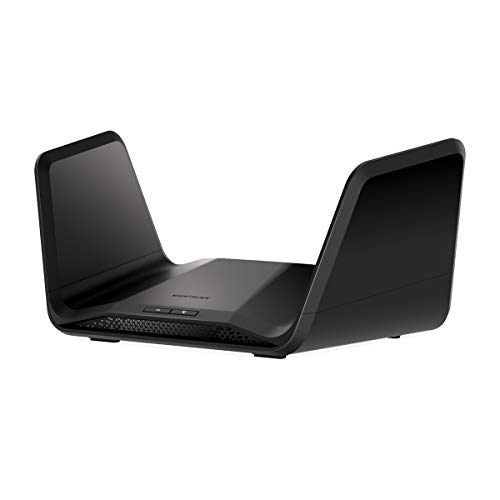
The NETGEAR Nighthawk RAX70 is a tri-band Wi-Fi 6 router with eight streams and a combined speed of AX6600. The extra 5 GHz band gives the network room to separate streaming traffic from everything else, which is the simplest way to stop a 4K stream from stuttering when another device starts a large download. NETGEAR rates coverage at up to 2,500 square feet and support for up to 40 connected devices.
Four Gigabit LAN ports and a USB 3.0 port cover wired connections to a TV, console, or network storage. The router includes NETGEAR Armor security features and Dynamic QoS, which automatically prioritises video and voice traffic. For a mid-size home with many devices it is a strong Wi-Fi 6 choice.
| Specs | Details |
|---|---|
| Wi-Fi standard | Wi-Fi 6 (802.11ax) |
| Speed | AX6600 |
| Bands | Tri-band, 2.4 GHz + 5 GHz + 5 GHz |
| Streams | 8 |
| Coverage | Up to 2,500 sq. ft. |
| Devices | Up to 40 |
| Wired ports | 4 Gigabit LAN, USB 3.0 |
| ASIN | B08KTWXCZT |
TP-Link Archer BE550
The TP-Link Archer BE550 is the only Wi-Fi 7 router in this roundup, and it shows in the specification sheet. It is a tri-band BE9300 model with six streams, Multi-Link Operation, 4K-QAM, and 320 MHz channels, reaching up to 5,760 Mbps on 6 GHz, 2,880 Mbps on 5 GHz, and 574 Mbps on 2.4 GHz. Six internal antennas and full 2.5G ports on the back keep wired devices fast, and coverage is rated at up to 2,000 square feet.
For streaming, the 6 GHz band is the main attraction: it is a clean band that newer phones, laptops, and streaming sticks can use without competing with older devices. EasyMesh support allows extra units to extend coverage, and HomeShield and VPN clients and server are included. Confirm streaming devices support Wi-Fi 7 or Wi-Fi 6E before counting on the 6 GHz band, since older devices cannot use it.
| Specs | Details |
|---|---|
| Wi-Fi standard | Wi-Fi 7 (802.11be) |
| Speed | BE9300 |
| Bands | Tri-band, 2.4 GHz + 5 GHz + 6 GHz |
| Streams | 6 |
| Coverage | Up to 2,000 sq. ft. |
| Wired ports | Full 2.5G WAN/LAN ports, USB 3.0 |
| Antennas | 6 internal |
| Mesh | EasyMesh |
| ASIN | ⚠ B0CJSNSVMR |
Amazon eero Pro 6E
The Amazon eero Pro 6E takes a different approach: instead of raw speed, it sells simplicity and coverage. It is a tri-band Wi-Fi 6E mesh router rated AXE5400, with access to the 6 GHz band for lower latency on compatible devices. A single unit covers up to 2,000 square feet and supports more than 100 connected devices, and extra units can be added to build a mesh network that fills dead spots without running cables.
Setup runs through the eero app, and the built-in Zigbee hub can also control compatible smart home devices. It has two Ethernet ports, one of which is a 2.5G port for the modem connection. This is the pick for a streamer whose main problem is a weak signal in the room where the TV sits, rather than a lack of speed at the router itself.
| Specs | Details |
|---|---|
| Wi-Fi standard | Wi-Fi 6E (802.11ax) |
| Speed | AXE5400 |
| Bands | Tri-band, 2.4 GHz + 5 GHz + 6 GHz |
| Coverage | Up to 2,000 sq. ft. per unit |
| Devices | 100+ |
| Wired ports | 2 Ethernet ports, one 2.5G |
| Mesh | eero mesh, backward compatible |
| Smart home | Built-in Zigbee hub |
| ASIN | ⚠ B091G65HH6 |
TP-Link Archer AX21

The TP-Link Archer AX21 is the compact Wi-Fi 6 option in this roundup. It is a dual-band AX1800 router, delivering up to 1,200 Mbps on the 5 GHz band and 574 Mbps on the 2.4 GHz band, with OFDMA and MU-MIMO to keep several devices moving at once. Four antennas and beamforming focus the signal toward connected devices, and EasyMesh support allows a second unit to extend coverage later.
There is no USB port and no 2.5G port, so this router suits a smaller home where the TV and a handful of devices share the network, rather than a large household with many simultaneous 4K streams. It works with Alexa, and it is a straightforward upgrade from an older Wi-Fi 5 router.
| Specs | Details |
|---|---|
| Wi-Fi standard | Wi-Fi 6 (802.11ax) |
| Speed | AX1800 |
| Bands | Dual-band, 2.4 GHz + 5 GHz |
| Antennas | 4 external |
| Wired ports | Gigabit WAN + 4 Gigabit LAN |
| Mesh | EasyMesh |
| Voice control | Works with Alexa |
| ASIN | B08H8ZLKKK |
How to Choose a Router for Streaming
Start with the number of simultaneous streams. One 4K stream needs a steady connection, but three or four at once need a router with enough capacity to serve them all without queueing. Tri-band models help here because they offer an extra 5 GHz or 6 GHz band to spread devices across, and Wi-Fi 6 or newer adds OFDMA and MU-MIMO, which let the router talk to several devices in the same transmission window.
A TV connected by Ethernet never competes for airtime, so a router with enough Gigabit or 2.5G LAN ports is worth prioritising. Quality-of-service settings are the next thing to check: a router that can prioritise video traffic keeps a stream smooth when another device starts a backup or a download.
Coverage is the third factor. A single powerful router suits an open-plan home, while a mesh system suits a home with thick walls or several floors. Remember that the 6 GHz band is fast but has shorter range than 5 GHz, so it works best in the same room as the router. Finally, confirm the router matches the internet plan: a multi-gig WAN port only helps if the plan itself delivers more than a gigabit.
Who Should Skip These Routers
Anyone whose internet plan is slow should fix the plan first, since no router can deliver more speed than the connection coming into the home. A renter who cannot run Ethernet cable and has only one TV may find a basic mesh node or a simple Wi-Fi 6 router is enough.
Gamers who need the lowest possible latency should wire the console directly rather than relying on Wi-Fi, and look for a router with a 2.5G WAN port. Households with no Wi-Fi 6E or Wi-Fi 7 devices should think twice about paying for a 6 GHz band they cannot use yet. Finally, anyone who needs a modem-router combo should check compatibility first, because every router here needs a separate modem.
Frequently Asked Questions
Do I need Wi-Fi 7 to stream in 4K?
No. A single 4K stream works well on a good Wi-Fi 5 or Wi-Fi 6 connection. Wi-Fi 7 helps when several people stream at once, because its extra band and wider channels reduce congestion.
Should I wire my TV with Ethernet?
Yes, when the router is close enough. A wired connection removes the TV from Wi-Fi contention entirely, which is the most reliable way to stop buffering. Use the 5 GHz band for the TV only when running a cable is not practical.
What does QoS do for streaming?
Quality of Service lets the router recognise video traffic and give it priority over background downloads and backups. It does not add speed, but it keeps a stream smooth when the network is busy.
Is a mesh system better than one powerful router?
It depends on the home. One powerful router is simpler and cheaper for an open-plan space. A mesh system is better for homes with thick walls, several floors, or rooms where the signal drops.
Final Verdict
The TP-Link Archer BE550 is the best router for streaming in most homes: Wi-Fi 7, tri-band capacity, and full 2.5G ports give it room to grow as more devices gain 6 GHz support. The NETGEAR RAX70 is the best Wi-Fi 6 pick for a busy household, and the TP-Link Archer AX73 is the right choice for a large home that needs range. The eero Pro 6E solves coverage problems in homes with dead spots, while the TP-Link AX21 is a sensible upgrade for a smaller space. Match the router to the size of the home and the number of simultaneous streams, wire the TV when possible, and turn on QoS.
More from Amazon
Programs that pair well with the guide above. Offers and eligibility are set by Amazon and may change.
Free shipping on eligible items, Prime Video and more. Eligible new members can start with a free trial.
Start a Prime free trialAd-free music streaming. Eligible new subscribers can start with a free trial.
Try Music Unlimited freeA Prime membership for ages 18-24 with a trial period. Eligibility is set by Amazon.
See Prime for Young AdultsAudiobooks and podcasts to listen to on the go. Eligible new members can start with a free trial.
Try Audible freeAs an Amazon Associate we earn from qualifying purchases.