Key takeaways
- Compare the best speakerphones for Zoom meetings by mic pickup, talk time and connection, from a Zoom Certified six-mic pick to a daisy-chain budget model.
- Top Pick: Anker PowerConf
- Runner-up: Jabra Speak 510 UC
- Also consider: Poly Sync 20
Quick answer: A speakerphone for Zoom meetings is bought on the microphone array, because the puck’s real job is to make one voice — or several voices around one table — arrive clean at the far end while the room’s echo and noise stay behind. Meeting participants who want the default purchase should begin with the Anker PowerConf, a Zoom Certified six-microphone puck with a full day of call time that covers a small room from the middle of the table. Buyers who want the proven personal classic, the one that has sat on more desks than any rival here, should look at the Jabra Speak 510 UC. Buyers who want the richest feature set in a personal puck — a steerable three-microphone array, dust and water resistance, and a battery that also charges a phone — should look at the Poly Sync 20. Travelers and hot-desk workers who want the smallest bag footprint should look at the Yealink CP700. And buyers who need one puck to stretch across a bigger table should look at the EMEET M0 Plus, which daisy-chains a second unit to double its coverage.
As an Amazon Associate, we earn from qualifying purchases.
Table of Contents
- Why Meeting Audio Is a Microphone Problem
- How to Choose
- Quick Comparison
- 1. Anker PowerConf
- 2. Jabra Speak 510 UC
- 3. Poly Sync 20
- 4. Yealink CP700
- 5. EMEET M0 Plus
- Before You Buy: Recall, Variant and Listing Checks
- FAQ
- Conclusion
- Product and ASIN Reference
Why Meeting Audio Is a Microphone Problem
Every Zoom meeting has two audio directions, and they are not equally hard. The direction toward your ears is easy: any speaker larger than a laptop’s built-in drivers will render the far end clearly, and every puck in this guide clears that bar without effort. The direction away from you is the hard one. Your voice has to cross a room — past a keyboard, a coffee cup, a humming air conditioner and the reflective surface of the desk itself — and arrive at a microphone that cannot tell your voice from any of that. A laptop microphone sits at the worst possible place for the job, up by the screen, off-axis from your mouth and inches from the fan and keyboard it shares a chassis with. A speakerphone exists to fix the geometry first and the electronics second: it puts a ring of microphones in the middle of the table, close to everyone who will speak, and then spends its processing budget on keeping the voices and discarding the rest.
That is why the specifications that matter in this category are microphone specifications. The count and arrangement of the microphones decide the pickup pattern — whether the puck hears one person at a desk or a ring of people around a table. The published pickup range decides how far from the puck a speaker can sit before the processing has to strain. The echo cancellation and noise reduction decide how much of the room survives the trip. Battery life, connections and certifications matter, and this guide treats them in full below, but they are the supporting specifications. A buyer who reads only one line of each Specs block should read the microphone line, because in a speakerphone the microphone array is the product and the speaker is the accessory.
One boundary defines this guide, and it should be read before any pick: every unit here is a named maker’s published model with a stated microphone array, a stated talk time and a stated connection set a buyer can check against the listing. One famous name in this category is deliberately absent, and the checks section at the end explains why — a recall record attaches to it, and the scope of that record is stated exactly there.
How to Choose
Size the pickup to the room, not to the meeting title. A speakerphone’s published coverage figure is a geometry claim: how many people, seated how far from the puck, its microphones can hold at conversational level. The picks divide honestly. The Yealink CP700 publishes a pickup range of about 1.5 metres and is a personal device — one worker at a desk, perhaps a second person pulled up beside them. The Jabra Speak 510 is likewise a personal puck, built for one speaker moving between desks and hotel rooms. The Anker PowerConf publishes coverage for groups of up to eight around a table, and the EMEET M0 Plus covers up to eight on its own and sixteen with a second unit chained to it. The Poly Sync 20 is rated for rooms up to about four metres square. Buy the coverage that matches the largest meeting the puck will actually serve: an oversized array in a solo office buys nothing, and an undersized puck at the middle of a boardroom table leaves the far seats straining to be heard.
Count microphones, then ask what the processing does with them. Microphone count is the headline figure, and the spread here runs from two in the compact Yealink to six in the Anker. Count alone is not the whole story, because the array’s job is as much rejection as capture: every maker here pairs its array with echo cancellation, so the far end’s voice coming out of the speaker does not re-enter the microphones and loop, and with noise reduction aimed at the steady sounds of a room — fans, air conditioning, keyboard clatter. One pick steers its array, focusing its three microphones toward the active speaker rather than listening equally in all directions. The honest way to read the Specs blocks is microphone count plus pickup range plus the named processing, together: a six-microphone puck with a modest range and a three-microphone puck with steering are answering the same problem from opposite ends.
Decide between wired certainty and wireless freedom, and check the port. Every pick here connects to a computer by USB cable, and that wired path is the one to plan around: it carries audio and, on the battery models, charging, with no pairing step and no wireless dropout. The differences are in the connector and in what else is offered. The Yealink and the EMEET and the Anker connect by USB-C; the Poly Sync 20 in the version pinned here carries a USB-A cable, which suits older laptops and docks and asks newer machines for an adapter; the Jabra Speak 510’s cable is the older USB generation. Bluetooth is the second path on every pick, and it earns its place for phones and tablets and for a cable-free desk — with the caveat that a computer’s own Bluetooth stack is the least predictable link in any meeting setup, which is why several of these models are also sold in versions bundled with a pre-paired USB Bluetooth adapter under separate listings. The checks section names those variant traps exactly.
Read talk time as a work pattern, not a contest. The published talk times here run from nine hours on the compact Yealink to twenty-four hours on the Anker, and the right reading is not that the largest figure wins. A puck that lives on one desk and charges from the same cable that carries its audio never needs its battery at all; talk time decides the purchase for the worker who carries the puck between rooms, sites and hotel desks, where a nine-hour day of calls on one charge is the difference between a tool and a chore. The Poly Sync 20 adds a second use for its battery: a USB port that charges a phone, which turns the puck into the bag’s emergency power source on a travel day. Match the figure to the pattern — desk-bound buyers can ignore it, mobile buyers should treat anything under a full working day as a compromise.
Treat certification as a convenience, not a quality mark. Two kinds of badge appear in this guide. Platform certification — the Anker’s Zoom Certified badge, the Yealink’s Microsoft Teams certification in the version pinned here — means the maker has put the device through the platform’s own program, and what it buys in practice is integration: call controls on the puck that the platform answers, and a device the platform’s audio settings recognize without argument. The UC and MS editions of the Jabra line divide the same way, with the UC edition aimed at mixed-platform work. None of it changes the microphone. A buyer whose meetings all live in one platform gets real convenience from the matching badge; a buyer who moves between Zoom, Teams and Meet should buy the array and the connections and let the badge fall where it may.
Plan the second seat before you need it: daisy-chaining and pairing. A personal puck has a hard ceiling set by its pickup geometry, and two of the category’s answers to a growing meeting appear in this guide’s wider field. The EMEET M0 Plus answers with a cable: a second unit chains to the first, the pair presents to the computer as one device, and the published coverage doubles to sixteen people — the only true scaling path among these five picks. The Jabra Speak line answers differently at its higher tiers, with models that pair wirelessly in twos, though the Speak 510 pinned here is a single-unit device. A buyer whose small room is becoming a medium room should decide which answer they are buying before the first purchase, because the chain and the pair only work within a maker’s own family.
Quick Comparison
| Product | Tier | Microphones | Talk time | Connections | Distinguishing feature |
|---|---|---|---|---|---|
| Anker PowerConf | Mid-range | Six-mic array, 360-degree pickup | Up to 24 hours | Bluetooth and USB-C | Zoom Certified, with coverage published for up to eight people |
| Jabra Speak 510 UC | Mid-range | Omnidirectional, 360-degree pickup | Up to 15 hours | USB and Bluetooth | The proven personal classic, at 195 grams with a travel pouch |
| Poly Sync 20 | Premium | Three-mic steerable array | Up to 20 hours | USB-A cable and Bluetooth | IP64 sealing, and a battery that also charges a phone |
| Yealink CP700 | Budget | Two omnidirectional mics | Up to 9 hours | USB and Bluetooth | The smallest puck here, at 120 mm across and 220 grams |
| EMEET M0 Plus | Budget | Four AI microphones, 360-degree pickup | Per the maker’s listing data | USB-C and Bluetooth | Daisy-chains a second unit to cover up to sixteen people |
1. Anker PowerConf
The PowerConf is the default pick for the small meeting room, because it is the one puck in this guide that was specified from the table outward: six microphones arranged for full 360-degree pickup, a published coverage figure of up to eight people around it, and a Zoom Certified badge that makes it the natural first answer for a Zoom-first workplace. Its talk time is the longest published here — up to twenty-four hours of calls on a charge — which is more than a specification-sheet victory: it means the puck can live in the middle of a shared table, away from any cable, through a full week of meetings, and still be a wired USB-C device the moment someone plugs it in.
The processing story is the other half of the pick. Anker pairs the six-microphone array with real-time voice enhancement aimed at the two failures of table audio: the voice that fades as a speaker turns away, and the room noise that fills the gaps. The array listens in every direction at once, so the participant at the far end of the table is not a second-class voice, and the full-duplex design lets both ends speak at once without the clipping that makes interruptions collapse into silence. For the hybrid meeting — three people in the room, five on the call — this is the shape of device the room side should be heard through.
Two identity checks belong with this pick, and both are developed in the checks section below. The first is the name: PowerConf, PowerConf S3 and PowerConf S330 are three different products, and the one pinned here is the original PowerConf. The second is the recall record that attaches to its S3 sibling — a different model, named exactly in the checks section — which does not cover this unit but is the reason the S3 is not in this guide. A buyer who reads those two paragraphs can order this puck with the identity question fully settled.
Specs
- Model: PowerConf, per the listing data reviewed
- Microphones: Six-microphone array, 360-degree voice pickup, per the maker’s published data
- Coverage: Up to eight people, per the maker’s published data
- Call time: Up to 24 hours, per the maker’s published data
- Connections: Bluetooth and USB-C, per the listing data reviewed
- Certification: Zoom Certified, per the listing data reviewed
- Processing: Real-time voice enhancement and echo cancellation, per the maker’s published data
2. Jabra Speak 510 UC
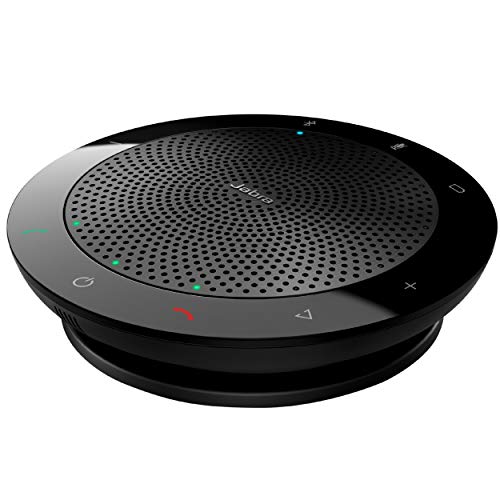
The Speak 510 UC is the personal classic of this category, the puck that defined the form: a 120-millimetre disc, an omnidirectional microphone with 360-degree pickup, and a control ring that answers, mutes and adjusts volume without the software ever being opened. Its argument is not a headline figure. It is that every part of the design has been settled by a decade of desks: the cable wraps into the base, the unit weighs 195 grams, a travel pouch is in the box, and the published talk time of up to fifteen hours covers a travel day of calls with room to spare.
The UC edition pinned here is the mixed-platform version, certified for Zoom and Google Meet per its listing, and that choice is deliberate: the buyer this guide aims at moves between platforms, and the UC model’s call handling is built for all of them rather than keyed to one. The speaker side is honest for its size — a maximum output of ten watts per the listing data, voiced for speech rather than music — and the Bluetooth path serves the phone and tablet as readily as the laptop, which is the pattern of a worker whose meetings happen wherever the day puts them.
The variant discipline matters more with this model than with any other pick, because the Speak 510 name covers a small crowd of listings: UC and MS editions, versions with and without a bundled USB Bluetooth adapter, and a refreshed edition sold under its own listing. The checks section lays out the family. The listing pinned here is the long-running UC model, and a buyer comparing listings should match the edition letters before anything else, because the puck in the photograph will look identical across all of them.
Specs
- Model: Speak 510 UC, per the listing data reviewed
- Microphone: Omnidirectional, 360-degree pickup, per the maker’s published data
- Talk time: Up to 15 hours, per the maker’s published data
- Connections: USB and Bluetooth, per the maker’s published data
- Speaker: Up to 10 watts maximum output, per the listing data reviewed
- Weight: 195 grams, per the listing data reviewed
- Certification: Certified for Zoom and Google Meet, per the listing data reviewed
- In the box: Travel pouch included, per the listing data reviewed
3. Poly Sync 20
The Sync 20 is the feature-led pick, the personal puck that treats the category’s supporting specifications as headline ones. Its three-microphone array is steerable — it focuses its pickup toward the active speaker instead of listening with equal weight in every direction — which is the right answer for the solo desk and the two-person huddle, where the voice that matters is one voice and everything else in the room is noise to be rejected. The published pickup range is up to about two metres, the rated room size about four metres square, and the speaker is a 40-millimetre driver with dual passive radiators that give it the fullest playback voice among the personal picks here.
The rest of the specification reads like a travel checklist answered in full. The battery is rated for up to twenty hours of talk time and doubles as a phone charger through its USB port. The body carries an IP64 rating against dust and water, the only sealing figure published in this guide, which is the difference between a puck that fears a spilled coffee and one that shrugs at it. The full-duplex audio, noise and echo reduction, and the visible status light bar round out a device aimed squarely at the professional whose meeting room is wherever the laptop opens.
The version pinned here connects by a USB-A cable, and that single detail is the pick’s one planning point: it suits the enormous installed base of USB-A laptops and docks directly, while a USB-C-only machine needs an adapter or the sibling USB-C listing, which is a separate listing with its own identity. The Sync 20 family also divides into standard and Teams-certified editions and into plus versions bundled with a Bluetooth adapter, all under their own listings — the checks section names the pattern, and the buyer should confirm the cable letter and the edition before ordering, because the photographs across the family are near-identical.
Specs
- Model: Sync 20, USB-A version, per the listing data reviewed
- Microphones: Three-microphone steerable array, per the maker’s published data
- Pickup range: Up to about 2 metres; rooms up to about 4 x 4 metres, per the maker’s published data
- Speaker: 40 mm driver with dual passive radiators, per the maker’s published data
- Battery: Up to 20 hours of talk time; 3,200 mAh, per the maker’s published data
- Connections: USB-A cable and Bluetooth, per the listing data reviewed
- Sealing: IP64 dust and water resistance, per the maker’s published data
- Extra: USB port charges a phone; full-duplex audio with noise and echo reduction, per the maker’s published data
- Weight: 360 grams, per the maker’s published data
4. Yealink CP700

The CP700 is the compact pick, built to a single brief: the smallest bag footprint that still counts as a real speakerphone. It is 120 millimetres across and 28 millimetres tall, weighs 220 grams, and disappears into a laptop sleeve in its zipper case — yet it keeps the category’s essential architecture, with two omnidirectional microphones, full-duplex audio, and Yealink’s Optima HD voice processing with noise suppression and acoustic echo cancellation. The published pickup range of up to 1.5 metres states its honest limit: this is a personal device for one worker, or two at a small desk, and it does not pretend to be a boardroom instrument.
The version pinned here is the Microsoft Teams certified model sold without the USB Bluetooth dongle, and both halves of that description matter. The Teams certification brings the platform’s call handling to the puck’s touch surface for the Teams-standard workplace. The absent dongle means the computer connection is the USB cable, or the computer’s own Bluetooth — the dongle-bundled version exists under its own listing for buyers whose machines pair poorly. Connectivity otherwise runs to three paired Bluetooth devices alongside the wired path, so the phone and the tablet stay paired while the laptop uses the cable.
The trade the CP700 makes is battery: up to nine hours of talk time, the shortest figure in this guide, in exchange for the size. For its intended pattern — a day of calls at a desk or a satellite office, charged overnight from the same USB family that connects it — nine hours is a working day, and the puck’s published charge time of about three hours restores it. A buyer who runs back-to-back meeting days away from power should read the Anker’s figure instead; a buyer who wants the meeting to travel light should start here.
Specs
- Model: CP700, Teams certified version without dongle, per the listing data reviewed
- Microphones: Two omnidirectional microphones, per the maker’s published data
- Pickup range: Up to 1.5 metres, per the maker’s published data
- Speaker: 5 watts peak, 3 watts RMS, per the maker’s published data
- Battery: Up to 9 hours of talk time; 1,420 mAh, per the maker’s published data
- Connections: USB 2.0 and Bluetooth; up to three paired Bluetooth devices, per the maker’s published data
- Size and weight: 120 mm diameter x 28 mm; 220 grams, per the maker’s published data
- Processing: Optima HD voice, full duplex, noise suppression and acoustic echo cancellation, per the maker’s published data
5. EMEET M0 Plus

The M0 Plus is the scaling pick, and its distinguishing specification is a socket: a daisy-chain connection that lets a second EMEET unit join the first, the pair presenting to the computer as a single device. On its own, the M0 Plus covers up to eight people with a four-microphone array and full 360-degree pickup; chained, the published coverage doubles to sixteen, which carries it from the huddle room into the long-table meeting that no single personal puck in this guide can serve. For a buyer whose meeting keeps growing, it is the only pick here whose second unit is an upgrade rather than a replacement.
The processing is the maker’s VoiceIA system, an algorithm layer over the four-microphone array aimed at the standard enemies — background noise and the echo of the speaker’s own output returning through the room — and the array’s four microphones are the AI-assisted design EMEET builds its current line around. Connections are USB-C and Bluetooth, the current pairing of ports, so the puck moves between a modern laptop wired and a phone wirelessly without an adapter in either direction.
The honest limits belong in the open. The M0 Plus is the youngest design in this guide, from the maker with the shortest track record here, and its published data is thinner than the Jabra’s or the Poly’s — the Specs block below prints what the listing states and no more, and a buyer who needs a figure the listing does not publish should treat that absence as information. Its name also needs care: the M0, the M0 Plus and the M2 are different models in one family, and the checks section names the pattern. What the M0 Plus offers in exchange is the chain — and for the right room, that is the whole argument.
Specs
- Model: M0 Plus, per the listing data reviewed
- Microphones: Four-microphone array, 360-degree voice pickup, per the maker’s published data
- Coverage: Up to 8 people; up to 16 with a second unit daisy-chained, per the maker’s published data
- Processing: VoiceIA noise reduction and echo cancellation, per the maker’s published data
- Connections: USB-C and Bluetooth, per the listing data reviewed
- Daisy chain: Supported with a second compatible EMEET unit, per the maker’s published data
Before You Buy: Recall, Variant and Listing Checks
The recall record in this category names one famous model, and it is not in this guide. In December 2024, the US Consumer Product Safety Commission announced recall 25-056, covering the lithium-ion battery packs in certain Anker Soundcore speakers and Anker PowerConf S3 speakerphones — specifically units carrying the model identifiers A3302011 and A3302031, sold on Amazon from March through October 2023, whose batteries could overheat. The scope matters and is stated exactly: the recall covers the battery packs in those identified PowerConf S3 units, identified by serial number on the maker’s recall page. Its consequence for this guide is direct. The PowerConf S3 is the best-known name in this category, and it is excluded here; the Anker pick above is the original PowerConf, a different and earlier model that the recall does not name. A buyer who already owns an S3, or meets one in a sale of used equipment, should run its serial number through the maker’s recall checker before using it. No other pick in this guide is named in a CPSC recall, and no other conference speakerphone recall covers this category’s current models.
Read edition letters before prices, because every family here sells twins. The Jabra Speak 510 exists as UC and MS editions, with and without a bundled USB Bluetooth adapter, and in a refreshed edition under its own separate listing; the photographs are interchangeable and the call behaviour is not. The Poly Sync 20 divides by cable — USB-A and USB-C versions are separate listings — and again into standard and Teams editions and plus versions with an adapter in the box; the listing pinned here is the standard USB-A model. The Yealink CP700 is sold with and without its BT50 Bluetooth dongle, and in UC and Teams versions; the pinned listing is the Teams version without the dongle. The Anker names divide by generation: PowerConf, PowerConf S3 and PowerConf S330 are three different devices, and only the first is this guide’s pick. The EMEET names divide the same way: M0, M0 Plus and M2 are distinct models. In every family, the model line in the Specs block is the identity to match at checkout.
Treat a missing offer box on a summary page as a prompt to check, not as a verdict. Some of these listings have shown a “no featured offers” note in the summary area of crawled copies while the models remained current, stocked lines in their makers’ catalogues and in current buying coverage. That note describes the state of one crawl’s offer data, not the state of the product. The correct response is to open the live listing and read its actual offer — and if a listing ever is genuinely retired, the variant map above is the tool for finding its successor inside the same family rather than a stranger with a similar photograph.
Match the puck to the platform’s audio settings once, at setup. Every pick here is a standard USB and Bluetooth audio device, and Zoom, Teams and Meet will all see it without drivers. The one-time discipline is to select the speakerphone explicitly as both the speaker and the microphone inside the meeting app, rather than leaving the app on the laptop’s defaults, and to switch off any second echo-cancellation layer the app offers when the puck’s own processing is active, since two cancellers working the same signal can thin a voice. That two-minute setup is the difference between the array you bought and the laptop microphone you already had.
FAQ
Is a speakerphone actually better than a headset for Zoom meetings?
They solve different halves of the problem. A headset puts the microphone centimetres from one mouth and isolates that one voice completely, which is why it stays the right answer for a solo worker in a noisy room. A speakerphone serves everyone in its room at once — the hybrid meeting with three people around one table cannot share a headset — and it leaves the ears free, which matters across a day of back-to-back calls. Buy the headset for one voice in a loud space; buy the puck when the room itself is a participant.
How many people can one speakerphone cover?
The published figures in this guide run from the Yealink CP700’s personal range — one or two people within about 1.5 metres — through the Anker PowerConf’s up to eight people, to the EMEET M0 Plus at eight alone and sixteen with a second unit chained. Treat the figures as seating geometry rather than headcount alone: eight people around a compact table sit inside the pickup pattern, while eight people spread down a long boardroom table do not, and the far seats are where coverage is lost first.
Can a speakerphone connect to a computer and a phone at the same time?
In the ways that matter, yes. The wired USB path and the Bluetooth path are separate doors: the Yealink CP700, for example, holds pairings with up to three Bluetooth devices alongside its cable, and the Bluetooth models here generally keep a phone paired while the laptop uses the cable. What none of them does is mix two calls into one; the puck serves one active call and keeps the other devices ready. Buyers whose computers pair unreliably should look for the versions of these models bundled with a pre-paired USB Bluetooth adapter, sold under separate listings.
Is the Anker PowerConf in this guide affected by the Anker speaker recall?
No. The December 2024 CPSC recall, number 25-056, covers the battery packs in identified units of the PowerConf S3 — a different, later model — carrying the identifiers A3302011 and A3302031 and sold between March and October 2023, together with a Soundcore music speaker. The original PowerConf recommended here is not named in the recall. Owners of an S3 can check a unit’s serial number on the maker’s recall page; the remedy for an affected unit is handled there.
Conclusion
A speakerphone is the rare purchase whose whole value is heard by other people, and the five picks here divide the job cleanly. The Anker PowerConf is the default: six microphones, a day of call time and a Zoom Certified badge, sized for the small room where hybrid meetings actually happen. The Jabra Speak 510 UC is the settled personal classic for the worker who carries the meeting between desks. The Poly Sync 20 is the feature-complete personal puck, with its steerable array, sealed body and phone-charging battery. The Yealink CP700 is the compact traveller, honest about its personal range. And the EMEET M0 Plus is the one that grows, chaining a second unit when the table gets longer. Read the microphone line first, match the edition letters at checkout, and check the one recall record in the checks section if an S3 ever crosses your path — the rest of the decision is the room you already know.
More from Amazon
Programs that pair well with the guide above. Offers and eligibility are set by Amazon and may change.
Free shipping on eligible items, Prime Video and more. Eligible new members can start with a free trial.
Start a Prime free trialAd-free music streaming. Eligible new subscribers can start with a free trial.
Try Music Unlimited freeA Prime membership for ages 18-24 with a trial period. Eligibility is set by Amazon.
See Prime for Young AdultsAudiobooks and podcasts to listen to on the go. Eligible new members can start with a free trial.
Try Audible freeAs an Amazon Associate we earn from qualifying purchases.