Key takeaways
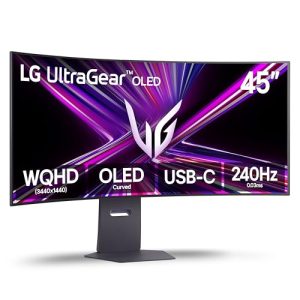
- The LG UltraGear 45GX900A-B pairs a 45-inch curved OLED panel with 240Hz speed. See how its specs, ports and limits stack up before you buy.
The real decision with a 45-inch ultrawide is not whether the screen looks dramatic on a product page. It is whether a 3440 x 1440 panel stretched across this much glass still looks sharp at your seating distance, whether your graphics card can feed 240Hz at that resolution, and whether an aggressive 800R curve suits the games you actually play. The LG UltraGear 45GX900A-B asks buyers to accept a modest pixel density in exchange for immersion and speed, and that trade sits at the center of this review from start to finish.
This assessment is written for sim racers, flight sim fans and single-player gamers weighing this monitor against smaller OLEDs, plus desk workers curious about one huge screen replacing two. Every judgement below is drawn from the Amazon listing and LG’s published specifications for model 45GX900A-B — the panel figures, port list and stated features — so the focus stays on what the numbers mean for a purchase decision.
Quick Picks
As an Amazon Associate we earn from qualifying purchases
| Product | Best for | Key spec from title |
|---|---|---|
| LG UltraGear 45GX900A-B | Immersive ultrawide gaming at high frame rates | 45-inch WQHD OLED, 240Hz, 0.03ms |
How to Choose
Judge pixel density before screen size
A 45-inch panel at 3440 x 1440 spreads the same pixel count as a 34-inch ultrawide across far more glass, which drops pixel density to roughly the level of a 27-inch 1080p display. Fast-moving games hide that softness well, because motion and wide scenery dominate what the eye tracks. Text, strategy interfaces and photo work expose it immediately. Before choosing any monitor in this class, compare the density figure against the display you use now, and be honest about how much of your day is spent reading rather than playing. Sitting farther back softens the problem, which is why couch-style and rig setups forgive the resolution more readily than a close desk chair does.
Match the refresh rate to your graphics card
A 240Hz panel only delivers its advantage when the graphics card can approach 240 frames per second at 3440 x 1440, a workload closer to 4K gaming than to ordinary 1440p. Competitive titles with scalable engines reach that territory on strong hardware; heavy open-world releases usually land far lower, where the panel behaves like a good 120Hz screen. Adaptive sync support matters just as much, since it keeps motion smooth in the wide middle range where most demanding games actually run on current hardware. Upscaling features on modern cards also change the maths, letting a strong but not flagship GPU approach high frame rates at this resolution with a modest cost to image sharpness.
Decide whether an 800R curve fits your desk
The 800R radius is the steepest curve sold on a consumer monitor, wrapping the edges of the 21:9 panel toward the viewer. Racing rigs and flight setups benefit most, because the wrap fills peripheral vision and matches a natural seating arc. Shared viewing suffers, since anyone sitting off to the side sees a distorted slice of the image. Desk depth counts too: the panel is wide enough that a shallow desk puts the edges uncomfortably close. Measure the space and picture the seating position before treating the curve as a pure upgrade. A monitor arm can help reclaim depth, though a screen this heavy and wide needs an arm rated well beyond ordinary office loads.
Weigh OLED strengths against OLED care duties
Self-lit pixels give this class of monitor true black levels, near-instant pixel response and contrast that LCD panels cannot match, which is why night scenes and dark cockpits look so convincing. The counterweight is panel care: static elements such as taskbars, HUDs and news tickers raise long-term image-retention concerns, and manufacturers build in pixel-refresh routines and screen-shift features to manage them. Buyers who mix long workdays of static windows with evening gaming should read the care features and warranty terms as carefully as the speed figures. Simple habits — auto-hiding the taskbar, rotating wallpapers, letting the panel run its refresh cycles — reduce the risk considerably for mixed-use owners.
The 1 Best Option
LG UltraGear 45GX900A-B

The 45GX900A-B suits gamers who want the widest, most enveloping view a single panel can give without stepping up to a television. Its OLED panel pairs a 240Hz refresh rate with a 0.03ms response time, so fast pans in racing and action titles stay clean, while the 800R curve pulls the far edges of a cockpit or circuit into peripheral vision. The 3440 x 1440 resolution keeps the graphics workload below 4K levels, and USB-C with 65W power delivery lets a laptop drive the screen and charge over one cable between gaming sessions. HDMI 2.1 and DisplayPort inputs also leave room for a console or second PC without cable swapping.
Specs
- Model: 45GX900A-B (Amazon listing model 45GX900A-B.AUS)
- Panel: 45-inch (44.5-inch viewable) OLED, curved 800R
- Resolution: WQHD 3440 x 1440, 21:9 aspect ratio
- Refresh rate: 240Hz
- Response time: 0.03ms GtG
- HDR: VESA DisplayHDR True Black 400, HDR10
- Contrast ratio: 1.5M:1 (per listing)
- Color: DCI-P3 98.5%, 1.07 billion colors (per listing)
- Brightness: 275 cd/m² typical, up to 1,300 nits peak (per listing)
- Adaptive sync: NVIDIA G-Sync Compatible, AMD FreeSync Premium Pro
- Ports: HDMI 2.1, DisplayPort 1.4, USB Type-C with 65W power delivery
Best for: Sim racers, flight sim players and cinematic single-player gamers who want maximum wrap and speed from one screen.
Watch out for: Pixel density is low for a panel this size, so text looks coarse at close range, the sheer width demands a deep desk and a sturdy stand or arm, and LG’s warranty on this model runs two years — shorter than the three-year OLED cover some rivals advertise.
Which One Fits Your Situation
You run a racing or flight simulator rig
This is the scenario the 45GX900A-B was shaped for. The steep 800R curve wraps a cockpit view around your seating position, the 21:9 frame shows mirrors and side windows without a second monitor, and 240Hz keeps fast scenery changes fluid. A wheel stand or yoke setup places you at the curve’s focal distance, exactly where the geometry works best, and one panel replaces a triple-screen rig without bezels crossing the view or extra stands crowding the desk.
You play cinematic single-player games in a dim room
OLED black levels change how dark scenes read: caves, night drives and space titles hold detail in shadow instead of washing out to grey. DisplayHDR True Black 400 certification and the wide DCI-P3 gamut support that strength, flattering stylised art direction from neon cityscapes to painterly indie titles, and the sheer width of the panel fills more of your view than a 16:9 screen can, especially in games that render true ultrawide.
You split the desk between work and gaming
The wide canvas fits two full windows side by side, and USB-C with 65W power delivery means a work laptop connects and charges through a single cable. The compromise is text clarity: at this pixel density, documents look softer than on a 27-inch 1440p screen. If work is mostly email and browser tabs, the trade is reasonable; heavy writing days argue for a sharper panel. Raising system text scaling recovers some readability, though it returns a little workspace.
You play competitive shooters and want every frame
The 240Hz refresh rate and 0.03ms response time are the headline figures here, and adaptive sync from both major GPU camps keeps frame delivery smooth. The caution is size: a 45-inch screen forces more eye and head movement to track corners than a 24- or 27-inch esports display. Players who value raw speed over immersion usually pick smaller; those who want both accept the wider scan and the broader view that ultrawide support in many shooters now provides.
Common Mistakes
- Assuming a 45-inch 3440 x 1440 screen looks as sharp as a 34-inch model with the same resolution, when the pixel density is noticeably lower and text at a normal desk distance reveals the difference within minutes.
- Pairing the monitor with a mid-range graphics card and expecting 240 frames per second in demanding titles at native resolution, when the pixel count demands flagship hardware or upscaling, and then blaming the panel for frame rates it was never fed.
- Ignoring desk depth and total width, then finding the 800R curve puts the panel edges too close on a shallow desk and crowds out speakers or a second screen.
- Leaving static desktop elements on screen all day without enabling the panel’s built-in OLED care and refresh features, then blaming the technology for avoidable image retention.
- Confusing this model with the 45GX950A, a different 5K2K monitor, or the older 45GR95QE, and ordering against the wrong specification sheet, wrong port expectations and the wrong idea of what the screen can do.
Frequently Asked Questions
Is the LG 45GX900A-B the same as the 45GX950A?
No. The 45GX900A-B reviewed here uses a 3440 x 1440 panel at 240Hz, while the 45GX950A is a separate 5K2K model running 5120 x 2160 with a dual-mode refresh arrangement and stronger USB-C power delivery. The two share a size and curve but differ in resolution and ports, so the model number on the listing deserves a careful check before ordering, especially in secondhand and marketplace listings.
Can a console make good use of this monitor?
Consoles connect over HDMI 2.1 and can output high refresh rates at lower resolutions, but they render a 16:9 image, leaving black bars on both sides of the 21:9 panel. The screen works, yet much of its width goes unused. Console-first players generally get more from a 4K 16:9 display, while PC gamers can set the full ultrawide resolution in most modern titles and use the whole panel.
How demanding is 3440 x 1440 at 240Hz on a PC?
The pixel count sits between standard 1440p and 4K, and pushing it toward 240 frames per second in modern releases calls for a high-end graphics card, often with upscaling enabled. Esports and older titles reach the ceiling far more easily. Mid-range cards still deliver smooth adaptive-sync gaming, just well below the headline figure.
What should be checked about the warranty before buying?
Listings for this model describe a two-year parts and labor warranty that includes the OLED panel, shorter than the three-year cover on some competing OLED monitors. Because panel care is the main long-term question with any OLED, confirming the exact warranty terms and burn-in wording on the current listing is a sensible final step before ordering, and keeping the purchase record makes any later claim simpler.
More from Amazon
Programs that pair well with the guide above. Offers and eligibility are set by Amazon and may change.
Free shipping on eligible items, Prime Video and more. Eligible new members can start with a free trial.
Start a Prime free trialAd-free music streaming. Eligible new subscribers can start with a free trial.
Try Music Unlimited freeA Prime membership for ages 18-24 with a trial period. Eligibility is set by Amazon.
See Prime for Young AdultsAudiobooks and podcasts to listen to on the go. Eligible new members can start with a free trial.
Try Audible freeAs an Amazon Associate we earn from qualifying purchases.