Our Top Picks
For most RVers, the Amazon Fire TV Stick 4K Plus is the safest all-round streaming device: it is small, its title lists Wi-Fi 6, and it does not need extra boxes or cables. The device matters less than the internet behind it, though. Campground Wi-Fi, a phone hotspot or a cellular router decides whether anything plays, so a cheap stick on a good connection beats a premium box on a weak one. Below are nine listings, including one renewed unit and one like-new unit, with notes on what each title does and does not promise.
Picks in a sentence
As an Amazon Associate we earn from qualifying purchases at no extra cost to you.






- Best all-rounder: Fire TV Stick 4K Plus.
- Lowest-effort 4K: Fire TV Stick 4K Select.
- Most hands-free: Fire TV Cube.
- Roku fans: Roku Streaming Stick+ or Roku 3900SE.
- Google apps and casting: Chromecast with Google TV (4K).
Nine streaming devices compared
| Model | Key point from the title | Best for |
|---|---|---|
| Fire TV Stick 4K Select | 4K streaming, AI-powered search, free and live TV | Simple 4K upgrade |
| Fire TV Stick 4K Plus | Wi-Fi 6, AI-powered search | Most RV setups |
| Fire TV Stick 4K Max (2-Year Protection Plan) | Bundle with a protection plan | Rough-travel peace of mind |
| Like-New Fire TV Stick 4K | Like-New condition, Wi-Fi 6 | Cost-conscious buyers |
| Fire TV Cube | Hands-free, Wi-Fi 6E, 4K Ultra HD | Voice control |
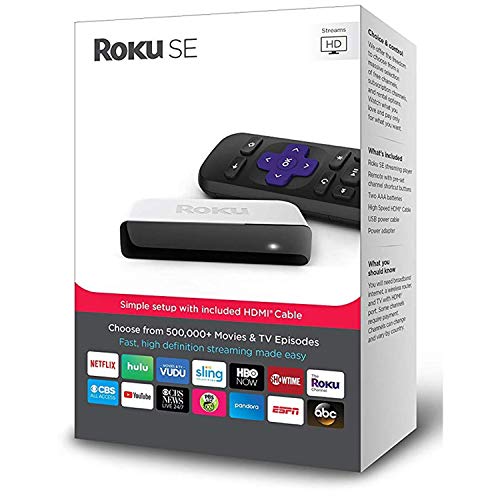
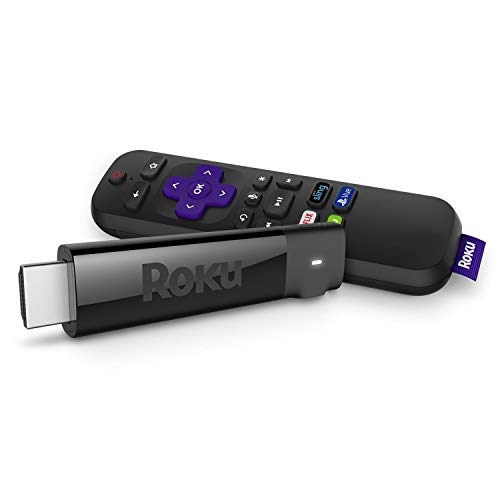
| Roku Streaming Stick+ | Compact Roku stick; title gives few specs | Roku loyalists |
| Roku 3900SE | Fast HD streaming | Older HD sets |
| Roku Express HD (Renewed) | HD player, renewed | Backup device |
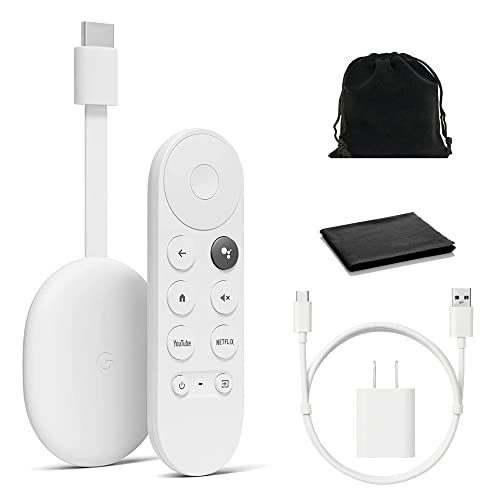
| Chromecast with Google TV (4K) | 4K HDR, voice search, pouch included | Google ecosystem users |
The nine listings in detail
Amazon Fire TV Stick 4K Plus
The title lists AI-powered Fire TV Search, Wi-Fi 6, hundreds of thousands of movies and shows, free and live TV, and Alexa+. A stick is easy to pack and plugs into the HDMI port of an RV TV without a power brick on the shelf. Wi-Fi 6 only helps if the campground or router supports it, so do not expect miracles from a weak signal. In a rig with a single TV, that simplicity is the point: one remote, one HDMI port and nothing else to mount.
Pros
- Wi-Fi 6 named in the title
- Small enough to leave plugged in or throw in a drawer
Cons
- Needs an internet source it cannot supply itself
- Title does not state power requirements
Who it’s for: RVers who want one dependable stick.
Amazon Fire TV Stick 4K Select
This title lists 4K streaming, AI-powered search, free and live TV, and Alexa+. It sits at the simple end of the 4K sticks and suits a small RV TV where you mainly want apps and a clean remote. The title gives no Wi-Fi standard, so check the listing if reception in a metal-skinned rig is your worry. A router placed near the TV usually helps more than any change of stick.
Pros
- Straightforward 4K stick
- Free and live TV options named in the title
Cons
- No Wi-Fi standard in the title
- A 4K picture needs a 4K RV TV to matter
Who it’s for: buyers upgrading an older stick on a tight budget.
Amazon Fire TV Stick 4K Max with 2-Year Protection Plan
The title bundles the 4K Max with a two-year protection plan. For a device that bounces down highways, a plan can be worth a look, but the terms, provider and what counts as a claim are not in the title, so read them on the listing, including whether a claim covers drops or only defects. The title says nothing else about specs, so check the product page for the Max-specific features.
Pros
- Protection plan in the same listing
- Max model name, with feature details on the product page
Cons
- Plan terms are not spelled out in the title
- Bundle makes direct price comparison harder
Who it’s for: full-timers who want some coverage on a device that travels.
Like-New Amazon Fire TV Stick 4K (newest model)
This listing is a Like-New unit of the Fire TV Stick 4K, with Wi-Fi 6 and AI-powered search in the title. Like-New is a condition label, so check the seller, return window and warranty before buying. It is a sensible way to trim cost on a second set in the bedroom of the rig, as long as you accept it is not sold as brand new. Ask the seller what is in the box, since remotes and cables are the parts that tend to go missing on used gear.
Pros
- Lower entry cost is the likely appeal
- Wi-Fi 6 named in the title
Cons
- Condition label means no new-unit guarantee
- Warranty depends on the seller
Who it’s for: second-TV setups where a Like-New unit is acceptable.
Amazon Fire TV Cube
The title lists hands-free streaming, AI-powered search with Alexa+, Wi-Fi 6E and 4K Ultra HD. It is a box rather than a stick, which means more shelf space in a small RV but easier voice control from across the room. The title does not mention an Ethernet port, so check the listing if a wired link to a router matters to you. In a small coach, a box that sits on a shelf behind a cabinet door can have its signal blocked, so plan where it will live.
Pros
- Hands-free voice control named in the title
- Wi-Fi 6E listed
Cons
- Larger than a stick in tight spaces
- Ethernet support not mentioned in the title
Who it’s for: RVers who like voice control and have shelf room.
Roku Streaming Stick+
The listing is bare: just the model name. That means you need to read the product page for resolution, remote type and power details. Roku players are widely used, and the stick form factor is easy to pack, but nothing in this title confirms 4K, HDR or Wi-Fi standard, so treat any of those as unconfirmed. If you pick this one, compare it with the other Roku listings here before paying for a feature the title never mentions.
Pros
- Compact stick form
- Familiar Roku interface for existing users
Cons
- Title gives almost no specs
- Features must be checked on the page
Who it’s for: Roku users who want a simple stick and will verify the specs.
Roku 3900SE
The title says only fast high-definition streaming that is easy on the wallet. HD, not 4K, so it pairs best with an older or smaller RV TV. Because the title does not describe form factor or connectivity, check the listing for how it connects and what ships in the box. Roku’s HD tier is often enough for a bunk-room TV that is only used for background shows.
Pros
- HD streaming at a modest tier
- Roku platform if you already use it
Cons
- Title does not confirm 4K or HDR
- Few specs listed
Who it’s for: owners of older HD sets who want a basic player.
Roku Express HD (Renewed)
This is a renewed Roku Express HD, described as an HD streaming media player in black. Renewed means refurbished, so check the seller’s grading, warranty and return policy before relying on it. For a backup unit that lives in a drawer in case the main device fails, a low-cost renewed player is a reasonable thought, as long as the terms are clear. Keep the original packaging and note the return window so you can act quickly if it arrives faulty.
Pros
- Renewed route can lower cost
- HD output suits older RV TVs
Cons
- Refurbished condition adds uncertainty
- Not a 4K device per the title
Who it’s for: buyers who want a backup player and accept refurbished gear.
Google Chromecast with Google TV (4K HDR)
The title lists voice search, 4K HDR streaming, and a pouch and cleaning cloth in snow white. Chromecast with Google TV combines an interface with casting, which suits Google ecosystem users. Double-check the product page for the exact edition you are ordering, since a separate Chromecast HD listing aimed at Nordic countries appeared alongside it. Casting from a phone also needs both devices on the same network, which a hotspot or travel router can provide.
Pros
- 4K HDR named in the title
- Pouch included is a small travel perk
Cons
- Title gives no power or Wi-Fi details
- Casting depends on the phone and router
Who it’s for: RVers who already use Google apps and want to cast from a phone.
How we picked these
We began with ten streaming device listings supplied for this keyword, kept the nine that suit US RV use, and left out a Chromecast HD listing marked for Norway, Denmark, Sweden and Finland. Everything is drawn from published specifications, manufacturer documentation and buyer reviews as reflected in the listing text. Nobody on the team used or measured these units. Renewed and Like-New listings are flagged, and none of these devices solves the connection problem itself.
What to look for in an RV streaming device
Connection first, device second
RVs rarely have a fixed broadband line. You will depend on campground Wi-Fi, a phone hotspot, a cellular router or satellite internet, and each has quirks. Some campground networks require a web login page that a stick without a browser handles awkwardly; a travel router that logs in once and shares the connection is the usual fix. A better stick does not make a weak signal stronger. If the signal is poor, moving the router or hotspot closer to the TV or switching to a wired link where the device supports it is cheaper than upgrading the player.
Data use on a capped plan
Streaming can eat a hotspot plan quickly. Worked example, using a planning assumption of about 2 GB per hour for HD: three hours a night is roughly 6 GB, or around 180 GB over a month, and 4K can use more. Lower the video quality in the app settings and check your streaming service’s data guidance before relying on a capped plan.
Power, size and travel
Sticks usually draw power from a TV USB port or an adapter, boxes need an outlet, and RV power can be 12V DC, an inverter or shore power. Check what is in the box and keep a spare cable. Sticks pack easily; the Fire TV Cube needs shelf space. Turn off auto-updates on a metered connection, and unplug devices you are not using on battery power, since standby draw adds up when you are off-grid.
Checklist before buying
Ask four questions: does the RV TV support 4K, how will you get online, do you need voice control, and is a protection plan or refurbished unit acceptable? If the TV is HD, a 4K stick adds no picture benefit.
Mistakes RV buyers make
The classic error is paying for 4K on an HD RV TV. Another is assuming the device brings its own internet, when it only receives whatever the campground, hotspot or router gives it. Buyers also skip the Renewed or Like-New label and then discover that the warranty is shorter than expected. Finally, forgetting to download shows ahead of time leaves you stuck when the signal drops, so use offline downloads where the service allows it. A last slip is stowing the device in a drawer without its power cable, which you only notice at the next campsite.
Verdict
The Fire TV Stick 4K Plus is the default pick for most rigs. Choose the Select for a plainer 4K stick, the Cube if you want voice control and have space, and Roku or Chromecast if you are loyal to those apps. Put your effort into the internet source before you spend extra on the player. If you travel with a hotspot or cellular router, test your signal at a campsite before you commit to a more costly device.
RV streaming FAQ
What is the best streaming device for an RV?
For most RVers, a compact stick such as the Fire TV Stick 4K Plus is the easiest fit: small, simple to plug in and listed with Wi-Fi 6. The right pick depends on your TV, your apps and your internet source. A good hotspot or router matters more than any single device model.
Do you need 4K for an RV TV?
Only if your TV is 4K and you stream 4K content. On an HD TV, a 4K stick adds no picture benefit and can use more data. Many RV TVs are HD, so a Roku 3900SE or a plain 4K stick is enough. Check your TV’s specifications before paying extra.
Can you stream on campground Wi-Fi?
Often yes, but results vary. Many campground networks are shared and slow, and some use a login page that streaming sticks handle poorly. A travel router that connects once and shares the connection to your devices is a common workaround. Cellular or satellite internet can be a more reliable source.
How much data does streaming use on a hotspot?
It depends on the service and quality setting. As a rough planning figure, HD streaming can use around 2 GB per hour, and 4K can use more. Quality settings vary by app. Check your streaming app’s data settings, lower the quality, and use offline downloads where available to protect a capped data plan, since a few binge nights can use up an allowance meant for the month.
Are renewed or like-new streaming devices a good idea?
They can save money, but condition labels differ from new. Check the seller, the warranty and the return window before you buy. A renewed or like-new unit can suit a second TV or a backup device, but if the device is your only way to watch, many buyers prefer a new unit with clear terms.
Related guides
- Hdmi Capture Cards For Streaming From Console
- Streaming Devices With Ethernet Port
- How Much Data Does Streaming Use Per Hour