Our Top Picks
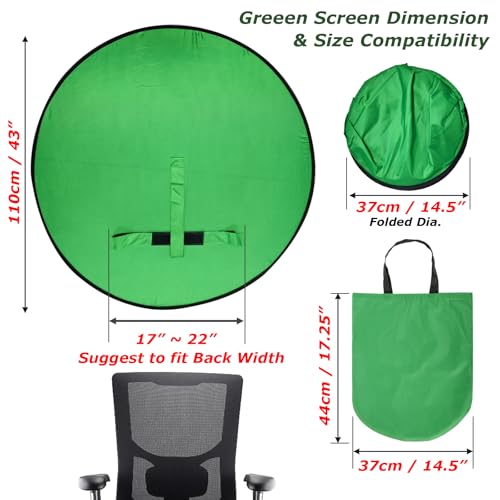
 Cosmos 1 Pc Green Screen Backdrop 43 in43 inches diameter43 x 43 x 0.1 inches0.7 PoundsCheck on Amazon
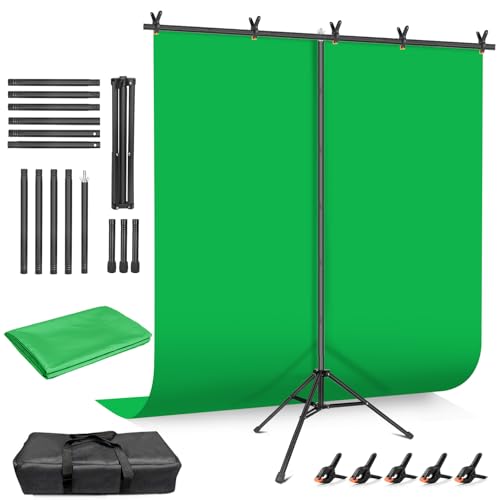 Hemmotop Wider Green Screen Backdrop with Stand8x7.5ft95.67 x 89.96 x 0.1 inches5 PoundsCheck on Amazon
 Emart 5x6.5ft Green Screen Backdrop Kit with T-Shape5x7FT78 x 78 x 0 inches6.2 PoundsCheck on Amazon
For a standard desk-camera stream, an eight-foot stand kit such as the Hemmotop or the Surprizo is the safest pick because it covers the width a typical webcam sees at normal distances, while the smaller five-foot kits and collapsible panels suit tight spaces where the camera sits close. The very small Cosmos round panel only makes sense as a head-and-shoulders accessory, and the chair-back listings are a niche option for people who cannot mount anything behind them. These notes come from titles, sizes the sellers claim, and recurring buyer themes; nobody here has set the products up, so verify dimensions before you buy.
Top picks at a glance
Cosmos 1 Pc Green Screen Backdrop 43 in / 110 cm Diameter Foldable Portable Photography Background Green Screen Chroma Key Backdrop for Photography Photo Video Studio, Live Streaming, Video Meeting


As an Amazon Associate we earn from qualifying purchases. Product prices and availability are accurate as of the date/time indicated.
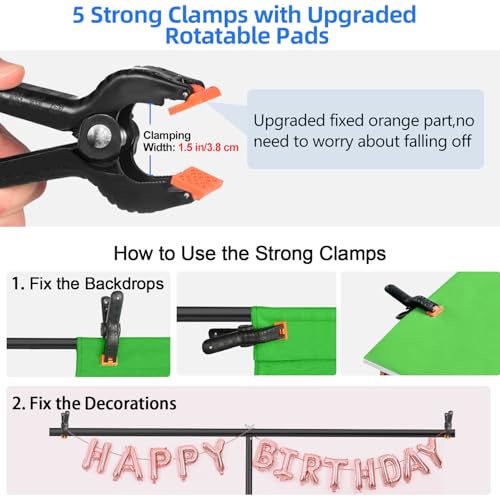
Hemmotop Wider Green Screen Backdrop with Stand, 8x7.5ft Background Kit | Solid Chroma Green, Polyester Cloth, Perfect for Streaming Video Calls Zoom Studio, Ideal for Content Creators, Photography


As an Amazon Associate we earn from qualifying purchases. Product prices and availability are accurate as of the date/time indicated.

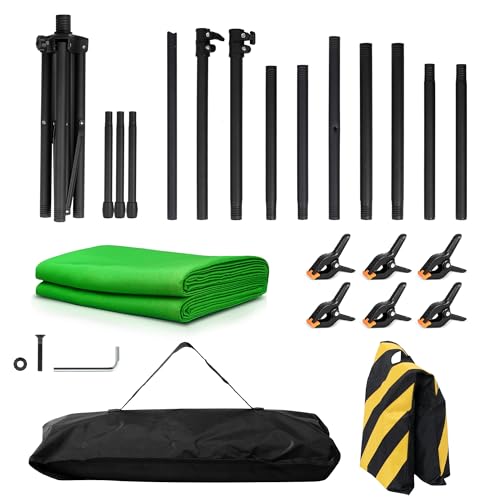
Surprizo Green Screen Backdrop with Stand, 8x7.2FT for Streaming Video | 8x7.2ft kit with T-stand, 6 clamps, sandbag - wrinkle-free, 2-min setup


As an Amazon Associate we earn from qualifying purchases. Product prices and availability are accurate as of the date/time indicated.

EMART Green Screen, 58x74in Collapsible Chroma Key Panel for Backdrop | Portable & Retractable Wrinkle-Resistant Backdrop with Stand for Background Removal, Streaming, Photographic Studio, TikTok


As an Amazon Associate we earn from qualifying purchases. Product prices and availability are accurate as of the date/time indicated.

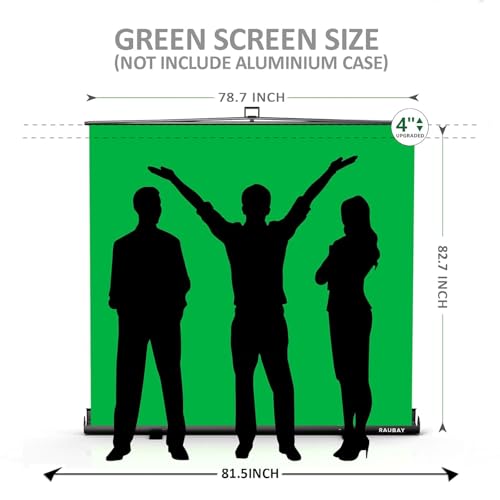
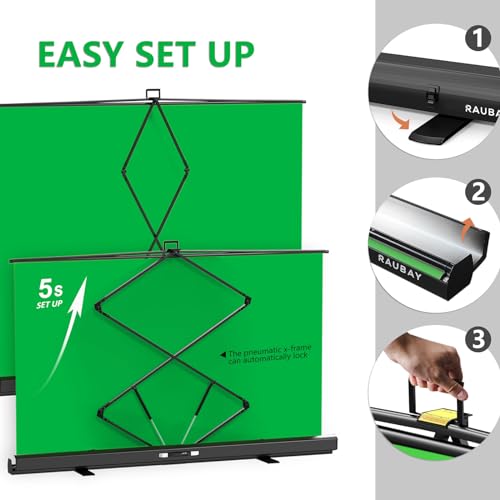
【Wider Style】 RAUBAY 78.7 x 82.7in Large Collapsible Green Screen Backdrop | Portable Retractable Chroma Key Panel Photo Background with Stand for Video Conference, Photographic Studio, Streaming



As an Amazon Associate we earn from qualifying purchases. Product prices and availability are accurate as of the date/time indicated.
Emart 5x6.5ft Green Screen Backdrop Kit with T-Shape Stand and 6 Clamps | Reverse folding base for easy storage & transport,perfect for Photography, Photoshoot, Studio Video Recording, Streaming


As an Amazon Associate we earn from qualifying purchases. Product prices and availability are accurate as of the date/time indicated.

Qoolfoto Green Screen Backdrop Kit 5x7 ft with Foldable T-Shaped Stand | Portable Greenscreen Background with 5 Clamps, Carrying Bag for Parties, Streaming, Photography, Zoom, Gaming, Video Studio


As an Amazon Associate we earn from qualifying purchases. Product prices and availability are accurate as of the date/time indicated.

Portable Green Screen Chair, 57 in Greenscreen Backdrop with Stand Double Sided Foldable Green Background, Chroma Key, for Photography Streaming Gaming Photo Zoom Video Chats and Meeting


As an Amazon Associate we earn from qualifying purchases. Product prices and availability are accurate as of the date/time indicated.

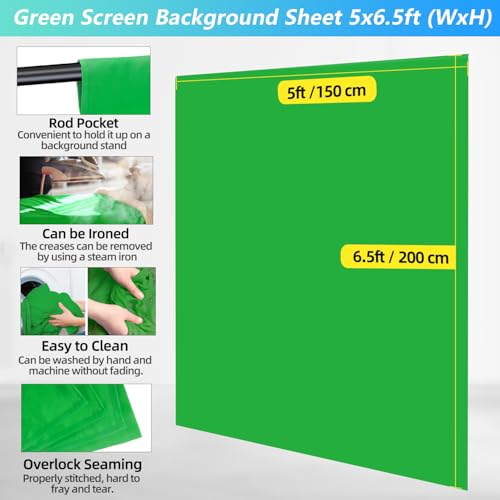
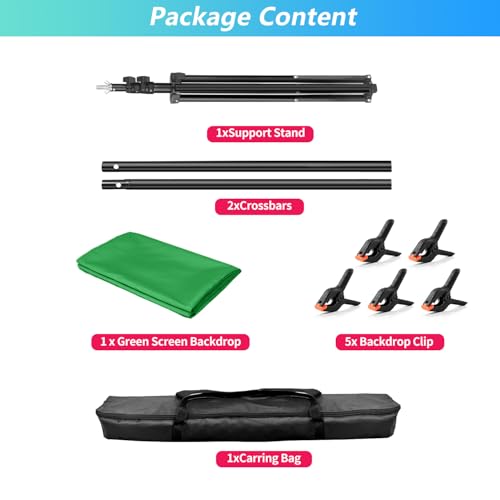
JEBUTU Green Screen with Stand, 5X6.5ft Portable Green Screen Backdrop with Stand kit, GreenScreen Background with Stand Carrying Bag Clamp for Streaming Video Creators




As an Amazon Associate we earn from qualifying purchases. Product prices and availability are accurate as of the date/time indicated.

Portable Green Screen Chair, 59 in Greenscreen Backdrop with Stand Double Sided Foldable Green Background, Chroma Key, for Video Chats and Meetings, Photography, Photo Zoom, Streaming Games


As an Amazon Associate we earn from qualifying purchases. Product prices and availability are accurate as of the date/time indicated.
| Model | Key points from the title | Price tier | Best for |
|---|---|---|---|
| Cosmos 43 in round backdrop | 43 in / 110 cm diameter, foldable, portable | Budget | Close-up webcam shots only |
| Hemmotop 8×7.5ft kit | Wider cloth with stand, polyester | Mid | Wide coverage on a normal desk |
| Surprizo 8×7.2ft kit | T-stand, 6 clamps, sandbag, wrinkle-free claim | Mid | Fast, stable wide setup |
| EMART 58x74in panel | Collapsible, retractable, with stand | Mid | Quick open and close |
| RAUBAY 78.7×82.7in panel | Large collapsible chroma key panel | Mid to premium | Wide panel without cloth wrinkles |
| EMART 5×6.5ft kit | T-stand, 6 clamps, reverse-folding base | Budget to mid | Close camera, small room |
| Qoolfoto 5x7ft kit | Foldable T-stand, 5 clamps, carrying bag | Budget to mid | Portable, party and stream use |
| Aiuca 57in chair-back | Double-sided, foldable, chair format | Budget | Small spaces, ambiguous setup |
| JEBUTU 5×6.5ft kit | Stand, carrying bag, clamps | Budget | Entry-level cloth kit |
| RGTBANWPN 59in chair-back | Similar format to the Aiuca | Budget | Near-duplicate of the Aiuca |
What a green screen actually asks of your room
Chroma keying is simple in principle: software removes one color and shows something else behind you. The practical difficulty is that the removed color has to be the same everywhere in the frame. A wrinkle throws shadows, an uneven light turns the backdrop two shades of green, and the software then removes some parts and not others. Most green screen frustration is a lighting and flatness problem rather than a product problem.
Distance matters in two ways. First, the farther you sit from the backdrop, the less of your own light bounces onto it and onto you, which is called spill and shows up as a green rim on hair and shoulders. Second, the farther the camera sits from the backdrop, the more width it sees, and the wider the screen has to be. The worked example later in this guide puts numbers on that second point.
Portability is the third factor. Cloth kits on T-shaped stands break down into a bag but take a few minutes to clamp. Collapsible panels pop open in seconds and fold into a flat disc, which is easier to store but harder to pack neatly into a bag without damaging the frame. Which one is better depends on whether the backdrop stays up or is stowed after each stream.
How the ten were selected
These came from listings tied to streaming and video-call keywords that include a stand or a self-supporting design. Each was read against its title, the sizes the seller states and common themes in buyer comments. Nobody on the team used or measured these units. Where a title is unclear, such as the chair-back products, the entry says so rather than guessing.
The ten listings, one at a time
Cosmos 43 in Round Green Screen Backdrop
A single foldable disc, 43 inches (110 cm) across, written up for photography, video studio, live streaming and video meetings. At that size it is a small circle behind a seated person rather than a full wall, which is acceptable only when your camera is close and you sit still. It has no stand in the title, so you will need a way to hold it behind you.
A hook on the wall, the back of a chair or a light stand clamp can all work, which is extra hardware to plan for.
- Pros: Tiny when folded; low price tier; quick to deploy.
- Cons: Small coverage; no stand mentioned; edges show if you lean.
Ask before buying: where will you hang or prop it behind your chair?
Hemmotop Wider Green Screen Backdrop with Stand
The title gives an 8 by 7.5 foot kit with a stand, solid chroma green polyester cloth and a pitch aimed at streamers, video calls and creators. The wider width is the whole story: eight feet is enough for a standard webcam at normal desk distances, as the table later in the guide shows. Cloth backdrops wrinkle, so plan on smoothing it and clamping it flat before going live.
A kit this wide also needs a deep enough room: the stand legs, the cloth and the gap you leave behind your chair together can eat several feet of floor. Measure the wall space before ordering, and think about whether you can leave the kit standing or must fold it away each night.
- Pros: Wide cloth; stand included; polyester material.
- Cons: Needs smoothing; larger footprint; fewer details on clamps in the title.
Ask before buying: do you have room for an eight-foot stand?
Surprizo Green Screen Backdrop with Stand, 8×7.2ft
This listing spells out the kit contents: an 8 by 7.2 foot backdrop, a T-stand, six clamps and a sandbag, plus a wrinkle-free and two-minute-setup claim. The sandbag is a practical touch because a tall stand with a wide cloth can topple if bumped. Treat the wrinkle-free and two-minute lines as seller marketing and read buyer comments about how the cloth looks after unpacking.
- Pros: Complete kit with clamps and sandbag; wide coverage; fast setup claim.
- Cons: Marketing claims to verify; larger storage bag; mid price tier.
Ask before buying: will the sandbag and stand legs fit the floor space behind you?
EMART 58x74in Collapsible Green Screen
A retractable, collapsible panel on a stand, pitched as wrinkle-resistant for streaming, studio work and TikTok. The 58 inch width is about 4.8 feet, which is narrow, so it works only when the camera is fairly close to it. The upside is a firm surface that avoids the clamps and smoothing routine of cloth kits, and a pop-open shape that is fast to store.
- Pros: Quick open and close; flatter surface; stand included.
- Cons: Narrow width; folded disc is awkward to pack; edges need care.
Ask before buying: how far back will the camera sit?
RAUBAY Large Collapsible Green Screen, 78.7×82.7in
The wide collapsible option. At about 6.6 by 6.9 feet it covers more than the EMART panel without needing cloth clamps, and the title adds a retractable chroma key panel with stand for video conferences, studio and streaming. Collapsible panels of this size can be bulky to fold, so check the folded diameter on the listing if you plan to move it often.
Because panels hold a fixed shape, the usual complaint is edge visibility rather than wrinkles. If the camera can see past the frame, add a strip of green cloth or move the panel closer to the lens.
- Pros: Large flat-ish surface; stand included; fast deployment.
- Cons: Bulky folded size; mid to premium price tier; width still below the eight-foot kits.
Ask before buying: how wide is your storage space when the panel is folded?
EMART 5×6.5ft Green Screen Backdrop Kit
A smaller cloth kit with a T-shaped stand, six clamps and a reverse-folding base that the title says helps with storage and transport. Five feet of width is only enough when the camera sits near the screen, so it fits compact rooms. If your desk sits close to a wall, this is the kind of size that actually fits.
- Pros: Compact; six clamps; stand folds for storage.
- Cons: Narrower than the wide kits; cloth will wrinkle; limited height for tall setups.
Ask before buying: how many feet separate the camera from the backdrop?
Qoolfoto Green Screen Backdrop Kit 5×7 ft
A foldable T-stand, five clamps and a carrying bag, aimed at parties, streaming, photography, Zoom, gaming and video studio use. The title does not say which side is the width, so check whether the 5 foot dimension runs across or up before comparing it with the others. The carrying bag suggests a portable, set-up-and-pack-away approach rather than a permanent installation.
That makes it a reasonable pick for someone who streams from a shared room, as long as the dimension question is answered before checkout.
- Pros: Carrying bag included; stand and clamps; flexible use cases.
- Cons: Ambiguous width and height wording; one clamp fewer than some kits; cloth wrinkles.
Ask before buying: is the 5 foot figure the width or the height?
Aiuca Portable Green Screen Chair, 57 in
A confusing listing. The title says green screen chair, greenscreen backdrop with stand, double-sided, foldable green background, for photography, streaming, gaming and video chats. It reads like a screen that attaches behind a chair rather than a freestanding wall, but the wording is ambiguous, so confirm how it mounts and what the second side is. A 57 inch width is small, so treat it as a close-up solution.
- Pros: Compact; double-sided; budget price tier.
- Cons: Unclear mounting; small coverage; title wording is muddled.
Ask before buying: does the listing explain how the screen attaches to a chair?
JEBUTU Green Screen with Stand, 5×6.5ft
A cloth kit very close to the smaller EMART in size, with a stand, a carrying bag and clamps for streaming and video creators. It sits at the entry-level end, so the main questions are about stitching, stand sturdiness and how the cloth hangs after unpacking. Buyer comments are the best source for these points.
- Pros: Entry price; bag included; familiar kit layout.
- Cons: Narrow for wide cameras; near-duplicate of other 5×6.5ft kits; details on clamp count missing from the title.
Ask before buying: how many clamps and what stand height does the seller state?
RGTBANWPN Portable Green Screen Chair, 59 in
Almost the same pitch as the Aiuca: a chair-style green background with stand, double-sided and foldable, for video chats, meetings, photography and streaming. At 59 inches wide it is slightly larger, but the listing carries the same ambiguity about how it mounts. Treat the two chair listings as near-duplicates and compare prices and buyer comments rather than expecting different performance.
- Pros: Budget tier; double-sided; compact fold.
- Cons: Unclear mounting; similar to the Aiuca; small coverage.
Ask before buying: which backdrop color is on the second side?
Spec concepts that decide the purchase
| Concept | What to look for | Why it matters |
|---|---|---|
| Width and height | Stated in feet or inches with a clear width | Sets how much of the frame is green |
| Material | Polyester cloth or a stretched panel | Wrinkles show up in the key |
| Stand type | T-shaped, with clamps, sandbag or a weighted base | Stability behind your chair |
| Clamps | Five or six included in several titles | Holds cloth flat |
| Storage format | Folding stand, carrying bag, reverse-folding base | Matters if you pack up after streams |
| Reversibility | Double-sided, if offered | A second color for variety |
Which one for which user
| If your situation is… | Start with | Why |
|---|---|---|
| A normal desk and a wide webcam view | Hemmotop or Surprizo | Eight-foot width |
| A small room and a close camera | EMART 5×6.5ft or JEBUTU | Compact cloth kits |
| You hate wrinkles | RAUBAY or EMART panel | Collapsible panel |
| You pack up after each stream | Qoolfoto or Surprizo | Bag or sandbag included |
| Head-and-shoulders only | Cosmos round panel | Small, fast |
| Cannot place anything behind you | Aiuca or RGTBANWPN | Chair-style, with caveats |
A worked example: how much green does your camera need?
Here is a calculation you can reuse. Assume a webcam with about a 70 degree horizontal field of view. The visible width at a given distance equals twice the distance times the tangent of half that angle, which for 70 degrees is about 1.4 times the distance. That is an assumption, because real webcams range from narrow to wide, so check the maker’s field of view figure and redo the math.
| Camera to backdrop | Visible width (70 degrees) | Panels that cover it |
|---|---|---|
| 3 ft | 4.2 ft | Any 5-foot kit; the 4.8-foot EMART panel |
| 4 ft | 5.6 ft | RAUBAY at about 6.6 ft; both 8-foot kits |
| 5 ft | 7.0 ft | Hemmotop and Surprizo (8 ft) |
| 6 ft | 8.4 ft | None quite; shift the camera closer |
Now apply it. Suppose your camera sits two feet from you and you sit three feet from the backdrop. That is five feet in total, a visible strip of seven feet, and only the eight-foot kits close the gap. If you move your chair forward so that the total is 3.5 feet, the strip shrinks to about 4.9 feet and the five-foot kits work. Hence the rule of thumb: a panel’s width divided by 1.4 gives the maximum camera-to-backdrop distance it can cover under these assumptions.
Decision flow: measure your seat-to-camera and seat-to-wall distances, add them, multiply by 1.4, and pick a panel at least that wide. If the answer is above eight feet, bring the camera closer or zoom in before you buy anything larger.
Setting up a cloth kit without the wrinkles
Cloth backdrops arrive folded, and fold lines are the enemy. Take the cloth out of the bag a day before your first stream and hang it on the stand so gravity relaxes the creases. A garment steamer on a low setting, or a cool iron where the fabric label allows it, flattens stubborn lines; read the seller’s care notes first, because some polyester blends melt under heat. Stretch the cloth with the clamps along the top and sides, pulling gently so it sits like a flat sheet instead of a sagging curtain.
Next, position the stand. Set the legs level and, if a sandbag or weight is supplied, place it over the foot before you walk away from the stand. Keep the base out of your chair’s path, since a rolling chair that clips a stand leg is the usual way a backdrop falls over mid-stream. Leave a gap behind you of at least a few feet if the room allows; the farther you sit from the cloth, the less of your own light bounces onto it and the cleaner your edges look.
Finally, build the key in OBS only after the physical setup is steady. Add a chroma key filter to the camera source, nudge the similarity slider until the green vanishes, and use smoothness to soften edges. If you still see shadow bands from folds, go back and fix the cloth rather than pushing the sliders to extremes, because heavy settings eat into hair and glasses.
Lighting the screen
Whatever you buy, light the backdrop separately. A soft light on each side, aimed at the cloth rather than at you, gives an even tone. Keep it a couple of feet from the fabric so it spreads, and use your key light on yourself from the front. If you need a refresher on lights, our guide to ring lights for streaming covers the front-light side of the setup, and the webcams for OBS list helps pick the camera that sees it.
Mistakes buyers make and how to fix them
| Mistake | What goes wrong | Fix |
|---|---|---|
| Buying by width without checking distance | Green gaps at the edges | Use the camera-distance table |
| Leaving wrinkles in cloth | Patchy key and shadows | Smooth, clamp and steam if needed |
| Sitting against the backdrop | Green spill on skin and hair | Sit a few feet forward |
| Wearing green items | Holes in your outfit | Pick colors far from the backdrop |
| One light for everything | Uneven backdrop tone | Light the screen and yourself separately |
| Ignoring stand stability | Topples when bumped | Use the sandbag or weights |
Verdict by use case
For the average desk and a typical webcam: the Surprizo or the Hemmotop, because eight feet of width gives you room to move. For tight rooms: one of the 5 by 6.5 foot kits, as long as the camera sits close. For the least ironing: the RAUBAY panel. For tiny spaces and head-and-shoulders only: the Cosmos disc. The chair-style listings are the ones to approach carefully, since their titles do not clearly explain how they mount.
Related guides
- Hdmi Capture Cards For Streaming From Console
- How To Reduce Background Noise When Streaming
- Streaming Devices With Ethernet Port
Frequently asked questions
How big does a green screen need to be for streaming?
It depends on how far your camera sits from the backdrop and how wide the camera’s view is. A camera at about five feet from the screen with a roughly 70 degree horizontal field of view sees a strip about seven feet wide, so a five-foot panel leaves green gaps at the edges. Closer cameras or narrower lenses need less width. Work out your own distances before choosing a size.
Is a collapsible panel better than a cloth backdrop on a stand?
Neither wins outright. Collapsible panels are quick to open and stay flatter with less ironing, but they are narrower and the edges can show. Cloth kits on a T-shaped stand cover more width and cost less per square foot, but they need smoothing out and clamping. Choose by the width you need and by how often you will set it up and pack it away.
Why does my green screen look patchy in OBS?
Uneven lighting and wrinkles are the usual causes. Light the screen evenly and separately from yourself, smooth out folds, and keep it a few feet behind you so your own lights do not reflect onto it. In OBS, tune the chroma key similarity and smoothness settings only after the lighting is as even as you can make it; software cannot rescue a very patchy backdrop.
Can I wear green on stream with a green screen?
Avoid it. Anything close to the backdrop color becomes see-through when the key removes it, so a green shirt, green headphones or green hair accents leave holes. If you need green items in frame, consider a blue backdrop where one is offered, and keep shiny or reflective accessories to a minimum because they pick up green spill from the backdrop.
Do I need a green screen if my webcam has background removal?
Not always. Software background removal in webcams and in tools like OBS filters is convenient, but it can flicker around hair, hands and glasses. A physical green screen gives the keying software a solid color to remove, which usually produces steadier edges. If you rarely move and your lighting is steady, software removal can be enough; if you gesture a lot, a real backdrop is more reliable.
Can I use a green screen in a small apartment?
Yes, but pick the format with care. A collapsible panel or a five-foot kit takes far less floor space than an eight-foot stand, and a close camera reduces the width you need. Check the folded size, find a spot where you can store it upright against a wall, and set it up only when you stream so it does not crowd your living area.