
Key takeaways
- Cable management: Cut-outs or channels help hide cords. Leave space for ventilation near consoles and receivers.
- Open vs. closed storage: Open shelves let remote signals through and give airflow; doors hide clutter but may need cut-outs.
- Adjustable shelves: Useful for soundbars, game consoles and streaming boxes.
- Soundbar clearance: If you use a soundbar, ensure the stand leaves space in front of the screen or that the soundbar sits below the TV’s lower edge.
- Anti-tip hardware: Look for included brackets or straps, and use them.
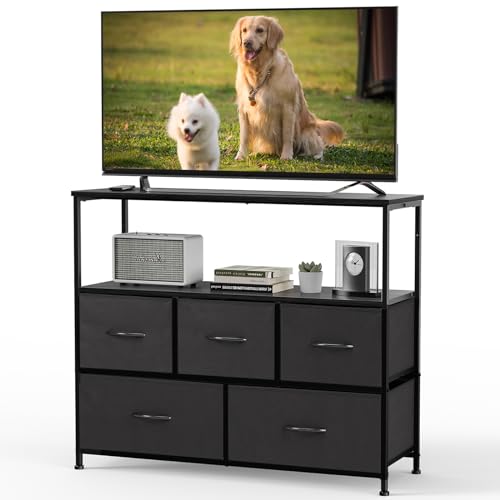
For most living rooms, a stand that is clearly wider than your TV, rated for its weight, and anchored to the wall is the right pick: IKEA Besta or similar modular units for storage, Walker Edison or Sauder for budget furniture-style stands, and a metal-frame option from Mount-It or similar brands for modern, light looks. Match the stand to the TV size, weight and your room before worrying about style.
Our top picks



As an Amazon Associate we earn from qualifying purchases at no extra cost to you.
Start With Fit and Safety
A TV stand must support your TV safely. Check three numbers before anything else: the stand’s maximum TV size, its weight capacity, and the width and foot spacing of your TV. Many modern TVs have feet near the outer edges, so a stand needs a top surface wide enough to span them, or you should use a centre-pedestal-compatible model. Some TVs are heavy, particularly large models, and a lightweight stand may not hold them safely.
Furniture tipping is a recognised hazard, especially for children. The Consumer Product Safety Commission advises anchoring furniture and TVs to the wall. Use the anti-tip hardware that comes with the stand, and ask a qualified person to help if you are unsure about wall fixings. Do not place heavy items on top of a lightweight stand.
At a Glance: TV Stand Types Compared
| Type | Examples | Best for | Limits |
|---|---|---|---|
| Modular storage unit | IKEA Besta and similar | Rooms needing media storage and custom layout | Assembly time; check weight and TV foot spacing |
| Budget furniture-style console | Walker Edison, Sauder, South Shore, Bestier | Average living rooms and first apartments | Engineered wood can sag; read the capacity rating |
| Metal and glass stand | Mount-It, Yaheetech and similar | Modern spaces, light look, open shelving | Glass shelves need care; lighter wood shelves vary |
| Corner TV stand | Various makers | Small rooms and corner placement | Limited surface area for large TVs |
| Swivel mount stand or floor stand | Mount-It and others | Rooms where wall mounting is not possible | Check weight limit, VESA pattern and stability |
| Fireplace-style entertainment centre | Various | Cold rooms and decor | Heater features, if any, must follow the maker’s guidance and local codes |
Specifications change by product and year. Always read the product page for the exact capacity and size rating.
How to Size a Stand
- Measure the TV width. A stand should be at least as wide as the TV, ideally a few inches wider on each side for balance. Measure the width of the TV itself, not just the diagonal size.
- Check foot spacing. Find the distance between the outer feet. The stand top must be wide enough to support them.
- Check weight. Compare the TV’s stated weight with the stand’s capacity, with a margin for soundbars or other items.
- Measure the space. Consider the wall width, the height and any outlets, baseboards or radiators.
- Set the viewing height. The screen centre should be at roughly eye level when seated. Very tall stands put the screen too high.
As a rule of thumb, makers often rate stands by TV diagonal, such as up to 55, 65 or 75 inches. Use the listed width and weight capacity rather than the diagonal alone.
Materials and Construction
Solid wood
Solid wood is sturdy and long-lasting, but it is heavier and typically at the premium end. It handles weight well and can be refinished.
Engineered wood (MDF and particleboard)
Most mainstream stands use engineered wood with a veneer or laminate. It keeps costs down and offers many finishes. Shelves can sag under heavy loads, so check the per-shelf rating. Avoid moisture exposure.
Metal frames
Metal frames are strong for their weight and suit modern interiors. Check for sharp edges and wobble after assembly.
Glass
Tempered glass shelves look light but can chip. Do not overload them, and keep children away from sharp corners.
Useful Features
- Cable management: Cut-outs or channels help hide cords. Leave space for ventilation near consoles and receivers.
- Open vs. closed storage: Open shelves let remote signals through and give airflow; doors hide clutter but may need cut-outs.
- Adjustable shelves: Useful for soundbars, game consoles and streaming boxes.
- Soundbar clearance: If you use a soundbar, ensure the stand leaves space in front of the screen or that the soundbar sits below the TV’s lower edge.
- Anti-tip hardware: Look for included brackets or straps, and use them.
Budget Tiers
Budget tier
Walker Edison, Bestier, Yaheetech and similar brands cover this tier. Expect engineered wood, simple styling and moderate capacity. Read assembly reviews and check the stated capacity.
Mid-range tier
Sauder, South Shore, IKEA and similar names offer better finishes, more storage and sturdier hardware. This tier suits most households.
Premium tier
Solid wood and designer pieces from furniture makers cost the most and last the longest, with better finishes and larger capacity.
Pick X If… Decision Table
| Pick this | If you… |
|---|---|
| IKEA Besta or modular unit | Want storage and a customised layout |
| Walker Edison or Bestier | Need a budget-friendly console for a mid-size TV |
| Sauder or South Shore | Want more finish options and storage at a moderate tier |
| Metal and glass stand | Prefer a light, modern look and have no young children nearby |
| Corner stand | Have a small room and a modest TV size |
| Floor stand or wall mount | Prefer to avoid a console or have limited floor space |
Assembly and Placement Tips
- Assemble on a flat, soft surface and follow the instructions in order.
- Tighten fasteners again after a few weeks, since cam locks and screws can loosen.
- Place the stand on a level floor; use furniture shims if the floor is uneven.
- Anchor the stand and TV to the wall with the supplied hardware.
- Keep consoles and routers ventilated, and avoid blocking air vents on the TV.
- If you have a fireplace-style unit with a heater, follow the maker’s safety guidance and consult an electrician for any wiring questions.
Alternatives Worth Considering
Wall mounting
Wall mounts free up floor space and can place the TV at the right height. Use a mount rated for the TV’s weight and VESA pattern, fasten into studs, and ask a professional if unsure.
Media consoles and sideboards
Low sideboards and credenzas from furniture makers can work as TV stands if they meet the width and weight needs.
Floor-standing TV stands with poles
These raise the TV and suit rooms where the wall is unsuitable. Check the weight rating and stability, and anchor if possible.
Matching the Stand to Your Room
Think about how the room is used. In a family room, rounded corners, closed storage and sturdy anchoring matter more than looks. In a small apartment, a slim console or corner unit saves floor space. In a media room, a wide unit with ventilated shelves can hold a receiver, game consoles and a streaming box. Measure doorways and stairways too, since assembled units can be too big to move, and flat-pack boxes can be heavy.
Finish and style are worth a thought. Dark finishes show dust, while light finishes show scuffs. Veneer and laminate surfaces should be kept away from moisture and direct heat. If you have pets, avoid low gaps where cables can be chewed or small animals can become trapped.
Care
Dust the surface with a soft cloth and use a slightly damp cloth for spills. Avoid harsh cleaners on veneers. Do not let the top surface bear more than the rated weight, and recheck fasteners each season, since vibration and temperature changes can loosen them. When moving the stand, remove the TV and shelf contents first and lift rather than drag, because dragging stresses the joints and leg fittings.
Frequently Asked Questions
How wide should a TV stand be?
It should be at least as wide as the TV, and preferably a few inches wider on each side. Also check that the top surface can reach the TV’s feet.
How much weight can a TV stand hold?
It depends on the model. Makers publish a maximum weight for the top and each shelf. Compare it with your TV’s weight plus any equipment on top.
Do I need to anchor my TV stand to the wall?
Safety groups advise anchoring TVs and furniture to prevent tipping, especially in homes with children. Use the supplied hardware or purchase a suitable kit.
Can I put a soundbar on a TV stand?
Yes. Make sure the soundbar fits below the screen or leaves the TV’s sensors unobstructed, and check the stand’s shelf rating.
Is a glass TV stand safe?
Tempered glass is designed to be strong, but it can chip. Avoid overloading shelves and be careful with sharp corners around children.
What height should the TV be?
The centre of the screen should be roughly at eye level when seated. A stand that is too tall can cause neck strain.





