
Key takeaways
- Hand size: smaller hands may prefer the DualSense or Switch Pro layouts, and larger hands the Xbox shape.
- Layout: Xbox pads stagger the left stick above the D-pad, while PlayStation and Switch-style pads use a symmetric layout.
- Latency: wired or 2.4 GHz connections generally respond faster than Bluetooth, which competitive players may notice.
- Drivers: Xbox pads work out of the box, others may need Steam Input or the maker’s software.
- Batteries: if you play long sessions, a dock or removable pack is easier than swapping AA cells.
For most PC players, the standard Xbox Wireless Controller is the safest buy because Windows and nearly every PC game support it without setup, while the Xbox Elite Series 2 suits players who want adjustable parts, the DualSense suits fans of PlayStation haptics, and Hall effect third-party pads such as the 8BitDo Ultimate line or GameSir G7 SE suit people worried about stick drift on a tighter budget.
Our top picks



As an Amazon Associate we earn from qualifying purchases at no extra cost to you.
What matters when choosing a PC controller
Compatibility is the first filter. Most PC games are written for the XInput standard that Xbox controllers use, so those pads work immediately. Other controllers either emulate XInput through a switch or rely on Steam Input, which maps almost any pad to a game. The second filter is connection type: Bluetooth is convenient but can add latency, a 2.4 GHz USB dongle is typically lower latency, and a wired USB cable removes battery worries altogether. The third is the stick sensor. Traditional potentiometer sticks can develop drift over time; Hall effect and similar magnetic sensors are marketed as more resistant to it, and several makers now use them.
Controllers at a glance
| Product | Best for | Key stated specs (per maker) | Limits |
|---|---|---|---|
| Xbox Wireless Controller | Plug-and-play default | Bluetooth and USB-C, Xbox Wireless adapter support, AA batteries or rechargeable pack | Standard sticks, no back paddles |
| Xbox Elite Series 2 | Competitive and customization-minded players | Adjustable-tension thumbsticks, swappable parts, back paddles, rechargeable battery rated by the maker at up to 40 hours | Premium tier; reviewers note reports of wear on some units over time |
| Sony DualSense | PlayStation fans who want haptic feedback | Bluetooth and USB-C, haptic feedback and adaptive triggers | Those features work only in games that support them on PC; Steam Input helps with the rest |
| 8BitDo Ultimate line | Wireless with a charging dock | 2.4 GHz dongle and Bluetooth on selected models; Hall effect sticks on newer versions | Features differ by model, so check the exact version |
| GameSir G7 SE | Wired, budget-friendly Hall effect option | Wired USB, Hall effect sticks and triggers listed by the maker | Wired only; cable needed |
| Nintendo Switch Pro Controller | Players who like Nintendo’s layout and battery life | Bluetooth and USB-C, gyro support | Needs Steam Input for many games |
| Logitech F310 | Very low budget, wired | Wired USB, switchable XInput and DirectInput modes | Basic build and no rumble-heavy features |
Xbox Wireless Controller: the default
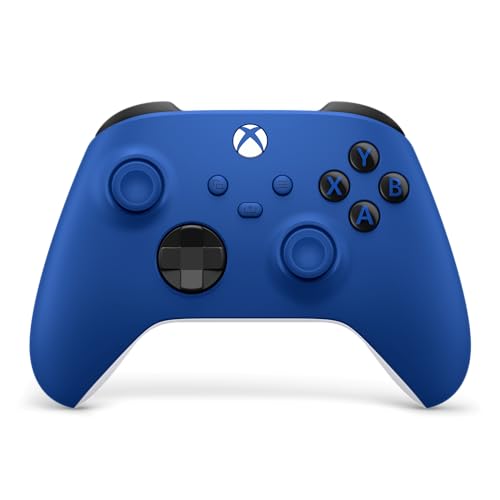
The current Xbox controller connects by Bluetooth, USB-C cable or the dedicated Xbox Wireless adapter. It works with Windows without extra drivers and is the controller game developers test most often. Reviewers regularly point out its comfortable shape for most hand sizes, a textured grip and a hybrid D-pad. It runs on AA batteries out of the box, and a rechargeable pack is sold separately by the maker. For anyone who does not need extras, it is hard to go wrong.
Xbox Elite Series 2: for tweakers
The Elite Series 2 adds interchangeable thumbsticks, a swappable D-pad, back paddles, trigger locks and adjustable stick tension, all stored in the included case. Microsoft lists a battery life of up to 40 hours. Reviewers praise the build and the customization through the Xbox Accessories app, but also note that it belongs in the premium tier, and some owners report wear problems after heavy use. It suits competitive players and those who like to tune a controller to their grip.
DualSense: haptics on PC
The DualSense brings haptic feedback and adaptive triggers to PC through USB-C or Bluetooth. Support for those features depends on each game, and many titles treat it as a generic pad. Steam Input offers good mapping for games that do not natively support PlayStation buttons. If you also own a PlayStation 5, one controller across both is a practical advantage. The DualSense Edge adds back buttons and swappable parts at a premium tier, with a battery that reviewers have described as shorter than the standard pad.
8BitDo and GameSir: Hall effect alternatives
8BitDo’s Ultimate controllers pair with a PC through a 2.4 GHz receiver, which is often a charging dock, or through Bluetooth. Newer versions list Hall effect sticks and extra buttons. GameSir’s G7 SE is wired and lists Hall effect sticks and triggers at a budget-to-mid tier, and GameSir also makes wireless models. Because these makers release several variants with different features, confirm the exact model’s connection options and sensor type on the maker’s page before buying.
Fit, comfort and compatibility notes
- Hand size: smaller hands may prefer the DualSense or Switch Pro layouts, and larger hands the Xbox shape.
- Layout: Xbox pads stagger the left stick above the D-pad, while PlayStation and Switch-style pads use a symmetric layout.
- Latency: wired or 2.4 GHz connections generally respond faster than Bluetooth, which competitive players may notice.
- Drivers: Xbox pads work out of the box, others may need Steam Input or the maker’s software.
- Batteries: if you play long sessions, a dock or removable pack is easier than swapping AA cells.
Budget tiers
At the budget tier, wired pads such as the Logitech F310 or GameSir G7 SE work well for casual and emulator play. In the mid-range, the standard Xbox and DualSense controllers or 8BitDo models cover most needs. The premium tier is the Elite Series 2 and DualSense Edge, which are worth it mainly if you will actually use paddles and stick adjustments.
Pick X if…
| If you… | Pick |
|---|---|
| want zero setup and the widest game support | Xbox Wireless Controller |
| want paddles and adjustable sticks | Xbox Elite Series 2 |
| love PlayStation haptics | DualSense |
| want wireless with a dock | 8BitDo Ultimate line |
| want cheap and wired with Hall effect sticks | GameSir G7 SE |
| want a gyro-capable pad with a long battery | Switch Pro Controller |
Alternatives
- Handheld PCs: devices with built-in controls such as the Steam Deck can replace a controller for couch play.
- Arcade sticks and wheels: fighting and racing games reward specialist hardware.
- Keyboard and mouse: still best for shooters and strategy games.
Setting up a controller on Windows
For an Xbox pad, plug in a USB cable or pair over Bluetooth, and Windows detects it within seconds. To use the Xbox Wireless adapter, press the pairing buttons on both devices. For a DualSense or Switch Pro Controller, pair via Bluetooth or cable and then enable controller support in Steam’s settings so that Steam Input can translate the buttons. Non-Steam games can be added to the Steam library as shortcuts so they can use the same mapping.
Firmware updates matter. Microsoft, Sony and 8BitDo all provide update tools, and makers say updates can improve connection stability and fix bugs. If a controller disconnects, try a different USB port, keep the dongle close to the pad, and avoid placing it behind a PC case where metal blocks the signal. A short USB extension cable for the dongle is a cheap fix.
Care and longevity
- Keep the controller clean by wiping it with a slightly damp cloth, and do not let liquid enter the stick or button openings.
- Do not leave rechargeable controllers fully drained for long periods, since this can shorten battery life.
- If a stick starts to drift, check whether the pad is under warranty and consider recalibrating in the maker’s software before replacing it.
- Use only the charger or cable that the maker supplies or approves.
Frequently Asked Questions
Can I use a PS5 controller on PC?
Yes. The DualSense connects by USB-C or Bluetooth, and Steam Input can map it for most games. Advanced features such as adaptive triggers work only in games that support them.
What is stick drift and how do I avoid it?
Stick drift is when the cursor or camera moves without input, usually caused by wear in the stick sensor. Controllers with Hall effect sensors are marketed as less prone to it, though no maker can promise it never happens.
Is Bluetooth or a 2.4 GHz dongle better?
A 2.4 GHz dongle generally gives lower latency and easier reconnection. Bluetooth is convenient with no extra hardware but may add a little delay.
Do all PC games support controllers?
No. Most modern action, racing and platform games do, but some strategy and shooter titles are built for keyboard and mouse. Steam Input can add controller support to many games.
Is the Elite Series 2 worth it over the standard Xbox controller?
Only if you will use the paddles, stick tension and swappable parts. For casual play the standard controller offers the same core experience at a much lower tier.
Can I use a controller on a laptop with Bluetooth?
Yes, if the laptop has Bluetooth, and USB-C or USB-A cable connection works as an alternative. Pair it through Windows Bluetooth settings and follow the maker’s pairing instructions.
More from Amazon
Programs that pair well with the guide above. Offers and eligibility are set by Amazon and may change.
Free shipping on eligible items, Prime Video and more. Eligible new members can start with a free trial.
Start a Prime free trialAd-free music streaming. Eligible new subscribers can start with a free trial.
Try Music Unlimited freeA Prime membership for ages 18-24 with a trial period. Eligibility is set by Amazon.
See Prime for Young AdultsAudiobooks and podcasts to listen to on the go. Eligible new members can start with a free trial.
Try Audible freeAs an Amazon Associate we earn from qualifying purchases.








