
Key takeaways
- Sensor and low-light behavior: larger sensors and better lenses handle dim rooms more gracefully. Many reviewers say lighting improves a picture more than a pricier camera does.
- Field of view: narrow views suit a single user at a desk, wider views suit two people or a small huddle. Makers list the diagonal field of view, and some cameras let you change it in their companion software.
- Autofocus: fixed-focus is simpler but can look soft if you lean in. Autofocus follows movement but can hunt in low light.
- Auto-framing and tracking: some cameras keep you centered as you move. Useful for presenters who stand or pace.
- Microphones: built-in mics are convenient but typically inferior to a headset or dedicated microphone.
- Privacy: a physical shutter or lens cover is worth having.
- Compatibility: most use USB and work with Windows, macOS and Zoom without drivers, but advanced features often need the maker’s app.
For most Zoom users a good 1080p webcam such as the Logitech C920-class models is enough, while buyers who want sharper detail or auto-framing should look at the Logitech Brio line, the Insta360 Link or the OBSBOT Tiny series, and streamers who want a cleaner picture should consider the Elgato Facecam. A webcam’s value depends mostly on lighting, field of view and software, so this guide explains those trade-offs before listing models.
Our top picks

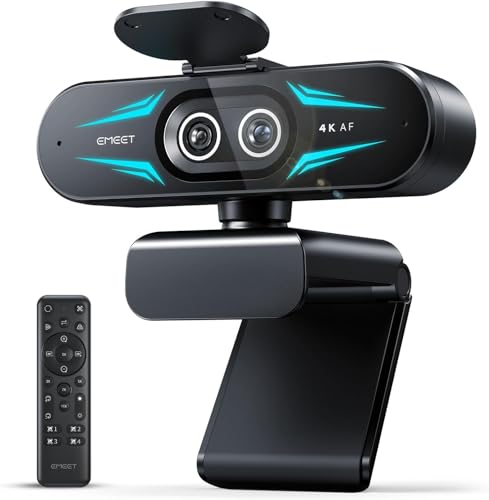

As an Amazon Associate we earn from qualifying purchases at no extra cost to you.
What matters for video meetings
Zoom compresses video, and standard meetings run at 720p or 1080p depending on plan, settings and bandwidth. A 4K webcam does not automatically give a 4K meeting. Where higher resolution helps is in cropping, digital zoom and clearer image processing, and in other apps.
- Sensor and low-light behavior: larger sensors and better lenses handle dim rooms more gracefully. Many reviewers say lighting improves a picture more than a pricier camera does.
- Field of view: narrow views suit a single user at a desk, wider views suit two people or a small huddle. Makers list the diagonal field of view, and some cameras let you change it in their companion software.
- Autofocus: fixed-focus is simpler but can look soft if you lean in. Autofocus follows movement but can hunt in low light.
- Auto-framing and tracking: some cameras keep you centered as you move. Useful for presenters who stand or pace.
- Microphones: built-in mics are convenient but typically inferior to a headset or dedicated microphone.
- Privacy: a physical shutter or lens cover is worth having.
- Compatibility: most use USB and work with Windows, macOS and Zoom without drivers, but advanced features often need the maker’s app.
At a glance
| Model line | Best for | Key stated traits | Limits |
|---|---|---|---|
| Logitech C920 / C922 family | Reliable everyday 1080p meetings on a budget | 1080p video, autofocus, built-in microphones as listed by the maker | Older design; limited low-light performance versus newer sensors |
| Logitech Brio line | Sharper picture, HDR and better low-light handling | 4K sensor on the higher Brio models, selectable field of view, privacy shutter on some models | Higher price tier; features vary by exact model |
| Insta360 Link / Link 2 family | Presenters and teachers who move around | 4K camera with a gimbal that tracks the user, gesture controls listed by the maker | Premium tier; relies on its app for advanced tracking |
| OBSBOT Tiny series | AI tracking and auto-framing for solo presenters | Gimbal-mounted camera with subject tracking, as stated by the maker | Premium tier; larger than basic webcams |
| Elgato Facecam family | Streamers and anyone valuing image quality | 1080p at higher frame rates, fixed-focus lens, manual controls in its app | No built-in mic on the original Facecam; fixed focus |
| Razer Kiyo family | Desk setups with built-in lighting or low-light emphasis | Some models offer a ring light or large sensor, per the maker | Ring light is not a full lighting solution |
| Anker PowerConf C200 and similar | Budget buyers who want 2K without much cost | 2K resolution stated by the maker, built-in microphones, privacy cover | Basic software; image processing is modest |
The models in more detail
Logitech C920 and C922: the default choice
These cameras have been the standard recommendation for years. The maker lists 1080p video, autofocus and built-in stereo microphones, and they work as plug-and-play devices with Zoom. Reviewers generally say they deliver a clear, natural picture in decent light, and note that lower-light rooms produce more grain. If your office has a window or a desk lamp, this class is plenty. The C922 adds features aimed at streamers; confirm exactly which resolution and frame rate options the maker lists for your region.
Logitech Brio: a step up
The Brio line has long been the choice of users wanting sharper video, HDR support on certain models and a selectable field of view. Newer Brio models add software features such as auto-light correction and sometimes a privacy shutter, according to the maker. Reviewers often say the improvement over a 1080p camera is most visible in mixed or dim lighting. Model numbers differ between consumer and business versions, so read the spec sheet carefully.
Insta360 Link: tracking for people who move
The Link is a 4K camera on a small gimbal. The maker lists AI tracking, gesture control and a desk-friendly form factor. Teachers, trainers and presenters who stand or move often value the automatic follow feature. The trade-off is cost and reliance on the maker’s software for the best features. Reviewers have generally praised the picture quality and tracking, while noting that tracking can occasionally misjudge in crowded frames.
OBSBOT Tiny: AI framing alternatives
The OBSBOT Tiny line competes in the same tracking category. The maker states features such as subject tracking, gesture controls and 4K video on higher models. It is mainly sensible for presenters, streamers and remote teachers who want an operator-free camera.
Elgato Facecam: picture first
Elgato’s Facecam uses a fixed-focus lens and offers manual controls through its software, aimed at creators who want consistent, non-processed images. The maker lists 1080p at up to 60 frames per second for the original model. A fixed-focus camera works best when you sit at a consistent distance, and some buyers pair it with a separate microphone because of the limited built-in audio.
Budget alternatives
Anker’s PowerConf C200 and similar offerings from Ugreen, Logitech’s C270 family and other makers fill the budget tier. Their appeal is price and simplicity. Typical compromises include modest low-light performance and basic software. For a simple home-office setup in a bright room, they are usually adequate.
Lighting and setup matter as much as the camera
- Face a window or use a soft lamp in front of you, not behind you.
- Place the camera at or slightly above eye level and look at the lens when making key points.
- Clean the lens; a fingerprint smear causes a soft, hazy picture.
- Use a headset or standalone mic rather than relying on the webcam mic.
- In Zoom’s video settings, enable HD where available and consider the touch-up and low-light options if the picture is noisy.
Pick X if …
| Pick this | If you |
|---|---|
| A Logitech C920-class camera | need dependable 1080p for daily meetings on a budget |
| A Logitech Brio | work in variable light and want sharper images and software features |
| Insta360 Link or OBSBOT Tiny | stand, move or present and want automatic tracking |
| Elgato Facecam | stream or record and want manual control and a consistent look |
| A budget 2K camera | want better-than-basic resolution at a low cost |
| A conference-room camera (Logitech Meetup-class) | need to cover several people around a table |
Alternatives to a dedicated webcam
- Using a smartphone as a webcam: both Apple and Android ecosystems offer options with companion apps, giving a strong sensor, though mounting and battery management take effort.
- Mirrorless or DSLR cameras with a capture device: excellent picture quality, but a complicated and costly setup for ordinary meetings.
- Laptop built-in camera: improving on current laptops, and acceptable for casual calls if light is good.
Software settings worth knowing
Many picture complaints come from settings rather than hardware. In the video settings of Zoom, choose the correct camera, enable HD if your plan and bandwidth support it, and try the low-light adjustment only when the room is dim, since it can soften detail. Touch-up filters smooth skin but can look artificial. Makers such as Logitech, Elgato, Insta360 and OBSBOT offer companion apps that let you fix exposure, white balance and field of view so the picture stays consistent between meetings. Locking exposure helps if a camera keeps brightening and darkening as you move.
Mounting and cable notes
- Most webcams use a clip that fits monitors and laptops, plus a standard tripod thread. A small tripod can place the camera at eye level on a laptop stand.
- Use a USB port built for the camera’s data needs. Plugging a 4K camera into a low-speed hub can cap resolution or frame rate, according to maker guidance on USB versions.
- Short, good-quality cables reduce dropouts. If the camera disconnects, try a direct port on the computer instead of a hub.
- Gimbal cameras need clearance to rotate, so keep the area around them free.
Budget tiers in plain terms
Budget webcams give a usable 1080p image in good light and little else. Mid-range models add better lenses, autofocus and software control. Premium models add large sensors, HDR, tracking or gimbals. For most remote workers the first or second tier covers everyday meetings, and money is often better spent on a lamp and a headset.
Frequently Asked Questions
Do I need a 4K webcam for Zoom?
Usually not. Zoom meetings typically run at 720p or 1080p depending on plan and settings, so a good 1080p camera is enough. A 4K camera can still help with cropping, digital zoom and other apps, but better lighting often improves the picture more.
Is a webcam better than my laptop camera?
Often yes, especially on older laptops. External webcams usually have better lenses and sensors and can be placed at eye level. Recent laptops have improved, so compare the maker’s stated resolution and low-light features.
Which webcam is best in low light?
Cameras with larger sensors and strong image processing, such as the Logitech Brio line or the Insta360 Link, are often described by reviewers as stronger in dim rooms. Even so, a lamp in front of you helps far more than any setting.
Do webcams need special drivers?
Most USB webcams work with Windows and macOS without extra drivers and appear in Zoom’s camera list. Features like tracking, field-of-view changes and color adjustments usually need the maker’s companion software.
Are built-in webcam microphones good enough?
They are fine for casual calls in a quiet room but can pick up echo and keyboard noise. A headset or dedicated microphone is generally clearer, and Zoom lets you choose a separate audio input.
How do I protect my privacy with a webcam?
Use a model with a physical shutter or lens cover, or cover the lens when not in use. Review app permissions on your computer and unplug USB cameras when you do not need them.
More from Amazon
Programs that pair well with the guide above. Offers and eligibility are set by Amazon and may change.
Free shipping on eligible items, Prime Video and more. Eligible new members can start with a free trial.
Start a Prime free trialAd-free music streaming. Eligible new subscribers can start with a free trial.
Try Music Unlimited freeA Prime membership for ages 18-24 with a trial period. Eligibility is set by Amazon.
See Prime for Young AdultsAudiobooks and podcasts to listen to on the go. Eligible new members can start with a free trial.
Try Audible freeAs an Amazon Associate we earn from qualifying purchases.








