
Key takeaways
- Xbox Series X|S, Xbox One and Windows PC are supported by Xbox-branded controllers. Check the platform list for each third-party model.
- Hand size matters. Larger hands may prefer taller thumbsticks and larger paddles.
- Check whether paddles are removable if you want to switch between competitive and casual play.
- Cases and docks are part of the Elite Series 2 package but are not always included with competing models.
The Xbox Elite Wireless Controller Series 2 suits players who want the most adjustable first-party option, the Elite Series 2 Core suits those who want the same controller base and are happy to add accessories later, and third-party options such as the SCUF Instinct Pro and Razer Wolverine V3 Pro suit competitive players who care about back paddles, trigger stops and faster wireless or wired response. Most buyers choosing between them are really deciding how much customisation they will use and how long they expect the controller to last.
Our top picks


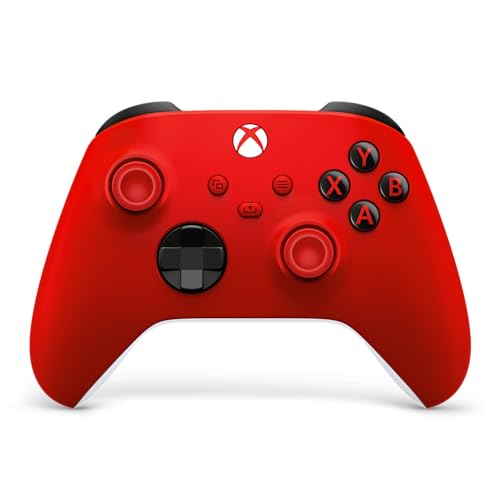
As an Amazon Associate we earn from qualifying purchases at no extra cost to you.
At a glance
| Controller | Best for | Key stated specs (per the maker) | Limits |
|---|---|---|---|
| Xbox Elite Wireless Controller Series 2 | All-round Xbox and PC players wanting full customisation | Swappable thumbsticks and D-pad, adjustable-tension thumbsticks, trigger stops, back paddles, Bluetooth, charging case and dock, onboard profiles | Premium tier; reviewers report some units develop stick or bumper wear over time |
| Xbox Elite Wireless Controller Series 2 Core | Buyers who want Elite features without the full kit | Same core controller, with the case, extra sticks and paddles sold separately as a pack | Paddles and extras cost more if added later |
| SCUF Instinct Pro (Xbox) | Competitive players who want paddles and fast triggers | Back paddles, instant triggers with adjustable stops, textured grips, vendor-made faceplates | Premium tier; fewer first-party features such as the Xbox-only wireless dongle may differ by model |
| Razer Wolverine V3 Pro | Esports-style play with fast wireless | Remappable buttons, trigger stops, Razer wireless dongle for Xbox and PC, modular design per the maker | Premium tier; battery life differs from Microsoft’s stated figure |
| PowerA Fusion Pro (wired) | Budget to mid-range players wanting paddles | Mappable back buttons, wired USB connection, trigger locks per the maker | Wired only; fewer premium materials |
Controller models are refreshed often. Check each maker’s page for the current version and the exact feature list.
What Elite controllers add
Back paddles
Back paddles let your fingers stay on the thumbsticks while you press buttons such as jump or reload. The Xbox Elite Series 2 ships with paddles in its full set. The Core model leaves them out of the box, which keeps the controller cheaper at launch but makes later upgrades add up.
Thumbsticks and D-pad
Microsoft’s Elite Series 2 lists swappable thumbsticks and a choice of D-pad, plus adjustable stick tension. This lets you choose the height and shape that fit your hands and play style. Third-party controllers usually offer fewer swap options.
Trigger stops
Hair-trigger locks shorten the travel on the triggers so shots register sooner. They help in shooters and racing games, though some players prefer full travel for analogue control in driving games.
Profiles
The Xbox Accessories app lets you save button maps and sensitivity settings. Elite Series 2 lists onboard profiles you can switch between with a button. Third-party controllers use their own apps, so check which console and PC versions each supports.
Battery, charging and connection
Microsoft lists an internal rechargeable battery on the Elite Series 2 with a stated life of up to 40 hours and a charging case. SCUF and Razer list their own batteries and wireless dongles, and some include fast-charging docks. Wired controllers such as the PowerA Fusion Pro avoid battery management entirely but tether you to the console. Check each maker’s stated battery life, since it varies by use and by connection type.
Connection type matters for latency and compatibility. Xbox controllers use the Xbox Wireless protocol and Bluetooth. Third-party dongles can offer a low-latency connection on Xbox and PC but may not work with other platforms, so read the platform list for each controller.
Durability and reliability
Elite controllers cost more than standard pads, so the build matters. Reviewers have reported that some Elite Series 2 units develop wear in the bumpers or sticks after heavy use, and Microsoft provides warranty terms you should read. SCUF and Razer publish their own warranty periods. If you play for many hours daily, look at the warranty length and how replacement parts are sold.
Fit and compatibility notes
- Xbox Series X|S, Xbox One and Windows PC are supported by Xbox-branded controllers. Check the platform list for each third-party model.
- Hand size matters. Larger hands may prefer taller thumbsticks and larger paddles.
- Check whether paddles are removable if you want to switch between competitive and casual play.
- Cases and docks are part of the Elite Series 2 package but are not always included with competing models.
Pick the controller if…
| Pick… | If you… |
|---|---|
| Elite Series 2 | want the widest customisation and the case and dock in one package |
| Elite Series 2 Core | want to start with a lower-priced Elite and add paddles and extras later |
| SCUF Instinct Pro | play competitively and want paddles and trigger stops built around that use |
| Razer Wolverine V3 Pro | prefer a low-latency wireless dongle and a modular design |
| PowerA Fusion Pro | want paddles at a lower tier and are fine with a cable |
Budget tiers
The budget tier includes wired paddle controllers from PowerA and similar makers. The mid-range includes the Elite Series 2 Core and some of the lower-range third-party pads. The premium tier includes the full Elite Series 2, SCUF and Razer’s top models. Pricing shifts with promotions, so compare feature sets rather than relying on tier alone.
Alternatives
- Standard Xbox Wireless Controller: The base pad is a good option if you rarely use paddles. Microsoft also offers a customised version through Xbox Design Lab.
- Add-on paddles: Some third-party kits add paddles to a standard pad. Check the compatibility list and fit.
- PC gamepads from other makers: Several support Xbox and PC with Hall-effect sticks. Confirm Xbox console compatibility before buying.
Common mistakes and how to avoid them
The first mistake is paying for features you will not use. Back paddles are the headline feature, but many players keep their thumbs on the sticks out of habit and never remap anything. If you are unsure, try a friend’s controller or a cheaper paddle model first. If you know you want paddles, an Elite Core plus add-ons can cost more than the full package, so add up the pieces before you choose.
The second mistake is ignoring warranty and support. Premium controllers cost much more than standard ones, and buyer reports across the category mention wear in sticks and bumpers on some units. Read the maker’s warranty terms and what is covered, and consider how replacement parts are sold. Registration and returns policies differ between makers.
The third mistake is overlooking compatibility. A controller that works on Xbox may not work on every PC game launcher or other console. If you also play on PC, check that the maker lists Windows support and whether its software runs on your system. Some wireless dongles use a proprietary connection that works only with the supported platforms.
The fourth mistake is overlooking ergonomics. Stick height, grip texture and weight change how a controller feels after an hour. If you can, hold the controller in a shop before ordering. Many players adjust stick tension and trigger stops gradually, so give a new controller a few sessions before deciding whether it suits you.
Finally, look after the controller. Wipe it with a slightly damp cloth, never spray liquid into the sticks or buttons, and store it in its case. Charge it with the maker’s cable or dock, and keep firmware up to date through the maker’s app, since updates can change stick behaviour and wireless performance.
Frequently Asked Questions
Is the Elite Series 2 worth it over the standard Xbox controller?
It is worth it if you will use back paddles, trigger stops and swappable sticks. If you play casually and never remap buttons, the standard controller does the job at a lower tier. The Elite adds a case and dock, which matters for travel.
What is the difference between the Elite Series 2 and the Core version?
The Core model uses the same controller body but leaves out the case, extra sticks, D-pad and paddles that come in the full set. Microsoft sells a pack of those parts separately. Add up the cost of the pack if you want everything.
Do Elite controllers work on PC?
Xbox Elite controllers work on Windows PC through Bluetooth or USB. Third-party controllers vary, so confirm PC support and driver needs on the maker’s page.
How long does the battery last?
Microsoft lists up to 40 hours for the Elite Series 2. Third-party makers list their own figures, and real use depends on vibration, connection type and age. A charging dock keeps the controller topped up between sessions.
Are back paddles useful outside shooters?
Yes. Paddles help in racing, action and fighting games by mapping common actions to your fingers without moving your thumbs. Some players never adapt to them, so consider whether you can use the extra inputs before paying for them.
Can I use an Elite controller on other consoles?
Xbox Elite controllers are intended for Xbox and PC. Some third-party models list other platforms, and the details vary. Read the maker’s compatibility list before buying.
More from Amazon
Programs that pair well with the guide above. Offers and eligibility are set by Amazon and may change.
Free shipping on eligible items, Prime Video and more. Eligible new members can start with a free trial.
Start a Prime free trialAd-free music streaming. Eligible new subscribers can start with a free trial.
Try Music Unlimited freeA Prime membership for ages 18-24 with a trial period. Eligibility is set by Amazon.
See Prime for Young AdultsAudiobooks and podcasts to listen to on the go. Eligible new members can start with a free trial.
Try Audible freeAs an Amazon Associate we earn from qualifying purchases.








