Our Short List of 3
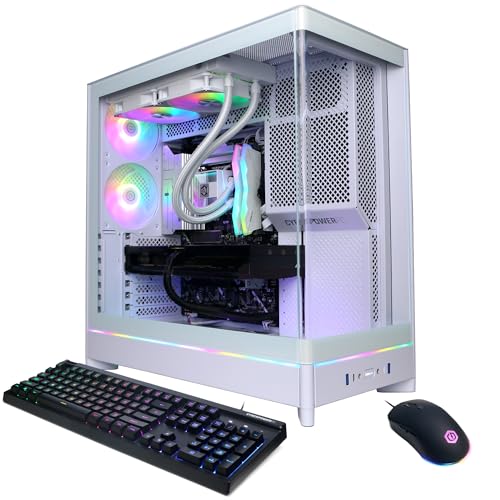
- Best for: Streamers playing at 1440p who record every session locally.
- Processor: Intel Core Ultra 7 265KF, 20 cores, 3.9 GHz, LGA 1851 socket
- Graphics: NVIDIA GeForce RTX 5070 Ti, 16GB GDDR7
- Memory: 32GB DDR5
- Storage: 2TB PCIe 4.0 SSD

- Best for: Streamers running layered scenes and extra apps alongside demanding games.
- Processor: Intel Core i9 14900KF
- Graphics: NVIDIA GeForce RTX 5070 Ti, 16GB
- Memory: 32GB DDR5 RGB
- Storage: 1TB NVMe SSD

- Best for: A dependable all-round single-PC setup for 1080p broadcasts and 1440p play.
- Processor: Intel Core i7 14700F
- Graphics: NVIDIA GeForce RTX 5070, 12GB
- Memory: 32GB DDR5 RGB, 5200MHz
- Storage: 1TB NVMe SSD
All 5 Picks at a Glance
| Product | Specs | Action |
|---|---|---|
| CyberPowerPC Gamer Xtreme VR (GXiVR8680A12) |
| Check price on Amazon |
| iBUYPOWER Element Pro White (EPWI9N57T01) |
| Check price on Amazon |
| iBUYPOWER Slate MESH (SMI7N5701) |
| Check price on Amazon |
 CyberPowerPC Gamer Xtreme VR (GXiVR8040A16) |
| Check price on Amazon |
 iBUYPOWER TraceMesh (TMI7N46T01) |
| Check price on Amazon |
Key takeaways
- Five Intel gaming desktops that can play and broadcast from one PC, compared on CPU, RTX graphics, memory and storage from their Amazon listings.
Streaming from a single PC asks the machine to do two jobs at once: render the game at the frame rate you play at, and encode a clean broadcast without dropping frames every time a fight gets busy. A desktop that feels fast in solo play can still stutter on stream if the processor has no spare cores for the broadcasting software, the chat apps and the browser sources running behind the game. The real decision is where the headroom lives, in the Intel CPU, the graphics card, or both.
This roundup is for new streamers building a one-PC setup, established streamers moving up from 1080p, and creators who also record and edit their sessions. Every pick is a prebuilt desktop whose Amazon listing publishes an Intel processor, and the comparisons below use only the names and specifications printed on those product pages.
Quick Picks
As an Amazon Associate we earn from qualifying purchases.
| Product | Best for | Key spec from title |
|---|---|---|
| CyberPowerPC Gamer Xtreme VR (GXiVR8680A12) | Current-generation power for 1440p play while streaming | Intel Core Ultra 7 265KF with RTX 5070 Ti 16GB |
| iBUYPOWER Element Pro White (EPWI9N57T01) | Maximum CPU headroom for busy productions | Intel Core i9 14900KF with RTX 5070 Ti 16GB |
| iBUYPOWER Slate MESH (SMI7N5701) | A balanced single-PC streaming setup | Intel Core i7 14700F with RTX 5070 12GB |
| CyberPowerPC Gamer Xtreme VR (GXiVR8040A16) | 1080p streaming with extra graphics memory | Intel Core i7-14700F with RTX 4060 Ti 16GB |
| iBUYPOWER TraceMesh (TMI7N46T01) | A first streaming PC with generous memory | Intel Core i7 14700F with RTX 4060 Ti 8GB |
How to Choose
Processor Cores Do Double Duty
On a one-PC stream, the processor runs the game, the broadcasting software, your voice chat, the browser behind your alerts and often a recording at the same time. Core count and thread count matter more here than in a pure gaming build, because the game only uses part of the chip. Intel’s i7 and i9 models, and the Core Ultra 7 in this roundup, publish core counts in their listings that leave threads spare for background work. An entry-level chip can hold a simple stream, but busy scenes with many players are where dropped frames start.
Let the Graphics Card Encode the Stream
Every desktop here pairs its Intel processor with an NVIDIA GeForce RTX graphics card, and that pairing is deliberate. RTX cards carry a dedicated hardware encoder, so broadcasting software can hand the video encoding to the graphics card instead of the processor. The game keeps the CPU cores it needs, and the stream quality stops depending on how much processor is left over. When you compare listings, confirm the exact RTX model and its memory size in the title, because a card’s gaming strength and its headroom at higher resolutions follow from that name.
Memory and Storage Fill Up Faster Than You Expect
Sixteen gigabytes of memory is the floor for gaming alone, but a stream adds broadcasting software, chat clients, a browser and sometimes a face-tracking app on top. The 32GB configurations in this roundup leave room for all of that without swapping to disk mid-game. Storage matters just as much: locally recorded sessions are large files, and a 1TB drive that also holds a modern game library fills quickly. Note the drive size in each listing, and treat 2TB as the comfortable option if you archive recordings rather than deleting them.
Networking, Cooling and the Corners Budget Models Cut
A stable upload matters as much as frame rates, so check whether the listing states Wi-Fi, and plan on a wired Ethernet connection for the stream itself whenever your room allows it. Long broadcasts also heat a case for hours, which is why cooling shows up in these listings, from tower air coolers to a 360mm liquid system. The corners cut on cheaper prebuilts are usually invisible in the title: power supply wattage, motherboard model and case airflow are often unpublished, so read the full specification block before ordering.
The 5 Best Options
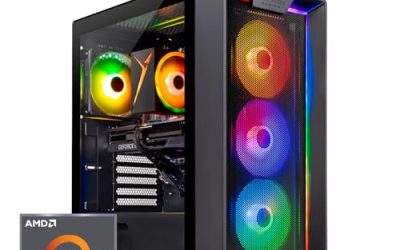
CyberPowerPC Gamer Xtreme VR (GXiVR8680A12)
- Best for: Streamers playing at 1440p who record every session locally.
- Processor: Intel Core Ultra 7 265KF, 20 cores, 3.9 GHz, LGA 1851 socket
- Graphics: NVIDIA GeForce RTX 5070 Ti, 16GB GDDR7
- Memory: 32GB DDR5
- Storage: 2TB PCIe 4.0 SSD
Streamers playing at 1440p who record every session locally.
The KF suffix means no integrated graphics, so your monitors must connect to the RTX card’s outputs, not the motherboard.
This is the current-generation option in the group, built around Intel’s Core Ultra 7 265KF with 20 cores as published in the listing. That core count is exactly what a busy one-PC stream wants, and the RTX 5070 Ti 16GB gives the broadcast a strong graphics card to encode from while you play at 1440p. The 2TB solid-state drive is the largest here, which suits streamers who keep local recordings of every session. Streamers who want the newest Intel platform and the fewest storage worries should start with this one.
iBUYPOWER Element Pro White (EPWI9N57T01)
- Best for: Streamers running layered scenes and extra apps alongside demanding games.
- Processor: Intel Core i9 14900KF
- Graphics: NVIDIA GeForce RTX 5070 Ti, 16GB
- Memory: 32GB DDR5 RGB
- Storage: 1TB NVMe SSD
Streamers running layered scenes and extra apps alongside demanding games.
The 1TB drive is half the size of the CyberPowerPC’s, so frequent recorders should budget for a second drive.
The Element Pro White takes the strongest Intel processor in this roundup, the Core i9 14900KF, and pairs it with the same RTX 5070 Ti 16GB graphics card as the CyberPowerPC above. That combination suits productions that go beyond a game and a webcam: multiple scenes, animated overlays, a virtual avatar or several browser sources all draw on the processor while the game runs. The 360mm liquid cooler is the most substantial cooling listed here, which helps during marathon sessions, and the white case stands out on camera if your PC appears in the frame.
iBUYPOWER Slate MESH (SMI7N5701)
- Best for: A dependable all-round single-PC setup for 1080p broadcasts and 1440p play.
- Processor: Intel Core i7 14700F
- Graphics: NVIDIA GeForce RTX 5070, 12GB
- Memory: 32GB DDR5 RGB, 5200MHz
- Storage: 1TB NVMe SSD
A dependable all-round single-PC setup for 1080p broadcasts and 1440p play.
The listing does not publish power supply wattage, so check the full specification block if you plan a future graphics card upgrade.
The Slate MESH is the balanced middle of this roundup: an Intel Core i7 14700F, an RTX 5070 12GB and 32GB of DDR5 memory. The iBUYPOWER listing itself names streaming among the machine’s intended uses, and the specification supports that, with enough processor threads for the game plus broadcasting software and enough memory for the usual stack of chat and browser apps. The mesh-fronted case and tower air cooler are a straightforward cooling arrangement with no liquid loop to maintain, which some streamers will count as a plus for a machine that runs daily.
CyberPowerPC Gamer Xtreme VR (GXiVR8040A16)
- Best for: 1080p streamers whose games are heavy on textures and open worlds.
- Processor: Intel Core i7-14700F, 2.1GHz
- Graphics: NVIDIA GeForce RTX 4060 Ti, 16GB
- Memory: 16GB DDR5
- Storage: 1TB PCIe Gen4 SSD
1080p streamers whose games are heavy on textures and open worlds.
With 16GB of memory, close unneeded browser tabs and apps before going live, or plan a memory upgrade.
This Gamer Xtreme VR configuration pairs the Intel Core i7-14700F with the 16GB version of the RTX 4060 Ti, and that extra graphics memory is its distinguishing feature. Streamers who broadcast at 1080p while playing games with large texture sets get more headroom from the 16GB card than from the 8GB variant below, and the processor still has the core count a one-PC stream needs. The trade-off sits in system memory: 16GB of DDR5 is workable for a game plus broadcasting software, but it is the tightest allowance in this roundup.
iBUYPOWER TraceMesh (TMI7N46T01)
- Best for: New streamers broadcasting esports titles at 1080p from one PC.
- Processor: Intel Core i7 14700F
- Graphics: NVIDIA GeForce RTX 4060 Ti, 8GB
- Memory: 32GB DDR5 5600 RGB (2 x 16GB)
- Storage: 1TB NVMe SSD
New streamers broadcasting esports titles at 1080p from one PC.
Confirm you are ordering the 8GB version of the RTX 4060 Ti, since a 16GB variant exists under a similar name.
The TraceMesh takes the opposite trade-off from the CyberPowerPC above: the same Intel Core i7 14700F processor and an RTX 4060 Ti, but in its 8GB form, paired with a generous 32GB of DDR5 5600 memory. For a first streaming PC aimed at 1080p broadcasts of esports and indie titles, that balance makes sense, because the broadcasting stack gets plenty of system memory while the graphics card handles both the game and the encode. The mesh chassis and RGB fans keep the presentation streamer-friendly without a liquid cooling loop to look after.
Which One Fits Your Situation
You Stream Competitive Shooters at 1080p
Frame rate in the game matters more than resolution for shooters, and either RTX 4060 Ti configuration can drive it while the card’s encoder handles the broadcast. The TraceMesh is the natural pick here, because its 32GB of memory leaves room for the game, the broadcasting software and your voice chat without anything closing mid-match.
You Play at 1440p and Want a Stream That Keeps Up
Higher in-game resolution raises the load on the graphics card at the same time as the encode, so step up to an RTX 5070 Ti machine. Choose the CyberPowerPC GXiVR8680A12 for its 2TB drive and current-generation Core Ultra 7, or the iBUYPOWER Element Pro White if your production leans harder on the processor.
Your Broadcast Is a Full Production
If your scenes include a virtual avatar, animated alerts, several browser sources and a recording running beside the game, processor headroom is the thing you run out of first. The Element Pro White’s Core i9 14900KF and liquid cooling are built for exactly that pile-up of simultaneous work.
You Are Buying Your First Streaming PC
Start with the machine that removes the most day-one friction: the Slate MESH. Its 32GB of memory, RTX 5070 and air cooling cover 1080p broadcasts and 1440p play without a liquid loop to maintain, and the included keyboard and mouse mean one box gets you set up.
Common Mistakes
- Encoding the stream with the processor when the graphics card has a dedicated encoder sitting idle, which costs game frame rate for no quality gain.
- Buying 16GB of memory for a machine that must run a game, broadcasting software, chat and a browser at the same time.
- Streaming over Wi-Fi from a room with a weak signal instead of running a cable, then blaming the PC for dropped frames.
- Ordering an RTX 4060 Ti desktop without checking whether the listing is the 8GB or 16GB version of the card.
- Filling the only drive with recordings until the game library and the archive are fighting for the last gigabytes.
Frequently Asked Questions
Can one PC really handle gaming and streaming at the same time?
Yes, provided the hardware splits the work sensibly. The graphics card’s dedicated encoder handles the broadcast video, the processor’s spare cores run the game and the broadcasting software, and 32GB of memory keeps the supporting apps comfortable. Every configuration in this roundup is built around that division of labour.
Does an Intel F or KF processor cause problems for streaming?
Not for the streaming itself, because the RTX graphics card does the encoding. What the F and KF suffixes remove is the processor’s integrated graphics, which some streamers use as a backup encoder or for an extra monitor output. If that matters to you, choose a configuration whose listing names a non-F Intel chip.
How much storage does a streamer actually need?
More than a pure gamer, because local recordings of long sessions are large and they accumulate quietly. A 1TB drive works if you upload and delete recordings promptly. If you keep an archive or record at high quality for editing later, the 2TB configuration in this roundup saves an early upgrade.
Do I need a capture card with a single-PC setup?
No. A capture card is for bringing in video from a second PC or a console. When the game runs on the same machine that broadcasts it, the broadcasting software captures the game directly, and the desktops here need nothing extra beyond a microphone and a camera of your choice.
More from Amazon
Programs that pair well with the guide above. Offers and eligibility are set by Amazon and may change.
Free shipping on eligible items, Prime Video and more. Eligible new members can start with a free trial.
Start a Prime free trialAd-free music streaming. Eligible new subscribers can start with a free trial.
Try Music Unlimited freeA Prime membership for ages 18-24 with a trial period. Eligibility is set by Amazon.
See Prime for Young AdultsAudiobooks and podcasts to listen to on the go. Eligible new members can start with a free trial.
Try Audible freeAs an Amazon Associate we earn from qualifying purchases.