Our Short List of 3

- Best for: New streamers building a focused 1080p setup.
- Processor: AMD Ryzen 5 5500 3.6 GHz (4.2GHz Turbo Boost)
- Graphics: NVIDIA GeForce RTX 4060 8GB GDDR6X Graphics Card
- Memory: 16GB DDR4 RAM 3200
- Storage: 1TB NVMe M.2 SSD

- Best for: Streamers who record long sessions and edit on the same machine.
- Processor: AMD Ryzen 7 9700X 3.8 GHz (5.5GHz Turbo Boost)
- Graphics: NVIDIA GeForce RTX 4060 8GB GDDR6 Graphics Card
- Memory: 32GB DDR5 RAM 6000 RGB
- Storage: 2TB NVMe M.2 SSD

- Best for: Streamers playing demanding titles at higher settings.
- Processor: AMD Ryzen 7 7700X 4.5 GHz (5.4GHz Max Boost)
- Graphics: NVIDIA GeForce RTX 4070 12GB GDDR6X Graphics Card
- Memory: 32GB DDR5 RAM RGB
- Storage: 1TB NVMe SSD
All 4 Picks at a Glance
| Product | Specs | Action |
|---|---|---|
| Skytech Gaming Nebula |
| Check price on Amazon |
| Skytech Gaming Azure |
| Check price on Amazon |
| Skytech Gaming Chronos |
| Check price on Amazon |
 Skytech Gaming King 95 |
| Check price on Amazon |
Key takeaways
- Compare the best RTX gaming desktops for game streaming, with RTX graphics, fast processors, DDR5 memory, and storage picked for smooth live broadcasts.
Streaming while you play asks one machine to do two demanding jobs at once: render the game at the settings your viewers expect, and encode a clean broadcast without stealing the frames you need to compete. The real decision is balance, because a strong graphics card paired with a weak processor, slow memory, or cramped storage will stutter on air even if the game itself feels fine offline.
This guide is for new streamers buying their first dedicated rig, creators upgrading from a laptop, and players who want one desktop to handle both sides of the desk. Every pick below is a prebuilt gaming desktop whose Amazon product page names an NVIDIA GeForce RTX graphics card, and the products were chosen from the names and specifications printed on those Amazon pages.
Quick Picks
As an Amazon Associate we earn from qualifying purchases.
| Product | Best for | Key spec from title |
|---|---|---|
| Skytech Gaming Nebula | First streaming setups at 1080p | NVIDIA RTX 4060 8GB GDDR6X |
| Skytech Gaming Azure | Streamers who record and store long sessions | NVIDIA RTX 4060 8GB GDDR6 |
| Skytech Gaming Chronos | Higher settings with memory headroom | RTX 4070 12GB GDDR6X |
| Skytech Gaming King 95 | Demanding games streamed at higher resolutions | NVIDIA RTX 4070 Super 12GB |
How to Choose
Let the Graphics Card Carry the Encode
For a streaming desktop, the graphics card does double duty: it renders your game and, on NVIDIA RTX cards, it can also handle the video encoding work through the built-in encoder, which keeps the processor freer for the game and your streaming software. Check the exact card named on the product page rather than the series name alone, because memory size and the step from a standard card to a Super or Ti variant change how much headroom you have when chat overlays, alerts, and a webcam feed join the scene.
Match the Processor to Two Workloads
Your processor runs the game, the streaming application, your voice chat, browser sources, and everything else open during a broadcast, so core count and clock speed both matter more here than in a play-only build. A modern mid-range chip can handle a single-PC stream comfortably, but if you plan to record locally at high quality while streaming, edit clips afterward on the same machine, or keep many applications open, stepping up to a stronger processor gives the whole setup room to breathe during long sessions.
Give Memory and Storage Room to Grow
Streaming setups are memory hungry in quiet ways: the game, the broadcast software, a browser full of dashboard tabs, and chat tools all compete for the same pool. Sixteen gigabytes is a workable starting point for a focused setup, while thirty-two gigabytes suits streamers who record, edit, and multitask heavily. Storage fills quickly too, since game installs are large and saved broadcasts pile up fast, so a bigger solid-state drive saves you from deleting footage or shuffling libraries between sessions.
Plan Connectivity, Cooling, and Power
A wired network connection is the most reliable foundation for a stable broadcast, so confirm the desktop offers the ports and wireless options your room needs before buying. Long streams also push cooling for hours at a stretch, which makes case airflow, fan configuration, or liquid cooling worth checking on the product page. Finally, look at the power supply wattage and rating printed in the specifications, because a properly sized unit supports the graphics card today and leaves a safer path for a future upgrade.
The 4 Best Options
Skytech Gaming Nebula
- Best for: New streamers building a focused 1080p setup.
- Processor: AMD Ryzen 5 5500 3.6 GHz (4.2GHz Turbo Boost)
- Graphics: NVIDIA GeForce RTX 4060 8GB GDDR6X Graphics Card
- Memory: 16GB DDR4 RAM 3200
- Storage: 1TB NVMe M.2 SSD
New streamers building a focused 1080p setup.
Confirm the graphics outputs on the listing match your monitor and capture plans, since port layouts can vary.
The Nebula is the sensible starting point for a first single-PC streaming setup built around 1080p play. Its Ryzen 5 processor and RTX 4060 give a new streamer a dedicated graphics card to lean on for encoding while the game runs, and the fast solid-state storage keeps load screens short between matches. It suits players whose channel is just getting going, who stream a few nights a week, and who would rather begin with a balanced tower than overspend before knowing their schedule, audience, and favorite games.
Skytech Gaming Azure
- Best for: Streamers who record long sessions and edit on the same machine.
- Processor: AMD Ryzen 7 9700X 3.8 GHz (5.5GHz Turbo Boost)
- Graphics: NVIDIA GeForce RTX 4060 8GB GDDR6 Graphics Card
- Memory: 32GB DDR5 RAM 6000 RGB
- Storage: 2TB NVMe M.2 SSD
Streamers who record long sessions and edit on the same machine.
Check the case dimensions on the listing against your desk space, since the tempered glass tower needs room for airflow.
The Azure pairs an RTX 4060 with a notably stronger processor and double the memory and storage of the entry pick, which makes it a better fit for streamers who record every session and keep a large local library. The Ryzen 7 9700X gives streaming software, chat tools, and editing work more room alongside the game, while the liquid cooling suits longer broadcasts. Choose it if your stream is only part of the workload and the same desk also handles clipping, editing, and uploading between broadcasts.
Skytech Gaming Chronos
- Best for: Streamers playing demanding titles at higher settings.
- Processor: AMD Ryzen 7 7700X 4.5 GHz (5.4GHz Max Boost)
- Graphics: NVIDIA GeForce RTX 4070 12GB GDDR6X Graphics Card
- Memory: 32GB DDR5 RAM RGB
- Storage: 1TB NVMe SSD
Streamers playing demanding titles at higher settings.
Storage is the smaller drive here relative to its power, so check the listed capacity against your game library and recording habits.
The Chronos steps the graphics up to an RTX 4070 while keeping thirty-two gigabytes of memory, a combination aimed at streamers who play at higher settings and still want a clean encode on the same PC. The Ryzen 7 7700X brings strong clock speeds for fast-paced titles, and the included keyboard and mouse shorten the path from delivery to first broadcast. It fits creators whose games are the demanding part of the show, who stream competitive or graphically rich titles, and who want headroom without jumping to the largest configuration in this guide.
Skytech Gaming King 95
- Best for: Streamers who play and broadcast at higher resolutions and settings.
- Processor: AMD Ryzen 7 7700 3.8 GHz (5.3GHz Turbo Boost)
- Graphics: NVIDIA GeForce RTX 4070 Super 12GB GDDR6X Graphics Card
- Memory: 16GB DDR5 RAM 6000
- Storage: 1TB NVMe M.2 SSD
Streamers who play and broadcast at higher resolutions and settings.
Memory is sixteen gigabytes on this configuration, so verify the listing details if you plan heavy multitasking or later memory upgrades.
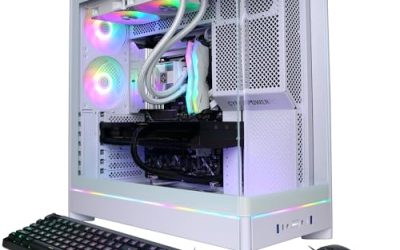
The King 95 is the pick for streamers who push resolution and settings hardest, built around the RTX 4070 Super and a higher-wattage power supply. Its Ryzen 7 7700 and fast DDR5 memory support a busy broadcast layout with overlays, alerts, and multiple applications running beside the game. The white showcase case also suits streamers whose tower appears on camera. Choose it when your audience expects high-resolution, high-setting gameplay and you want the strongest graphics option in this lineup handling both the render and the encode.
Which One Fits Your Situation
You Are Starting Your First Channel
Pick the Skytech Gaming Nebula. A first channel rarely needs the strongest hardware in the room; it needs a dependable tower that plays well at 1080p and leaves the RTX card free to encode. The Nebula covers that brief, keeps the setup simple, and lets you spend your early effort on audio, lighting, and consistency, which viewers notice far more than a small settings increase.
You Record Everything and Edit Between Streams
Pick the Skytech Gaming Azure. Its stronger processor, thirty-two gigabytes of memory, and two-terabyte drive are aimed squarely at a record-and-edit workflow, so footage, projects, and a growing game library can live on one fast drive. The RTX 4060 still handles the live encode while the rest of the machine absorbs the heavier background work.
You Play Competitive Titles at High Settings
Pick the Skytech Gaming Chronos. Fast-paced games punish any setup that drops frames when the action peaks, and the RTX 4070 with thirty-two gigabytes of memory gives both the game and the broadcast more headroom. The strong processor clock speeds also suit high-refresh play, making this the balanced choice for ranked grinds in front of an audience.
Your Stream Is the Main Event
Pick the Skytech Gaming King 95. When the broadcast itself is the product and viewers expect high settings at higher resolutions, the RTX 4070 Super is the right anchor, supported by the largest power supply in this guide. Its showcase case also looks the part on camera, which matters when the tower sits inside the frame.
Common Mistakes
- Buying on graphics card name alone without checking which exact RTX model and memory size the listing actually configures.
- Forgetting that streaming software, chat, and a browser dashboard all consume memory and processor time alongside the game.
- Planning to stream over a weak wireless signal when a wired connection would prevent dropped frames and unstable broadcasts.
- Underestimating storage, then discovering that a few large games plus saved recordings fill a one-terabyte drive quickly.
- Ignoring case size, airflow, and power supply wattage, which decide how the machine behaves during multi-hour sessions and future upgrades.
Frequently Asked Questions
Can one desktop really handle gaming and streaming at the same time?
Yes, that is exactly the workload these desktops are built around. The RTX graphics card can take on the encoding work while the processor runs the game and your streaming software, which is why single-PC setups are so common. The key is matching the configuration to your resolution and settings rather than expecting the entry configuration to do everything at maximum.
How much memory does a streaming desktop need?
Sixteen gigabytes covers a focused setup where the game and streaming software are the main programs running. Thirty-two gigabytes is the safer choice if you record locally, keep many browser tabs and chat tools open, or edit footage on the same machine afterward. Memory pressure shows up as stutters that viewers see, so headroom here protects the broadcast.
Does storage speed matter for streaming?
The drive does not change your broadcast quality directly, but fast solid-state storage shortens game load times, keeps large titles responsive, and makes handling big recording files far less painful. Capacity matters just as much, because saved broadcasts accumulate quickly. Streamers who record every session should weigh the larger drive options in this guide seriously before buying.
Should I use a wired connection for streaming?
A wired connection is strongly recommended whenever your room allows it, because it removes wireless interference and signal drops from the list of things that can damage a live broadcast. Check the connectivity listed on the product page before ordering, and plan your desk layout around the router or a long cable run if needed, rather than discovering the limitation on your first stream night.
More from Amazon
Programs that pair well with the guide above. Offers and eligibility are set by Amazon and may change.
Free shipping on eligible items, Prime Video and more. Eligible new members can start with a free trial.
Start a Prime free trialAd-free music streaming. Eligible new subscribers can start with a free trial.
Try Music Unlimited freeA Prime membership for ages 18-24 with a trial period. Eligibility is set by Amazon.
See Prime for Young AdultsAudiobooks and podcasts to listen to on the go. Eligible new members can start with a free trial.
Try Audible freeAs an Amazon Associate we earn from qualifying purchases.