
Our Short List of 3
All 4 Picks at a Glance
| Product | Specs | Action |
|---|---|---|
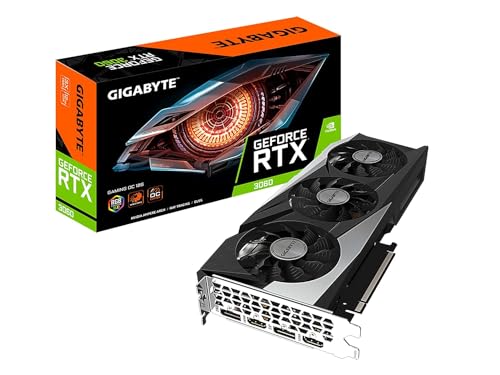 GIGABYTE GeForce RTX 3060 Gaming OC 12G (REV 2.0) | Check price on Amazon | |
 MSI GeForce RTX 4060 Ventus 2X Black 8G OC | Check price on Amazon | |
 ASUS Dual GeForce RTX 4070 EVO OC Edition 12GB GDDR6X | Check price on Amazon | |
 PNY GeForce RTX 5070 EPIC-X ARGB OC Triple Fan | Check price on Amazon |
Key takeaways
- Compare the best GeForce graphics cards from NVIDIA, from the RTX 3060 to the RTX 5070, with VRAM, memory and encoder guidance for gaming and streaming.
Choosing among the best GeForce graphics cards starts with a simple fact: every card in this guide is built around an NVIDIA GeForce GPU, and the differences that matter most are the generation, the amount of video memory, and the features that generation brings with it. A GeForce RTX 3060, an RTX 4060, an RTX 4070, and an RTX 5070 all play modern games and all carry NVIDIA hardware encoding for streaming, yet they suit very different monitors, budgets, and upgrade cycles. Matching the card to the resolution you actually play at saves money and avoids the frustration of a card that is either overwhelmed by a high-refresh display or wasted on a basic one.
This guide compares four NVIDIA GeForce cards that cover the range most buyers shop in, from an affordable 1080p and 1440p option with a generous memory buffer to a current-generation card built for high-refresh 1440p and entry-level 4K play. Each pick is a specific retail card from a known board partner, with its specifications taken from its product listing, so you can compare memory type, memory bus, cooling, and slot size side by side. Streaming matters throughout, because GeForce cards carry the NVENC encoder that lets a single PC play and broadcast at the same time, and newer generations handle that job with newer codec support.
As an Amazon Associate, we earn from qualifying purchases.
How to Choose a GeForce Graphics Card
Start with your monitor. For 1080p play, a GeForce RTX 3060 or RTX 4060 class card has enough power for high settings in most titles, especially with DLSS upscaling enabled. For 1440p, especially at high refresh rates, the RTX 4070 and RTX 5070 class is the safer step, because the extra GPU power and faster memory hold frame rates up when the pixel count rises. For 4K, plan on the strongest card you can fit and budget for, and expect DLSS to do meaningful work in demanding games. Buying far beyond your display wastes money, while buying below it leaves performance on the table every session.
Video memory, usually called VRAM, is the second decision. The RTX 3060 in this guide carries 12GB of GDDR6 memory on a 192-bit bus, which is a large buffer for its class and helps with texture-heavy games and with holding assets at 1440p. The RTX 4060 carries 8GB of GDDR6 on a 128-bit bus, which suits 1080p and lighter 1440p play but leaves less headroom for the most texture-heavy settings. The RTX 4070 moves to 12GB of faster GDDR6X memory on a 192-bit bus, and the RTX 5070 carries 12GB of GDDR7, also on a 192-bit bus. More and faster memory does not rescue an otherwise weak GPU, but too little memory can force texture settings down even when the GPU itself is capable.
Generation decides the feature set. The RTX 3060 is an Ampere card with DLSS upscaling and hardware ray tracing. The RTX 4060 and RTX 4070 are Ada Lovelace cards, and they add DLSS 3 with Frame Generation, which can raise frame rates in supported games by generating additional frames. The RTX 5070 is a Blackwell card with DLSS 4, the newest generation of that technology at the time of writing. If you keep a card for many years, a newer generation usually ages better, because game support for new upscaling and frame generation features tends to follow the newest hardware first.
Streaming deserves a separate look. GeForce RTX cards include the NVENC hardware encoder, which encodes your broadcast on a dedicated part of the GPU instead of loading the processor, so the game keeps the main GPU resources while NVENC handles the outgoing stream for platforms such as Twitch and YouTube. Newer generations improve encoder efficiency and codec options, so a creator who streams heavily has a practical reason to favor the RTX 40 and RTX 50 series cards here over the older RTX 3060.
Finally, check the physical and power basics before ordering. Measure the length clearance inside your case and confirm the slot width, because the picks below range from compact dual-fan designs to longer triple-fan models. Confirm your power supply has the wattage and connectors the card requires, since connector types differ between generations, and check that your display cables match the HDMI and DisplayPort outputs listed in each specification table.
GIGABYTE GeForce RTX 3060 Gaming OC 12G (REV 2.0)
The GIGABYTE GeForce RTX 3060 Gaming OC 12G is the value anchor of this guide, and its headline specification is memory. With 12GB of GDDR6 memory on a 192-bit bus, it carries a larger and wider memory configuration than many newer entry-level cards, which helps in texture-heavy games and gives it a longer useful life at 1080p and moderate 1440p settings. The RTX 3060 GPU itself is an Ampere design with hardware ray tracing and DLSS upscaling, so features that define modern GeForce gaming are present, even though it lacks the Frame Generation found in later generations.
GIGABYTE fits this card with its three-fan WINDFORCE cooling design, which suits builders who have the case length for a triple-fan layout. As a factory overclocked Gaming OC model, it sits above basic dual-fan RTX 3060 variants in the GIGABYTE range. For streaming, the Ampere NVENC encoder handles a single-PC broadcast, making this a sensible card for a first streaming setup. The trade is clear: this is the oldest generation in the guide, so its upscaling stops at DLSS rather than the frame generation versions, and its ray tracing performance is a step behind the newer cards.
Who It Suits
This card suits 1080p gamers who want high settings with memory headroom to spare, players stepping up to 1440p with DLSS enabled, and new streamers who want NVENC encoding without paying for the newest generation. It is less suited to buyers chasing high-refresh 1440p or 4K play, or to anyone who specifically wants DLSS Frame Generation, where the RTX 4060 and above are the better match.
MSI GeForce RTX 4060 Ventus 2X Black 8G OC
The MSI GeForce RTX 4060 Ventus 2X Black 8G OC is the compact, power-conscious step into the Ada Lovelace generation. Its RTX 4060 GPU brings DLSS 3 with Frame Generation, which is the single biggest practical difference from the RTX 3060 above: in supported games, frame generation can lift frame rates noticeably at 1080p and 1440p, and the Ada architecture delivers that performance with modest power draw. The card carries 8GB of GDDR6 memory on a 128-bit bus, a configuration aimed squarely at 1080p play and lighter 1440p use rather than maximum texture settings at higher resolutions.
MSI builds this model as a dual-fan Ventus 2X design with TORX Fan 4.0 cooling, in a black shroud without lighting extras, which keeps it appropriate for smaller cases and understated builds. The listing specifies PCI Express Gen 4 connectivity, three DisplayPort 1.4a outputs, and one HDMI 2.1a output, a combination that covers multi-monitor desks and high-refresh displays over DisplayPort. For streamers, the Ada-generation NVENC encoder is a genuine upgrade over the Ampere encoder in the RTX 3060, with more efficient encoding for the same broadcast job. The honest limitation is memory: 8GB is workable today at its target resolutions, but buyers who keep cards for a long time should weigh that against the 12GB options in this guide.
Who It Suits
This card suits 1080p gamers who want the newest features at a modest power level, small-form-factor builders who need a shorter dual-fan card, and streamers who want the Ada NVENC encoder in an affordable package. It is a weaker fit for buyers focused on 1440p maximum settings in texture-heavy games, where the 8GB memory buffer is the limiting factor and the 12GB cards below and above it in this guide make more sense.
ASUS Dual GeForce RTX 4070 EVO OC Edition 12GB GDDR6X
The ASUS Dual GeForce RTX 4070 EVO OC Edition is the 1440p step in this guide. The RTX 4070 GPU is a substantial move up from the RTX 4060 in raw rendering power, and it pairs that power with 12GB of GDDR6X memory on a 192-bit bus, so both the GPU and its memory system are sized for high-refresh 1440p play and for dipping into 4K with DLSS doing part of the work. As an Ada Lovelace card, it supports DLSS 3 with Frame Generation and the generation’s ray tracing hardware, which together make it the most balanced high-settings option here for a single high-refresh monitor.
ASUS packages the card in its Dual format, a 2.5-slot design with two Axial-tech fans and 0dB technology, which stops the fans entirely under light loads so a desktop stays silent while browsing or watching video. The listing specifies PCI Express 4.0, one HDMI 2.1a output, and DisplayPort 1.4a connectivity. ASUS describes the EVO version as designed for broad compatibility, and the dual-fan format is meaningfully easier to fit than the large triple-fan RTX 4070 variants from other ranges. For creators, the Ada NVENC encoder and the 12GB memory buffer make this a comfortable card for streaming a 1440p game while encoding the broadcast on the same machine. The consideration is generational: the RTX 5070 below is newer, so this card makes the most sense when it is the better value of the two at the time you buy.
Who It Suits
This card suits 1440p gamers with high-refresh monitors, players who want strong ray tracing performance with DLSS 3 support, and streamers running a single-PC setup at higher resolutions. It also suits builders who need that performance in a dual-fan card that fits ordinary mid-tower cases. Buyers who always want the newest generation, or who are building around a PCIe 5.0 platform for the long term, should compare it carefully with the RTX 5070 before deciding.
PNY GeForce RTX 5070 EPIC-X ARGB OC Triple Fan
The PNY GeForce RTX 5070 EPIC-X ARGB OC is the current-generation pick in this guide, built on NVIDIA Blackwell architecture. Its RTX 5070 GPU supports DLSS 4, the newest version of NVIDIA upscaling and frame generation technology, which is the main reason to choose it over the RTX 4070 above: game support for the newest features arrives on the newest hardware first, and a buyer planning to keep a card through several game generations benefits from starting at the front of that line. The card carries 12GB of GDDR7 memory on a 192-bit bus, moving to a faster memory standard than the GDDR6X of the previous generation.
PNY lists a boost speed of 2685 MHz for this overclocked model, with a triple-fan cooler, ARGB lighting, and a 2.4-slot design that PNY rates as SFF-Ready, meaning it is shaped with small-form-factor clearance guidance in mind despite the three fans. Connectivity is the newest in this guide, with PCIe 5.0 and HDMI and DisplayPort 2.1 outputs. For streaming and recording, Blackwell carries the most recent NVENC encoding hardware in this comparison. The trade is that it is the premium option here, and its advantages over the RTX 4070 show up most in DLSS 4 titles and long-term feature support rather than in every older game.
Who It Suits
This card suits buyers building a new PC around the current GeForce generation, 1440p high-refresh gamers who want DLSS 4 support from day one, and creators who want the newest encoder hardware for streaming and recording. It also suits compact builds that can use its SFF-Ready dimensions. It is more card than a 1080p monitor can use, so budget-focused 1080p players will get better value from the RTX 4060 or RTX 3060 above.
Frequently Asked Questions
Is a GeForce card a good choice for streaming on a single PC?
Yes, and the reason is the NVENC hardware encoder built into GeForce RTX cards. NVENC encodes the outgoing broadcast on dedicated hardware, so the processor is left free for the game and for running streaming software, chat tools, and a browser at the same time. Every card in this guide includes NVENC, and the newer generations in the RTX 40 and RTX 50 series carry updated versions of the encoder, which is one reason streamers often favor a newer card even when an older one looks close in game performance alone.
How much VRAM do I need on a GeForce graphics card?
For 1080p play, 8GB is workable in most current games, which is the configuration of the RTX 4060 in this guide. For 1440p, 12GB is the more comfortable target, because higher resolutions and higher texture settings use more memory, and all three other cards here carry 12GB. Memory speed and bus width matter alongside capacity: the GDDR6X in the RTX 4070 and the GDDR7 in the RTX 5070 move data faster than the GDDR6 in the older and lower cards, which helps at higher resolutions where memory traffic is heaviest.
What is the difference between DLSS 3 and DLSS 4?
Both are NVIDIA technologies that combine AI upscaling with frame generation to raise frame rates beyond what raw rendering delivers. DLSS 3, supported by the RTX 40 series cards in this guide such as the RTX 4060 and RTX 4070, introduced Frame Generation on the Ada Lovelace generation. DLSS 4 is the Blackwell generation’s version, supported by the RTX 5070, and it extends that frame generation approach further in supported titles. In practice, support is per game, so check the titles you play most, and remember that the RTX 30 series card here supports DLSS upscaling without the frame generation feature.
Will these GeForce cards fit my case and power supply?
Fit depends on the specific card, not just the GPU name. The picks here range from a compact dual-fan RTX 4060 to triple-fan designs from GIGABYTE and PNY, with slot widths of about 2.4 to 2.5 slots on the ASUS and PNY models. Before ordering, measure the card length clearance in your case, count the slots the card will cover, and confirm your power supply provides the wattage and connector type the model requires, because requirements differ between generations and partner designs.
Final Verdict
The best GeForce graphics card depends on the monitor in front of you and how long you plan to keep the card. For value at 1080p with generous memory, the GIGABYTE GeForce RTX 3060 Gaming OC 12G remains a sensible buy, pairing a 12GB buffer with a proven triple-fan cooler. For a compact, efficient card with modern features, the MSI GeForce RTX 4060 Ventus 2X Black 8G OC adds DLSS 3 frame generation and the Ada encoder in a small dual-fan design. For high-refresh 1440p, the ASUS Dual GeForce RTX 4070 EVO OC Edition balances strong performance, 12GB of GDDR6X memory, and broad case compatibility. For buyers who want the current generation and the longest feature runway, the PNY GeForce RTX 5070 EPIC-X ARGB OC brings Blackwell, GDDR7 memory, and DLSS 4. Any of the four is a genuine NVIDIA GeForce card with NVENC encoding, so the right choice is the one whose resolution class, memory, and generation match your PC.
Product and ASIN Reference
| Product | ASIN |
|---|---|
| GIGABYTE GeForce RTX 3060 Gaming OC 12G (REV 2.0) | B0971BG25M |
| MSI GeForce RTX 4060 Ventus 2X Black 8G OC | B0C7W8GZMJ |
| ASUS Dual GeForce RTX 4070 EVO OC Edition 12GB GDDR6X | B0CQRX9HPK |
| PNY GeForce RTX 5070 EPIC-X ARGB OC Triple Fan | B0DYPGBX6J |
More from Amazon
Programs that pair well with the guide above. Offers and eligibility are set by Amazon and may change.
Free shipping on eligible items, Prime Video and more. Eligible new members can start with a free trial.
Start a Prime free trialAd-free music streaming. Eligible new subscribers can start with a free trial.
Try Music Unlimited freeA Prime membership for ages 18-24 with a trial period. Eligibility is set by Amazon.
See Prime for Young AdultsAudiobooks and podcasts to listen to on the go. Eligible new members can start with a free trial.
Try Audible freeAs an Amazon Associate we earn from qualifying purchases.









