
Our Short List of 3
All 4 Picks at a Glance
| Product | Specs | Action |
|---|---|---|
 Razer Huntsman Mini | Check price on Amazon | |
 HyperX Alloy Origins 60 | Check price on Amazon | |
 Corsair K65 RGB Mini | Check price on Amazon | |
 RK Royal Kludge RK61 | Check price on Amazon |
Key takeaways
- Compare the best 61 key keyboards for gaming and desk work, from optical and Cherry MX boards to a triple-mode wireless model with hot-swappable switches.
A 61 key keyboard keeps the full letter block, number row, and punctuation keys of a standard board while dropping the function row, navigation cluster, arrow keys, and number pad. That compact 60 percent layout frees up a large amount of desk space for mouse movement, which is why this format has become a favorite for gaming setups, small desks, and travel kits where a full-size board simply takes up too much room.
The trade-off is that everyday commands move to a secondary layer, reached by holding the Fn key. Arrow keys, function keys, and media controls are still available, just printed on the side or top of the regular keys. This guide compares four verified 61 key keyboards that take different approaches to that formula, covering wired optical switches, classic Cherry MX mechanical switches, a solid aluminum build, and a wireless triple-mode option with hot-swappable switches.
As an Amazon Associate, we earn from qualifying purchases.
How to Choose a 61 Key Keyboard
The first decision is the switch type, because it shapes both the feel and the sound of every keystroke. Optical switches, like the ones in the Razer Huntsman Mini below, register a press by interrupting a beam of light, which removes the mechanical contact delay found in traditional switches. Linear optical switches move smoothly from top to bottom, while clicky optical switches add a deliberate click and tactile bump. Traditional mechanical switches, including Cherry MX and HyperX designs, use metal contacts instead. Linear mechanical switches suit fast, repeated presses, tactile switches give a small bump that helps typists feel each press, and clicky switches are the loudest option in any shared room.
The second decision is connectivity. A wired board with a detachable USB-C cable is the simplest and most consistent choice for a fixed desk, and it never needs charging. A triple-mode board adds Bluetooth and a 2.4GHz wireless receiver on top of the wired connection, so the same keyboard can move between a desktop, a laptop, and a tablet. Wireless freedom is convenient, but it adds a battery to manage and one more connection to troubleshoot, so a purely wired board remains the safer pick for competitive play at a single desk.
Keycaps matter more on a compact board than on a full-size one. Double-shot PBT keycaps resist shine and fading, and the legends stay readable after years of use. Side-printed secondary legends are especially valuable on a 61 key layout, because the Fn layer carries the arrow keys, function row, and media controls. A board that prints those functions clearly on the keycaps shortens the learning curve considerably, while a board with blank or top-only legends can leave new owners hunting through a manual.
Build quality and software round out the choice. An aluminum frame adds weight and stability, which keeps a small board planted during fast mouse work, while a plastic case keeps the keyboard light enough for a backpack. Software support decides how far customization goes, from remapping keys and recording macros to saving profiles in onboard memory. Boards with onboard storage keep those settings when the keyboard moves to another computer, which matters for players who switch between a home desk and an event or office machine.
Finally, consider hot-swappable sockets. A hot-swappable board lets the owner pull a switch out and press a different one in without soldering, which makes it easy to change the feel of the board or replace a single faulty switch. Fixed-switch boards are usually simpler and sometimes thinner, but a failed switch is much harder to repair. For a first compact keyboard, hot-swappable sockets offer the most flexibility over the life of the product.
Razer Huntsman Mini
The Razer Huntsman Mini is the speed-focused entry in this group, built around Razer optical switches that actuate with light instead of metal contacts. The version covered here uses the clicky purple optical switch, which pairs the fast optical actuation with an audible click and a tactile bump. The board follows the standard 61 key layout, with secondary functions printed on the keycaps and a detachable USB-C cable for transport.
Razer lists doubleshot PBT keycaps on this model, along with an aluminum frame and onboard memory for storing profiles. Chroma RGB backlighting provides per-key lighting that can be configured in Razer Synapse, and the onboard storage means a saved profile travels with the keyboard when it is plugged into a different computer. The Huntsman Mini also supports fully programmable keys through the software, so the Fn layer can be adjusted to match how the owner actually uses those secondary commands.
Who It Suits
The Huntsman Mini suits competitive players who want the fastest switch response in this group and enjoy a clicky, tactile keystroke. It also fits players who already use Razer software and want one place to manage lighting and macros. Anyone who needs a quiet board for a shared office, or who wants wireless connections, should look at the other options in this guide instead, because this model is wired only and the clicky switch is deliberately audible.
HyperX Alloy Origins 60
The HyperX Alloy Origins 60 takes the opposite approach to the Razer board: traditional mechanical switches in a notably solid body. HyperX uses its own Red linear mechanical switches on this version, and the entire body is made from aircraft-grade aluminum, which gives this small keyboard a planted, substantial feel on the desk. The layout carries 61 keys, with secondary functions printed on the side of the keycaps where they are easy to read at a glance.
HyperX fits double-shot PBT keycaps, per-key RGB backlighting, and a detachable USB-C cable. The NGENUITY software handles lighting effects, macros, and key assignments, and the board includes onboard memory for saving profiles. A Game Mode key helps prevent accidental interruptions during play. Compatibility extends beyond the PC to current and previous generation game consoles, which makes this a reasonable single keyboard for a mixed desk and console setup.
Who It Suits
The Alloy Origins 60 suits players and typists who want a compact board that feels dense and durable, with smooth linear switches that work well for both gaming and long typing sessions. The side-printed legends make it one of the easier 61 key boards to learn. Buyers who want to change switches later should note that the switches on this model are fixed rather than hot-swappable, and buyers who need Bluetooth should choose the wireless option below.
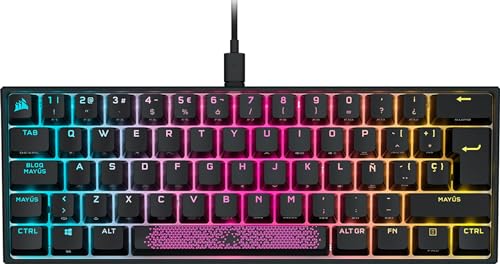
Corsair K65 RGB Mini
The Corsair K65 RGB Mini is a wired 61 key board built around genuine Cherry MX switches. The version covered here uses Cherry MX Red linear switches, a long-established design known for a smooth press with no tactile bump. Corsair pairs those switches with its AXON hyper-processing technology, which the company rates for a much faster polling rate than a standard gaming keyboard, aimed at players who compete in fast-paced titles.
The board uses PBT double-shot keycaps, per-key RGB backlighting controlled through Corsair iCUE software, and a detachable USB-C cable. iCUE handles key remapping, macro recording, and lighting synchronization with other Corsair gear, and onboard storage holds profiles for use on other machines. The K65 RGB Mini is a wired-only design, which keeps the setup simple and avoids battery management entirely.
Who It Suits
The K65 RGB Mini suits players who prefer the familiar feel of Cherry MX switches and already run Corsair iCUE for the rest of their setup. It is also a sensible pick for a dedicated gaming desk where the keyboard never moves, since the wired connection is always ready. Buyers who want wireless freedom, hot-swappable switches, or a tactile switch feel out of the box should compare the Royal Kludge model below before deciding.
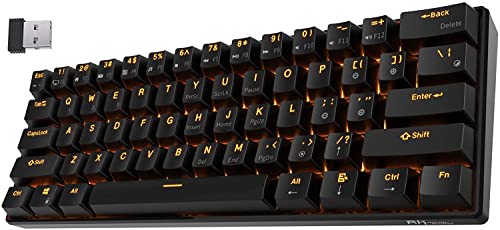
RK Royal Kludge RK61
The RK Royal Kludge RK61 is the flexible option in this group. It connects three ways, over Bluetooth, a 2.4GHz wireless receiver, or a USB-C cable, so one board can serve a desktop, a laptop, and a tablet in the same day. The 61 key layout matches the other boards here, but the RK61 adds hot-swappable sockets, and the version covered here ships with Red linear switches installed.
Because the sockets accept replacement switches without soldering, owners can change a single switch, mix switch types across the board, or replace a faulty switch in minutes. The RK61 includes RGB backlighting and programmable software support for remapping and macros. Its plastic construction keeps it light for travel, and the wireless modes make it the only board in this guide that can clear the cable off the desk entirely.
Who It Suits
The RK61 suits anyone who moves between devices, works from more than one desk, or wants a first compact board that can change character later through switch swaps. It is also the natural choice for a clean, cable-free setup. Buyers who want the heaviest, most solid-feeling board, or who prefer premium PBT keycaps from the start, may lean toward the HyperX model above, while competitive players at a fixed desk may prefer a wired-only board.
Frequently Asked Questions
How do arrow keys and function keys work on a 61 key keyboard?
They sit on a secondary layer. Holding the Fn key turns letter and punctuation keys into arrow keys, and the number row into the F1 through F12 function row. The exact positions vary by brand, and boards with side-printed legends, like the HyperX Alloy Origins 60, make those positions easiest to learn. After a short adjustment period, most owners reach those keys without looking.
Is a 61 key keyboard good for typing and office work?
It can be, as long as the work does not depend heavily on dedicated arrow keys, a number pad, or frequent function key use. Writers, programmers, and general office users often adapt quickly, and the compact layout can bring the mouse closer, which some people find more comfortable. Anyone who enters data into spreadsheets all day will usually be happier with a larger board that keeps the number pad.
What is the difference between optical and mechanical switches?
A mechanical switch registers a press when metal contacts meet inside the switch, while an optical switch registers the press when the stem interrupts a beam of light. Optical designs remove the contact delay used to prevent double inputs, so they can register slightly faster, and they have fewer contact parts to wear. Mechanical switches offer a wider range of established feels, including the Cherry MX family, and hot-swappable mechanical boards make changing switches simple.
Can a 61 key keyboard connect to more than one device?
Only some models can. Wired boards like the Razer Huntsman Mini, HyperX Alloy Origins 60, and Corsair K65 RGB Mini connect to one device at a time through the cable. The RK Royal Kludge RK61 adds Bluetooth and a 2.4GHz receiver alongside its wired mode, so it can pair with several devices and switch between them. Buyers who regularly move between a PC and a laptop should check the connection list before choosing.
Final Verdict
Each of these four boards serves a different priority. The Razer Huntsman Mini is the pick for players who want optical switch speed and a clicky feel in a wired board. The HyperX Alloy Origins 60 is the sturdiest option here, with an aluminum body, smooth linear switches, and the clearest secondary legends. The Corsair K65 RGB Mini fits players who trust Cherry MX switches and already use iCUE. The RK Royal Kludge RK61 is the most flexible, adding triple-mode wireless connections and hot-swappable sockets. Any of the four delivers the core benefit of the format, a full typing block in a fraction of the desk space, so the right choice comes down to switch feel, connection needs, and how much customization matters.
Product and ASIN Reference
| Product | ASIN |
|---|---|
| Razer Huntsman Mini | B089QP4QNB |
| HyperX Alloy Origins 60 | B08XBQ79MN |
| Corsair K65 RGB Mini | B091FF53NF |
| RK Royal Kludge RK61 | B08G4P7KZQ |
More from Amazon
Programs that pair well with the guide above. Offers and eligibility are set by Amazon and may change.
Free shipping on eligible items, Prime Video and more. Eligible new members can start with a free trial.
Start a Prime free trialAd-free music streaming. Eligible new subscribers can start with a free trial.
Try Music Unlimited freeA Prime membership for ages 18-24 with a trial period. Eligibility is set by Amazon.
See Prime for Young AdultsAudiobooks and podcasts to listen to on the go. Eligible new members can start with a free trial.
Try Audible freeAs an Amazon Associate we earn from qualifying purchases.









