
Our Short List of 3

- Best for: buyers who want current-generation components and a mainstream brand’s warranty and support.
- Processor: Intel Core Ultra 7 265F, 2.4GHz
- Graphics: NVIDIA GeForce RTX 5060 Ti, 8GB GDDR7
- Memory: 16GB DDR5, 5600MHz
- Storage: 1TB SSD

- Best for: 1440p players who want one machine that games hard and still handles everyday multitasking.
- Processor: Intel Core i7-14700F
- Graphics: NVIDIA GeForce RTX 5070, 12GB
- Memory: 32GB DDR5 RGB, 5200MHz
- Storage: 1TB NVMe SSD
- Best for: players who split their time between gaming and processor-heavy work on the same machine.
- Processor: AMD Ryzen 9 9900X, 4.4GHz
- Graphics: NVIDIA GeForce RTX 5070, 12GB GDDR7
- Memory: 32GB DDR5
- Storage: 1TB PCIe 4.0 SSD
All 4 Picks at a Glance
| Product | Specs | Action |
|---|---|---|
| Lenovo Legion Tower 5i |
| Check price on Amazon |
| iBUYPOWER Slate MESH SMI7N5701 |
| Check price on Amazon |
| CyberPowerPC Gamer Xtreme GXiVR8080A41 |
| Check price on Amazon |
 iBUYPOWER Y40 PRO Y40BA9N57T01 |
| Check price on Amazon |
Key takeaways
- Compare five prebuilt gaming PCs by graphics card, processor, memory and storage, from 1080p starters to 4K-ready towers, and pick the right one.
Buying a prebuilt gaming computer comes down to one real decision: how much graphics power your monitor and your games actually demand, because everything else in the box should be chosen to support that card rather than the other way round. Pay for processor cores you will never load and the graphics card gets squeezed; underspend on the card and no amount of memory makes a demanding game run the way you hoped.
This roundup is for first-time PC buyers replacing a console, players stepping up from an ageing laptop, and anyone who wants a tower that arrives assembled with Windows installed. Every pick is a prebuilt gaming desktop taken from its Amazon product page, and the specifications quoted below come from the names and details printed on those pages.
Quick Picks
As an Amazon Associate we earn from qualifying purchases
| Product | Best for | Key spec from title |
|---|---|---|
| CyberPowerPC Gamer Xtreme VR GXiVR8060A24 | First gaming PC for 1080p play | GeForce RTX 4060 8GB |
| Lenovo Legion Tower 5i | Newer-generation parts in a compact tower | GeForce RTX 5060 Ti 8GB |
| iBUYPOWER Slate MESH SMI7N5701 | 1440p play with memory headroom | GeForce RTX 5070 12GB |
| CyberPowerPC Gamer Xtreme GXiVR8080A41 | Gaming plus heavy multitasking | GeForce RTX 5070 12GB |
| iBUYPOWER Y40 PRO Y40BA9N57T01 | High-refresh 1440p and 4K ambitions | GeForce RTX 5070 Ti 16GB |
How to Choose
Start With the Graphics Card and Your Monitor
The graphics card decides your resolution and settings more than any other part, so match it to the screen you own or plan to buy. An RTX 4060-class card is built for 1080p, the RTX 5060 Ti and RTX 5070 stretch comfortably into 1440p, and the RTX 5070 Ti adds the memory and muscle for high-refresh 1440p or entry 4K. Buying a card far beyond your monitor wastes money; buying one below it means lowering settings in the games you bought the PC to enjoy.
Pair the Processor With the Card, Not the Other Way Round
A gaming processor needs strong per-core speed and enough cores to keep the graphics card fed, but beyond that point extra cores mostly sit idle during play. A modern Core i5 or Ryzen 5 handles mainstream cards without holding them back. Step up to a Core i7, Ryzen 7 or Ryzen 9 when you also record, edit video, compile code or keep many applications open while you play, because that second workload is where the larger chips earn their place in the build.
Read the Memory and Storage Lines Carefully
Sixteen gigabytes of DDR5 is the working minimum for current games, while 32GB gives breathing room for large open-world titles and background apps. Check whether the memory runs as a matched pair, since a single stick can cost performance. For storage, 1TB of NVMe SSD is the sensible floor: modern game installs are large, and a 500GB drive fills after a handful of titles. A 2TB drive removes the delete-and-redownload cycle entirely, and PCIe Gen4 speeds keep load times short either way.
Check the Exact Configuration Behind the Listing
Prebuilt listings often group several configurations under one page, and the headline price belongs to whichever variant is selected, not necessarily the one in the title you read. Before ordering, confirm the style name matches the processor, graphics card, memory and drive size you expect, because sibling variants of the same model can swap an RTX 4060 for a much weaker card. Also note what is in the box: several picks here include a keyboard and mouse, which saves a separate purchase on day one.
The 5 Best Options
CyberPowerPC Gamer Xtreme VR GXiVR8060A24
This is the straightforward starting point of the group: an Intel Core i5-13400F paired with an RTX 4060 8GB, 16GB of DDR5 and a 1TB PCIe Gen4 SSD. That combination targets smooth 1080p play in competitive titles and respectable settings in story-driven games, without paying for headroom a 1080p monitor cannot show. The tower format leaves room to add storage or memory later, and the included keyboard and mouse mean the box is genuinely ready to use on arrival.
Specs
- Processor: Intel Core i5-13400F, 2.5GHz
- Graphics: NVIDIA GeForce RTX 4060 8GB GDDR6
- Memory: 16GB DDR5
- Storage: 1TB PCIe Gen4 NVMe SSD
- Operating system: Windows 11 Home
- Connectivity: WiFi Ready
- Included: desktop, keyboard and mouse
Best for: first-time PC gamers playing at 1080p who want a complete, ready-to-run tower.
Watch out for: the 8GB of graphics memory is the ceiling here, so demanding games at 1440p will need settings turned down; confirm the 13400F style name at checkout, as this listing carries other variants.
ASIN: B0DCMPRRFD
Lenovo Legion Tower 5i
- Best for: buyers who want current-generation components and a mainstream brand’s warranty and support.
- Processor: Intel Core Ultra 7 265F, 2.4GHz
- Graphics: NVIDIA GeForce RTX 5060 Ti, 8GB GDDR7
- Memory: 16GB DDR5, 5600MHz
- Storage: 1TB SSD
buyers who want current-generation components and a mainstream brand’s warranty and support.
memory is 16GB where the stronger picks below carry 32GB, and Legion listings on Amazon span many configurations, so verify the 90YA005BUS model number before ordering.
Lenovo’s Legion Tower 5i in this configuration runs an Intel Core Ultra 7 265F with an RTX 5060 Ti 8GB, which puts newer-generation parts in a comparatively tidy tower at 19.31 by 8.31 by 16.3 inches. The 5060 Ti’s GDDR7 memory and current architecture suit 1080p high-refresh play and a step into 1440p, and the Ultra 7 processor gives the machine a long useful life beyond gaming alone. It is the pick for buyers who prefer a major manufacturer’s support network behind the badge.
iBUYPOWER Slate MESH SMI7N5701
- Best for: 1440p players who want one machine that games hard and still handles everyday multitasking.
- Processor: Intel Core i7-14700F
- Graphics: NVIDIA GeForce RTX 5070, 12GB
- Memory: 32GB DDR5 RGB, 5200MHz
- Storage: 1TB NVMe SSD
1440p players who want one machine that games hard and still handles everyday multitasking.
storage stays at 1TB, so a large library will need a second drive sooner than the 2TB pick below; the air cooler is effective but the case fans will be audible under full load.
The Slate MESH pairs an Intel Core i7-14700F with an RTX 5070 12GB and doubles the memory of the two picks above to 32GB of DDR5 RGB. That is the balanced 1440p recipe in this roundup: the 5070 has the memory capacity that heavier textures at 1440p ask for, and the 14700F brings enough cores to keep the card fed while other work runs alongside. The mesh-front case and tower air cooler keep the design simple, and a keyboard and mouse are included in the box.
CyberPowerPC Gamer Xtreme GXiVR8080A41
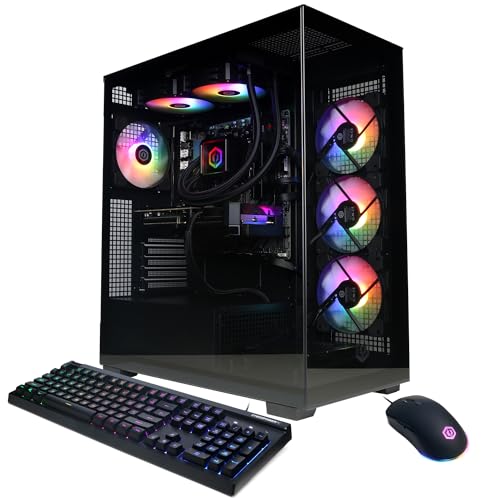
- Best for: players who split their time between gaming and processor-heavy work on the same machine.
- Processor: AMD Ryzen 9 9900X, 4.4GHz
- Graphics: NVIDIA GeForce RTX 5070, 12GB GDDR7
- Memory: 32GB DDR5
- Storage: 1TB PCIe 4.0 SSD
players who split their time between gaming and processor-heavy work on the same machine.
for gaming alone the Ryzen 9 is more processor than the RTX 5070 can use, so pure players may prefer the iBUYPOWER above; storage is 1TB rather than 2TB.
This Gamer Xtreme build leans on AMD’s Ryzen 9 9900X, a twelve-core processor, alongside the same RTX 5070 12GB graphics card as the Slate MESH above. The difference is where the money goes: here it buys processing headroom for buyers whose PC also renders video, runs virtual machines or handles other core-hungry work between gaming sessions. Memory is 32GB of DDR5 and storage a 1TB PCIe 4.0 SSD, and the box includes the desktop, keyboard, mouse and power cord.
iBUYPOWER Y40 PRO Y40BA9N57T01
- Best for: enthusiasts with a high-refresh 1440p or 4K monitor who want the longest-lived specification in the group.
- Processor: AMD Ryzen 9 7900X
- Graphics: NVIDIA GeForce RTX 5070 Ti, 16GB
- Memory: 32GB DDR5 RGB, 5200MHz
- Storage: 2TB NVMe SSD
enthusiasts with a high-refresh 1440p or 4K monitor who want the longest-lived specification in the group.
the Ryzen 9 7900X is a previous-generation chip next to the newer processors above, and a liquid cooler deserves a periodic check for leaks and pump noise that an air cooler does not.
The strongest gaming specification here belongs to the Y40 PRO: a Ryzen 9 7900X driving an RTX 5070 Ti with 16GB of graphics memory, backed by 32GB of DDR5 and a 2TB NVMe SSD. The extra video memory is what high-refresh 1440p and entry-level 4K settings consume, and the 240mm liquid cooler is fitted to keep the processor quiet while it works. Storage is finally generous enough to hold a big library without rotation, and the HYTE Y40 case shows the build off through its glass panel.
Which One Fits Your Situation
You Are Replacing a Console at a 1080p TV or Monitor
Start with the CyberPowerPC Gamer Xtreme VR GXiVR8060A24. Its RTX 4060 is matched to 1080p, the 1TB SSD holds a healthy library, and the included keyboard and mouse close the last gap between a console setup and a working PC desk. You can add memory or storage later when a specific game asks for it.
You Play Competitive Titles and Want High Frame Rates
The Lenovo Legion Tower 5i and its RTX 5060 Ti are aimed at you. Esports titles reward frame rate over raw resolution, and the newer card with GDDR7 memory delivers that at 1080p while still giving you a route into 1440p later. The Core Ultra 7 keeps the rest of the system responsive between matches.
You Have a 1440p Monitor and a Mixed Workload
Choose between the two RTX 5070 builds by what else the PC must do. The iBUYPOWER Slate MESH is the cleaner gaming-first answer, while the CyberPowerPC GXiVR8080A41’s twelve-core Ryzen 9 suits buyers who edit, render or multitask heavily on the same desk. Both carry 32GB of memory, so neither needs an early upgrade.
You Are Buying Once and Keeping It for Years
The iBUYPOWER Y40 PRO is the long-haul pick. Sixteen gigabytes of graphics memory, 2TB of storage and liquid cooling give it the most room to absorb future games without surgery, and the specification stays sensible even as requirements climb. It costs the most commitment up front, but it postpones the next purchase the longest.
Common Mistakes
- Choosing the processor first and letting the graphics card take whatever budget remains, when the card decides game performance.
- Reading a listing’s headline configuration but ordering a cheaper variant with a weaker card hidden in the style selector.
- Accepting 8GB or 16GB of system memory without checking, then blaming the graphics card for stutters that memory causes.
- Buying a 500GB drive to save money and spending the next year deleting games to make room for new ones.
- Matching a high-end tower to an old 1080p 60Hz monitor, so the extra graphics power never reaches the screen.
Frequently Asked Questions
Is a prebuilt gaming PC worse than building my own?
Not inherently. These towers use standard processors, graphics cards, memory and drives, assembled and covered by one warranty instead of many. Building your own can save money and teach you the machine, but a prebuilt trades that effort for a system that works on arrival, which is the right exchange for many buyers.
How much memory does a gaming PC actually need?
Sixteen gigabytes of DDR5 covers current games comfortably, and every pick here meets that floor. Thirty-two gigabytes, fitted to three of the five machines above, helps when games run alongside browsers, chat and recording software, and it delays the first upgrade. More than that is for workstations rather than play.
Can I upgrade one of these PCs later?
Generally yes, because prebuilt towers use standard parts: memory and SSDs are the easy additions, and a graphics card swap is possible if the power supply and case have room. Check the power supply wattage printed for the specific configuration before planning a card upgrade, since that is the limit most often overlooked.
Which of these is right for a 4K monitor?
The iBUYPOWER Y40 PRO, with its RTX 5070 Ti and 16GB of graphics memory, is the only pick here specified with 4K in mind, and even it will use upscaling and sensible settings in the heaviest titles. The RTX 5070 machines are better matched to 1440p, where they run with room to spare.
More from Amazon
Programs that pair well with the guide above. Offers and eligibility are set by Amazon and may change.
Free shipping on eligible items, Prime Video and more. Eligible new members can start with a free trial.
Start a Prime free trialAd-free music streaming. Eligible new subscribers can start with a free trial.
Try Music Unlimited freeA Prime membership for ages 18-24 with a trial period. Eligibility is set by Amazon.
See Prime for Young AdultsAudiobooks and podcasts to listen to on the go. Eligible new members can start with a free trial.
Try Audible freeAs an Amazon Associate we earn from qualifying purchases.









