
Our Short List of 3

- Best for: frequent flyers who want the smallest, longest-running mouse in the bag.
- Sensor: Razer 5G optical, up to 18,000 DPI
- Connectivity: HyperSpeed 2.4 GHz wireless and Bluetooth
- Battery life: up to 425 hours on HyperSpeed, up to 950 hours on Bluetooth
- Battery: 1 AA or AAA battery

- Best for: travellers who want one AA battery to last an entire season of trips.
- Sensor: Logitech HERO, 200 to 12,000 DPI
- Connectivity: Lightspeed 2.4 GHz wireless, 1 ms report rate
- Battery life: up to 250 hours on a single AA battery
- Battery: 1 AA battery, included

- Best for: light packers who want a rechargeable mouse that weighs almost nothing.
- Sensor: HyperX 26K optical, up to 26,000 DPI
- Connectivity: 2.4 GHz wireless and Bluetooth
- Battery life: up to 100 hours per charge
- Charging: USB-C, rechargeable battery
All 5 Picks at a Glance
| Product | Specs | Action |
|---|---|---|
| Razer Orochi V2 |
| Check price on Amazon |
| Logitech G305 Lightspeed |
| Check price on Amazon |
| HyperX Pulsefire Haste 2 Mini Wireless |
| Check price on Amazon |
 Razer Cobra Pro |
| Check price on Amazon |
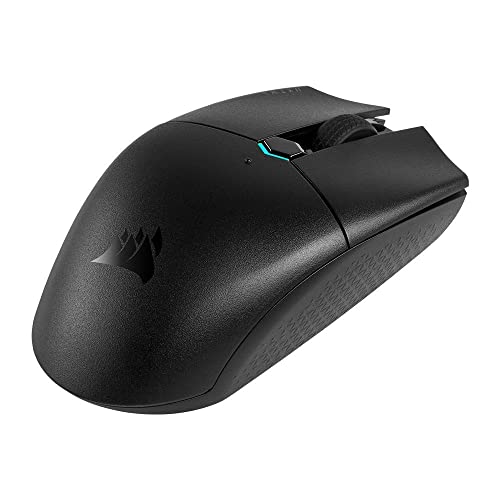 Corsair Katar Pro Wireless |
| Check price on Amazon |
Our Top Picks
- Razer Cobra Pro Wireless Gaming MouseCobra Pro Mouse4.71 x 2.46 x 1.5 inches0.17 poundsCheck on Amazon
Buying a travel gaming mouse is really a decision about what you are willing to give up for portability. A full-size esports mouse will not sit flat in a laptop sleeve, and a tiny office mouse falls apart the moment a match speeds up. The right travel pick keeps a proper gaming sensor and a low-latency 2.4 GHz connection, then shrinks everything else — shell, weight and battery demands — so it disappears into a carry-on and still plays properly at the other end.
This roundup is for laptop gamers who play in hotel rooms, students moving between dorm and library, and anyone whose second setup lives in a backpack. Every pick below is a compact wireless gaming mouse sold on Amazon, chosen from the sizes, weights, battery figures and connection modes printed on its own product page, so the numbers being compared are the ones that actually decide whether a mouse travels well.
Quick Picks
As an Amazon Associate we earn from qualifying purchases
| Product | Best for | Key spec from title |
|---|---|---|
| Razer Orochi V2 | Smallest bag footprint | 18K DPI sensor, up to 950-hour Bluetooth battery |
| Logitech G305 Lightspeed | Never hunting for a charger | 12,000 DPI HERO sensor, 250 hours on one AA |
| HyperX Pulsefire Haste 2 Mini Wireless | Lightest rechargeable pick | 26K sensor in a 53 g mini shell |
| Razer Cobra Pro | Premium compact performance | 30K optical sensor, up to 170-hour battery |
| Corsair Katar Pro Wireless | Simple two-mode commuting | 10,000 DPI, Slipstream wireless plus Bluetooth |
How to Choose
Shell size and weight come first
A travel mouse earns its place by fitting where a normal mouse cannot: a laptop sleeve pocket, a crowded backpack tech pouch, a tray table. Look for shells under roughly 120 mm long and weights under 100 g, because those are the models you will actually carry every day instead of leaving at home. Compact shells suit fingertip and claw grips best, so palm-grip players with large hands should check the length figure on the listing carefully before ordering, rather than assuming a smaller version of their desk mouse will feel the same.
Plan where the USB receiver lives
The fastest way to ruin a travel mouse is losing its 2.4 GHz dongle in a hotel room. Models with a storage slot inside the battery cover or under the shell keep the receiver with the mouse at all times, and that detail matters more on the road than any DPI figure. Bluetooth is the other half of the equation: it cannot match a dongle for latency, but it rescues you when the receiver is forgotten, and it lets the same mouse pair with a work laptop or tablet without moving any hardware.
Pick a battery strategy, not just a battery life
Listings quote battery life in two very different currencies. AA-powered mice such as the G305 and Orochi V2 run for months and come back to life in seconds with a spare battery from any airport shop, but you carry the spares. Rechargeable models such as the Haste 2 Mini and Cobra Pro top up over USB-C from the same cable as your laptop charger, yet a dead one mid-trip means playing wired or not at all. Decide which failure mode you would rather manage before comparing the hour counts.
Do not trade away the gaming parts
Small does not have to mean weak. Every mouse here keeps an optical sensor rated well past the speeds laptop gaming actually uses, a 2.4 GHz mode with a 1 ms-class response, and switches built for gaming rather than office clicking. Where travel models do cut back is extras: fewer side buttons, simpler lighting, no charging dock. If a listing leads with size but hides the sensor model or only offers Bluetooth, treat it as an office mouse in gaming clothing and keep looking.
The 5 Best Options
Razer Orochi V2
- Best for: frequent flyers who want the smallest, longest-running mouse in the bag.
- Sensor: Razer 5G optical, up to 18,000 DPI
- Connectivity: HyperSpeed 2.4 GHz wireless and Bluetooth
- Battery life: up to 425 hours on HyperSpeed, up to 950 hours on Bluetooth
- Battery: 1 AA or AAA battery
frequent flyers who want the smallest, longest-running mouse in the bag.
the compact shell is a fingertip-grip shape, so large hands and palm grippers may find it cramped on long sessions.
The Orochi V2 is the mouse Razer designed specifically for people who game away from a desk, and it shows in the details. The shell is the smallest in this roundup, the receiver tucks into the battery compartment so it cannot be left behind, and it runs on a single AA or AAA battery, which makes it the easiest pick to keep alive on a long trip. HyperSpeed wireless handles the actual gaming, while Bluetooth covers work sessions on the same machine without swapping anything.
Logitech G305 Lightspeed
- Best for: travellers who want one AA battery to last an entire season of trips.
- Sensor: Logitech HERO, 200 to 12,000 DPI
- Connectivity: Lightspeed 2.4 GHz wireless, 1 ms report rate
- Battery life: up to 250 hours on a single AA battery
- Battery: 1 AA battery, included
travellers who want one AA battery to last an entire season of trips.
there is no Bluetooth, so a lost receiver means no wireless connection until it is replaced.
The G305 has been the default recommendation for portable gaming for years because it gets the travel basics right without fuss. Its Lightspeed connection reports at 1 ms, the HERO sensor is efficient enough to stretch one AA battery to 250 hours, and the USB receiver stores inside the mouse so the whole kit is one object to pack. It is slightly longer and heavier than the Orochi V2, which some players will read as a plus: the shape fills a medium hand more comfortably on a hotel desk.
HyperX Pulsefire Haste 2 Mini Wireless
- Best for: light packers who want a rechargeable mouse that weighs almost nothing.
- Sensor: HyperX 26K optical, up to 26,000 DPI
- Connectivity: 2.4 GHz wireless and Bluetooth
- Battery life: up to 100 hours per charge
- Charging: USB-C, rechargeable battery
light packers who want a rechargeable mouse that weighs almost nothing.
the internal battery cannot be swapped, so a forgotten charging cable means playing wired until you find one.
The Haste 2 Mini answers a different travel problem: rechargeable convenience at the lowest weight here. At 53 g it adds almost nothing to a bag, the battery is rated for up to 100 hours and refills over USB-C, and you still get both a 2.4 GHz dongle mode for gaming and Bluetooth for everything else. The HyperX 26K sensor is far beyond what a mini mouse strictly needs, which is the point — shrinking the shell did not shrink the tracking. It suits claw and fingertip players who already travel with a USB-C cable for their laptop.
Razer Cobra Pro
- Best for: gamers who want flagship tracking and lighting in a bag-friendly size.
- Sensor: Razer Focus Pro 30K optical, up to 30,000 DPI
- Connectivity: HyperSpeed 2.4 GHz, Bluetooth and wired USB-C
- Battery life: up to 100 hours on HyperSpeed, up to 170 hours on Bluetooth
- Weight: 77 g
gamers who want flagship tracking and lighting in a bag-friendly size.
it is the largest and heaviest mouse in this roundup, and the RGB underglow is the first thing to switch off when battery matters.
The Cobra Pro is the pick for travellers who refuse to treat the road setup as a downgrade. It squeezes Razer’s Focus Pro 30K sensor, third-generation optical switches and full Chroma underglow lighting into a compact 119.6 mm shell, then offers three ways to connect: HyperSpeed for play, Bluetooth for battery stretching, and a USB-C cable when neither is convenient. Battery life reaches up to 100 hours on HyperSpeed and 170 hours on Bluetooth, so the lighting does not turn it into a nightly charging chore on short trips.
Corsair Katar Pro Wireless
- Best for: commuters who want a straightforward two-mode mouse with no charging routine.
- Sensor: PixArt PMW3325 optical, 10,000 DPI
- Connectivity: Slipstream 2.4 GHz wireless and Bluetooth
- Battery life: up to 135 hours on a single AA battery
- Battery: 1 AA battery
commuters who want a straightforward two-mode mouse with no charging routine.
this is an older design, so check the listing carefully for the exact configuration before ordering.
The Katar Pro Wireless keeps the formula deliberately simple: a compact symmetric shell, two wireless modes, and a single AA battery. Slipstream wireless delivers sub-1 ms response for gaming, Bluetooth handles the laptop-and-tablet shuffle, and Corsair rates the battery at up to 135 hours, which covers weeks of hotel sessions between swaps. The 10,000 DPI PixArt sensor is the most modest in this group on paper, yet it tracks well past the speeds its small shell will ever be flicked at, and the plain shape packs flat without snagging on anything.
Which One Fits Your Situation
You fly often and pack light
Choose the Razer Orochi V2. It is the smallest shell here, it sips power from a battery you can replace in any airport, and its receiver rides inside the mouse instead of loose in your bag. The HyperX Haste 2 Mini runs it close on weight, but the Orochi’s AA flexibility wins when a trip stretches longer than planned and no cable is handy.
You game in hotels on a gaming laptop
Take the Logitech G305 Lightspeed or the Razer Cobra Pro. The G305 is the low-maintenance option: one AA, months of play, nothing to configure when you open the laptop. The Cobra Pro costs you more bag presence but gives back optical switches, three connection modes and the strongest sensor in the group, which suits players who compete online from the road rather than just passing time.
One mouse has to cover work and play
The Orochi V2 and Haste 2 Mini both pair Bluetooth for the work laptop with a dongle for gaming, so one device covers the whole day. Pick the Orochi if you prefer swapping a battery twice a year, and the Haste 2 Mini if your travel kit is already built around USB-C cables and you would rather top up than carry spares.
Your gear gets thrown around
Durability on the road is mostly about what can be lost or run dry. The G305 and Katar Pro Wireless both run on AA batteries and keep their shapes simple, with no charging port to damage and no dock to pack. Add a small hard case to either and the setup survives being tossed between bags far better than a rechargeable mouse travelling loose with a cable wrapped around it.
Common Mistakes
- Buying a full-size esports mouse for travel, then leaving it at home because it will not fit the laptop sleeve.
- Choosing a mouse with no receiver storage, then losing the tiny USB dongle in a hotel room or airport lounge.
- Relying on Bluetooth alone for fast-paced games, when every mouse here offers a lower-latency 2.4 GHz mode for a reason.
- Picking a rechargeable mouse but packing no USB-C cable, or an AA mouse with no spare battery in the bag.
- Going smaller than your grip allows, so hand cramp, not the sensor, becomes the limit on longer sessions.
Frequently Asked Questions
Can a compact travel mouse keep up in competitive shooters?
Yes, provided it has a proper 2.4 GHz mode. The Orochi V2, G305 and Cobra Pro all pair gaming sensors with 1 ms-class wireless, which is the same connection standard used by full-size esports mice. The smaller shell changes how the mouse feels in your hand, not how quickly it reports movement to the game.
Is Bluetooth good enough for gaming while travelling?
For strategy games, RPGs and casual sessions, Bluetooth feels fine and stretches battery life dramatically — the Orochi V2 is rated up to 950 hours in that mode. For shooters and anything reaction-based, switch to the 2.4 GHz receiver, because Bluetooth adds latency and polls less often, which shows up as a slight delay on fast flicks.
Should a travel mouse use AA batteries or a rechargeable cell?
AA models such as the G305 and Orochi V2 are easier to rescue mid-trip, since a replacement battery is sold everywhere and swaps in seconds. Rechargeable models such as the Haste 2 Mini and Cobra Pro remove the spares but depend on a cable you must remember to pack. Neither is better in general; match the choice to how you already travel.
Will these mice work on hotel desks and cafe tables?
Mostly yes. Modern optical sensors track on bare wood, laminate and most desk surfaces you will meet in a hotel room, and every mouse here works without any software installed. Glass tables remain the exception, so carrying a thin travel mouse pad is still the safest way to guarantee consistent tracking wherever you end up playing.
More from Amazon
Programs that pair well with the guide above. Offers and eligibility are set by Amazon and may change.
Free shipping on eligible items, Prime Video and more. Eligible new members can start with a free trial.
Start a Prime free trialAd-free music streaming. Eligible new subscribers can start with a free trial.
Try Music Unlimited freeA Prime membership for ages 18-24 with a trial period. Eligibility is set by Amazon.
See Prime for Young AdultsAudiobooks and podcasts to listen to on the go. Eligible new members can start with a free trial.
Try Audible freeAs an Amazon Associate we earn from qualifying purchases.









