
Our Short List of 3

- Touch ID key for unlock and approvals on a supported Mac
- Layout and key feel match the MacBook Pro closely
- USB-C charging with a woven cable included
- Pairs automatically with a Mac over Bluetooth

- Firm clicky switches with clear audible feedback
- Mac layout with Mac function keys and extra keycaps for both systems
- Bluetooth for up to three devices plus USB-C wired mode
- RGB backlight with more than 15 lighting options
- Hot-swappable switches, changeable without soldering
- QMK/VIA programming for remaps and macros
- Tactile bump without a loud click
- South-facing RGB with fine control over hue and effects
All 4 Picks at a Glance
| Product | Specs | Action |
|---|---|---|
| 1. Apple Magic Keyboard with Touch ID (USB-C) |
| Check price on Amazon |
| 2. Keychron K2 Version 2 (Gateron G Pro Blue) |
| Check price on Amazon |
| 3. Keychron K2 Pro (K Pro Brown) |
| Check price on Amazon |
 4. Keychron K2 (Silent K Pro Red) |
| Check price on Amazon |
Key takeaways
- Find the best keyboards for macbook pro, from Apple's Touch ID keyboard to Mac-layout mechanical boards with Bluetooth, USB-C and quiet or clicky switches.
As an Amazon Associate I earn from qualifying purchases.
The Short Answer
The best keyboards for macbook pro are external keyboards built around a Mac layout, and the right one depends on how you use your laptop. If your MacBook Pro spends most of its day docked at a desk, an external keyboard gives you a full-size layout, a more comfortable typing angle, and a screen you can raise to eye level while the laptop sits closed or off to the side. If you carry your laptop between rooms, a compact wireless board that pairs over Bluetooth and charges over USB-C keeps the setup simple.
This guide covers external keyboards to pair with a MacBook Pro, not replacement parts for the laptop’s built-in keyboard. Every pick below ships with a Mac layout or a Mac mode, connects over Bluetooth or USB-C, and is a real product listed on Amazon US. The shortlist: Apple’s own Magic Keyboard with Touch ID for the cleanest match and fingerprint unlock, and three Keychron K2 models for mechanical typing in clicky, tactile, and silent flavors.
Our Top Picks
- Best overall match: Apple Magic Keyboard with Touch ID (USB-C) — the only pick here with Touch ID, a woven USB-C charge cable in the box, and a layout that mirrors the MacBook Pro itself.
- Best clicky mechanical: Keychron K2 Version 2 (Gateron G Pro Blue) — a three-quarter board with a Mac layout, RGB backlight, and a firm clicky feel for typists who like audible feedback.
- Best customizable mechanical: Keychron K2 Pro (K Pro Brown) — hot-swappable switches, QMK/VIA programming, and south-facing RGB for people who want to tune every key.
- Best quiet mechanical: Keychron K2 (Silent K Pro Red) — factory pre-lubed silent switches and a white LED backlight for shared rooms and late-night work.
Quick Comparison
| Keyboard | Layout | Switches | Backlight | Connection | Mac layout |
|---|---|---|---|---|---|
| Apple Magic Keyboard with Touch ID (USB-C) | Full-size compact, no numpad | Scissor | None | Bluetooth, USB-C | Yes, native |
| Keychron K2 Version 2 | three-quarter, 84 keys | Gateron G Pro Blue, clicky | RGB | Bluetooth, USB-C wired | Yes, Mac mode |
| Keychron K2 Pro | three-quarter, 84 keys | K Pro Brown, tactile, hot-swappable | RGB, south-facing | Bluetooth 5.1, USB-C | Yes, Mac mode |
| Keychron K2 (Silent K Pro Red) | three-quarter, 84 keys | Silent K Pro Red, linear | White LED | Bluetooth 5.1, USB-C wired | Yes, Mac mode |
How to Choose a Keyboard for a MacBook Pro
Match the layout to macOS first
A keyboard made for Windows puts the Windows key and Alt key where Command and Option belong on a Mac. You can remap keys in macOS settings, but a board with a Mac layout or a physical Mac/Windows switch saves the trouble and keeps the legends on the keycaps correct. Every pick in this guide has a Mac layout or a dedicated Mac mode, and the Keychron boards include extra keycaps for both systems in the box.
Decide between Bluetooth and wired
Bluetooth keeps a desk free of cables and lets one keyboard pair with a MacBook Pro, an iPad, and a phone. The Keychron boards in this guide pair with up to three devices over Bluetooth and switch between them with a keypress. A wired USB-C connection removes charging from the equation and, on the mechanical picks, raises the polling rate. Apple’s board pairs automatically with a Mac and charges through its USB-C port with the included woven cable.
Touch ID only works on Apple silicon
Touch ID on an external keyboard is tied to the Mac it is paired with. Apple’s listing states the feature is for Mac models with Apple silicon, and the USB-C model requires macOS 15.1 or later for Touch ID to work. If your MacBook Pro has an Intel processor or runs an older macOS version, the keyboard still types normally, but the fingerprint key will not unlock anything. Check your Mac’s chip and system version before choosing a board for Touch ID alone.
Pick a switch feel before a switch brand
Mechanical switches come in three broad feels. Clicky switches give a sharp click and a firm bump with each press. Tactile switches give a bump without the loud click. Linear switches travel smoothly with no bump, and silent linear switches add dampening for quieter typing. If you share a room or take calls at your desk, silent or tactile switches are the considerate choice. If you type alone and like feedback you can hear, clicky switches are satisfying. Apple’s scissor board is a fourth feel entirely: short, quiet, and close to the MacBook Pro’s own keys.
Think about size and desk space
A three-quarter layout keeps the arrow keys and function row while dropping the numeric keypad, which suits most desks and leaves room for a mouse. Apple’s compact Touch ID board is similar in spirit, with a full-size key pitch in a slim frame. If you enter numbers all day, a board with a numeric keypad is worth the extra width, but none of the compact picks here include one, so measure your desk before assuming a wider board fits.
Check the charging port
MacBook Pro models charge and connect over USB-C, so a keyboard that also charges over USB-C means one cable type for the whole desk. All four picks here charge or connect over USB-C. Older boards with Micro-USB charging still work, but they add a cable you would otherwise never need.
The Picks in Detail
1. Apple Magic Keyboard with Touch ID (USB-C)
- Touch ID key for unlock and approvals on a supported Mac
- Layout and key feel match the MacBook Pro closely
- USB-C charging with a woven cable included
- Pairs automatically with a Mac over Bluetooth
Apple Magic Keyboard with Touch ID (USB-C)
Apple’s own keyboard is the most direct match for a MacBook Pro. It is a slim wireless board with a scissor mechanism, a Mac layout, and a Touch ID key in the top-right corner for unlocking the Mac and approving logins and purchases. It connects over Bluetooth, pairs automatically with a Mac, and charges through a USB-C port with a woven USB-C charge cable included in the box. The listing states the internal battery lasts about a month or more between charges. Model MJLY4LL/A, US English layout, white keys.
The typing feel is the closest thing here to the MacBook Pro’s own keyboard: short travel, quiet, and precise. There is no backlight, which is the main thing Apple leaves out, and the board is a fixed layout with no switch choices. For a MacBook Pro owner who wants the desk keyboard to feel like an extension of the laptop, and who wants Touch ID at the desk, this is the natural pick. Touch ID requires a Mac with Apple silicon running macOS 15.1 or later.
Pros
Cons
2. Keychron K2 Version 2 (Gateron G Pro Blue)
- Firm clicky switches with clear audible feedback
- Mac layout with Mac function keys and extra keycaps for both systems
- Bluetooth for up to three devices plus USB-C wired mode
- RGB backlight with more than 15 lighting options
Keychron K2 Version 2 (Gateron G Pro Blue)
The Keychron K2 Version 2 is a three-quarter mechanical keyboard with 84 keys, a Mac layout, and Gateron G Pro Blue clicky switches. The listing gives 60gf actuation force, 2.3mm pre-travel, and a 50 million keystroke lifespan for the switches. It connects with up to three devices over Bluetooth and also works wired over USB-C, with a 4000 mAh battery and an RGB backlight with more than 15 lighting options. The frame is aluminum, the bottom is inclined for a comfortable typing angle, and extra keycaps for both Windows and Mac are included. Model K2C2, Gateron Blue switch version.
This is the pick for typists who like to hear and feel every keypress. The click is distinct, so it suits a private room or a desk where nobody else is on calls. The Mac layout puts the right legends on the keys, and the dedicated screen capture key is a small touch Mac users will notice. N-key rollover works in wired mode, with 6-key rollover in wireless mode.
Pros
Cons
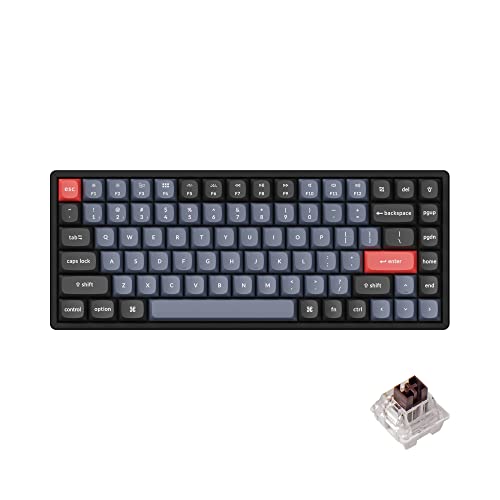
3. Keychron K2 Pro (K Pro Brown)
- Hot-swappable switches, changeable without soldering
- QMK/VIA programming for remaps and macros
- Tactile bump without a loud click
- South-facing RGB with fine control over hue and effects
The K2 Pro is the customizable member of the family. It is a three-quarter board with 84 keys, pre-installed pre-lubed K Pro Brown tactile switches, and hot-swappable sockets that accept almost any 3-pin or 5-pin MX-style switch without soldering. It programs through QMK and VIA, so keys and macros can be remapped on macOS, Windows, or Linux. The board has a south-facing RGB backlight with more than 22 lighting types, Bluetooth 5.1 and USB-C connectivity, a 4000 mAh battery, and screw-in stabilizers. Keycaps are double-shot PBT with a shine-through design, and keycaps for both Windows and macOS are included. Model K2P-J3.
Tactile brown switches give a bump you can feel without the click of the blue switches, which makes this board a middle ground for typing feel and noise. The hot-swappable design means the switch choice is not permanent: if brown switches feel wrong after a month, another set drops in with no tools beyond a switch puller. The 1000 Hz polling rate in wired mode and N-key rollover in both modes suit gaming as well as typing.
Pros
Cons
4. Keychron K2 (Silent K Pro Red)
- Silent switches for quiet rooms and late nights
- White LED backlight with shine-through keycaps
- Mac-optimized layout with native multimedia keys
- Bluetooth for three devices plus wired USB-C
Keychron K2 (Silent K Pro Red)
This version of the Keychron K2 uses silent K Pro Red linear switches that are factory pre-lubed for smooth, quiet typing. It is a three-quarter board with 84 keys, a white LED backlight with shine-through keycaps, Bluetooth 5.1 for up to three devices, and a wired USB-C mode with a 1000 Hz polling rate. The listing describes it as fully optimized for macOS with native multimedia keys, and it includes extra keycaps for Windows. Model K2A6.
Silent linear switches are the right call for a shared office, a bedroom desk, or late-night sessions when other people are nearby. The white LED backlight is calmer than RGB and easier on the eyes in a dark room. The trade is feel: linear switches have no tactile bump, so typists who rely on feedback to know a key registered may find them vague at first. Give it a few days before judging.
Pros
Cons
Who Should Choose What
- You want the simplest match for your MacBook Pro: Apple Magic Keyboard with Touch ID. It pairs automatically, matches the laptop’s key feel, and adds fingerprint unlock on a supported Mac.
- You want Touch ID specifically: Apple’s board is the only pick here with it, and it needs a Mac with Apple silicon running macOS 15.1 or later.
- You type all day and like clicky feedback: Keychron K2 Version 2 with Gateron Blue switches.
- You want to change switches or remap keys later: Keychron K2 Pro, with hot-swappable sockets and QMK/VIA programming.
- You share your space or type at night: Keychron K2 with Silent K Pro Red switches.
- You work with numbers constantly: none of these compact picks has a numeric keypad, so look for a full-size Mac-layout board instead of forcing one of these to fit.
Common Mistakes
Buying a Windows-layout board and hoping for the best. Remapping fixes the labels in software, but the keycaps still show the wrong legends, and the Alt and Windows keys sit where Command and Option should be. A Mac layout or a Mac mode switch avoids the friction entirely.
Choosing a keyboard for Touch ID on an unsupported Mac. Touch ID on Apple’s external keyboard needs Apple silicon and macOS 15.1 or later. On an Intel MacBook Pro or an older system version, the board still types, but the fingerprint key does nothing. Confirm your Mac before paying for the feature.
Picking clicky switches for a shared room. Blue switches sound great alone and less great on a call with colleagues or next to a sleeping partner. If in doubt, choose tactile or silent switches.
Ignoring the charging cable. A board that charges over Micro-USB adds a cable type your MacBook Pro never uses. All four picks here use USB-C, which keeps the desk to one cable standard.
Forgetting the laptop stand. An external keyboard only helps if the MacBook Pro’s screen sits at eye level. Pair the keyboard with a stand or a closed-lid setup with an external display, or the neck strain the keyboard was meant to fix stays put.
Assuming all K2 models are the same board. Keychron sells the K2 in several versions with different switches, backlights, and programmability. Check the model number and switch type on the listing before buying, because the version changes the typing feel completely.
Frequently Asked Questions
Do these keyboards work with a MacBook Pro in closed-lid mode?
Yes. A Bluetooth or USB-C keyboard paired with the MacBook Pro works with the lid closed when the laptop is connected to power and an external display. Apple’s board pairs automatically, and the Keychron boards reconnect over Bluetooth to the last paired device.
Does Touch ID on the Magic Keyboard work with every MacBook Pro?
No. Apple’s listing states Touch ID on this keyboard is for Mac models with Apple silicon, and the USB-C model requires macOS 15.1 or later. Check your MacBook Pro’s chip and system version first if Touch ID is the reason you are buying it.
Can I use one of these keyboards with an iPad or a Windows PC as well?
Yes. The Keychron boards pair with up to three devices over Bluetooth and include keycaps for both systems, with a physical switch between Mac and Windows modes. Apple’s board is built for Mac, so its layout and Touch ID are Mac-only features.
Are mechanical keyboards too loud for an office?
It depends on the switches. Clicky blue switches are loud. Tactile brown switches are moderate. Silent red switches are the quietest mechanical option in this guide, and Apple’s scissor board is quieter still. Choose the switch for the room, not just for the feel.
Do I need a numeric keypad?
Most MacBook Pro owners do not. A three-quarter layout keeps the arrows and function keys while dropping the keypad, which saves desk space. If you enter long columns of numbers daily, a full-size board with a keypad is worth the extra width.
How do I switch a Keychron board between Mac and Windows?
The Keychron boards have a physical toggle on the side for Mac or Windows mode, plus extra keycaps for both systems in the box. Flip the toggle, swap the keycaps if you want the legends to match, and the board sends the right codes for the system.
Conclusion
The best keyboards for macbook pro pair a Mac layout with the connection your desk already uses. Apple’s Magic Keyboard with Touch ID is the cleanest match for a MacBook Pro, with fingerprint unlock on a supported Mac and a feel that mirrors the laptop itself. The Keychron K2 family covers the mechanical side: clicky blue switches for typists who like feedback, the hot-swappable K2 Pro for people who want to tune their board, and silent red switches for quiet rooms. Pick the switch feel first, confirm Touch ID support if that feature matters to you, and make sure the board charges over USB-C so the whole desk runs on one cable.
More from Amazon
Programs that pair well with the guide above. Offers and eligibility are set by Amazon and may change.
Free shipping on eligible items, Prime Video and more. Eligible new members can start with a free trial.
Start a Prime free trialAd-free music streaming. Eligible new subscribers can start with a free trial.
Try Music Unlimited freeA Prime membership for ages 18-24 with a trial period. Eligibility is set by Amazon.
See Prime for Young AdultsAudiobooks and podcasts to listen to on the go. Eligible new members can start with a free trial.
Try Audible freeAs an Amazon Associate we earn from qualifying purchases.









