Our Short List of 3

- Tier: Budget
- Screen size: 13 to 32 inches
- Weight capacity: up to 22 pounds
- VESA patterns: 75 x 75 mm and 100 x 100 mm

- Tier: Mid-range
- Screen size: 17 to 32 inches
- Weight capacity: up to 15.4 pounds, per the instruction manual
- VESA patterns: 75 x 75 mm and 100 x 100 mm

- Tier: Premium
- Screens: 3 screens, 13 to 24 inches each
- Weight capacity: up to 22 pounds per screen
- VESA patterns: 75 x 75 mm and 100 x 100 mm
All 4 Picks at a Glance
| Product | Specs | Action |
|---|---|---|
| 1. WALI MF001 Single Monitor Stand – Budget Pick |
| Check price on Amazon |
| 2. VIVO STAND-V001V Pneumatic Monitor Stand – Mid-Range Pneumatic Pick |
| Check price on Amazon |
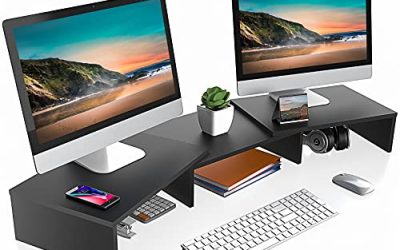
| 4. HUANUO Triple Monitor Stand – Premium Triple Pick |
| Check price on Amazon |
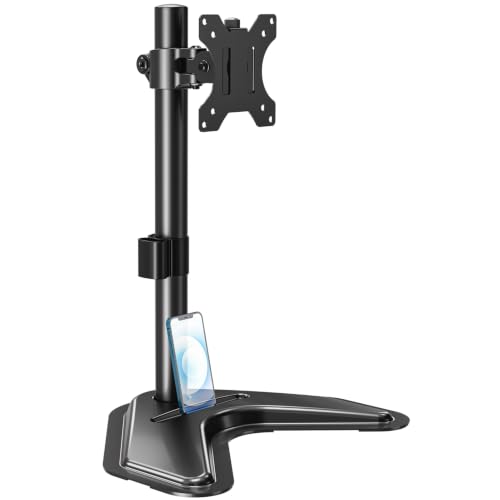 5. MOUNTUP MU0023 Single Monitor Stand – Budget Freestanding Pick |
| Check price on Amazon |
Key takeaways
- Five freestanding computer monitor stands for streaming desks: single and triple VESA stands with weighted and glass bases, height adjustment, and tilt.
Quick answer: A streaming monitor stand lifts a computer monitor off its factory foot and holds it on a freestanding VESA pole, so the screen sits at eye level, the desk stays clear for a keyboard, a stream deck, and a notebook, and the camera keeps a clean line to the streamer. The best all-round pick here is the Perlegear PGTVS29, a freestanding single stand with a tempered glass base that fits 13 to 34 inch screens up to 44 pounds and offers five height settings from 9.27 to 15.26 inches. The best budget pick is the WALI MF001, a freestanding single stand with a weighted base for 13 to 32 inch screens up to 22 pounds and height adjustment up to 18 inches. The best pneumatic pick is the VIVO STAND-V001V, a freestanding single stand with a lever that raises and lowers a 17 to 32 inch screen along a telescopic column. The best triple-screen pick is the HUANUO Triple Monitor Stand, a freestanding three-screen stand that holds three 13 to 24 inch screens up to 22 pounds each on one center pole. The second budget pick is the MOUNTUP MU0023, a freestanding single stand with a weighted steel base for 13 to 32 inch screens up to 17.6 pounds and height adjustment up to 17.49 inches. Every stand in this guide is freestanding, which means it sits on the desk on its own base and needs no clamp, no grommet hole, and no drilling, so it works on glass tops, thick desks, and shared workspaces alike.
As an Amazon Associate, we earn from qualifying purchases.
Table of Contents
- What a Streaming Monitor Stand Is, and What It Is Not
- How to Choose a Streaming Monitor Stand
- Quick Comparison
- 1. WALI MF001 Single Monitor Stand – Budget Pick
- 2. VIVO STAND-V001V Pneumatic Monitor Stand – Mid-Range Pneumatic Pick
- 3. Perlegear PGTVS29 Single Monitor Stand – Mid-Range Heavy-Duty Pick
- 4. HUANUO Triple Monitor Stand – Premium Triple Pick
- 5. MOUNTUP MU0023 Single Monitor Stand – Budget Freestanding Pick
- Setting Up a Freestanding Monitor Stand for Streaming
- Safety and Stability
- Frequently Asked Questions
- Conclusion
- Product and ASIN Reference
What a Streaming Monitor Stand Is, and What It Is Not
A streaming monitor stand is a desk stand for a computer monitor. It replaces the short foot that ships with the monitor and holds the screen on a VESA plate at the end of a pole or arm that rises from a base sitting on the desk. The screen can be raised, lowered, tilted, swiveled, and rotated, and the space underneath stays open for the tools a stream actually uses. That definition matters, because the phrase monitor stand is also used for two different products that do not belong in this guide. The first is the studio monitor stand, which holds audio speakers in a recording setup, and the second is the monitor riser, which is a fixed shelf platform that a monitor sits on top of. Both are useful products, and both are covered in separate guides, but neither one holds a computer screen on a VESA mount, and neither one gives a streamer the height and angle control that a pole stand provides.
A streaming desk is a demanding place for a monitor support. Most streamers run two screens, one for the game or the work in progress and one for chat and broadcast software, and sessions run for hours without a break. A monitor that sits too low forces the neck down and the shoulders forward, and a monitor that sits on a wobbly support drifts out of frame a little at a time. A freestanding VESA stand answers both problems at once. It raises the screen to eye level, it holds the screen steady through long sessions, and it frees the desk surface underneath, which is where a keyboard, a stream controller, an audio interface, or a notebook would otherwise compete for room with a wide factory foot.
The five stands below cover the shapes a streaming desk usually needs. Two are budget single-screen stands with weighted bases, one is a pneumatic single-screen stand for one-handed height changes, one is a heavy-duty single-screen stand with a glass base for large and heavy panels, and one is a triple-screen stand for a game screen, a chat screen, and a preview screen on a single pole.
How to Choose a Streaming Monitor Stand
Choosing a monitor stand is a short checklist, and working through it in order prevents the two mistakes that cause most returns: a screen that is too heavy for the stand, and a screen whose mounting holes do not match the plate. Start with the monitor itself. Turn the screen around and look for four screw holes in a square on the back of the panel. Measure the distance between them. Most monitors use 75 x 75 mm or 100 x 100 mm, and every stand in this guide accepts one or both of those patterns, with the Perlegear PGTVS29 also accepting 50 x 50 mm. If the monitor has no VESA holes at all, which is true of a small number of curved and all-in-one style panels, then a VESA stand cannot hold it without an adapter, and that adapter needs its own check before anything is ordered.
Next, weigh the monitor, or look up its weight without the factory foot attached, and compare it with the stand’s stated limit. The limit is a hard ceiling, not a suggestion, and it applies to the screen as mounted, including any attached webcam or light bar that hangs from the top edge. The Perlegear PGTVS29 and the HUANUO triple stand are the heavy lifters here, at 44 pounds for a single screen and 22 pounds per screen across three screens. The WALI MF001 stops at 22 pounds, the MOUNTUP MU0023 at 17.6 pounds, and the VIVO STAND-V001V at 15.4 pounds according to its instruction manual. A 32 inch panel with a thick back and a built-in power supply can weigh more than a slim 27 inch panel, so screen size alone never settles the question. When the weight is close to the limit, step up to the next stand rather than hoping the margin holds.
Screen size is the third check. The stands here cover 13 to 32 inches for the single-screen models, 13 to 34 inches for the Perlegear PGTVS29, and 13 to 24 inches per screen for the HUANUO triple stand. Size matters for a second reason beyond fit: a wide screen on a narrow base can feel top-heavy, and a screen that is wider than the desk is deep can put the center of gravity uncomfortably close to the front edge. Measure the desk depth as well as the screen width, and leave room behind the stand for cables to bend without pulling on the ports.
Height adjustment is where streaming needs differ from ordinary office needs. A streamer sits in one chair for hours, and the top of the screen should sit at or just below eye level so the camera sees the face straight on rather than from above or below. Fixed-height stands can reach that position only if the desk and the chair already agree, while an adjustable stand can be tuned in small steps. The Perlegear PGTVS29 gives five fixed height settings from 9.27 to 15.26 inches, the HUANUO triple stand gives 16.7 inches of travel along its center pole, the WALI MF001 adjusts up to 18 inches, the MOUNTUP MU0023 up to 17.49 inches, and the VIVO STAND-V001V uses a pneumatic lever for smooth one-handed movement along a telescopic column.
Tilt, swivel, and rotation are the fine controls. Tilt angles the screen up or down to cut glare from a key light or a window, swivel turns the screen toward a second person or toward the camera, and rotation turns the screen from landscape to portrait, which is the orientation many streamers prefer for a chat monitor. The stands here all rotate a full 360 degrees except for the VIVO STAND-V001V, whose rotation is 45 degrees each way, and all of them tilt and swivel within the ranges listed in their Specs blocks. Portrait rotation deserves a specific check on wide screens: a 32 inch panel turned on its side is very tall, and it needs clearance above the desk and a base heavy enough to hold it steady in that position.
The base is the part buyers overlook and the part that decides whether the stand feels solid. Weighted steel bases, like those on the WALI MF001 and the MOUNTUP MU0023, are compact and forgiving of uneven desks. Tempered glass bases, like those on the Perlegear PGTVS29 and the HUANUO triple stand, spread the load over a larger footprint and look lighter on the desk, but they need a flat surface and careful handling during assembly. In both cases the base should sit fully on the desk with no overhang, and the desk should be deep enough that the screen, when pushed back to its furthest position, still sits over the desktop rather than past its rear edge.
Quick Comparison
The WALI MF001 is the budget single-screen stand with the widest height range in this guide, adjusting up to 18 inches on a weighted base that fits desks a clamp cannot grip. The MOUNTUP MU0023 is the other budget single-screen stand, with a weighted steel base and height adjustment up to 17.49 inches for screens up to 17.6 pounds. The VIVO STAND-V001V is the mid-range pneumatic stand, the only one here that changes height with a lever instead of a collar or a stepped pin, and it suits a streamer who repositions the screen between sitting and standing or between solo work and a guest on camera. The Perlegear PGTVS29 is the mid-range heavy-duty stand, the only single-screen stand here rated to 44 pounds, and it is the pick for large panels and for ultrawide screens inside its 34 inch limit.
1. WALI MF001 Single Monitor Stand – Budget Pick
- Tier: Budget
- Screen size: 13 to 32 inches
- Weight capacity: up to 22 pounds
- VESA patterns: 75 x 75 mm and 100 x 100 mm
The WALI MF001 is the budget pick in this guide, and it earns that place by doing the basic job without asking the desk for anything in return. It is a freestanding single monitor stand with a weighted base, which means it sits on the desk surface and holds one screen on a VESA plate at the end of an adjustable arm. There is no clamp to fit to the desk edge and no grommet hole to drill, so it works on glass tops, on thick desktops, on desks with a crossbar underneath, and on shared desks where the owner does not want any hardware left behind when the stand is moved.
The MF001 fits monitors from 13 to 32 inches and weighing up to 22 pounds, using VESA patterns of 75 x 75 mm or 100 x 100 mm, which covers the great majority of flat panels a streamer is likely to own. The detachable VESA plate is the part that makes mounting a one-person job: the plate screws to the back of the monitor first, while the screen is still lying face down on a soft surface, and then the plate slides onto the arm and locks in place, so nobody has to hold a heavy screen with one hand while finding screw holes with the other. That sequence is worth following exactly, because it keeps the screen stable through the whole assembly and it keeps fingers away from the panel edge.
Height adjustment on the MF001 runs up to 18 inches, which is the longest reach among the single-screen stands in this guide, and it is the feature that makes this budget stand feel more capable than its position in the lineup suggests. A tall streamer, a standing desk, or a desk with a raised monitor shelf can all push the ideal screen position higher than a short stand can reach, and the MF001 covers that range without a second purchase. The arm also gives 360-degree rotation, so the screen turns from landscape to portrait for a chat monitor, 45-degree tilt for cutting glare from a key light, and 90-degree swivel for turning the screen toward a guest or toward the camera. Those ranges are generous for a stand at this end of the lineup, and they mean the MF001 can serve as a chat monitor stand today and as a main game monitor stand later if the desk layout changes.
The weighted base measures 15.4 x 11 x 0.8 inches, and its size is both the strength and the trade of this design. A base that large spreads the load and keeps the stand steady when the screen is tilted forward or swiveled to the side, and it does so without any fasteners. The cost is desk space: the base occupies a patch of desktop roughly the size of a small laptop, and on a narrow desk that patch competes with the keyboard and the stream controller. Measure the desk before ordering, and place the base where its rear edge sits fully on the desktop with room behind it for cables. A base that overhangs the back edge of the desk loses stability and puts the screen at risk, so a desk shallower than the base plus a few inches of clearance is a reason to choose a different stand.
For a streaming desk, the MF001 fits best as the main monitor stand on a desk that cannot take a clamp, or as the chat monitor stand beside a larger main screen. Its height range suits a tall seating position, its rotation suits a portrait chat view, and its freestanding base suits a desk that moves between rooms or between housemates.
2. VIVO STAND-V001V Pneumatic Monitor Stand – Mid-Range Pneumatic Pick
- Tier: Mid-range
- Screen size: 17 to 32 inches
- Weight capacity: up to 15.4 pounds, per the instruction manual
- VESA patterns: 75 x 75 mm and 100 x 100 mm
The VIVO STAND-V001V is the mid-range pneumatic pick, and it is the only stand in this guide that changes height with a lever instead of a collar, a pin, or a stepped setting. The stand is a freestanding single monitor mount with a telescopic column rising from a base that sits on the desk, and a pneumatic arm that holds the screen on a VESA plate. Pulling the lever up frees the column to move, and pressing the lever down locks the height in place, so the screen can be raised or lowered with one hand while the other hand steadies the panel. That motion is the reason to choose this stand over a stepped stand: a streamer who switches between sitting and standing, or who shares the desk with a taller or shorter housemate, can reset the screen height in seconds without tools and without loosening any hardware.
The STAND-V001V fits monitors from 17 to 32 inches, using VESA patterns of 75 x 75 mm or 100 x 100 mm, and its instruction manual sets the weight limit at 15.4 pounds. That limit is lower than the limits on the other single-screen stands in this guide, and it is the number to plan around, because the manual is the document that governs safe use of this model. A slim 24 or 27 inch monitor falls comfortably inside it, and many slim 32 inch panels do as well, but a thick 32 inch panel, a heavy curved screen, or a screen with a bulky attached accessory can exceed it. Weigh the monitor without its factory foot, add the weight of anything mounted on the screen itself, and compare the total with 15.4 pounds before ordering. If the total is close to the limit or above it, the WALI MF001 or the Perlegear PGTVS29 is the better fit.
The pneumatic column is the heart of this stand, and it changes how the desk feels during a session. A stepped stand asks the streamer to stop, loosen a collar, lift the screen, and retighten, which is a small job that never happens in the middle of a broadcast. A pneumatic stand asks for one pull of a lever, which is a motion that can happen between scenes without breaking the flow of the work. The column also keeps the screen steady once locked, because the lever clamps the height rather than relying on friction alone. That steadiness matters for a camera-facing setup, where a screen that drifts down a fraction of an inch at a time slowly changes the framing of the shot.
Tilt on the STAND-V001V runs from 20 degrees up to 20 degrees down, swivel runs 180 degrees each way, and rotation runs 45 degrees each way. The tilt range is narrower than the tilt on the WALI MF001, and the rotation is a partial turn rather than a full circle, so this stand is best used with the screen in landscape orientation and with the tilt set once for the room lighting rather than adjusted constantly. The swivel range is generous, and it is the adjustment that gets the most use on a streaming desk, turning the screen toward the camera for a face-to-face segment or toward a guest seat for a shared session. A pre-installed cable clip on the column keeps the power and video cables routed close to the pole, so they do not snag when the screen swivels.
Assembly follows the pattern that works for every freestanding VESA stand: attach the column to the base with the supplied screws, fit the pad over the screw heads, attach the VESA plate to the back of the monitor, slide the plate onto the mounting bracket, and secure it with the thumbscrew. The manual carries a tip-over warning, and it deserves to be read rather than skipped, because it covers the habits that keep a freestanding stand safe, which are covered in full in the safety section below.
For a streaming desk, the STAND-V001V fits best as the main monitor stand for a slim screen on a desk where the height changes often. It suits a sit-stand desk, a shared desk, and a desk where the streamer alternates between a low relaxed position and a high alert position during long sessions. It is not the stand for a heavy panel or for a portrait chat monitor, because its weight limit and its partial rotation point the other way.
3. Perlegear PGTVS29 Single Monitor Stand – Mid-Range Heavy-Duty Pick
The Perlegear PGTVS29 is the mid-range heavy-duty pick, and it is the stand to choose when the monitor itself is the problem. It is a freestanding single monitor stand with a tempered glass base and a steel support pillar, and it holds screens from 13 to 34 inches weighing up to 44 pounds, which is twice the capacity of the WALI MF001 and nearly three times the capacity of the VIVO STAND-V001V. That capacity covers heavy 32 inch panels, thick curved screens, and ultrawide panels inside the 34 inch limit, and it leaves a margin that keeps the stand steady even when the screen is tilted forward or turned to portrait. For a streamer whose main monitor is a large panel with a built-in power supply and a heavy back, the PGTVS29 is the stand that removes the weight question entirely.
The glass base is the defining feature of this stand, and it works differently from a weighted steel base. Tempered glass spreads the load over a wide footprint, and the pillar rises from the center of that footprint, so the screen sits over the middle of the base rather than at its edge. The base needs a flat desk surface and careful handling during assembly, and the supplied foot pads go on the matte side of the glass before the pillar is bolted on, with steel washers and plastic washers in the order the manual shows.
Height adjustment on the PGTVS29 runs through five settings from 9.27 to 15.26 inches, on a support pillar 17.24 inches tall. Five fixed settings are fewer choices than a pneumatic column offers, but they are repeatable: the same setting can be found again after the desk is moved, the room is cleaned, or the stand is taken apart and reassembled, which is useful on a streaming desk where the camera framing depends on the screen sitting in exactly the same place every session. The range itself covers the useful band for seated streaming, from a low position that keeps a small screen out of the camera frame to a high position that brings a large screen up to eye level. A streamer who needs the screen higher than 15.26 inches, or who changes height several times a day, will find the WALI MF001 or the VIVO STAND-V001V a better match, but for a fixed seated position the five settings are enough.
Rotation on the PGTVS29 is a full 360 degrees, tilt runs from 15 degrees down to 10 degrees up, and swivel runs 50 degrees each way. The full rotation is the feature that makes this stand work as a chat monitor stand as well as a main monitor stand, because a 27 inch panel turned to portrait fits a chat column, a document, or a vertical preview without a second purchase. The tilt range is narrower than some stands in this guide, and it is tuned for the small corrections that cut glare from a key light rather than for large re-aiming of the screen. The swivel range covers turning the screen toward a guest or toward the camera, and the cable clips supplied with the stand keep the power and video cables close to the pillar while the screen moves.
VESA compatibility on the PGTVS29 covers 50 x 50 mm and 100 x 100 mm patterns. The 100 x 100 mm pattern covers the standard full-size panels, while the 50 x 50 mm pattern fits smaller monitors and some compact panels that use the smaller square. The 75 x 75 mm pattern is not listed for this model, so a monitor with only 75 x 75 mm holes needs a different stand, and the WALI MF001, the VIVO STAND-V001V, and the MOUNTUP MU0023 all accept that pattern. Check the hole spacing on the back of the monitor before ordering.
For a streaming desk, the PGTVS29 fits best as the main monitor stand for a large or heavy screen, and as the stand that holds the most expensive panel in the setup. Its capacity, its glass base, and its full rotation cover the cases where a lighter stand would be a gamble, and its five height settings give a repeatable position that keeps the camera framing consistent from one session to the next.
Specs
- Tier: Mid-range
- Screen size: 13 to 34 inches
- Weight capacity: up to 44 pounds
- VESA patterns: 50 x 50 mm and 100 x 100 mm
- Mounting: freestanding tempered glass base with steel support pillar
- Column height: 17.24 inches
- Height settings: 5 settings from 9.27 to 15.26 inches
- Tilt: 15 degrees down to 10 degrees up
- Swivel: 50 degrees each way
- Rotation: 360 degrees
- Cable management: cable clips included
- Model: PGTVS29
- Color: Black
4. HUANUO Triple Monitor Stand – Premium Triple Pick
- Tier: Premium
- Screens: 3 screens, 13 to 24 inches each
- Weight capacity: up to 22 pounds per screen
- VESA patterns: 75 x 75 mm and 100 x 100 mm
The HUANUO Triple Monitor Stand is the premium pick in this guide, and it is the only stand here that holds more than one screen. It is a freestanding three-monitor desk mount with a heavy-duty base and a single center pole, and it holds three screens from 13 to 24 inches, each weighing up to 22 pounds, on VESA patterns of 75 x 75 mm or 100 x 100 mm. For a streaming desk, three screens is the shape the work actually takes: one screen for the game or the work in progress, one screen for chat and broadcast software, and one screen for preview, notes, or a second source. Three separate stands would need three bases, three poles, and three patches of desk, and they would drift out of alignment a little at a time. One pole with three arms keeps the screens in a single row, at a single height, with a single base to place and level.
The center pole gives 16.7 inches of height adjustment, and the three arms move along it together or independently, so the middle screen can sit at eye level while the side screens angle inward toward the streamer. Each arm offers tilt, swivel, and rotation, with the middle screen limited to 15 degrees of tilt each way because its back rests against the center pole, while the side arms tilt through a wider arc. Swivel runs 90 degrees each way and rotation runs a full 360 degrees, so any of the three screens can turn to portrait for a chat column or a vertical preview. That flexibility is the point of a triple stand: the layout can be a flat row for editing, a curved arc for gaming, or a mixed layout with a portrait screen on one end, and the change takes minutes rather than a rebuild of the desk.
The freestanding base is the part that makes this stand usable on desks a clamp mount cannot grip. The base is a heavy-duty plate that sits on the desk surface and holds the pole upright while the three screens hang from it, and a grommet mounting kit is included for desks where a drilled hole is available and a fixed installation is wanted. The freestanding mode is the one most streamers will use, because it needs no drilling and no desk-edge clamp, and it works on glass tops, thick desktops, and desks with a crossbar underneath. The grommet mode is the option for a permanent desk where the extra fixing is worth the wider adjustment range it allows. Either way, the base must sit fully on the desk with no overhang, and the desk must be deep enough that three screens in a row still leave room for a keyboard and a stream controller in front of them.
Weight and size limits deserve a careful read on a triple stand, because the limits apply per screen and the screens interact. Each screen must be no larger than 24 inches and no heavier than 22 pounds, and all three screens must use the same VESA patterns the stand accepts. A 24 inch screen is the largest that fits without the screens crowding each other on the pole, and a heavier screen on one side unbalances the load and puts a twisting force on the pole. Weigh each monitor without its factory foot, check each one for VESA holes, and do not mix a heavy screen on one arm with a light screen on the other unless the total stays inside the limits and the layout stays symmetrical.
For a streaming desk, the triple stand fits best where three screens are already in use or planned, and where the desk is wide enough to hold them in a row. It is the premium pick because it replaces three separate purchases with one, and because it keeps the three screens aligned in a way three separate stands never quite manage. It is not the stand for a narrow desk, because three screens need width.
5. MOUNTUP MU0023 Single Monitor Stand – Budget Freestanding Pick
- Tier: Budget
- Screen size: 13 to 32 inches
- Weight capacity: up to 17.6 pounds
- VESA patterns: 75 x 75 mm and 100 x 100 mm
The MOUNTUP MU0023 is the second budget pick in this guide, and it is the simplest stand here to describe: a freestanding single monitor stand with a weighted steel base, a height-adjustable column, and a VESA plate that fits the monitors most streamers already own. It holds one screen from 13 to 32 inches weighing up to 17.6 pounds, using VESA patterns of 75 x 75 mm or 100 x 100 mm, and it adjusts in height up to 17.49 inches. There is no pneumatic lever, no glass base, and no second or third arm, and that simplicity is the reason to choose it. Fewer moving parts means fewer adjustments to learn, fewer parts to wear, and an assembly that takes minutes with the supplied hardware.
The weighted steel base is the foundation of this stand, and it is the feature that decides whether the MU0023 fits a given desk. A weighted base needs no clamp and no hole, so it works on glass tops, on thick desks, and on desks where the edge is too thick or too irregular for a clamp to grip. The base sits on the desk surface and the column rises from it, and the screen hangs from the VESA plate at the top of the column. The trade is the same as on every freestanding stand: the base occupies desk space that a clamp mount would leave open, so the desk needs to be deep enough for the base plus the keyboard and the stream controller in front of it. Place the base fully on the desktop, with no overhang at the back, and leave room behind it for the cables to bend without pulling on the ports.
Height adjustment up to 17.49 inches is generous for a budget stand, and it covers the range a seated streamer needs, from a low position that keeps a small screen clear of the camera to a high position that brings a 32 inch screen up to eye level. The adjustment is a manual slide along the column rather than a pneumatic lift, so the height is set during assembly or between sessions rather than changed in the middle of a broadcast, and that is the right expectation for this stand. Set the height once, with the chair in its usual position and the camera in its usual place, and leave it there. The swivel, tilt, and rotation controls handle the smaller day-to-day changes: turning the screen toward a guest, angling it away from a window, or rotating it to portrait for a chat view.
The 17.6 pound weight limit is the boundary that matters most on the MU0023. It covers most 24 and 27 inch monitors, and it covers slim 32 inch panels, but it rules out heavy 32 inch panels, thick curved screens, and any screen with a heavy accessory mounted on it. Weigh the monitor without its factory foot before ordering, and if the weight is close to the limit, step up to the WALI MF001 at 22 pounds or the Perlegear PGTVS29 at 44 pounds.
For a streaming desk, the MU0023 fits best as a second monitor stand, as a chat monitor stand beside a larger main screen, or as the main monitor stand on a desk where the budget is tight and the screen is light. Its weighted base suits desks a clamp cannot grip, its height range suits a seated position, and its simple column suits a streamer who wants the stand set once and then forgotten. It is a budget stand that does one job, holds one screen at eye level on a desk that needs no holes drilled in it, and does that job with the parts that matter sized correctly for the screens it is rated to hold.
Setting Up a Freestanding Monitor Stand for Streaming
Assembly is the same sequence for all five stands, and doing it in order saves time and protects the screen. Start by clearing the desk and laying a soft cloth or a towel on the surface, then place the monitor face down on the cloth and remove the factory foot. Attach the VESA plate to the back of the monitor with the screws supplied for the hole pattern the monitor uses, and check that the plate sits flat against the back of the panel with no gap at any corner. A plate that rocks on its screws will let the screen wobble on the arm, so tighten the screws evenly and stop as soon as they are snug.
Next, assemble the base and the column on the desk, away from the edge, and check that the base sits flat with no rocking. A base that rocks on an uneven desk needs a thin shim or a different position, not extra force on the screws. Slide the VESA plate onto the arm or the column bracket, lock it with the thumbscrew or the latch the model uses, and only then lift the screen into its working position. Route the power and video cables through the clips on the column or the arms before plugging anything in, and leave enough slack for the screen to tilt and swivel without pulling on the ports. Plug the cables in last, set the height with the chair in its usual position, and check the camera framing before the first session, because a screen that looked right from the chair can look wrong from the camera.
Placement on the desk matters as much as assembly. The main monitor goes directly in front of the chair, with the top of the screen at or just below eye level, and at a distance where the whole screen is visible without turning the head. The chat monitor goes to the side, angled inward, close enough to read at a glance without pulling the eyes away from the camera for long. The stream controller, the keyboard, and the microphone arm go in the space the freestanding bases leave open, and the cables run behind the stands rather than across the desk.
Safety and Stability
A freestanding monitor stand holds a heavy object at height on a desk where people work, and a few habits keep that arrangement safe. Stay inside the weight limit for the model, and weigh the monitor without its factory foot before mounting it. Keep the base fully on the desk, with no overhang at the front or the back, and keep the screen over the desktop rather than past its edge. Tighten every screw and thumbscrew during assembly, and check them again after the first week of use, because a screw that was snug on day one can loosen as the stand settles. Route cables through the clips supplied with the stand so they cannot snag on a chair, a microphone arm, or a passing elbow and pull the screen sideways.
The VIVO STAND-V001V instruction manual carries a tip-over warning, and its guidance applies to every stand in this guide: never allow children to climb, stand, hang, or play on any part of the monitor or the stand, and use a tip-over restraint or anchor the stand to the wall where the room allows it. A freestanding stand is stable when it is used inside its limits, and it is not a shelf, a step, or a support for anything other than the monitor it is rated to hold. A search of the safety recall listings for these five models found no recall covering the WALI MF001, the VIVO STAND-V001V, the Perlegear PGTVS29, the HUANUO Triple Monitor Stand, or the MOUNTUP MU0023.
Frequently Asked Questions
What size monitor fits a freestanding streaming monitor stand?
Most freestanding stands in this guide fit screens from 13 to 32 inches, and the Perlegear PGTVS29 extends that range to 34 inches, while the HUANUO Triple Monitor Stand fits three screens from 13 to 24 inches each. Size alone never settles the question, because the weight limit and the VESA hole pattern matter just as much. Check both numbers against the Specs block for the stand before ordering.
Does a freestanding monitor stand need a clamp or a drilled hole?
No. Every stand in this guide sits on the desk on its own base and needs no clamp, no grommet hole, and no drilling. That is the reason to choose a freestanding stand for a glass desk, a thick desk, a rented room, or a shared workspace. The trade is desk space, because the base occupies a patch of desktop that a clamp mount would leave open, so measure the desk depth and the base size together before deciding.
Can a streaming monitor stand hold a monitor in portrait orientation?
Yes, on the stands in this guide that offer full rotation. The WALI MF001, the Perlegear PGTVS29, the HUANUO Triple Monitor Stand, and the MOUNTUP MU0023 all rotate a full 360 degrees, so a screen can turn from landscape to portrait for a chat column or a vertical preview. The VIVO STAND-V001V rotates 45 degrees each way, so it suits a landscape screen rather than a portrait one. A wide screen turned to portrait is very tall, so check the clearance above the desk and the weight limit before rotating a large panel.
How do I stop a monitor stand from wobbling during a stream?
Start by placing the base fully on the desk with no overhang, then tighten every screw and thumbscrew, and check them again after the first week of use. Keep the screen inside the weight limit for the model, route the cables through the clips on the column or the arms so they cannot pull on the ports, and set the height once with the chair and the camera in their usual positions. A stand that still moves after those steps is usually overloaded, under-tightened, or sitting on an uneven surface, and each of those causes has a fix in the steps above.
Conclusion
A streaming monitor stand is a small purchase that changes how a desk works for hours every day. The Perlegear PGTVS29 is the best all-round pick here, because its 44 pound capacity and its tempered glass base hold the large and heavy panels that the budget stands cannot, and its five height settings give a repeatable position that keeps the camera framing consistent. The WALI MF001 is the best budget pick, with the longest height reach among the single-screen stands and a weighted base that fits desks a clamp cannot grip. The VIVO STAND-V001V is the pick for a streamer who changes height often, because its pneumatic lever moves the screen with one hand and locks it in place without tools. The HUANUO Triple Monitor Stand is the pick for a three-screen desk, holding a game view, a chat view, and a preview view on one pole with one base. The MOUNTUP MU0023 is the second budget pick, a simple freestanding single stand for a light screen on a desk that needs no holes drilled in it.
Product and ASIN Reference
| Product | ASIN |
|---|---|
| WALI MF001 Single Monitor Stand | B072QDMRS8 |
| VIVO STAND-V001V Pneumatic Monitor Stand | B07G2RQGJP |
| Perlegear PGTVS29 Single Monitor Stand | B0CBTVQWDS |
| HUANUO Triple Monitor Stand | B07MW448MP |
| MOUNTUP MU0023 Single Monitor Stand | B0875SL7VL |
More from Amazon
Programs that pair well with the guide above. Offers and eligibility are set by Amazon and may change.
Free shipping on eligible items, Prime Video and more. Eligible new members can start with a free trial.
Start a Prime free trialAd-free music streaming. Eligible new subscribers can start with a free trial.
Try Music Unlimited freeA Prime membership for ages 18-24 with a trial period. Eligibility is set by Amazon.
See Prime for Young AdultsAudiobooks and podcasts to listen to on the go. Eligible new members can start with a free trial.
Try Audible freeAs an Amazon Associate we earn from qualifying purchases.