
Our Short List of 3
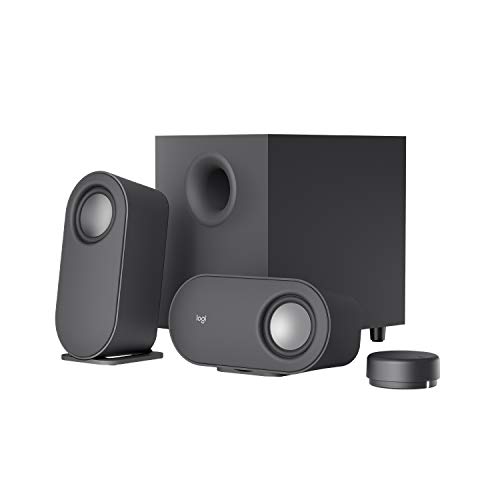
- Best Overall: Logitech Z407 — A 2.1 system with a subwoofer, Bluetooth, USB, and 3.5 mm inputs, plus a wireless control dial. View on Amazon
- Best Compact Pick: Creative Pebble Pro — Small USB-C desktop speakers with Bluetooth 5.3, RGB lighting, and a headset port. View on Amazon
- Best for Gaming Setups: Razer Nommo — Full-range 2.0 gaming speakers with 3-inch drivers, rear-facing bass ports, and a bass knob. View on Amazon
- Best Simple Stereo Pair: Bose Companion 2 Series III — A straightforward multimedia speaker pair with dual inputs and a headphone jack. View on Amazon
All 4 Picks at a Glance
| Product | Specs | Action |
|---|---|---|
| Our Top Picks |
| Check price on Amazon |
 Creative Pebble Pro — Best Compact Pick | Check price on Amazon | |
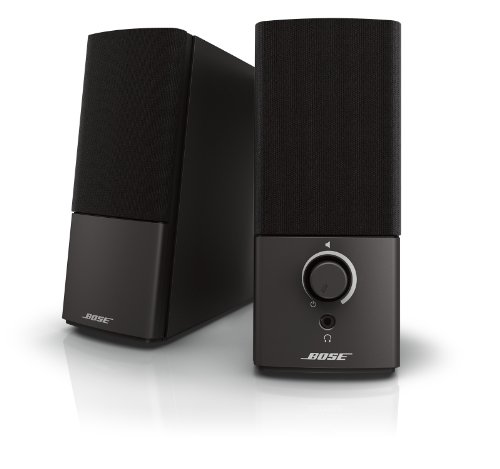 Bose Companion 2 Series III — Best Simple Stereo Pair | Check price on Amazon | |
 Klipsch ProMedia 2.1 — Best Room-Filling 2.1 System | Check price on Amazon |
Key takeaways
- Find the best monitor speakers for your desk. Compare five desktop speaker sets for music, movies, calls, and gaming, with setup tips for any monitor.
As an Amazon Associate I earn from qualifying purchases.
The Short Answer
The best monitor speakers for most desks are the Logitech Z407. This compact 2.1 system pairs two satellite speakers with a dedicated subwoofer, connects over Bluetooth, USB, and a 3.5 mm cable, and includes a wireless control dial that handles volume, mute, and input switching from anywhere on your desk. It covers music, movies, video calls, and gaming without demanding a large footprint or a complicated setup.
If your desk is tight, the Creative Pebble Pro is the compact pick. Its small angled cabinets aim sound up toward your ears, it runs on a single USB-C connection, and it adds Bluetooth and customizable RGB lighting for a tidy setup. Gamers who want a bold look and a practical bass control should look at the Razer Nommo, while listeners who want a simple, long-running stereo pair should consider the Bose Companion 2 Series III. For a bigger, room-filling sound with a dedicated subwoofer, the Klipsch ProMedia 2.1 remains the classic THX-certified choice.
One clarification before you buy: this guide covers desktop speakers that sit beside a computer monitor for everyday listening. Studio monitors are a different tool, built for flat, uncolored sound when mixing and producing music. If your work is mixing audio for release, a studio monitor guide is the right place to look. If your goal is better sound at your computer for music, movies, calls, and games, the five sets below are the ones to compare.
Our Top Picks
- Best Overall: Logitech Z407 — A 2.1 system with a subwoofer, Bluetooth, USB, and 3.5 mm inputs, plus a wireless control dial. View on Amazon
- Best Compact Pick: Creative Pebble Pro — Small USB-C desktop speakers with Bluetooth 5.3, RGB lighting, and a headset port. View on Amazon
- Best for Gaming Setups: Razer Nommo — Full-range 2.0 gaming speakers with 3-inch drivers, rear-facing bass ports, and a bass knob. View on Amazon
- Best Simple Stereo Pair: Bose Companion 2 Series III — A straightforward multimedia speaker pair with dual inputs and a headphone jack. View on Amazon
Quick Comparison
| Speaker Set | Configuration | Key Inputs | Standout Feature | Best For |
|---|---|---|---|---|
| Logitech Z407 | 2.1 with subwoofer | Bluetooth, USB, 3.5 mm | Wireless control dial | Most desks and mixed use |
| Creative Pebble Pro | 2.0 stereo | USB-C, Bluetooth 5.3, 3.5 mm | Compact angled cabinets with RGB lighting | Small desks and laptops |
| Razer Nommo | 2.0 stereo | USB, 3.5 mm | Bass knob with automatic gain control | Gaming setups |
| Bose Companion 2 Series III | 2.0 stereo | 3.5 mm AUX, PC input | Simple controls and headphone jack | Everyday listening and calls |
| Klipsch ProMedia 2.1 | 2.1 with subwoofer | 3.5 mm, RCA | THX-certified sound with control pod | Movies and music in larger rooms |
How to Choose Monitor Speakers
Match the size to your desk
Measure the space on either side of your monitor before you buy. Compact 2.0 pairs such as the Creative Pebble Pro fit on crowded desks and beside laptops, while 2.1 systems with a subwoofer need floor or shelf space for the bass unit. The subwoofer can sit under or beside the desk, but the satellites need a clear spot at ear level or angled upward toward you. A 2.0 pair has two speakers and nothing else: simpler to place and usually enough for calls, background music, and casual video. A 2.1 system adds a subwoofer for low frequencies, which gives movies and games a fuller feel. If you watch films or play games at your desk, a subwoofer is worth the extra footprint.
Check the inputs you actually use
Most desktop speakers connect with a 3.5 mm cable, and many add USB or Bluetooth. Bluetooth is handy when you switch between a computer and a phone, while USB audio can simplify wiring on a laptop with a single free port. Check that the set you pick has the input your computer uses, and confirm where the volume control lives: a control dial on the desk is easier to reach than a knob on the back of a speaker.
Think about placement and the room
Speakers sound best when they point at your ears and sit at roughly the same distance from you on each side. Angled cabinets, such as the Pebble Pro, aim sound upward from a low desk position, and a small stand or slight tilt helps flat speakers too. Keep speakers with rear-facing bass ports away from the wall behind your monitor, since the wall changes how the low end behaves. A small pair suits a bedroom or home office where you sit close to the screen, while a larger 2.1 system suits a room where you also listen from across the space.
The Picks in Detail
Logitech Z407 — Best Overall
The Logitech Z407 is a 2.1 Bluetooth computer speaker system with two satellite speakers, a dedicated subwoofer, and a wireless control dial. Its headline spec is 80 watts of peak power, with 40 watts RMS across the system. The satellites measure 7.87 x 3.70 x 3.35 inches, and the subwoofer measures 9.45 x 9.21 x 7.09 inches, so the whole set stays compact for a system with a separate bass unit.
Connectivity is the Z407’s strongest suit. It accepts Bluetooth, USB, and a 3.5 mm input, so you can switch between a computer, a phone, and another source without replugging cables. The wireless control dial sits on your desk and handles volume, mute, play and pause, and input selection, and you can turn the dial to adjust the bass level as well. Logitech’s digital signal processing shapes the sound to keep dialogue clear and music balanced at low and high volumes.
Pros:
– Three inputs, including Bluetooth, USB, and 3.5 mm, cover nearly every source
– Wireless control dial puts volume, mute, and bass within easy reach
– Dedicated subwoofer adds weight to movies and games without crowding the desk
– Compact satellites fit beside most monitors
Cons:
– The subwoofer still needs floor or shelf space, so very small desks may struggle
– No optical input for consoles or televisions that lack a 3.5 mm output
View the Logitech Z407 on Amazon
Creative Pebble Pro — Best Compact Pick
The Creative Pebble Pro is a minimalist 2.0 USB-C desktop speaker pair built for tight desks. Each cabinet is angled upward at 45 degrees, which aims the drivers toward your ears when the speakers sit flat on a desk. The pair connects over USB-C audio, Bluetooth 5.3, or a 3.5 mm AUX cable, and it includes a headset port on the front for private listening.
Creative’s BassFlex technology and Clear Dialog mode are the two features that set this pair apart from the original Pebble. BassFlex extends the low end for a speaker of this size, while Clear Dialog mode lifts spoken audio so voices in videos and calls come through cleanly. The RGB lighting around the base is customizable, and the whole set runs from a single USB-C connection, which keeps cable clutter to a minimum.
Pros:
– Small angled cabinets fit almost any desk and aim sound at your ears
– USB-C audio, Bluetooth 5.3, and 3.5 mm inputs cover laptops and desktops
– Clear Dialog mode helps voices stand out in calls and videos
– Headset port on the front makes private listening easy
Cons:
– No subwoofer, so low-end depth is limited compared with 2.1 systems
– Modest output means it suits near-field listening rather than filling a large room
View the Creative Pebble Pro on Amazon
Razer Nommo — Best for Gaming Setups
The Razer Nommo is a full-range 2.0 PC gaming speaker pair built around custom woven fiberglass 3-inch drivers and rear-facing bass ports. A bass knob with automatic gain control sits on the right speaker, letting you raise or lower the low end on the fly without opening any software. The pair connects over USB and a 3.5 mm cable.
Razer designed the Nommo for a gaming desk, and the look matches: the cylindrical cabinets and clean lines sit neatly beside a monitor and a keyboard. The full-range drivers handle the whole frequency range from one driver per cabinet, which keeps the sound coherent for positional audio in games. The rear-facing bass ports add warmth, though they work best when the speakers have some space behind them rather than sitting flush against a wall.
Pros:
– 3-inch full-range drivers give a coherent sound for games and music
– Bass knob with automatic gain control adjusts the low end by hand
– Clean, modern design fits gaming and streaming setups
– Simple USB and 3.5 mm connections with no extra software required
Cons:
– Rear-facing bass ports need clearance behind the speakers to sound their best
– No subwoofer, so the deepest bass is limited compared with 2.1 systems
View the Razer Nommo on Amazon
Bose Companion 2 Series III — Best Simple Stereo Pair
The Bose Companion 2 Series III is a multimedia speaker pair for PC use, and it has been in production for years because the formula is simple: two compact speakers, dual inputs, and a headphone jack on the right speaker. It connects with a 3.5 mm AUX cable and a PC input, and the volume control sits on the right speaker within easy reach.
There is no Bluetooth, no RGB lighting, and no subwoofer here. What you get instead is a pair that does one job well: clear, balanced stereo sound for music, video, and calls at a desk. The dual inputs let you keep a computer and a second device connected at the same time, and the headphone jack means you can switch to private listening without reaching behind the computer.
Pros:
– Long-running design with a simple, reliable setup
– Dual inputs keep a computer and a second device connected at once
– Headphone jack and volume control on the right speaker are easy to reach
– Compact cabinets suit office desks and small workspaces
Cons:
– No Bluetooth or USB audio, so wireless sources need a separate adapter
– No subwoofer, so bass depth is modest next to 2.1 systems
View the Bose Companion 2 Series III on Amazon
Klipsch ProMedia 2.1 — Best Room-Filling 2.1 System
The Klipsch ProMedia 2.1 is a THX-certified computer speaker system with two satellite speakers, a dedicated subwoofer, and a control pod. It is the oldest design in this guide and still one of the most capable for filling a room from a desk, thanks to the THX tuning and the large subwoofer that handles the low end.
The satellites use Klipsch’s horn-loaded tweeters, which give dialogue and high frequencies a crisp, forward character. The control pod puts volume and subwoofer level at your fingertips, and the system connects over a 3.5 mm cable with an RCA input as well. The subwoofer is the largest in this guide, so it needs a real spot on the floor or on a sturdy shelf, but that size is what gives the system its weight for movies and music.
Pros:
– THX-certified 2.1 sound fills a room from a desktop setup
– Dedicated subwoofer with its own level control adds real depth for movies and music
– Control pod keeps volume and bass within easy reach
– Horn-loaded tweeters keep dialogue crisp and clear
Cons:
– The subwoofer is large and needs a dedicated spot on the floor or a shelf
– The design is long-running, so it lacks Bluetooth and USB audio
View the Klipsch ProMedia 2.1 on Amazon
Who Should Choose What
- Most desks: Start with the Logitech Z407. Its three inputs, wireless control dial, and subwoofer cover the widest mix of music, movies, calls, and gaming.
- Small desks and laptops: Pick the Creative Pebble Pro. It fits almost anywhere, runs on a single USB-C cable, and the angled cabinets aim sound at your ears.
- Gaming setups: Choose the Razer Nommo. The bass knob and full-range drivers suit near-field gaming, and the design matches a gaming desk.
- Office desks and simple listening: Go with the Bose Companion 2 Series III. It is straightforward, compact, and the dual inputs and headphone jack cover daily use.
- Larger rooms and movie nights at the desk: Take the Klipsch ProMedia 2.1. The THX-certified 2.1 system and large subwoofer fill more space than any 2.0 pair in this guide.
If you already own a subwoofer or a soundbar for the room, a 2.0 pair is usually enough at the desk. If the desk speakers are your only audio system, a 2.1 set is the safer choice.## Common Mistakes
Buying studio monitors for everyday listening. Studio monitors are built for flat, uncolored sound so a mix translates to other systems. That honesty can sound thin or harsh for casual music and films. Unless you mix audio, desktop speakers tuned for listening are the better fit.
Placing both speakers on one side of the monitor. Stereo only works when the two speakers sit on either side of you at a similar distance. Stacking them together, or putting one on the desk and one on a shelf, collapses the soundstage.
Blocking the bass ports. Rear-facing bass ports need space behind the speaker. Pushing the Nommo or any ported speaker flat against a wall makes the low end boomy and muddy. Leave a few inches of clearance.
Ignoring the subwoofer’s footprint. A 2.1 system is only compact if you have somewhere to put the subwoofer. Measure the floor or shelf space before you buy, and check that the subwoofer cable reaches your chosen spot.
Forgetting the headphone jack. If you take calls or listen late at night, a front headphone jack saves you from reaching behind the computer. The Pebble Pro and the Companion 2 Series III both include one.
Choosing by size alone. A bigger speaker is not automatically better at a desk. Near-field listening rewards clarity and placement more than raw output, and a compact pair placed well can sound better than a large pair crammed into a corner.
Frequently Asked Questions
Are monitor speakers the same as studio monitors?
No. Monitor speakers in this guide are desktop speakers for everyday listening at a computer. Studio monitors are built for music production, with a flat frequency response that reveals flaws in a mix. The two categories share a name, but they serve different audiences and are tuned differently.
Do I need a subwoofer for monitor speakers?
Not always. A 2.0 pair is enough for calls, background music, and casual video. A subwoofer adds depth for movies, games, and bass-heavy music, and it takes the low frequencies off the small satellite drivers. If you watch films or play games at your desk, a 2.1 system is worth considering.
Can I connect monitor speakers to a laptop?
Yes. Most desktop speakers connect with a 3.5 mm cable or USB, and many add Bluetooth. The Creative Pebble Pro runs on a single USB-C connection, which is handy for laptops with few ports. Check your laptop’s outputs before you buy, and confirm the speaker set includes the cable you need.
Where should I place monitor speakers on my desk?
Put one speaker on each side of the monitor, at roughly ear level, angled slightly toward you. Keep them the same distance from your listening position and leave clearance behind any speaker with rear-facing bass ports.
Do monitor speakers work with a television?
Some do. Sets with a 3.5 mm or RCA input, such as the Klipsch ProMedia 2.1 and the Logitech Z407, can connect to a television with a matching output. Sets that rely on USB audio alone are designed for computers, so check the inputs first.
How do I keep monitor speakers from sounding muddy?
Give the speakers space, point them at your ears, and keep the bass level moderate for your room size. If a set has a bass control, turn it down before turning the volume up. A subwoofer on the floor rather than on the desk also reduces vibration.
Conclusion
The best monitor speakers for your desk depend on how you use the space, but the Logitech Z407 is the safest starting point for most people. It combines a subwoofer, three inputs, and a wireless control dial in a compact 2.1 system that handles music, movies, calls, and gaming. If your desk is tight, the Creative Pebble Pro gives you a tidy USB-C setup with Bluetooth and a headset port. Gamers should look at the Razer Nommo for its practical bass control, office listeners should consider the straightforward Bose Companion 2 Series III, and anyone who wants room-filling sound should take the THX-certified Klipsch ProMedia 2.1.
Measure your desk and check your inputs, and any of the five sets in this guide will sound better than the speakers built into your monitor.
More from Amazon
Programs that pair well with the guide above. Offers and eligibility are set by Amazon and may change.
Free shipping on eligible items, Prime Video and more. Eligible new members can start with a free trial.
Start a Prime free trialAd-free music streaming. Eligible new subscribers can start with a free trial.
Try Music Unlimited freeA Prime membership for ages 18-24 with a trial period. Eligibility is set by Amazon.
See Prime for Young AdultsAudiobooks and podcasts to listen to on the go. Eligible new members can start with a free trial.
Try Audible freeAs an Amazon Associate we earn from qualifying purchases.









