Our Top Picks
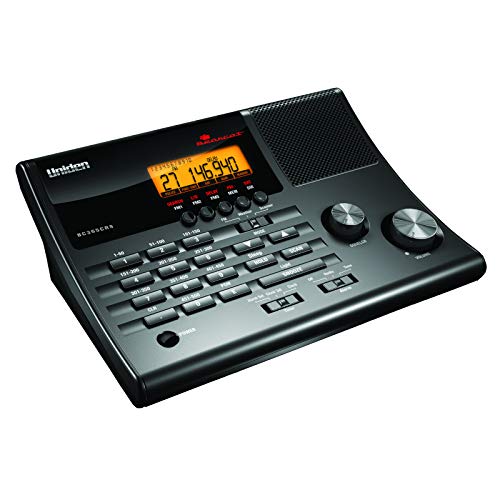 ChannelsUniden BC365CRS 500 Channel Scanner and Alarm ClockOne Size8.46 x 3.35 x 8.46 inches1 poundsCheck on Amazon
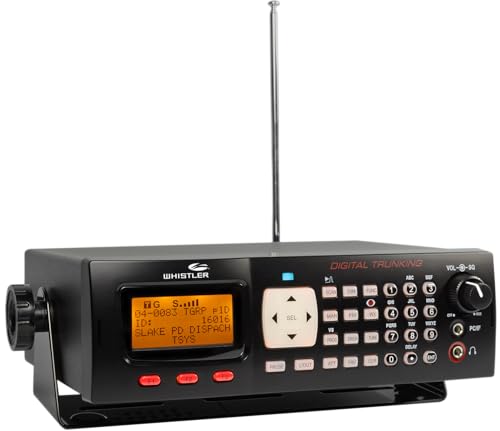
 Whistler TRX-1 Handheld Digital Police Scanner Radio7.75in. x 7.31in. x 5.75in.1.06 x 2.12 x 5.31 inches0.5 PoundsCheck on Amazon
 Uniden BEARTRACKER 885 Hybrid Full-Featured CB Radio +One Size3.7 x 14.5 x 8.4 Inches5 PoundsCheck on Amazon
Top 3 Picks
If you want one scanner that covers the widest range of modern public-safety radio traffic, the Whistler TRX-1 is the best overall pick for most listeners — it handles P25 Phase I and II digital systems plus legacy analog in a handheld format that travels anywhere. The Whistler WS1010 is the best budget choice for anyone in an area that still uses conventional analog channels, and the Whistler TRX-2 is the best premium pick for a fixed desktop or vehicle install where you want the same digital capability with a permanent power source.
Quick Comparison
| Product | Best For | Key Specs | Price Tier |
|---|---|---|---|
| Uniden BC365CRS | Desk listening plus clock/weather duty | 500 channels, analog, FM radio, weather alerts, alarm clock | Mid-range |
| Whistler WS1010 | Budget analog handheld listening | 400 channels, analog only, Skywarn, Spectrum Sweeper, PC programming | Budget |
| Whistler WS1065 | Desktop digital trunking on a budget | 1800 memories, digital trunking, backlit display, PC programmable | Mid-range |
| Whistler TRX-1 | Portable digital trunking anywhere | Handheld, EZ Scan, APCO P25 Phase I & II, digital + analog | Premium |
| Whistler TRX-2 | Fixed digital trunking base/mobile | Desktop/mobile, EZ Scan, APCO P25 Phase I & II | Premium |
| Uniden BEARTRACKER 885 | CB radio plus scanner in one unit | Hybrid CB, Digital TrunkTracking for police/fire/ambulance/DOT | Mid-range |
| IPG SDS100 Screen Protector (2-pack) | Protecting a handheld scanner display | Hydrogel film, ultra HD clarity, 2 units | Budget |
| Zip Scanners Desktop Stand | Stable desk positioning for handhelds | Fits SDS150, SDS100, SR30C, BCD436HP, BCD325P2 and similar | Budget |
How We Chose
This roundup is built around the decision a real listener faces: what kind of radio traffic is actually in your area, and what hardware do you need to hear it? We started by separating analog-only scanners from digital trunking models, because that single split determines whether a given unit will hear your local police, fire, and EMS at all. From there we weighed channel capacity and memory organization, since a 400-channel analog scanner and an 1800-memory digital trunking unit serve very different listening habits.
We also factored programming difficulty. EZ Scan-style software and PC programming support make a big practical difference for beginners, and we treated that as a first-class criterion rather than a footnote. Antenna and portability came next: handhelds trade antenna size and runtime for mobility, while desktop and mobile units can use fixed antennas and permanent power. Finally we looked at upgrade path and ownership realities — accessories, stands, and screen protection that extend the life of a scanner you already own. Every description here comes from manufacturer specifications and well-established facts about each product category; no unit in this list was tested or owned by us, and prices are given only as broad market tiers because listings change constantly.
1. Uniden BC365CRS — Best for Desk Listening With Clock and Weather Duty
As an Amazon Associate we earn from qualifying purchases at no extra cost to you.
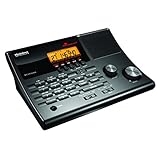
The BC365CRS is the scanner for someone who wants a radio sitting on a nightstand or kitchen counter doing several jobs at once. It is an analog scanner with a 500-channel memory, but Uniden pairs that with an FM radio, a weather-alert function, and a full alarm clock with snooze. If your local public-safety traffic is still conventional analog — common in many rural counties, smaller towns, and for services like fire dispatch, railroads, and utilities — this unit hears it while also waking you up and warning you about severe weather.
Its appeal is convenience rather than raw capability. You get a complete desk appliance rather than a dedicated scanning tool, which suits casual listeners who do not want to run programming software or manage talkgroups. Search bands let you sweep through spectrum to find active frequencies, which is the fastest way for a beginner to discover what is actually transmitting nearby.
Key Specs
- Type: Analog desktop scanner
- Channels: 500
- Additional functions: Alarm clock with snooze, FM radio, weather alerts, search bands
- Power: AC desktop operation
- Programming: Front-panel keypad, no PC software required
Strengths
The multi-function design is genuinely useful — a scanner you already keep on the nightstand for the clock gets used far more than a dedicated unit tucked in a drawer. Weather alerts add real practical value in storm-prone regions, and the analog search bands make it easy to explore without any reference material. It is also the easiest unit in this list to live with day to day, because there is no software, no talkgroup database, and no trunking system to configure.
Pros
- Combines scanner, FM radio, weather alerts, and alarm clock in one box
- 500 channels is generous for analog conventional listening
- Search bands help beginners find active frequencies quickly
- No programming software or computer required
- Well suited to a fixed desk or bedside location
Cons
- Analog only — will not decode P25 digital or trunked systems
- Not portable; requires a wall outlet
- Overkill if you already own a clock radio and only want scanning
- Cannot follow talkgroup conversations on modern digital networks
How It Compares
Against the Whistler WS1010, the BC365CRS trades portability for desk functionality. The WS1010 is a handheld with 400 channels and analog coverage, so it goes where you go; the BC365CRS stays put but adds a clock, FM radio, and weather alerts. If you want a bedside radio that also scans, choose the Uniden. If you want to carry a scanner in a bag or around the house, choose the Whistler. Both are analog-only, so neither is the right answer if your local agencies have moved to digital trunking.
2. Whistler WS1010 — Best Budget Analog Handheld
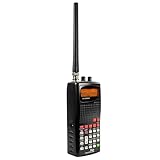
The WS1010 is the entry point into handheld scanning. It is a 400-channel analog scanner with Skywarn and SAME weather alerts, Spectrum Sweeper for finding nearby transmissions, and PC programming support. For someone who wants to listen to local analog traffic without spending much, it does the core job: it receives conventional frequencies, it fits in a hand or a pocket, and it runs on batteries so it works during a power outage.
The Spectrum Sweeper function is the standout feature at this tier. Rather than needing a frequency list, you can let the scanner hunt for strong nearby signals and lock onto them. That makes the WS1010 an excellent first scanner for a listener who does not yet know their local frequency plan.
Key Specs
- Type: Analog handheld scanner
- Channels: 400
- Features: Skywarn, SAME weather alerts, Spectrum Sweeper
- Programming: Keypad plus PC programming support
- Form factor: Handheld, battery powered
Strengths
Portability is the whole point here. A handheld analog scanner is useful at events, while traveling, or during storms when you want information without depending on a phone network. Skywarn and SAME alerts mean the same device that scans police and fire also warns you about severe weather — a combination that matters in areas where tornado or flash-flood warnings are a genuine concern. PC programming support lets you load channel lists instead of typing frequencies one by one, which saves substantial time once you have more than a couple dozen channels to enter.
Pros
- Lowest-cost way to get into handheld scanning
- 400 channels is plenty for a single county’s conventional traffic
- Spectrum Sweeper finds active frequencies without a reference list
- Weather alerts built in
- Battery operation keeps it working when the power is out
Cons
- Analog only — no digital or trunked system support
- Small handheld antenna limits range compared with a desktop unit
- Keypad programming is tedious without the PC cable and software
- Battery runtime depends on your own rechargeable or alkaline supply
How It Compares
Compared with the TRX-1, the WS1010 is a fraction of the capability at a fraction of the cost — analog versus digital trunking. The TRX-1 hears P25 Phase I and II systems; the WS1010 does not. The right question is what your local agencies use. If they are still on conventional analog frequencies, the WS1010 gets you nearly everything for far less money. If they have moved to a digital trunked system, the WS1010 will largely hear silence on those channels, and the TRX-1 becomes the realistic choice. Against the BC365CRS, the WS1010 wins on portability and loses on desk convenience.
3. Whistler WS1065 — Best Mid-Range Desktop Digital Trunking

The WS1065 is where digital trunking becomes affordable in a desktop format. It offers 1800 memories, digital trunking capability for police and fire radio, a backlit display, and PC programming. For a listener whose local system is digital but who does not need portability, this is often the most sensible unit in the Whistler line — it brings the essential digital capability to a fixed location without the premium handheld price.
The 1800-memory capacity is significant. Trunked systems are organized into talkgroups rather than simple channels, and a busy metro area can involve dozens of agencies and hundreds of talkgroups. Having 1800 memory locations means you can build organized scan lists instead of constantly swapping frequencies in and out.
Key Specs
- Type: Desktop digital trunking scanner
- Memories: 1800
- Coverage: Digital trunking plus conventional analog
- Display: Backlit
- Programming: PC programmable
Strengths
The combination of digital trunking, large memory, and a backlit display covers the practical needs of a serious home listener. Because it sits on a desk, you can connect a better antenna than a handheld allows — an outdoor or attic-mounted antenna connected by coax can dramatically extend what you receive, especially for distant systems. The backlit display matters more than it sounds: trunking scanners display talkgroup IDs, agency names, and system information, and reading that in low light is far easier on a backlit screen with PC-assigned text tags.
Pros
- Digital trunking at a mid-range price
- 1800 memories handle large multi-agency systems
- Backlit display readable in dim rooms
- PC programming makes managing talkgroups feasible
- Desktop format supports upgraded external antennas
Cons
- Not portable — requires a fixed location and power
- Digital trunking setup has a real learning curve for beginners
- Requires a computer and cable for comfortable programming
- Sits below the TRX line on feature support
How It Compares
Against the TRX-2, the WS1065 is the value-oriented digital desktop option. The TRX-2 adds EZ Scan software and explicit APCO P25 Phase I and II support, which matters if your area uses Phase II systems or if you want the friendliest programming workflow. If your local system is Phase I and you are comfortable programming manually or with third-party software, the WS1065 covers it for less. If you want the smoothest setup path and future-proof digital coverage, step up to the TRX-2. Against the BC365CRS, the WS1065 is the correct choice the moment your local agencies are digital — the Uniden simply cannot decode those transmissions.
4. Whistler TRX-1 — Best Portable Digital Trunking Scanner

The TRX-1 is the handheld flagship of this list and the best overall pick for most people who need digital coverage. It is a portable digital police scanner radio supporting APCO P25 Phase I and Phase II, with EZ Scan software for programming. That combination — full digital trunking capability in a battery-powered handheld — is what makes it the default recommendation for listeners in areas that have moved to modern public-safety radio systems.
Phase II support is the important detail. Many larger jurisdictions operate Phase II trunked systems, and a scanner without Phase II decoding will miss those conversations entirely. The TRX-1 covers both phases, so it works across a wider range of systems than a Phase I–only unit.
Key Specs
- Type: Handheld digital police scanner
- Digital modes: APCO P25 Phase I and Phase II
- Coverage: Digital trunking plus analog conventional
- Programming: EZ Scan software
- Form factor: Portable, handheld
Strengths
EZ Scan is the biggest practical advantage. Programming a digital trunking scanner by hand is genuinely painful — you need system information, site data, talkgroup IDs, and scan list assignments. EZ Scan lets you build and maintain all of that on a computer and load it to the radio, which turns a multi-hour chore into a manageable task. Phase I and II support means the radio stays useful as systems evolve. And because it is handheld, it works at home, in the car, at events, or anywhere else you want to monitor.
Pros
- Full APCO P25 Phase I and Phase II digital trunking
- Portable, battery-powered handheld format
- EZ Scan software dramatically simplifies programming
- Covers both digital and analog traffic
- Best all-around choice for mixed or unknown local systems
Cons
- Premium price tier
- Handheld antenna limits range versus a fixed outdoor antenna
- Battery runtime is finite; long monitoring sessions need spares or charging
- Still requires a computer for efficient programming
- Screen is exposed to scratches and scuffs in daily carry
How It Compares
Against the TRX-2, the choice is purely form factor: same digital family and EZ Scan workflow, but the TRX-1 runs on batteries and travels while the TRX-2 sits on a desk or mounts in a vehicle with permanent power. If you monitor from one location, the TRX-2 is the better fit; if you want one scanner that goes everywhere, the TRX-1 wins. Against the WS1010, the TRX-1 costs far more but hears the digital systems the analog unit cannot. Against the WS1065, the TRX-1 adds Phase II support, portability, and the EZ Scan workflow — the upgrade is real, not cosmetic.
5. Whistler TRX-2 — Best Fixed Digital Trunking Base/Mobile
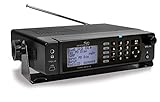
The TRX-2 is the desktop and mobile counterpart to the TRX-1. It supports APCO P25 Phase I and Phase II and uses the same EZ Scan software, but it is built for a fixed location — a desk at home or a mount in a vehicle. If your listening happens in one place and you want permanent power plus the option of a better antenna, this is the configuration that makes the most of digital trunking.
The base/mobile format solves two problems handhelds cannot. First, power: a fixed unit runs continuously without battery changes or charge cycles. Second, antenna: you can connect an external antenna with coax, mount it high, and receive systems well beyond handheld range. For listeners chasing distant sites or trying to hear agencies across a metro area, the antenna advantage alone justifies the fixed format.
Key Specs
- Type: Desktop/mobile digital scanner
- Digital modes: APCO P25 Phase I and Phase II
- Coverage: Digital trunking plus analog conventional
- Programming: EZ Scan software
- Installation: Fixed desk or vehicle mount
Strengths
Continuous operation is the quiet advantage. A scanner that is always on and always powered catches traffic a handheld misses when its batteries are charging. Combined with an external antenna, the TRX-2 can pull in sites a handheld will not reach. EZ Scan keeps programming manageable across both this and the TRX-1, so if you own both, your scan lists transfer between them.
Pros
- APCO P25 Phase I and Phase II digital trunking
- Designed for continuous fixed-location operation
- Supports external antennas for extended range
- Same EZ Scan programming ecosystem as the TRX-1
- Works well as both a home base and a vehicle install
Cons
- Premium price tier
- No battery — useless during a power outage without a backup supply
- Not portable between rooms without unplugging and moving it
- Vehicle install requires wiring and mounting work
- Requires a computer for efficient programming
How It Compares
Against the TRX-1, this is a pure use-case decision: fixed versus mobile. Buy the TRX-2 if the scanner lives on a desk or in a vehicle and you want permanent power and antenna flexibility. Buy the TRX-1 if you need to carry it. Against the WS1065, the TRX-2 adds explicit Phase II support and the EZ Scan workflow, which is worth the step up if your local system uses Phase II or if you value easier programming. Against the BC365CRS, the TRX-2 is the modern digital answer where the Uniden handles only analog.
6. Uniden BEARTRACKER 885 — Best Hybrid CB and Scanner

The BEARTRACKER 885 is a different kind of product: a full-featured CB radio that also includes Digital TrunkTracking for police, fire, ambulance, and DOT channels. It is aimed at the driver who wants one installed unit handling both CB communication and public-safety monitoring, rather than running two separate radios in the vehicle.
For long-haul drivers, the appeal is straightforward. CB radio remains a practical tool for traffic conditions, weather, and communication with other drivers, and adding trunked public-safety reception in the same chassis reduces dashboard clutter and wiring. It is a hybrid, which means it makes compromises, but for a specific driver it is the efficient answer.
Key Specs
- Type: Hybrid CB radio with digital trunk tracking scanner
- Scanner coverage: Police, fire, ambulance, DOT
- CB function: Full-featured CB radio
- Installation: Vehicle mount
Strengths
Integration is the whole value proposition. One wiring run, one mounting location, one display. For a driver already committed to CB, adding scanner capability without a second radio is genuinely convenient. Uniden’s scanner heritage means the trunk tracking side is not an afterthought, and DOT channels are useful for highway conditions, construction, and road closures.
Pros
- Combines CB radio and digital trunk tracking in one unit
- Reduces dashboard clutter versus two separate radios
- Covers police, fire, ambulance, and DOT traffic
- Good fit for long-distance drivers already using CB
Cons
- Compromises compared with a dedicated scanner or dedicated CB
- Vehicle-focused — not a desk or handheld solution
- Hybrid design means less flexibility in antenna choice for each function
- Overkill if you do not actually use CB radio
How It Compares
Against the TRX-2, the BEARTRACKER 885 trades scanner depth for CB integration. The TRX-2 is the better pure scanner with a wider digital feature set and easier PC programming; the Uniden is the better single-box vehicle solution if CB matters to you. If you never use CB, buy a dedicated scanner instead — you will get more scanning capability for the money. If you are a driver who relies on CB daily, the hybrid saves space and installation effort that two separate radios would cost.
7. IPG SDS100 Screen Protector (2-Pack) — Best for Protecting a Handheld Display

This two-pack of hydrogel screen protectors from IPG is designed for the Uniden SDS100 digital handheld police scanner. It is an accessory rather than a radio, but it addresses a real ownership problem: handheld scanner displays take constant abuse from keys, pockets, bags, and vehicle mounts.
Hydrogel film is a distinct material class from tempered glass. It is thinner and more conformable, which suits curved or slightly recessed scanner screens, and it tends to recover from minor impressions better than rigid glass. The tradeoff is that hydrogel offers less impact protection against a direct strike than tempered glass would.
Key Specs
- Type: Hydrogel screen protector film
- Quantity: 2 units
- Clarity: Ultra HD, described as invisible
- Compatibility: Uniden SDS100 handheld scanner
Strengths
The two-pack matters practically: a scanner screen protector is a consumable, and having a spare means you can replace a scuffed or lifted film without ordering again. Hydrogel’s conformability helps it sit flush on a scanner face, and high clarity preserves the readability of a display you rely on for talkgroup and channel information.
Pros
- Two protectors per pack — one to apply, one spare
- Hydrogel film conforms well to scanner screen shapes
- Preserves display clarity, important on information-dense scanner screens
- Cheap insurance against a scratched display
Cons
- Not a radio — purely a protective accessory
- Hydrogel offers less impact protection than tempered glass
- Model-specific fit limits it to compatible scanner bodies
- Requires careful dust-free application to avoid bubbles
How It Compares
Against the Zip Scanners desktop stand, both are low-cost accessories but they solve different problems. The stand prevents a handheld from tipping and holds it at a readable angle on a desk; the screen protector prevents the display from scratching during handling and travel. A handheld owner will likely want both — the stand for home use, the protector for everywhere else. Neither is a substitute for a scanner, and neither improves reception.
8. Zip Scanners Desktop Stand — Best for Stable Desk Positioning

The Zip Scanners desktop stand is a simple accessory that holds handheld scanners upright at a stable, readable angle. It is listed as fitting the Uniden SDS150 and SDS100, plus other handheld scanners including the SR30C, BCD436HP, and BCD325P2. For anyone running a handheld as a semi-permanent desk unit, it solves a genuine problem: handhelds are shaped to be held, not to stand on their own.
The practical benefit goes beyond tidiness. A scanner lying flat on a desk has its speaker and display aimed at the ceiling. Angle it upright and both become easier to hear and read, and the unit stops sliding around when you bump the desk or reach past it.
Key Specs
- Type: Desktop display stand for handheld scanners
- Compatibility: Uniden SDS150, SDS100, SR30C, BCD436HP, BCD325P2 and similar handhelds
- Function: Holds scanner upright for viewing and listening
Strengths
Broad compatibility is the selling point. Because it fits many popular handheld scanner bodies rather than one model, it remains useful if you upgrade your handheld or keep more than one. It is a one-time, low-cost purchase that improves daily ergonomics without changing how the scanner works.
Pros
- Fits multiple popular handheld scanner models
- Improves display readability and speaker projection
- Keeps the scanner from sliding or tipping on a desk
- Low-cost, one-time purchase
Cons
- Accessory only — no effect on reception or capability
- Not needed if you primarily use the scanner handheld or in a vehicle
- Compatibility is listed per model, so verify your scanner fits
How It Compares
Against the IPG screen protector, the stand addresses home desk use while the protector addresses handling wear. Both are inexpensive add-ons for the owner of a handheld like the TRX-1 or an SDS100. If you listen at a desk every evening, the stand has the more noticeable day-to-day impact. If you carry the scanner often, the screen protector protects a harder-to-replace component.
How to Choose
The single most important question is not price, brand, or channel count — it is what radio system your local agencies actually use. Get that wrong and a scanner hears nothing, no matter how much you spend. Everything else is secondary.
Step 1: Identify analog versus digital
Conventional analog systems transmit on fixed frequencies that any analog scanner can receive. Digital systems — most commonly APCO P25 — encode voice, and only a scanner with the matching decoder will reproduce it. Many rural counties, small towns, fire dispatch, railroads, utilities, and business users remain on analog. Most larger cities and county-wide law enforcement have moved to digital trunked systems.
A quick way to judge: if your local police department serves a metro area of significant size, assume digital. If you live in a rural county with a small sheriff’s office, analog is plausible but no longer guaranteed. If you are unsure, buy digital-capable hardware — a digital scanner also receives analog, so it is the safe side of the bet. The analog-only units in this list — the Uniden BC365CRS and the Whistler WS1010 — are the ones to avoid if you cannot confirm analog.
Step 2: Understand trunking before you buy
Trunked systems share a pool of frequencies among many agencies. Instead of one channel per department, the system assigns a frequency per transmission and identifies the conversation by talkgroup. A scanner that cannot follow trunking will hear fragments of conversations and then lose them when the system reassigns the frequency.
This is why trunk tracking, not raw channel count, defines modern capability. A 400-channel analog scanner and an 1800-memory trunking scanner are not comparable on channel count alone — they are different tools. If your area is trunked, you need trunk tracking, and you should also check which phase: Phase I systems are more common and more widely supported; Phase II systems are increasingly common in larger jurisdictions and require explicit Phase II support, which the TRX-1 and TRX-2 both provide.
Step 3: Match the form factor to where you listen
Three formats cover nearly every listener:
- Handheld: battery powered, small antenna, travels anywhere. Best if you monitor in multiple places, during outages, or away from home. Expect shorter range than a fixed install and finite runtime between charges.
- Desktop/base: permanent power, room for a larger antenna, comfortable display. Best if you listen mostly at home. Runs continuously and supports external antennas for meaningfully better reception.
- Mobile/vehicle: installed in a car or truck. Best for drivers. Requires wiring, mounting, and an antenna solution, but gives you monitoring on the road.
The hybrid BEARTRACKER 885 is a fourth path: it folds scanner capability into a CB radio for drivers who already want CB. Choose it only if you genuinely use CB; otherwise a dedicated scanner gives you more for the same money.
Step 4: Weigh antenna reality
The antenna supplied with a handheld is a compromise — it has to be short and rugged. That limits range more than most buyers expect. A few practical rules:
- Raising an antenna matters more than almost anything else. Height beats gain for most local monitoring.
- For a desktop unit, an attic or outdoor antenna connected by coax can transform what you receive, especially for distant or weak systems.
- For handhelds, an upgraded rubber-duck antenna helps modestly; do not expect miracles from a longer whip in a valley or dense urban canyon.
- Moving near a window, or to an upper floor, often improves handheld reception more than any accessory purchase.
If your priority is hearing distant systems, budget for a desktop or mobile unit plus a proper external antenna rather than spending the same money on a premium handheld alone.
Step 5: Rate programming difficulty honestly
Programming is where most beginners get stuck, and it deserves more weight than it usually gets. Ranked from easiest to hardest for a typical user:
- Analog desktop with keypad programming (BC365CRS): the simplest path. Enter a frequency on the keypad and you are listening.
- Analog handheld with PC support (WS1010): manageable by keypad for a few dozen channels; use the PC cable once your list grows.
- Digital with EZ Scan (TRX-1, TRX-2): a real learning curve, but the software handles system, site, and talkgroup data far better than manual entry.
- Digital desktop (WS1065): capable, but you will want PC programming to manage talkgroups comfortably.
The pattern is consistent: the more capable the scanner, the more it depends on computer-assisted programming. Budget for a programming cable and software as part of your purchase, not as an afterthought.
Step 6: Plan the ownership costs
Scanners are durable electronics, but a few things wear or run out first:
- Batteries: handheld runtime is the most common day-to-day limitation. Rechargeable cells plus a spare set solves it.
- The display: the most vulnerable surface on a handheld, since it faces outward in pockets and bags. Hydrogel protectors like the IPG two-pack are inexpensive insurance.
- Antenna connectors: repeated connect and disconnect cycles wear the connector. Leave a fixed antenna connected where possible.
- Programming data: systems change — agencies reband, add talkgroups, or migrate phases. Expect to update your programming periodically, which is another argument for software-based workflows.
- Desk ergonomics: a stand is trivial in cost but keeps a handheld stable and readable if it lives on a desk.
Step 7: Buy for the upgrade path, not just today
If your area is analog now but likely to migrate, buying analog-only hardware means buying twice. A digital scanner costs more upfront but covers both worlds and survives the transition. Similarly, opting for a unit with PC programming support protects you against the moment your scan list outgrows what is comfortable to type by hand. The most expensive scanner is the one you replace because it could not do the job six months later.
A simple decision rule: confirm your system type, confirm whether it is trunked, confirm the phase if it is, then choose the form factor that matches where you actually listen, and only then compare models within those constraints.
Frequently Asked Questions
Will an analog scanner still work for police and fire in 2026?
It depends entirely on your location. Many rural counties, small municipal departments, fire dispatch channels, railroads, and utility services still operate on conventional analog frequencies, and an analog scanner hears those fine. Large metro police and county-wide law enforcement agencies have largely migrated to digital trunked systems that analog scanners cannot decode. Before buying analog-only equipment, confirm what your local agencies use — otherwise you may spend money on a scanner that hears almost nothing.
What is the difference between P25 Phase I and Phase II?
Both are APCO P25 digital standards, and both encode voice in a form that requires a compatible scanner to decode. Phase II is the more spectrally efficient version and is increasingly common in larger jurisdictions, while Phase I remains widespread. The practical consequence for buyers is that a Phase I–only scanner may miss Phase II traffic entirely, so if you cannot determine which phase your area uses, choose hardware that supports both, such as the TRX-1 or TRX-2.
Do I need trunking support to listen to my local police?
If your local agency operates on a trunked system, yes. Trunked systems share a pool of frequencies and assign them per transmission, identifying conversations by talkgroup. Without trunk tracking, a scanner drifts off the conversation when the system reassigns frequencies, so you hear fragments rather than complete exchanges. Conventional analog systems do not require trunking, which is why analog-only scanners remain viable in some areas.
Why is programming a digital scanner so much harder?
Because digital trunked systems require more than a frequency. You need system identifiers, site information, control channel data, talkgroup IDs, and scan list organization — often across multiple agencies. Entering that by hand is slow and error-prone. Software like EZ Scan lets you build and maintain the database on a computer and transfer it to the radio, which is why nearly every digital scanner owner ends up programming with a PC.
How much does an external antenna actually help?
For desktop and mobile scanners, an external antenna mounted high — in an attic, on a roof, or on a vehicle roof — can meaningfully extend the range at which you receive systems, generally more than any other single change you can make to a fixed installation. For handhelds, the gain is smaller because the antenna must stay short and portable; moving to a window or an upper floor is often more effective than buying a longer whip.
What accessories are actually worth buying?
Three categories earn their cost. Programming software and a cable are close to essential for any digital scanner. A spare set of rechargeable batteries solves the most common handheld limitation. And a screen protector plus a desktop stand are cheap ways to protect and position a handheld you use daily. Antenna upgrades are worth it for fixed installations, less so for handhelds.
Will a police scanner still work during a power outage?
Handheld scanners running on batteries will keep working, which is one of their strongest arguments — especially combined with built-in weather alerts. Desktop units and the hybrid CB/scanner require mains power, so they go dark unless you have a backup supply. If emergency resilience is part of why you want a scanner, prioritize a battery-powered handheld with weather alert capability.
Should I buy an analog scanner first and upgrade later?
Only if you are confident your local traffic is analog and likely to stay that way. Buying analog-only hardware to save money now means buying again if your area migrates to digital. Since digital scanners also receive analog transmissions, a single digital purchase covers both worlds and avoids the double spend. The exception is a listener whose local traffic is firmly conventional and who wants the simplest possible setup.
Closing Recommendation by Situation
If you need one scanner for an unknown or mixed local system: choose the Whistler TRX-1. Phase I and Phase II support plus EZ Scan covers both digital and analog traffic and travels with you.
If you listen from one fixed location at home: choose the Whistler TRX-2, or the Whistler WS1065 if your system is Phase I and you want to spend less.
If you are on a tight budget in a confirmed analog area: choose the Whistler WS1010 for portable listening, or the Uniden BC365CRS if you want a bedside unit that also handles clock, FM, and weather duties.
If you are a driver who already relies on CB radio: choose the Uniden BEARTRACKER 885 and fold both jobs into one installed unit.
If you already own a handheld scanner: add the IPG screen protector two-pack for travel wear and the Zip Scanners desktop stand for stable, readable desk use.