
Key takeaways
- Huddle room (2 to 4 people): A wide-angle USB camera with built-in mics is usually enough.
- Small meeting room (4 to 8 people): Look for a video bar with a wide field of view and stronger microphones.
- Medium room (8 to 12 people): Consider a video bar with beamforming microphones and optional expansion microphones.
- Large boardroom: Makers generally sell dedicated systems with multiple cameras and microphones, which go beyond a simple webcam.
For a small huddle room, the Logitech MeetUp or the Poly Studio family are the usual starting points, for a mid-sized room an all-in-one video bar such as the Logitech Rally Bar Mini or Yealink MeetingBar offers better microphones and speakers, and for a table-centered meeting where people sit all around, the Owl Labs Meeting Owl 4+ is built around a 360-degree view. A conference room webcam has to handle a wider room, several voices, and often a laptop that is not powerful, so the best choice depends on room size and how many people join.
Our top picks

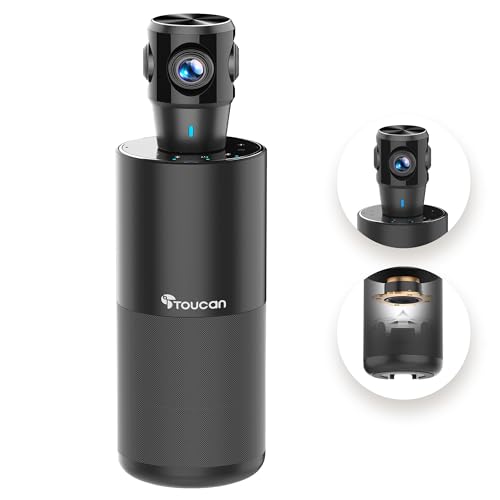


As an Amazon Associate we earn from qualifying purchases at no extra cost to you.
At a Glance: Conference Room Cameras Compared
| Model | Best for | Key stated traits (per maker) | Limits |
|---|---|---|---|
| Logitech MeetUp | Small huddle rooms | Wide field of view, built-in microphones and speaker, motorized pan and tilt, digital zoom | Aging design in a newer lineup; best in small rooms |
| Logitech Rally Bar Mini | Small to mid-sized rooms | All-in-one video bar with camera, speaker, and microphones, AI-based framing | Mid-to-premium tier |
| Poly Studio P15 or Studio P5 | Personal and small-room setups | USB cameras with framing features, per maker | Not designed for large rooms |
| Jabra PanaCast 50 | Small to mid rooms with intelligent framing | Panoramic camera system with built-in audio, per maker | Premium tier |
| Owl Labs Meeting Owl 4+ | Round-table and hybrid meetings | 360-degree camera, microphones, and speaker, auto-focus on the speaker | Premium tier; unusual look |
| Yealink UVC40 or MeetingBar | Budget-to-mid-range setups | USB video bars with AI framing, per maker | Fewer integrations than larger brands |
What Makes a Conference Camera Different
A standard webcam is built for one person sitting close to the screen. A conference camera has to cover several seats, so it needs a wider field of view, higher-quality audio pickup for people at a distance, and software that can frame participants automatically. Many also include speakers, so the device becomes a simple all-in-one video bar. Compared with a USB webcam plus a separate speakerphone, an all-in-one is easier to install and often easier for non-technical staff.
Match the Camera to the Room
- Huddle room (2 to 4 people): A wide-angle USB camera with built-in mics is usually enough.
- Small meeting room (4 to 8 people): Look for a video bar with a wide field of view and stronger microphones.
- Medium room (8 to 12 people): Consider a video bar with beamforming microphones and optional expansion microphones.
- Large boardroom: Makers generally sell dedicated systems with multiple cameras and microphones, which go beyond a simple webcam.
Logitech MeetUp
The MeetUp is one of the best-known cameras for small rooms. The maker lists a wide field of view, motorized pan and tilt, and a built-in microphone array and speaker, with an optional expansion microphone. Reviewers often describe it as a reliable plug-and-play choice for huddle rooms, but it uses an earlier design and lacks some of the AI features of newer video bars.
Logitech Rally Bar Mini
The Rally Bar Mini is a compact video bar for small to mid-sized rooms. The maker lists AI-powered framing features, built-in audio, and support for common video conferencing platforms through certified modes. It tends to cost more than a simple webcam but replaces separate speakers and microphones, which can simplify cabling.
Poly Studio P15 and P5
Poly (now part of HP) makes the Studio P-series cameras. The P15 is aimed at personal video bar use, with framing features listed by the maker, while the P5 is a simpler USB webcam. They suit very small rooms or a single user sitting at a table. Larger rooms need a dedicated video bar.
Jabra PanaCast 50
The PanaCast 50 is a video bar that uses several cameras to create a wide panoramic image. The maker lists intelligent framing and built-in audio. Reviewers often point to its wide coverage, which helps when people sit close to the camera. It sits in a premium tier.
Owl Labs Meeting Owl 4+
The Meeting Owl 4+ is placed in the center of a table and covers the room with a 360-degree view. The maker states that it automatically focuses on the person speaking and also shows a panoramic strip. It suits hybrid meetings where participants sit around a table. It may look unusual to some users, and it needs a flat place on the table with space around it.
Yealink UVC40 and MeetingBar Options
Yealink offers USB video bars with AI framing and built-in microphones. Reviewers describe them as a cost-conscious alternative to the largest brands, though software integration and support options vary by region.
Fit, Setup, and Compatibility Notes
- Mounting: Place the camera at about eye level, centered below or above the display. Wall mounts or TV mounts are sold by many makers.
- Cable length: USB cables have distance limits, so a long run from a laptop may need an active extension cable or a dedicated room computer.
- Platform support: Check certification for Zoom, Microsoft Teams, or Google Meet if you want the camera to work with a room system.
- Audio coverage: Built-in microphones have a stated pickup range. If your table is longer than that range, add an expansion microphone.
- Lighting: Avoid placing the camera facing a bright window. Even lighting helps all cameras show faces clearly.
- Power: Use the power supply supplied by the maker and follow the manual. Do not run cables where they can be tripped over.
- Privacy: Some models include a shutter or privacy mode, which is useful in shared spaces.
Budget Tiers
- Budget: Basic wide-angle USB cameras and Yealink options for huddle rooms.
- Mid-range: Logitech MeetUp and Poly Studio models.
- Premium: Logitech Rally Bar Mini, Jabra PanaCast 50, and Owl Labs Meeting Owl 4+ for better audio, framing, and room coverage.
Pick X If… (Decision Table)
| Pick this | If you… |
|---|---|
| Logitech MeetUp | have a small huddle room and want a simple plug-and-play solution |
| Logitech Rally Bar Mini | need a compact all-in-one bar with automatic framing |
| Poly Studio P15 or P5 | use a small room or a single desk and want a tidy USB camera |
| Jabra PanaCast 50 | want panoramic coverage and strong framing in a mid-sized room |
| Meeting Owl 4+ | run hybrid meetings around a central table |
| Yealink UVC40 | want a cost-conscious bar with AI framing |
Alternatives Worth Considering
- PTZ camera with a separate speakerphone: Gives flexible placement and optical zoom for medium and large rooms but takes more installation.
- Standard webcam with a conference speakerphone: Works for tiny rooms or home offices, though a standard webcam has a narrow field of view.
- Platform-certified room kits: Zoom Rooms and Microsoft Teams Rooms kits bundle cameras, audio, and controllers, which suits organizations that standardize their setup.
Frequently Asked Questions
Can I use a regular webcam in a conference room?
You can in a very small room, but a standard webcam has a narrow field of view and weak audio pickup. A conference camera covers more seats and often includes better microphones.
What field of view should I look for?
Makers often list wide angles, and the right choice depends on how close people sit to the camera. For small rooms a wide angle is typically enough, while larger rooms may need a panoramic or multi-camera system.
Do I need a separate microphone?
Many bars include microphones with a stated range. If your table is longer than that range, an expansion microphone helps people at the far end be heard.
Will it work with Zoom, Teams, and Google Meet?
Most USB conference cameras work with all major platforms. Certified room systems may need a specific mode, so consult the maker’s compatibility list.
What does auto-framing do?
It uses software to detect people and adjust the view so everyone fits in frame. Reviewers report that it works well in simple rooms and less well when people move around a lot.
Is a 360-degree camera better?
It suits round-table and hybrid meetings but is not necessary for rooms where everyone faces a screen. A standard video bar is often simpler in that case.
More from Amazon
Programs that pair well with the guide above. Offers and eligibility are set by Amazon and may change.
Free shipping on eligible items, Prime Video and more. Eligible new members can start with a free trial.
Start a Prime free trialAd-free music streaming. Eligible new subscribers can start with a free trial.
Try Music Unlimited freeA Prime membership for ages 18-24 with a trial period. Eligibility is set by Amazon.
See Prime for Young AdultsAudiobooks and podcasts to listen to on the go. Eligible new members can start with a free trial.
Try Audible freeAs an Amazon Associate we earn from qualifying purchases.








