Our Short List of 3

- Best for: Larger homes with Wi-Fi 7 devices and a multi-gig plan.
- Wi-Fi 7 tri-band BE10000, with 6 GHz, 5 GHz and 2.4 GHz bands
- Listing speeds of 5,188 Mbps on 6 GHz, 4,324 Mbps on 5 GHz and 574 Mbps on 2.4 GHz
- Coverage up to 7,600 sq. ft. for the 3-pack, per the listing
- Supports over 200 devices, per the listing

- Best for: Homes with Wi-Fi 6E devices and a plan above one gigabit.
- Wi-Fi 6E tri-band AX5400, with 2.4 GHz, 5 GHz and 6 GHz bands
- Listing throughput of 2,402 Mbps on 6 GHz, 2,402 Mbps on 5 GHz and 574 Mbps on 2.4 GHz
- Coverage up to 6,000 sq. ft. for the 3-pack, per the listing
- Supports over 100 devices, per the listing

- Best for: Larger family homes with many devices and wired gear in several rooms.
- Wi-Fi 6 dual-band AX3000, with 5 GHz and 2.4 GHz bands
- Listing speeds of 2,402 Mbps on 5 GHz and 574 Mbps on 2.4 GHz
- Coverage up to 6,500 sq. ft. for the 3-pack, per the listing
- Connects up to 150 devices, per the listing
All 5 Picks at a Glance
| Product | Specs | Action |
|---|---|---|
| TP-Link Deco BE63 (3-Pack) |
| Check price on Amazon |
| Amazon eero Pro 6E (3-Pack) |
| Check price on Amazon |
| TP-Link Deco X55 (3-Pack) |
| Check price on Amazon |
 Amazon eero 6+ (3-Pack) |
| Check price on Amazon |
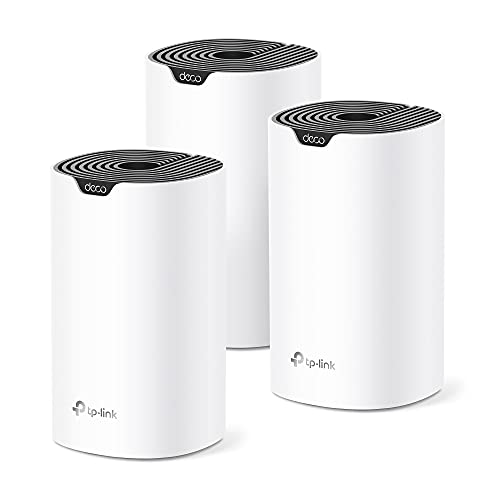 TP-Link Deco S4 (3-Pack) |
| Check price on Amazon |
Key takeaways
- Compare cyber monday mesh wifi deals on five whole-home kits, with coverage, band and port facts to help you pick the right node count for your rooms.
A single router in one corner of a home rarely reaches every bedroom, office nook and TV with a steady signal. A mesh kit solves that by spreading several nodes around the home, all sharing one network name, so phones and TVs hand off from node to node as you move. Cyber Monday is a natural moment to compare these kits side by side, because the same system often appears in several pack sizes.
This guide lines up five mesh Wi-Fi systems sold on Amazon, from a Wi-Fi 5 value kit to Wi-Fi 7 and Wi-Fi 6E flagships. Each pick below is a genuine multi-node mesh kit. The notes focus on coverage figures, band layout, port counts and device capacity as the listings state them, so you can match a kit to your floor plan and your internet plan.
Quick Picks
As an Amazon Associate we earn from qualifying purchases
| Product | Best for | Key spec from title |
|---|---|---|
| TP-Link Deco BE63 (3-Pack) | Large homes with Wi-Fi 7 phones and laptops | Tri-Band WiFi 7 BE10000 Whole Home Mesh System |
| Amazon eero Pro 6E (3-Pack) | Homes with a multi-gig internet plan | Supports internet plans up to 2.5 Gbps |
| TP-Link Deco X55 (3-Pack) | Busy homes with many wired gadgets | AX3000 WiFi 6 Mesh System, up to 6,500 sq. ft. |
| Amazon eero 6+ (3-Pack) | Smaller homes wanting simple app control | Supports internet plans up to a Gigabit |
| TP-Link Deco S4 (3-Pack) | Modest plans needing wide coverage on a budget | AC1900 Mesh WiFi System, up to 5,500 sq. ft. |
How to Choose
Match Node Count to Your Floor Plan
Coverage figures on mesh listings assume open space, and real walls, floors and brick or concrete will cut into them. A two-node kit may suit a compact flat, while a three-node kit gives you a node for the router corner, one midway and one near the far bedrooms. Think in terms of rooms and floors rather than square footage alone. If your TV room sits two floors from the modem, plan a node on each level so the signal climbs in short hops instead of one long, weak leap.
Pick a Wi-Fi Generation Your Devices Can Use
Wi-Fi 5 kits handle everyday browsing and HD video well, while Wi-Fi 6 adds capacity for many devices talking at once. Wi-Fi 6E opens the 6 GHz band for newer phones and laptops, and Wi-Fi 7 adds wider channels and Multi-Link Operation on compatible gear. Your older devices still connect to any of these systems, since each kit keeps the 2.4 GHz and 5 GHz bands. The gain from a newer generation shows up mainly on devices built for it, so weigh your current phones, laptops and TVs before paying for headroom you cannot yet use.
Check Bands and Backhaul Options
Dual-band kits share their 5 GHz band between your devices and the node-to-node link, called backhaul. Tri-band kits add a third radio that can carry that backhaul traffic, which helps when several people stream at once. Many kits also allow wired backhaul, where an Ethernet cable links two nodes for a steadier hop. If your home already has Ethernet runs, or you can place nodes near existing sockets, wired backhaul can matter more than a headline speed figure. Check the listing for port counts per node before you decide.
Count Ports and Device Capacity
Each node offers a small number of Ethernet ports, and those ports decide what you can plug in near a node: a TV, a console, a desktop or a network drive. Count the wired gear in each room, not just at the router corner. Listings also state a device capacity, such as 75, 100 or 200 devices. Phones, bulbs, plugs, cameras and speakers add up quickly in a smart home, so leave room above your current count if you plan to add gear over the next few years.
The 5 Best Options
TP-Link Deco BE63 (3-Pack)
- Best for: Larger homes with Wi-Fi 7 devices and a multi-gig plan.
- Wi-Fi 7 tri-band BE10000, with 6 GHz, 5 GHz and 2.4 GHz bands
- Listing speeds of 5,188 Mbps on 6 GHz, 4,324 Mbps on 5 GHz and 574 Mbps on 2.4 GHz
- Coverage up to 7,600 sq. ft. for the 3-pack, per the listing
- Supports over 200 devices, per the listing
Larger homes with Wi-Fi 7 devices and a multi-gig plan.
Confirm your internet plan and devices can use Wi-Fi 7 and 2.5G ports before choosing this tier, and check that the pack shown is the 3-pack.
This Wi-Fi 7 kit suits a larger home where newer phones and laptops can use the 6 GHz band and where several 4K streams run at the same time. The listing rates the three-pack for coverage up to 7,600 sq. ft. and more than 200 devices, and each unit carries four 2.5G ports, which gives unusual freedom to wire a TV, a console or a desktop at any node. It also fits homes with a multi-gig internet plan that would overwhelm a gigabit-only kit.
Amazon eero Pro 6E (3-Pack)
- Best for: Homes with Wi-Fi 6E devices and a plan above one gigabit.
- Wi-Fi 6E tri-band AX5400, with 2.4 GHz, 5 GHz and 6 GHz bands
- Listing throughput of 2,402 Mbps on 6 GHz, 2,402 Mbps on 5 GHz and 574 Mbps on 2.4 GHz
- Coverage up to 6,000 sq. ft. for the 3-pack, per the listing
- Supports over 100 devices, per the listing
Homes with Wi-Fi 6E devices and a plan above one gigabit.
Each unit has only two Ethernet ports, so count your wired gear per room, and confirm the listing is the 3-pack rather than a single unit.
The eero Pro 6E fits homes that want the 6 GHz band without moving to Wi-Fi 7, and households drawn to eero’s app-led setup and TrueMesh software. The listing rates the three-pack for coverage up to 6,000 sq. ft. and more than 100 devices, and it supports internet plans up to 2.5 Gbps through a 2.5 GbE port on each unit. Built-in Thread and Zigbee support also makes it a tidy hub for smart home gear that uses those radios.
TP-Link Deco X55 (3-Pack)
- Best for: Larger family homes with many devices and wired gear in several rooms.
- Wi-Fi 6 dual-band AX3000, with 5 GHz and 2.4 GHz bands
- Listing speeds of 2,402 Mbps on 5 GHz and 574 Mbps on 2.4 GHz
- Coverage up to 6,500 sq. ft. for the 3-pack, per the listing
- Connects up to 150 devices, per the listing
Larger family homes with many devices and wired gear in several rooms.
This is a dual-band kit with no 6 GHz band, and its ports are gigabit only, so check your plan speed and device mix before ordering.
The Deco X55 is the steady Wi-Fi 6 middle ground for a busy family home. The listing rates the three-pack for coverage up to 6,500 sq. ft. and up to 150 devices, which covers most houses with room to spare. Each unit carries three Gigabit Ethernet ports, more per node than most rivals here, so a desk setup or media corner can plug in without a separate switch. AI-driven mesh and HomeShield basics round out a kit aimed at homes that want capacity and wired flexibility on a gigabit plan.
Amazon eero 6+ (3-Pack)
- Best for: Flats and mid-size homes on a gigabit or slower plan wanting simple control.
- Wi-Fi 6 dual-band AX3000, with 2.4 GHz and 5 GHz bands
- 160 MHz channel support on the 5 GHz band
- Coverage up to 4,500 sq. ft. for the 3-pack, per the listing
- Connects 75+ devices, per the listing
Flats and mid-size homes on a gigabit or slower plan wanting simple control.
Coverage and capacity sit below the bigger kits here, so measure your home and count devices, and confirm the pack holds three router units.
The eero 6+ suits a smaller or mid-size home that values a calm, guided setup over long spec sheets. The listing rates the three-pack for coverage up to 4,500 sq. ft. and more than 75 devices, and it supports internet plans up to a gigabit. The 5 GHz band uses 160 MHz channel support, a step up from the older eero 6. A built-in smart home hub with Thread and Zigbee support lets the kit double as the base for compatible bulbs, locks and sensors.
TP-Link Deco S4 (3-Pack)
- Best for: Homes on a modest plan that need wide coverage without newer Wi-Fi features.
- Wi-Fi 5 dual-band AC1900, with 5 GHz and 2.4 GHz bands
- Listing speeds of 1,300 Mbps on 5 GHz and 600 Mbps on 2.4 GHz
- Coverage up to 5,500 sq. ft. for the 3-pack, per the listing
- Connects up to 100 devices, per the listing
Homes on a modest plan that need wide coverage without newer Wi-Fi features.
Wi-Fi 5 tops out below Wi-Fi 6 speeds, so check your plan speed first, and confirm the listing is the 3-pack of Deco S4 units.
The Deco S4 is the value route into whole-home mesh for homes on a modest broadband plan. The listing rates the three-pack for coverage up to 5,500 sq. ft. and up to 100 devices, a wide spread for a Wi-Fi 5 kit. Each unit offers Gigabit Ethernet ports for a TV or console near the node, and the Deco app handles setup and parental control profiles. For browsing, HD and 4K streaming and everyday work calls on a sub-gigabit plan, this older generation still covers the brief.
How to Check Cyber Monday Deals
Open the Amazon product page for the exact kit you want and read the amount shown on the Amazon product page today, on that page, rather than relying on a figure quoted anywhere else. Amounts on deal pages and roundups can lag behind the live page, and the live page is the one that governs your order. Note the pack size named beside the amount, since a single node and a three-pack of the same system sit on closely related listings.
Compare like with like across node counts. A two-pack and a three-pack of the same system are different purchases, and the amount shown on the Amazon product page for each reflects that. Work out the amount per node only as a rough guide, and weigh it against the rooms you truly need to cover. Buying one node too few can leave a dead zone, while one too many adds a unit you may never place well.
Before you check out, re-open the product page and confirm three things: the model name, the pack size and the amount shown on the Amazon product page at that moment. Also confirm the seller and the delivery estimate shown on the page. If any detail differs from what you saw earlier, pause and re-check the listing rather than assuming the earlier view still holds.
Which One Fits Your Situation
A Large Multi-Level House With Dead Zones Upstairs
Spread three nodes across the levels: one by the modem, one on the middle floor and one near the far bedrooms. A tri-band kit with a listed coverage figure above 6,000 sq. ft. gives the upstairs rooms a shorter hop to a node. The Deco BE63, eero Pro 6E and Deco X55 all sit in that range, and wired backhaul helps further if your home has Ethernet runs between floors.
A Flat or Small Home With One Problem Room
You may not need the biggest kit. A three-pack rated near 4,500 sq. ft., such as the eero 6+, lets you place a node in the weak room while keeping the setup simple. In a small flat, even using two nodes and keeping the third as a spare for a future move can make sense. Focus on node placement near the room where video calls and streaming struggle most.
A Busy Smart Home With Dozens of Connected Gadgets
Count every bulb, plug, camera and speaker, then choose a kit whose listed device capacity clears that count with room to grow. The Deco X55 at up to 150 devices and the Deco BE63 at over 200 devices give the most headroom here. A built-in Thread and Zigbee hub, as on the eero kits, can also simplify a home that runs many small smart devices.
A Home Office That Needs Wired Gear in Several Rooms
Look at ports per node before headline speed. The Deco X55 offers three Gigabit ports on every unit, so a desktop, a printer and a drive can plug in at a desk far from the modem. The Deco BE63 goes further with four 2.5G ports per unit for faster wired gear. Fewer ports per node, as on the eero kits, may call for a small switch in the office.
Common Mistakes
- Buying a pack size by square footage alone, without counting floors, thick walls and the distance from the modem corner.
- Mixing up a single add-on node listing with a full multi-node kit that includes the main router unit.
- Choosing a Wi-Fi 7 or Wi-Fi 6E kit when every phone and laptop in the home only uses Wi-Fi 5 or Wi-Fi 6 bands.
- Placing all nodes in one half of the home, leaving the far rooms on a weak single hop.
- Forgetting that a mesh kit replaces router duties but still needs your modem or provider gateway to reach the internet.
Frequently Asked Questions
Does a mesh kit replace my modem?
No. A mesh kit takes over the router and Wi-Fi duties in your home, but it still connects to a modem or provider gateway that brings the internet into the house. Most listings note that a modem is required for most providers. If your provider supplied a combined gateway, the kit can usually work alongside it or take over routing, following the maker’s setup guide in the app.
How many nodes does my home need?
Let your floor plan guide you. One node covers a small flat, two suit many mid-size homes, and three help in larger or multi-level houses. Listed coverage figures assume open space, so thick walls and floors reduce them. Adding a node later is possible within the same system family, so beginning with a two-pack and growing is a valid path for many homes.
Can I wire some nodes instead of using wireless links?
Yes, the kits here support wired backhaul, where an Ethernet cable links nodes for a steadier connection. The Deco models and eero models both allow a mix, with some nodes wired and others wireless. Check the port count per unit in the listing, since a wired node uses one of its ports for the link and leaves fewer ports free for your wired devices.
Will older phones and laptops work with Wi-Fi 6E or Wi-Fi 7 kits?
Yes. Every kit here keeps the 2.4 GHz and 5 GHz bands, so older devices connect as before. The 6 GHz band on Wi-Fi 6E and Wi-Fi 7 systems serves only devices built for it, and those newer devices gain the extra room. Nothing in your current setup is locked out by choosing a newer kit, though the benefit shows mainly on matching hardware.
More from Amazon
Programs that pair well with the guide above. Offers and eligibility are set by Amazon and may change.
Send a Prime gift membership to someone who would use free shipping and Prime Video.
Gift Amazon PrimeGive audiobooks to someone who loves to listen. Plans and prices are set by Amazon.
Gift AudibleFree shipping on eligible items, Prime Video and more. Eligible new members can start with a free trial.
Start a Prime free trialAd-free music streaming. Eligible new subscribers can start with a free trial.
Try Music Unlimited freeAs an Amazon Associate we earn from qualifying purchases.