
Key takeaways
- Upgrade your TV, instantly
- The newest Fire TV experience (2026)
- All your apps in one place
A Roku stick plugs into your TV’s HDMI port and replaces any built-in smart platform with one that gets updated constantly and supports every major streaming service. For most people, the question is not whether to buy one but which model earns its spot behind the couch cushion. Prices range from under $20 to nearly $95, and the differences between tiers—resolution ceiling, HDR formats, remote quality, Wi-Fi range—determine whether a stick feels responsive for years or becomes a bottleneck the moment you add a new service.
What separates a good Roku stick for TV from a forgettable one comes down to three things: does it decode the HDR format your TV actually supports, does the remote have volume and power buttons that talk to your TV without a separate universal remote, and does the Wi-Fi radio maintain a stable signal at your viewing distance? Everything else is preference. The eight models below span entry-level HD sticks, a renewed bargain bin, the current top-tier Ultra, and even two Amazon Fire TV sticks that appear alongside Roku options in most shopping results.
Our top picks



 Amazon Fire TV Stick HD
- Upgrade your TV, instantly
- The newest Fire TV experience (2026)
- All your apps in one place
 Amazon Fire TV Stick 4K Select
- Essential 4K streaming
- The newest Fire TV experience (2026)
- Make your TV even smarter


As an Amazon Associate we earn from qualifying purchases at no extra cost to you.
Quick Picks
| Product | Best for | Price |
|---|---|---|
| Roku Streaming Stick HD with Voice Remote | Non-4K TVs and guest rooms | $29.99 |
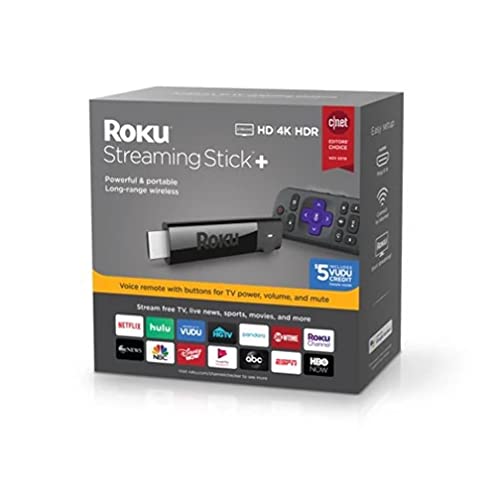
| Roku Streaming Stick Plus with Voice Remote | HDR10+ displays on a budget | $36.47 |
| Roku Streaming Stick 4K with Voice Remote | Dolby Vision and HDR10+ TVs | $47.06 |
| Amazon Fire TV Stick HD (newest model) | Lowest price, Alexa households | $17.99 |
| Amazon Fire TV Stick 4K Select (newest model) | Cheapest 4K option overall | $19.99 |
| Roku Streaming Stick 4K (Renewed) | Dolby Vision on a reduced budget | $43.50 |
| Roku Streaming Stick+ (Renewed) | Upgrading a first-gen Roku setup cheaply | $29.99 |
| Roku Ultra | Maximizing a high-end 4K HDR TV | $94.95 |
How We Picked
We narrowed this list by checking published spec sheets for HDR format support, confirming remote feature parity across Roku’s lineup, comparing owner-reported Wi-Fi stability from long-range antenna models versus basic sticks, and weighing current market prices against what each tier actually adds over the one below it. A model that costs $5 more but unlocks Dolby Vision made the cut; a model that costs $20 more for no additional formats did not.
The 8 Best Roku Sticks For Tv in 2026
Roku Streaming Stick HD with Voice Remote
This is the right stick when your TV tops out at 1080p or when you need a second Roku for a bedroom where 4K is irrelevant. The Voice Remote includes TV power and volume controls, so one remote handles everything. Setup takes under five minutes with the on-screen prompts. The main limitation is obvious: no HDR processing at all, so any 4K HDR TV will default to SDR and you lose the contrast benefits your panel offers. Skip this if your primary display supports HDR—spend a few dollars more on the Plus or the 4K model instead.
Roku Streaming Stick Plus with Voice Remote
The Plus adds HDR10+ decoding to the HD stick’s platform, making it a solid Roku stick for TV owners with Samsung or TCL displays that favor HDR10+ over Dolby Vision. The long-range Wi-Fi antenna is a real upgrade over the basic HD model in multi-story homes or rooms far from the router. The remote includes a dedicated replay button and headphone jack for private listening. The gap to the 4K model is Dolby Vision support, so if your TV is LG or Sony (brands that lean on Dolby Vision), the extra $10 for the next tier is worth it.
Roku Streaming Stick 4K with Voice Remote
This is the sweet spot for most people buying a Roku stick for TV in 2026. It handles both HDR10+ and Dolby Vision, so it covers the two dominant dynamic HDR formats without forcing you to know which one your TV prefers. The quad-core processor keeps the interface snappy even with dozens of channels pinned. The Voice Remote with TV controls is the same one bundled with the Plus. The only reason to go higher is if you want wired Ethernet, an audio pass-through for older receivers, or the Roku Ultra’s premium build. For the price, nothing else in the lineup offers this much format coverage.
Amazon Fire TV Stick HD (newest model)
At $17.99, this is the cheapest streaming stick on the list that still supports free and live TV content. The Alexa Voice Remote works well if you already have Echo devices and want a unified voice ecosystem. Setup is genuinely effortless—plug it in, connect to Wi-Fi, done. The AI-powered discovery through Alexa+ surfaces shows faster than the Fire OS home screen did in previous generations. The HD resolution ceiling means it is not for any 4K display. If you already own a Roku TV or a stick with Dolby Vision support, switching to this would be a feature downgrade for a small price savings.
Amazon Fire TV Stick 4K Select (newest model)
Priced at $19.99, this undercuts every Roku 4K option by a significant margin while delivering 4K output, AI-powered search, and the same Alexa+ discovery features. It is the budget king for anyone whose TV handles 4K and who lives in an Alexa-centric household. The trade-off is that Fire OS is heavier on ads and promotional tiles in the home screen than Roku’s interface. Owners note the Wi-Fi connection can drop more frequently in congested apartment buildings. If ad-free navigation matters to you, the $7 difference to the Roku 4K model is easy to justify.
Roku Streaming Stick 4K (Renewed)
The renewed version of the standard 4K stick drops the price by $3.50 over new, which at this tier means you are paying about 7% less for the identical hardware and software experience. It retains HDR10+, Dolby Vision, long-range Wi-Fi, and the full Voice Remote with TV controls. The renewed listing means the unit has been inspected and refurbished, so packaging and remote battery condition vary by seller. For budget-conscious buyers who want Roku’s best stick-tier model without paying full retail, this is a sensible pick. Skip it only if you need a guaranteed like-new unboxing or the seller’s return window is shorter than you want.
Roku Streaming Stick+ (Renewed)
This renewed Stick+ gives you the same hardware that sold as the $36.47 Plus model for $29.99, making it one of the cheapest paths to HDR10+ on Roku. It includes the long-range wireless antenna and the Voice Remote with TV power and volume buttons. The software is the same Roku OS that powers the newer sticks, so channel support and interface updates are identical. The gap to the renewed 4K model is Dolby Vision and a slightly faster processor. If your TV is an HDR10+ panel and $43.50 feels steep, this is the most logical middle ground on the list.
Roku Ultra
The Ultra is Roku’s only stick-tier device with a wired Ethernet port, which removes Wi-Fi variability entirely for anyone whose router sits far from the TV or whose apartment has heavy network congestion. It supports 4K, HDR10+, Dolby Vision, and Dolby Atmos audio passthrough. The remote is rechargeable via USB-C, eliminating battery swaps. The chassis is noticeably larger than the sticks and includes an SD card slot for offline photo and video playback. At $94.95, the premium over the 4K stick is $47.90. That price is only justified if you need Ethernet stability or Atmos passthrough for a legacy receiver without HDMI 2.1 audio return.
Buying Guide
HDR Format Support Matters More Than Resolution
A 4K stick that outputs SDR on a Dolby Vision TV gives you a sharper but flatter image than a well-tuned 1080p SDR display. Check which dynamic HDR format your TV supports. LG and Sony favor Dolby Vision; Samsung and TCL lean toward HDR10+. The Roku 4K and Ultra cover both. The Plus and the renewed Stick+ cover HDR10+ only. Matching format to panel is the single most important spec check before buying.
Remote TV Controls Are Not Universal Across the Lineup
Every Roku Voice Remote on this list includes TV power and volume buttons that learn your TV’s infrared codes during setup. On Amazon Fire TV sticks, the Alexa Voice Remote adds a dedicated volume button but does not always control TV power without navigating an on-screen menu. If you already manage your TV with its native remote and hate juggling devices, verify the remote’s IR learning step during first setup.
Renewed Units Are a Real Shortcut for Budget Buyers
Roku renewed sticks carry the same firmware, channel access, and interface as their new counterparts. The hardware is identical; the savings come from reduced packaging and shorter seller return windows. On this list, the renewed 4K saves $3.50 over new and the renewed Stick+ saves $6.48. For buyers in the $30–$45 range, that percentage discount is larger than the price gap between tiers, making renewed units the value play without any feature compromise.
Our Verdict
The Roku Streaming Stick 4K with Voice Remote is the top pick for most buyers. It covers both dynamic HDR formats, includes long-range Wi-Fi, and the price sits in the middle of the range—high enough to include every useful feature, low enough to justify a spare unit for a second TV. The Amazon Fire TV Stick 4K Select wins the budget pick at $19.99 for anyone already in the Alexa ecosystem who needs 4K output. The condition under which another product takes the top spot: if your TV sits more than fifteen feet from your router through multiple walls and you have a wired network drop nearby, the Roku Ultra’s Ethernet port eliminates the connectivity issues that frustrate owners of every stick-tier model on this list.
FAQ
Do Roku sticks work on any TV?
Any Roku stick requires an available HDMI port and a TV that accepts standard 1080p or 4K input over HDMI. Older TVs without HDMI will not work regardless of which stick you buy. The TV’s own smart platform is irrelevant once the stick is plugged in.
Is renewed Roku stick quality reliable?
Renewed units are inspected and refurbished to meet functional standards set by the seller or platform. Firmware, channel access, and interface updates are identical to new units. The main variables are packaging condition and the length of the return window, which can be shorter than the 30-day period offered on new items.
Can I use a Fire TV Stick alongside a Roku on the same TV?
Yes. Most TVs have two or more HDMI ports. You can switch between them with the TV’s input selector, and each device maintains its own channel list, login sessions, and remote controls. There is no conflict between platforms sharing one display.
Do I need the Voice Remote or can I use any Roku remote?
Roku’s interface works with older infrared remotes that ship with some models, but the Voice Remote adds hands-free search, TV power and volume control, and a dedicated microphone button. If your setup already handles remote functions through a universal remote or a smart home hub, the basic remote is sufficient.









