
Key takeaways
- Pro: The low-profile design sits the TV close to the wall, reducing the gap that collects dust and hides cables awkwardly.
- Pro: Owners with studs at 16-inch and 18-inch spacing report a straightforward install with included hardware.
- Con: No tilt means the viewing angle is fixed, so mounting above a mantel or high on a wall creates neck strain.
A flat screen TV that sits on a stand looks like a TV in a rental unit. One that sits flush against a wall or tilts toward your couch looks like part of the room. The difference is rarely the TV itself; it is the hardware holding it up. Yet choosing among the hundreds of tv mounts for flat screens sold online is where most buyers stall, because the specs on a product page do not always translate to what happens when you actually hang a 70-inch panel on drywall and studs.
This roundup compares eight current mounts on published compatibility ranges, weight ratings, VESA support, stud spacing flexibility, and recurring themes in owner feedback. What separates a solid mount from a frustrating one usually comes down to three things: how accurately the stated weight and size limits match what buyers report, whether the bracket accommodates the stud spacing in an older home, and how much clearance the design leaves behind the panel for cables and receivers. We weighted those factors alongside price to produce the rankings below.
Our top picks







As an Amazon Associate we earn from qualifying purchases at no extra cost to you.
Quick Picks
| Product | Best for | Price |
|---|---|---|
| Mounting Dream Fixed 42-84″ | Large-screen reliability | $29.99 |
| USX STAR Fixed 37-86″ | Thick studs, heavy TVs | $21.17 |
| Pipishell Full Motion 13-43″ | Small rooms, Echo Show 21 | |
| USX MOUNT Full Motion 32-74″ | Flexible viewing angles | $31.99 |
| No Stud Drywall Mount 12-55″ | Renters, no-drill installs | $19.99 |
| Mounting Dream Tilting 37-90″ | High mounting positions | $29.99 |
| GLWIXY Fixed 14-42″ | Small TVs on a tight budget | $9.98 |
| PERLESMITH Tilting 23-60″ | Mid-size, low-profile tilt | $16.99 |
How We Picked
We evaluated four criteria. First, compatibility accuracy: does the stated size and weight range align with what owners confirm in reviews, or are people reporting stripped screws and sagging brackets at the top of the rated range? Second, installation flexibility: mounts that accept 16-inch and wider stud spacing, or that work without studs at all, scored higher because most homes are not built to a single standard. Third, build quality relative to price: a $10 bracket that holds 50 pounds is more impressive than a $30 bracket with the same rating. Fourth, real-world clearance: how much room the mount leaves behind the TV for power strips, HDMI cables, and receiver boxes.
The 8 Best Tv Mounts For Flat Screens in 2026
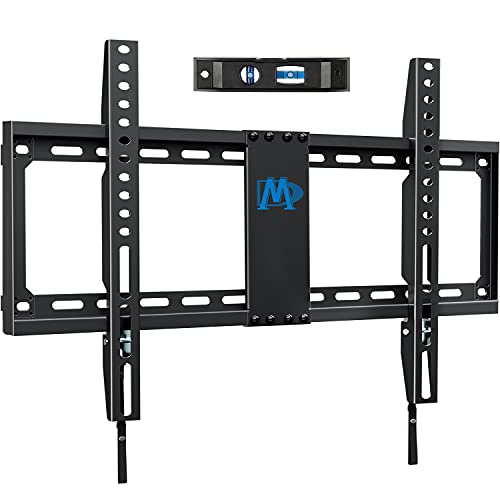
Mounting Dream TV Mount Fixed for Most 42-84 Inch Flat Screen TV UL Listed
Mounting Dream has become a default recommendation in enthusiast forums, and this fixed model is the reason. It covers a wide 42-to-84-inch range with a UL listing that adds reassurance for anyone mounting a screen over a fireplace or in a bedroom.
- Pro: The low-profile design sits the TV close to the wall, reducing the gap that collects dust and hides cables awkwardly.
- Pro: Owners with studs at 16-inch and 18-inch spacing report a straightforward install with included hardware.
- Con: No tilt means the viewing angle is fixed, so mounting above a mantel or high on a wall creates neck strain.
Skip it if you need any articulation or if your studs are spaced wider than the bracket’s bolt pattern allows without modification.
UL Listed Fixed TV Wall Mount for 37-86 Inch Screens by USX STAR
This USX STAR bracket targets buyers with heavier, larger panels who want the security of a higher weight ceiling. At 132 pounds rated and accommodating VESA patterns up to 600 by 400 millimeters, it covers screens that smaller mounts simply cannot. The quick-release lock is a practical touch for anyone who needs to remove the TV for firmware updates or cable swaps without unscrewing four bolts each time.
- Pro: Accepts 16-inch, 18-inch, and 24-inch stud spacing, rare among budget fixed mounts.
- Pro: Priced well below comparable 86-inch-capable brackets while maintaining a UL listing.
- Con: The included hardware is generic; owners with masonry or unusual wall types often need to source anchors separately.
Consider a full-motion option instead if the TV will sit in a corner or shared viewing area where angles shift.
Pipishell Full Motion TV Wall Mount for Echo Show 21/15 and 13-43 Inch Flat Curved Screen TVs & Monitors
Pipishell carved out a niche by supporting the Echo Show 21 and 15 alongside small TVs, making this the mount for kitchen or office setups where a smart display shares a wall bracket with a secondary screen. The full-motion arm provides extension, swivel, and tilt in a compact package rated to 44 pounds with VESA up to 200 by 200 millimeters.
- Pro: Pivots and extends, so you can pull a monitor forward for use or tuck it flat when done.
- Pro: At $15.99, it undercuts most full-motion mounts that lack the smart-display compatibility.
- Con: The 43-inch upper size limit and 44-pound ceiling rule out anything approaching a living-room main display.
Skip it if your primary screen exceeds 43 inches or weighs more than about 35 pounds with the stand removed.
USX MOUNT TV Wall Mount for 32-74 inch Flat Screen/LED/4K up to 110lbs
Dual articulating arms give this mount a wide range of motion across its 32-to-74-inch span, and the 110-pound rating covers most current 65-inch panels with headroom. It is the most versatile option here for a main living-room TV that needs to face different seating positions. The tilt range helps when the mount sits above a soundbar or receiver.
- Pro: Swivels left and right enough to split viewing between a dining table and a sofa without repositioning the TV.
- Pro: Compatible with 12-inch and 16-inch wood stud spacing, accommodating older construction.
- Con: The dual-arm design protrudes several inches from the wall when retracted, leaving a visible gap that fixed mounts avoid.
A fixed or tilting mount is a better fit if a low-profile flush look matters more than angle flexibility.
No Stud TV Wall Mount, Drywall Studless TV Hanger No Damage, No Drill
This is the mount that solves the renter problem: no drill, no screws into studs, no damage to patch when you move. The bar-style bracket distributes weight across a wider drywall surface and supports VESA patterns for 12-to-55-inch TVs up to 99 pounds. Included hardware and levels simplify the no-guesswork install.
- Pro: Truly no-drill, leaving the wall ready for paint touch-up rather than spackle.
- Pro: The 99-pound rating is generous for a studless design, covering most 55-inch sets comfortably.
- Con: Owners note the bar is visible on the wall surface, which reads as less clean than a flush-mount fixed bracket.
Go with a stud-mounted option if your lease allows drilling or if the TV will hold more than 60 pounds long-term, since drywall-only mounts are not ideal for sustained heavy loads.
Mounting Dream Tilting TV Wall Mount for Most 37-90 Inch TVs up to 132lbs
The tilting variant of Mounting Dream’s popular line adds a downward angle that corrects for high placements over a fireplace or above a cabinet. The 37-to-90-inch range and 132-pound capacity make it one of the most broadly compatible tilt mounts available without moving into a premium price bracket. For anyone who has ever mounted a TV too high and felt the angle penalty, this is the fix.
- Pro: Covers 90-inch screens, the largest ceiling in this roundup, with a tilt mechanism that locks securely.
- Pro: Low-profile hinge keeps the gap behind the TV minimal even when tilted.
- Con: Tilt is downward-only, so it does not help if the TV sits below eye level, such as on an entertainment console wall.
A full-motion mount is necessary if you need horizontal swivel in addition to vertical adjustment.
GLWIXY Fixed TV Wall Mount for 14-42″ TVs Low Profile Wall Mount TV Bracket
At under ten dollars, the GLWIXY is the cheapest entry here and one of the few mounts purpose-built for screens below 42 inches. It suits a bedroom monitor, a kitchen TV, or a secondary display in a home office. The low-profile design keeps small panels tight to the wall without protruding awkwardly.
- Pro: The $9.98 price point is half of most competitors, making it easy to outfit multiple rooms.
- Pro: Simple two-piece install that requires only a drill and a screwdriver.
- Con: The 14-to-42-inch range and lower weight rating mean it cannot serve as a single-solution bracket for a household with mixed sizes.
Look elsewhere if your screen exceeds 42 inches or if you want tilt or articulation at any price point.
PERLESMITH Tilting TV Wall Mount Bracket Low Profile for Most 23-60 inch LED LCD OLED, Plasma Flat Screen TVs
PERLESMITH occupies the middle ground: larger than the GLWIXY, more affordable than the Mounting Dream tilt, and rated to 115 pounds across a 23-to-60-inch span. The tilt mechanism uses a simple hinge that locks at a few preset angles, which is adequate for most high-mount scenarios. VESA 400 by 400 millimeters covers nearly every mid-size panel on the market.
- Pro: The $16.99 price undercuts comparable tilt mounts while supporting screens up to 60 inches.
- Pro: Fits standard 16-inch wood stud spacing without adapters.
- Con: The tilt range is modest, so very high mounts over a fireplace may still leave the screen angled toward the floor more than ideal.
A full-motion bracket is the better choice if you need horizontal swivel alongside the tilt.
Buying Guide
Weight Rating and Size Range
The single most common mistake is buying a mount rated for the TV’s size but not its weight. A 65-inch LED panel and a 65-inch plasma from the same era can differ by 20 pounds or more. Always add the weight of the wall bracket plate to your TV’s spec sheet weight, then compare that total against the mount’s rating with at least 15 percent headroom. A mount rated to 110 pounds is comfortable with a 95-pound TV; one rated to 100 pounds is not.
Stud Spacing and Wall Type
Most mounts assume 16-inch on-center stud spacing, which is standard in newer homes. Older construction frequently uses 18-inch or 24-inch spacing, and brick or concrete walls require entirely different anchors. If your wall does not match the mount’s bolt pattern, you need an adapter plate or a mount that lists wider spacing, like the USX STAR at 16, 18, and 24 inches. Renters or anyone unwilling to drill should evaluate studless options, but understand the trade-off in load distribution over time.
Clearance Behind the TV
Fixed and tilting mounts typically sit an inch or two from the wall, while full-motion brackets add three to five inches of depth even when retracted. If you route HDMI cables through a wall plate or need a receiver tucked behind the panel, that clearance matters. Measure the depth of your cables plus any adapter box before deciding, and choose a mount whose minimum gap exceeds that measurement. Owners who skip this step often end up with a panel that will not sit flush or a connector that bends at an awkward angle.
Our Verdict
For most buyers upgrading a primary living-room TV, the Mounting Dream Tilting for 37-to-90-inch screens is the top pick: it covers the widest range of sizes, tilts to correct high placements, and carries the confidence of a brand with extensive owner feedback. For a small-screen setup or a second room where budget leads, the GLWIXY Fixed at $9.98 delivers a clean, functional install for a fraction of the cost. If your lease prohibits drilling and your TV weighs under 60 pounds, the No Stud Drywall Mount is the only practical path and performs better than expected for a no-anchor solution.
FAQ
Can any mount hold any TV?
No. Each mount specifies a size range, a VESA pattern range, and a weight ceiling. A TV can fall within the size range but exceed the weight limit, particularly if it is an older plasma or a panel with a heavy metal chassis rather than a slim LED. Match all three specs before purchasing.
What does VESA mean and why does it matter?
VESA refers to the standardized pattern of screw holes on the back of a TV, measured in millimeters as width by height, such as 400 by 400. A mount rated for VESA 200 by 200 cannot accept a TV with 600 by 400 mounting holes because the bracket plate simply does not extend far enough to reach them.
Is a fixed mount or a tilting mount better for above a fireplace?
A tilting mount is almost always better above a fireplace because it angles the screen downward toward seated viewers, reducing the neck strain that a fixed mount would create at that height. Full-motion adds swivel, but above a mantel the extra protrusion often looks awkward and catches on the shelf edge.
Do I need special anchors for drywall-only installation?
If you are mounting into studs, standard lag screws included with most brackets are sufficient. If the studs do not align with your desired position and you must anchor into drywall alone, rated toggle bolts or a studless system designed for that load are essential. Regular plastic drywall anchors will pull out within months under the weight of a large TV.









